
Introduzzjoni
This manual provides detailed instructions for the HERCHR BAO-JIE BJ-218/BJ-318 USB Programming Cable. This cable is designed to facilitate programming and data transfer between your personal computer and compatible BAO-JIE BJ-218 or BJ-318 mobile two-way radios. Please read this manual thoroughly before use to ensure proper operation and to maximize the cable's performance and longevity.

Image: The HERCHR BAO-JIE USB Programming Cable, showing its USB and RJ45 connectors. This cable is used for programming BJ-218 and BJ-318 mobile radios.
Setup Istruzzjonijiet
- Installa Sewwieqa: Before connecting the cable, ensure that any necessary USB drivers for the programming cable are installed on your computer. These drivers are typically provided with the programming software or can be downloaded from the manufacturer's websit.
- Qabbad mal-Kompjuter: Insert the USB-A connector of the programming cable into an available USB port on your personal computer.
- Qabbad mar-Radju: Connect the RJ45 8-Pin connector of the programming cable to the corresponding programming port on your BAO-JIE BJ-218 or BJ-318 mobile radio. Ensure a secure connection.
- Tnedija tas-Softwer: Open the dedicated programming software for your BAO-JIE radio on your computer.
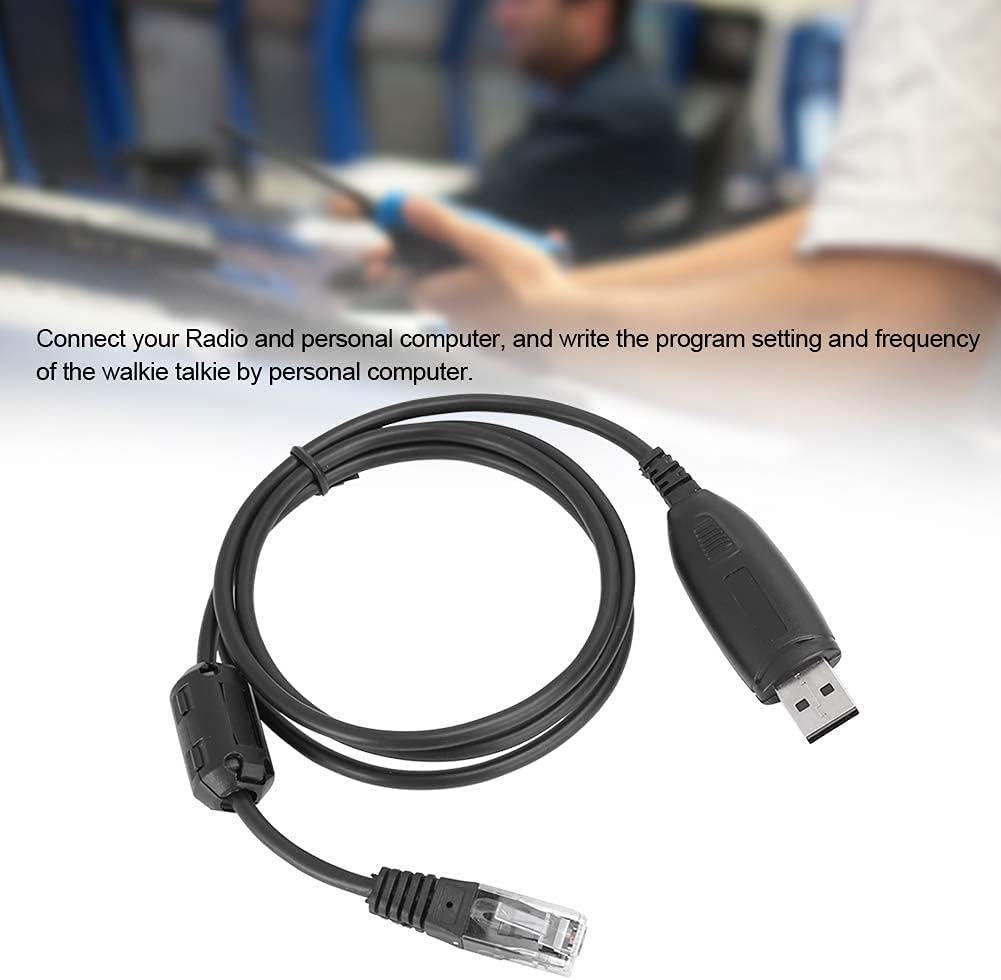
Image: The USB programming cable connected to a computer, illustrating the setup process for programming a mobile radio.
Istruzzjonijiet Operattivi
Once the cable is connected and the software is launched, you can proceed with programming your radio:
- Rikonoxximent tas-Softwer: The programming software should detect the connected radio via the USB cable. Confirm that the software recognizes the radio model.
- Aqra d-Data tar-Radju: Use the software's function to read the current program settings and frequencies from your radio. This is often a good practice before making any changes.
- Immodifika s-Settings: Adjust frequencies, channel settings, and other parameters within the programming software interface as needed.
- Ikteb lir-Radju: After making desired changes, use the software's "write" or "upload" function to transfer the new settings to your radio. Follow any on-screen prompts.
- Ivverifika: After writing, it is recommended to read the radio data again to verify that the new settings have been successfully applied.
The cable enables stable and efficient programming of your radio by PC and through the microphone's keypad, offering ease of operation.

Image: A person operating a two-way radio, illustrating the context in which the programming cable is used for configuration.
Manutenzjoni
- Ħażna: Aħżen il-kejbil f'post frisk u niexef 'il bogħod mix-xemx diretta u minn temperaturi estremi.
- Tindif: Uża drapp artab u niexef biex tnaddaf il-kejbil u l-konnetturi. Evita li tuża kimiċi ħarxa jew materjali li joborxu.
- Immaniġġjar: Avoid bending or twisting the cable excessively, especially near the connectors, to prevent internal damage. Always grasp the connector housing when plugging or unplugging, not the cable itself.
- Spezzjoni: Periodically inspect the cable for any signs of wear, fraying, or damage to the connectors. Discontinue use if damage is observed.

Immaġni: Dettaljata view of the USB and RJ45 connectors, highlighting the robust construction designed for stable transmission performance and durability.
Issolvi l-problemi
- Cable Not Recognized:
- Ensure the USB cable is securely plugged into both the computer and the radio.
- Ipprova port USB differenti fuq il-kompjuter tiegħek.
- Verify that the correct USB drivers are installed. Check your computer's Device Manager for any unknown devices or driver errors.
- Restart your computer and radio.
- Programming Software Issues:
- Confirm that you are using the correct programming software version for your specific radio model (BJ-218 or BJ-318).
- Check the software settings to ensure the correct COM port is selected (if applicable).
- Run the programming software as an administrator (on Windows).
- Data Transfer Errors:
- Ensure the radio is powered on and in programming mode (refer to your radio's manual).
- Avoid disconnecting the cable during data transfer.
- Close other applications that might interfere with USB communication.
Speċifikazzjonijiet
| Karatteristika | Dettall |
|---|---|
| Brand | HERCHR |
| Tip ta' Oġġett | Kejbil tal-Ipprogrammar USB |
| Materjal | ABS |
| Kulur | Iswed |
| Output Interface | USB |
| Input Interface | 8-Pin (RJ45 type) |
| Temperatura operattiva | -20°C sa +60°C (-4°F sa +140°F) |
| Apparati Kompatibbli | BAO-JIE BJ-218, BAO-JIE BJ-318 Mobile Radios |
| Tip ta' Konnettur | USB |
| Tip ta' Cable | USB |
| Konnettur Sess | Raġel għal Mara |
| Numru ta' Labar | 8 |
| Piż tal-oġġett | 0.04 Kilogrammi (1.41 uqija) |
| Użu fuq ġewwa/barra | Ġewwa, Barra |
Informazzjoni dwar Garanzija
Specific warranty details for this product are not provided in this manual. For information regarding warranty coverage, duration, and claims, please refer to the product packaging or contact the seller directly. Keep your proof of purchase for any warranty-related inquiries.
Appoġġ għall-Klijent
If you encounter any issues or have questions regarding the HERCHR BAO-JIE BJ-218/BJ-318 USB Programming Cable that are not addressed in this manual, please contact the seller or manufacturer for assistance. Provide your product model number (BJ-218 or BJ-318) and a detailed description of your issue when seeking support.