
1. Introduzzjoni
Thank you for choosing the Qlima PH635 Portable Reversible Air Conditioner. This manual provides essential information for the safe and efficient operation, maintenance, and troubleshooting of your appliance. Please read it thoroughly before use and keep it for future reference.
The Qlima PH635 is a versatile unit designed to provide comfort in various conditions, offering cooling, heating, dehumidification, and fan functions. It features automatic stop, programming backup in case of power interruption, and adjustable ventilation.
2. Istruzzjonijiet tas-Sigurtà
Biex tevita korriment lill-utent jew lil persuni oħra u ħsara lill-proprjetà, l-istruzzjonijiet li ġejjin għandhom jiġu segwiti. Tħaddim ħażin minħabba l-injezzjoni ta 'struzzjonijiet jista' jikkawża ħsara jew ħsara.
- Dejjem kun żgur li l-unità titqiegħed fuq wiċċ ċatt u stabbli biex tevita li tinqaleb.
- Do not operate the unit with a damaged power cord or plug. If the supply cord is damaged, it must be replaced by the manufacturer, its service agent, or similarly qualified persons to avoid a hazard.
- Daħħalx subgħajk jew oġġetti barranin fid-daħliet jew fil-ħruġ tal-arja.
- Żomm l-unità 'l bogħod minn materjali fjammabbli u fjammi miftuħa.
- Kun żgur li jkun hemm ventilazzjoni xierqa madwar l-unità; timblokkax il-ventijiet tal-arja.
- Skonnettja l-apparat qabel ma tnaddaf jew tagħmel xi manutenzjoni.
- Dan l-apparat jista' jintuża minn tfal minn 8 snin 'il fuq u persuni b'kapaċitajiet fiżiċi, sensorji jew mentali mnaqqsa jew b'nuqqas ta' esperjenza u għarfien jekk ikunu ngħataw superviżjoni jew struzzjoni dwar l-użu tal-apparat b'mod sikur u jifhmu l-perikli involuti .
- It-tfal għandhom ikunu sorveljati biex jiżguraw li ma jilagħbux bl-apparat.
3. Kontenut tal-Pakkett
Jekk jogħġbok iċċekkja li l-oġġetti kollha huma preżenti meta tiftaħ il-pakkett:
- Qlima PH635 Portable Air Conditioner Unit
- Manka tal-egżost
- Window Sealing Kit (adaptor, window slide bar)
- Kontroll mill-bogħod
- Manwal għall-Utent (dan id-dokument)
4. Prodott Aktarview
4.1 Komponenti
Familiarize yourself with the main parts of your Qlima PH635 unit:
- Control Panel (top of unit)
- Air Outlet (front, adjustable louvers)
- Air Inlet (rear/sides, with air filter)
- Exhaust Air Outlet (rear, for hose connection)
- Continuous Drainage Port (rear, for dehumidification)
- Casters (bottom, for mobility)
- Korda tal-Enerġija
4.2 Immaġni tal-Prodott
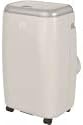
Image showing the Qlima PH635 portable reversible air conditioner from a slight angle, highlighting its compact, rectangular design with a light-colored casing and top control panel. The unit is equipped with casters for easy movement.
5. Setup
5.1 Disimballaġġ
- Neħħi bir-reqqa l-unità mill-ippakkjar tagħha.
- Neħħi l-materjali kollha tal-ippakkjar u armihom b'mod responsabbli.
- Ensure no parts are missing or damaged.
5.2 Tqegħid
- Place the air conditioner on a firm, level surface in a location that allows for proper air circulation.
- Maintain a minimum distance of 30 cm (12 inches) from walls or other objects to ensure adequate airflow.
- Evita li tpoġġi l-unità fid-dawl tax-xemx dirett jew ħdejn sorsi ta’ sħana.
5.3 Installazzjoni tal-Pajp tal-Egżost
- Attach one end of the exhaust hose to the exhaust air outlet on the rear of the unit. Twist clockwise until secure.
- Extend the exhaust hose to the nearest window or vent opening. Keep the hose as short and straight as possible to maximize efficiency.
5.4 Installazzjoni tal-Kit tat-Tieqa
For optimal performance, use the provided window sealing kit to prevent hot air from re-entering the room.
- Adjust the window slide bar to fit your window opening.
- Secure the slide bar in the window.
- Connect the other end of the exhaust hose to the adaptor on the window kit.
- Ensure all connections are sealed to prevent air leakage.
5.5 Drainage Setup (Dehumidification Mode)
When using the dehumidification function, continuous drainage is recommended. Connect a drainage hose (not supplied) to the continuous drainage port on the rear of the unit and lead it to a suitable drain or container.
6. Istruzzjonijiet Operattivi
6.1 Pannell tal-Kontroll u Kontroll mill-Bogħod
The unit can be operated via the control panel on top of the unit or the supplied remote control. The functions are generally identical.
6.2 Power On/Off
Agħfas il- QAWWA buttuna biex tixgħel jew titfi l-unità.
6.3 Għażla tal-Modalità
Agħfas il- MODALITÀ buttuna biex tiċċikla bejn il-modi disponibbli:
- Modalità tat-tkessiħ: Għat-tkessiħ tal-kamra. Issettja t-temperatura mixtieqa.
- Modalità tat-Tisħin: Għat-tisħin tal-kamra. Issettja t-temperatura mixtieqa.
- Mod ta' Dehumidifikazzjoni: Removes moisture from the air. Fan speed is typically fixed in this mode.
- Modalità Fan: Jiċċirkola l-arja mingħajr tkessiħ jew tisħin.
6.4 Aġġustament tat-Temperatura
In Cooling or Heating mode, use the UP u 'L isfel arrow buttons to set your desired temperature. The temperature range is typically 16°C to 30°C (61°F to 86°F).
6.5 Veloċità tal-fann
Agħfas il- VELOĊITÀ TAL-FAN button to select between Low, Medium, or High fan speeds. This function is available in Cooling, Heating, and Fan modes.
6.6 Funzjoni Timer
The timer allows you to set a specific time for the unit to turn on or off automatically.
- Agħfas il- TIMER buttuna.
- Uża l- UP u 'L isfel arrow buttons to set the desired time (in hours).
- Agħfas TIMER mill-ġdid biex tikkonferma.
6.7 Modalità Sleep
Activate Sleep Mode for quieter operation and gradual temperature adjustment during sleep. Press the L-IRQAD buttuna.
6.8 Automatic Stop and Programming Backup
The Qlima PH635 features an automatic stop function when the desired temperature is reached or the water tank is full (in dehumidification mode). In case of a power cut, the unit will automatically resume operation with the last settings once power is restored, thanks to its programming backup feature.
7. Manutenzjoni
Manutenzjoni regolari tiżgura prestazzjoni ottimali u testendi l-ħajja tal-arja kondizzjonata tiegħek.
7.1 Tindif tal-Unità
- Dejjem aqla l-unità qabel tnaddaf.
- Imsaħ il-barra b'artab, damp drapp. Tużax kimiċi ħarxa jew tindif li joborxu.
- Kun żgur li ma jidħolx ilma fil-komponenti elettriċi.
7.2 Tindif tal-Filtri tal-Arja
Il-filtri tal-arja għandhom jitnaddfu kull ġimagħtejn jew aktar ta’ spiss skont l-użu u l-kwalità tal-arja.
- Itfi u aqla l-unità.
- Locate and remove the air filters from the rear/sides of the unit.
- Wash the filters under running water (warm, not hot) or use a vacuum cleaner to remove dust.
- Ħalli l-filtri jinxef kompletament qabel ma terġa' tinstallahom.
7.3 Ħażna Staġjonali
Jekk l-unità mhux se tintuża għal perjodu estiż:
- Drain any accumulated water from the unit.
- Clean the air filters and the exterior.
- Store the unit in a dry, cool place, covered to protect it from dust.
8 Issolvi l-problemi
Qabel ma tikkuntattja l-appoġġ għall-klijenti, jekk jogħġbok irreferi għat-tabella li ġejja għal kwistjonijiet komuni u s-soluzzjonijiet tagħhom.
| Problema | Kawża Possibbli | Soluzzjoni |
|---|---|---|
| L-unità ma tixgħel | No power supply; Power cord not plugged in; Fuse blown; Water tank full (in dehumidification) | Check power outlet; Plug in power cord firmly; Replace fuse; Empty water tank. |
| L-ebda tkessiħ/tisħin | Air filter clogged; Exhaust hose blocked or disconnected; Room temperature already reached; Doors/windows open; Room too large | Clean air filter; Check exhaust hose connection and ensure it's not blocked; Adjust desired temperature; Close doors/windows; Consider room size limitations. |
| Tnixxija tal-ilma | Drainage plug loose; Unit not level; Continuous drainage hose blocked | Ensure drainage plug is secure; Place unit on a level surface; Check and clear continuous drainage hose. |
| Operazzjoni storbjuża | Unit not on a level surface; Air filter clogged; Foreign object in fan | Ensure unit is on a level surface; Clean air filter; Turn off and unplug, then check for obstructions (if safe to do so). |
9. Speċifikazzjonijiet
Key technical specifications for the Qlima PH635 Portable Reversible Air Conditioner:
| Karatteristika | Speċifikazzjoni |
|---|---|
| Brand | Qlima |
| Isem tal-Mudell | PH635 |
| Dimensjonijiet (L x W x H) | 71 x 33 x 44 ċm |
| Piż | 31 Kilogrammi |
| Kapaċità tat-tkessiħ | 3200 Watts (madwar 12000 BTU) |
| Kapaċità tat-tisħin | 3500 Watts (skont it-titlu tal-prodott) |
| Livell ta' Storbju | 55 Deċibel |
| Voltage | 240 Volts |
| Karatteristiċi Speċjali | Heating and Cooling Function, Programmable, Automatic Stop, Programming Backup |
| Proporzjon tal-Effiċjenza Enerġetika Staġjonali (SEER) | 6.1 |
| Tip ta' Installazzjoni | Portabbli |
| Sors tal-Enerġija | Corded Elettriku |
10. Garanzija u Appoġġ
For warranty information and customer support, please refer to the documentation provided with your purchase or contact your retailer. Information regarding the availability of spare parts is currently unavailable.
When contacting support, please have your model number (PH635) and purchase details ready.