
1. Introduzzjoni
Thank you for choosing the UnionSine HD2510 External Portable Hard Drive. This device offers a convenient and reliable solution for expanding your digital storage. Designed for portability and ease of use, it features high-speed data transfer capabilities and broad compatibility with various operating systems and devices.
2. Prodott Aktarview
The UnionSine HD2510 is an ultra-thin 2.5-inch external hard drive, featuring a robust design and a USB 3.0 interface for fast data transfers. Its compact form factor makes it ideal for users on the go.

Image 2.1: The UnionSine HD2510 features a mirror design for a sleek appearance, rounded corners for comfortable handling, and a chamfered edge for improved feel. The underside includes a barcode for product identification.

Image 2.2: The hard drive measures approximately 4.56 inches (11.6 cm) in length, 3.15 inches (8 cm) in width, and 0.5 inches (1.3 cm) in thickness, highlighting its compact size.
3. Setup
The UnionSine HD2510 is designed for plug-and-play functionality, requiring no software installation for most modern operating systems.
3.1 Konnessjoni tal-Hard Drive
- Locate the included USB 3.0 cable. One end has a standard USB-A connector, and the other has a Micro-B connector.
- Connect the Micro-B end of the cable to the port on your UnionSine HD2510 hard drive.
- Connect the USB-A end of the cable to an available USB 3.0 or USB 2.0 port on your computer, laptop, gaming console, or compatible device.
- The device should be automatically recognized by your operating system. You can then access it through your file esploratur (Windows) jew Finder (Mac).
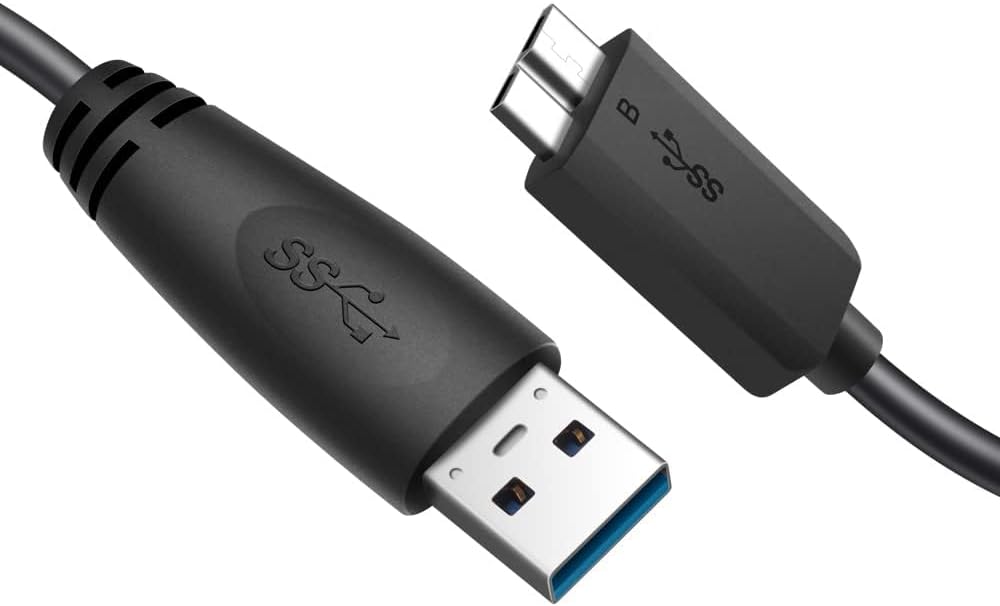
Image 3.1: The included USB 3.0 cable features a standard USB-A connector and a Micro-B connector, ensuring compatibility with the hard drive and various host devices.

Image 3.2: The hard drive is shown connected to a laptop via the USB cable, demonstrating a typical setup for data transfer and storage.
3.2 Formattjar Inizjali (Jekk Meħtieġ)
By default, the hard drive is formatted as ExFAT, which is compatible with most Windows, Mac, Linux, and Android systems. If your device does not recognize the drive or if you wish to use a different file system (e.g., NTFS for Windows-specific use, HFS+ for Mac-specific use), you may need to reformat the drive. Refer to your operating system's documentation for instructions on how to format external storage devices.
Warning: Formatting the drive will erase all data on it. Back up any important data before proceeding with reformatting.
4. Istruzzjonijiet Operattivi
4.1 Trasferiment tad-Data
Once connected, the hard drive functions like any other storage device. You can drag and drop files, copy and paste, or use backup software to transfer data to and from the drive. The USB 3.0 interface provides fast transfer speeds, significantly reducing the time required for large file operazzjonijiet.
4.2 Kompatibilità tas-Sistema
The UnionSine HD2510 is compatible with a wide range of devices and operating systems:
- Windows (XP/Vista/7/8/10/11)
- Mac OS (10.6.5 and above)
- Linux
- Android OS (requires USB OTG support and appropriate cable/adapter, not included)
- Gaming Consoles (Wii U, Xbox, PS4)
- Smart TVs with USB storage support

Image 4.1: The USB cable features a spiral wire mesh protective film to shield against electromagnetic waves and an aluminum foil layer to prevent high-frequency radio interference, ensuring stable data transfer.
4.3 Tneħħija Sikura
Always safely eject or unmount the hard drive from your operating system before physically disconnecting it. This prevents data corruption and ensures the longevity of the device.
5. Manutenzjoni
To ensure optimal performance and longevity of your UnionSine HD2510 hard drive, follow these maintenance guidelines:
- Kura Fiżika: Handle the drive with care. Avoid dropping it or subjecting it to strong impacts, as this can damage the internal mechanical components.
- Temperatura u Umdità: Store and operate the drive within recommended temperature and humidity ranges. Avoid extreme heat, cold, or high moisture environments.
- Tindif: Uża drapp artab u niexef biex tnaddaf il-barra tad-drajv. Tużax prodotti tat-tindif likwidi jew solventi.
- Ventilazzjoni: Ensure the drive has adequate ventilation, especially during prolonged use, to aid in heat dissipation. The built-in aluminum foil protective layer assists in heat management.
- Backup tad-Data: Regularly back up important data stored on the external hard drive to another location to prevent data loss in case of unforeseen issues.
6 Issolvi l-problemi
If you encounter issues with your UnionSine HD2510, refer to the following common problems and solutions:
| Problema | Kawża Possibbli | Soluzzjoni |
|---|---|---|
| Drive not detected | Loose cable connection, faulty USB port, driver issue, incorrect formatting. | Ensure the USB cable is securely connected to both the drive and the computer. Try a different USB port or cable. Check Device Manager (Windows) or System Information (Mac) for the drive. Reformat if necessary (see Section 3.2). |
| Slow transfer speeds | Connected to a USB 2.0 port, cable issue, system performance. | Ensure the drive is connected to a USB 3.0 port for optimal speeds. Try a different USB 3.0 cable. Close unnecessary applications on your computer. |
| Drive appears smaller than advertised capacity | Difference in measurement standards (decimal vs. binary). | This is normal. Hard drive manufacturers define 1GB as 1,000,000,000 bytes, while operating systems calculate 1GB as 1,073,741,824 bytes. For a 320GB drive, the usable capacity will be approximately 298GB. This is not a defect. |
| Ma nistax nikteb files to the drive | Drive is read-only, file system limitations, full drive. | Check if the drive is set to read-only. If formatted as FAT32, individual file size is limited to 4GB. Ensure there is sufficient free space on the drive. |
7. Speċifikazzjonijiet
Detailed technical specifications for the UnionSine HD2510 External Portable Hard Drive:
| Karatteristika | Dettall |
|---|---|
| Numru tal-Mudell | HD2510 |
| Kapaċità | 320 GB |
| Interface | USB 3.0 (kompatibbli b'lura ma' USB 2.0) |
| Tip ta' Hard Drive | Hard Drive Mekkaniku (HDD) |
| Fattur tal-Formola | 2.5 Pulzier |
| Veloċità Rotazzjoni | 5400 RPM |
| Dimensjonijiet (L x W x H) | 11.6 x 8 x 1.3 ċm (4.56 x 3.15 x 0.5 pulzieri) |
| Piż | 220 gramma |
| Kompatibilità tas-Sistema Operattiva | Windows, Mac, Linux, Android |
| Karatteristiċi Speċjali | Portable, Anti-slip design, Rounded corners, Aluminum foil protective layer |
| Komponenti Inklużi | External Portable Hard Drive, USB 3.0 Cable, User Manual |
8. Garanzija u Appoġġ
8.1 Garanzija tal-Manifattur
The UnionSine HD2510 External Portable Hard Drive comes with a Garanzija ta' 3 snin mill-manifatturDin il-garanzija tkopri difetti fil-materjali u fix-xogħol taħt użu normali. Jekk jogħġbok żomm il-prova tax-xiri tiegħek għal talbiet ta' garanzija.
The warranty does not cover damage caused by misuse, accident, unauthorized modification, or external causes such as power fluctuations or natural disasters.
8.2 Appoġġ Tekniku
For technical assistance, troubleshooting beyond this manual, or warranty inquiries, please contact UnionSine customer support through the official webis-sit jew l-informazzjoni ta' kuntatt ipprovduta mal-imballaġġ tal-prodott tiegħek.