
Introduzzjoni
Thank you for choosing the Opal Selfie Stick OP-Sel-BT-01. This manual provides essential information for the safe and effective use of your device. Please read it thoroughly before operation and retain it for future reference.
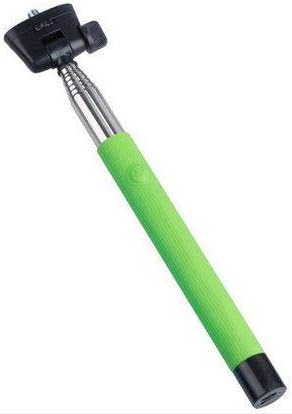
Figura 1: The Opal Selfie Stick OP-Sel-BT-01 in green, showing its extendable arm, phone holder, and comfortable grip.
Karatteristiċi tal-Prodott
- Kulur: Aħdar
- Materjal Prinċipali: Azzar
- Kapaċità massima tat-Tagħbija: 500 g
- Konnettività: Wireless (Bluetooth)
- Sistemi Kompatibbli: Android 3.0 u ogħla, iOS 4.0 u ogħla
Setup
- Unfold the Selfie Stick: Gently pull the phone holder section upwards to extend the stick.
- Adjust Phone Holder: Iftaħ it-telefon clamp and securely place your smartphone within it. Ensure the phone is centered and stable. The clamp is designed to hold various phone sizes.
- Qawwa Mixgħul: Locate the power button (if applicable, usually on the handle) and press it to turn on the selfie stick. An indicator light may illuminate.
Istruzzjonijiet Operattivi
Tqabbil tal-Bluetooth
- Ensure the selfie stick is powered on and in pairing mode (indicator light may flash rapidly).
- Fuq l-ismartphone tiegħek, mur fuq Settings > Bluetooth.
- Ixgħel il-Bluetooth u fittex apparati disponibbli.
- Select "Opal OP-Sel-BT-01" or a similar name from the list of devices.
- Once paired, the indicator light on the selfie stick may turn solid or turn off, indicating a successful connection.
Teħid tar-Ritratti/Vidjows
- Iftaħ l-applikazzjoni tal-kamera tal-ismartphone tiegħek.
- Estendi l-stick selfie għat-tul mixtieq tiegħek.
- Position your phone for the desired shot.
- Press the shutter button on the selfie stick handle to capture a photo or start/stop video recording.
Manutenzjoni
- Tindif: Wipe the selfie stick with a soft, dry cloth. Do not use abrasive cleaners or solvents.
- Ħażna: Store the device in a cool, dry place away from direct sunlight and extreme temperatures. Retract the stick fully before storage.
- Kura tal-batterija: If the selfie stick has a rechargeable battery, ensure it is charged periodically even when not in use to maintain battery health.
Issolvi l-problemi
| Problema | Kawża Possibbli | Soluzzjoni |
|---|---|---|
| Ma nistax nqabbad mat-telefon | Selfie stick not in pairing mode; Bluetooth off on phone; battery low. | Ensure stick is on and in pairing mode. Turn phone's Bluetooth off/on. Charge the selfie stick. |
| Shutter button not working | Not paired; camera app settings. | Verify successful Bluetooth pairing. Check camera app settings for volume button shutter control. |
| Phone not stable in clamp | Phone not centered; clamp mhux imsikkar għalkollox. | Re-position phone to be centered. Ensure clamp is firmly gripping the phone. |
Speċifikazzjonijiet
- Mudell: OP-Sel-BT-01
- Ditta: Opal
- Kulur: Aħdar
- Materjal Prinċipali: Azzar
- Kapaċità massima tat-Tagħbija: 500 g
- Konnettività: Wireless (Bluetooth)
- Sistemi Operattivi Appoġġjati: Android 3.0+, iOS 4.0+
- ASIN: B091DBB122
- L-Ewwel Data Disponibbli: 30 L-2021 ta’ Marzu
Garanzija u Appoġġ
For information regarding warranty coverage or technical support, please refer to the documentation included with your purchase or visit the official Opal websit. It-termini speċifiċi tal-garanzija jistgħu jvarjaw skont ir-reġjun u l-bejjiegħ bl-imnut.
Informazzjoni dwar is-Sigurtà
- Tesponix l-apparat għal temperaturi estremi, umdità, jew dawl tax-xemx dirett għal perjodi twal.
- Żomm fejn ma jintlaħaqx mit-tfal.
- Tippruvax tiżżarma jew timmodifika l-apparat. Dan jista' jannulla l-garanzija u jikkawża ħsara.
- Ensure your phone is securely fastened in the clamp before extending the stick.