
DELTACO GAMING DM210
Manwal tal-Utent tal-Maws tal-Logħob RGB Ultralight DELTACO GAMING DM210
Model: DM210 (GAM-108)
1. Introduzzjoni
Thank you for choosing the DELTACO GAMING DM210 Ultralight RGB Gaming Mouse. This manual provides essential information for setting up, operating, and maintaining your new gaming mouse. The DM210 is designed for performance, featuring an ultralight construction, customizable RGB lighting, and programmable buttons to enhance your gaming experience.
2. Kontenut tal-Pakkett
- 1x DELTACO GAMING DM210 Ultralight RGB Gaming Mouse
- 1x Manwal għall-Utent
3. Prodott Aktarview
The DELTACO GAMING DM210 mouse features an ergonomic design with a honeycomb shell for reduced weight and improved airflow. It includes 7 buttons for versatile control and customizable RGB lighting.
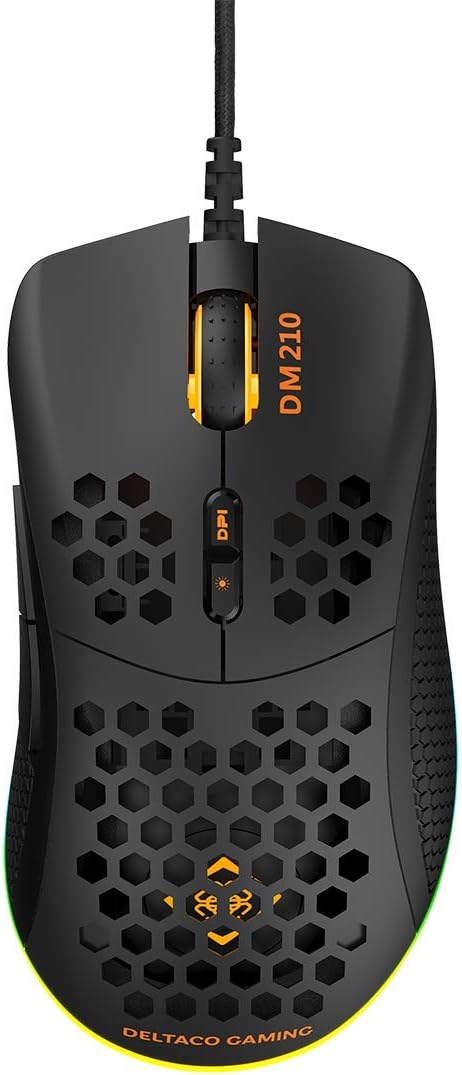
Stampa 3.1: Fuq view of the DM210 mouse. This image displays the left and right click buttons, the scroll wheel, and the two DPI adjustment buttons located below the scroll wheel. The ultralight honeycomb shell design is visible across the top surface of the mouse.
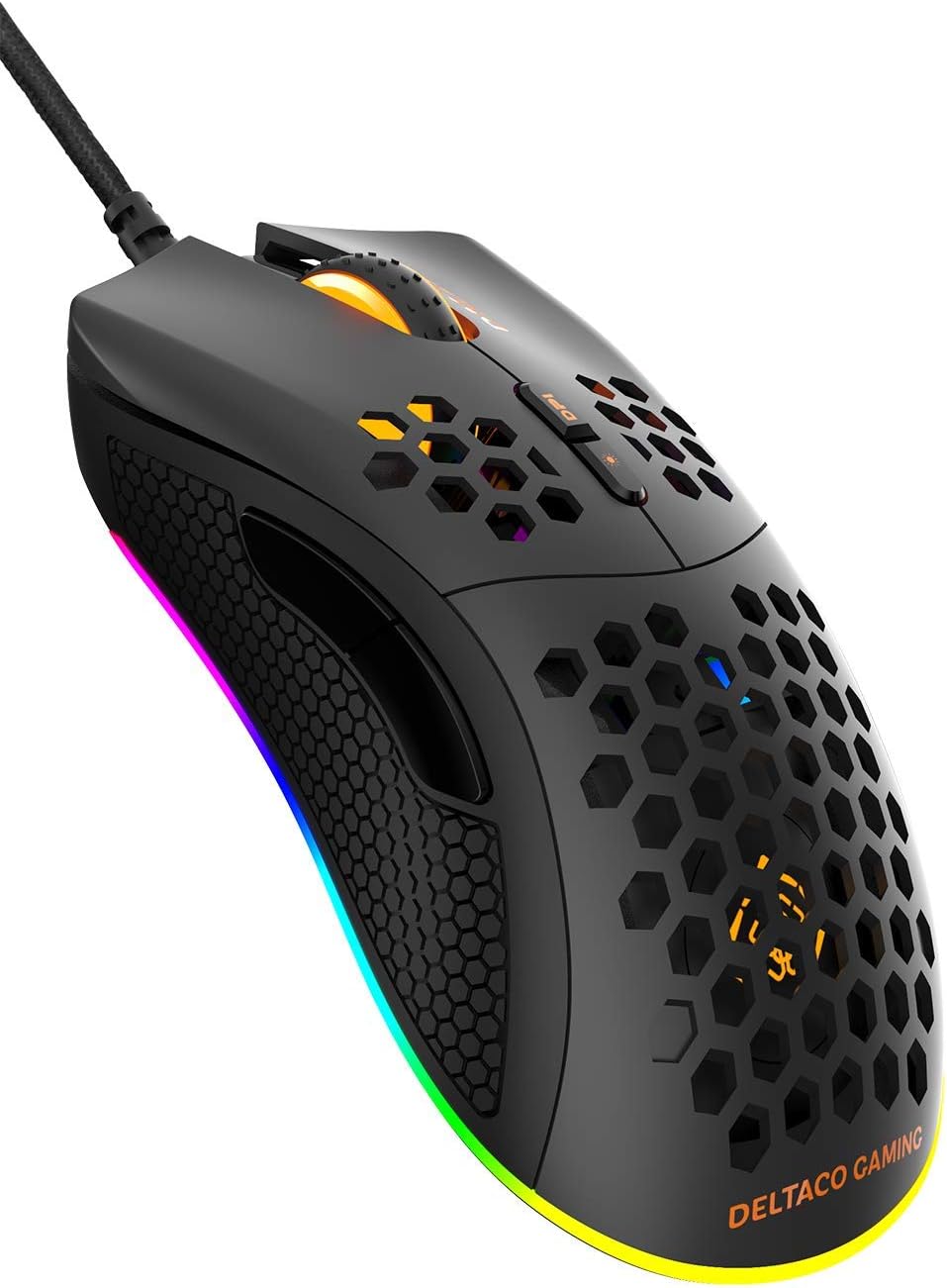
Stampa 3.2: Angolat view of the DM210 mouse from the front-right. This image highlights the two side buttons (forward and back) located on the left side of the mouse, designed for easy thumb access. The RGB lighting strip along the base of the mouse is also visible.
Funzjonijiet tal-buttuna:
- Buttuna tal-Ikklikkjar tax-Xellug: Funzjoni standard tal-ikklikkjar primarju.
- Buttuna tal-Ikklikkjar bil-Lemin: Funzjoni standard ta' klikk sekondarja.
- Scroll Wheel: For scrolling through documents and web pages. Also functions as a middle click button.
- DPI+ Button: Increases the DPI sensitivity.
- DPI- Button: Decreases the DPI sensitivity. (Note: The product description mentions a single DPI button and a separate LED button. For this model, the two buttons below the scroll wheel are typically for DPI adjustment.)
- Buttuna 'l quddiem: Jinnaviga 'l quddiem ġewwa web browsers jew applikazzjonijiet.
- Buttuna Lura: Jinnaviga lura ġewwa web browsers jew applikazzjonijiet.
4. Setup
- Qabbad il-Maws: Plug the USB connector of the DELTACO GAMING DM210 mouse into an available USB port on your computer.
- Installazzjoni tas-sewwieq: Your operating system (Windows 7/8/10) will automatically detect and install the necessary drivers. This process may take a few moments.
- Installazzjoni tas-Softwer (Mhux obbligatorja): For advanced customization, including programmable buttons and RGB lighting effects, download the DELTACO GAMING software. Refer to the product packaging or the official DELTACO GAMING website for the software download link.
5. Istruzzjonijiet Operattivi
5.1. Aġġustament tad-DPI
The DM210 mouse features multiple DPI (Dots Per Inch) settings, allowing you to adjust cursor sensitivity on the fly. Use the DPI buttons (located below the scroll wheel) to cycle through the available DPI levels:
- 400 DPI
- 800 DPI
- 1200 DPI
- 1600 DPI
- 3200 DPI
- 6400 DPI
Each DPI level may be indicated by a specific LED color or pattern, depending on the current RGB settings.
5.2. Kontroll tad-Dawl RGB
The mouse features dynamic RGB lighting. While some basic lighting modes might be accessible via a dedicated button (if present, often combined with DPI control), full customization of the RGB loop and logo lighting is achieved through the DELTACO GAMING software. The software allows you to select from 16 million colors and various lighting effects.
5.3. Buttuni u Softwer Programmabbli
The 7 buttons on the DM210 mouse are programmable using the DELTACO GAMING software. This software allows you to:
- Remap button functions to suit your preferences.
- Create macros for complex in-game actions.
- Adjust polling rate (up to 1000 Hz).
- Ippersonalizza l-effetti tad-dawl u l-kuluri RGB.
Install the software from the official DELTACO GAMING website for access to these advanced features.
6. Manutenzjoni
To ensure the longevity and optimal performance of your DELTACO GAMING DM210 mouse, follow these maintenance guidelines:
- Tindif: Uża artab, ftit damp cloth to clean the surface of the mouse. Avoid using harsh chemicals, abrasive cleaners, or solvents, as these can damage the finish and internal components.
- Kura tal-Cable: Avoid sharp bends or excessive pulling on the USB cable. Store the cable neatly when not in use to prevent tangling and damage.
- Ambjent: Keep the mouse away from extreme temperatures, direct sunlight, and excessive moisture.
7 Issolvi l-problemi
If you encounter issues with your DELTACO GAMING DM210 mouse, refer to the following common solutions:
- Il-Maws Mhux Jirrispondi:
- Kun żgur li l-kejbil tal-USB huwa mdaħħal sew f'port USB li jaħdem fuq il-kompjuter tiegħek.
- Ipprova qabbad il-maws ma' port USB differenti.
- Ibda mill-ġdid il-kompjuter tiegħek.
- Ittestja l-maws fuq kompjuter ieħor biex tiddetermina jekk il-problema hijiex fil-maws jew fis-sistema tiegħek.
- DPI Mhux qed Jinbidel:
- Kun żgur li qed tagħfas il-buttuni korretti tal-aġġustament tad-DPI.
- If using the software, check if DPI settings have been reconfigured or if a specific profile hija attiva.
- Dawl RGB Mhux Jaħdem/Mhux Korrett:
- Verify the mouse is properly connected.
- Check the DELTACO GAMING software for lighting settings and ensure they are configured as desired.
- Kun żgur li s-softwer huwa aġġornat.
- Buttuni Mhux Jaħdmu Sewwa:
- If using the DELTACO GAMING software, check button assignments to ensure they haven't been accidentally remapped.
- Test the mouse on another computer to rule out software conflicts on your primary system.
8. Speċifikazzjonijiet
| Brand | LOGĦOB DELTACO |
| Mudell | DM210 (GAM-108) |
| Konnettività | USB |
| Settings DPI | 400 / 800 / 1200 / 1600 / 3200 / 6400 |
| Ir-Rata tal-Votazzjoni | 1000 Hz |
| Buttuni | 7 (Programmabbli) |
| Piż | 70g |
| Dawl | RGB (16 miljun kulur) |
| Kompatibilità | Windows 7 / 8 / 10 |
| Kulur | Iswed |
9. Informazzjoni dwar Garanzija
The DELTACO GAMING DM210 Ultralight RGB Gaming Mouse comes with a garanzija ta 'sena from the date of purchase. This warranty covers manufacturing defects and ensures the product meets its specified performance. Please retain your proof of purchase for warranty claims. For detailed warranty terms and conditions, refer to the official DELTACO GAMING websit jew ikkuntattja l-appoġġ tal-klijent.
10. Appoġġ
For further assistance, software downloads, frequently asked questions (FAQs), and the latest product information, please visit the official DELTACO GAMING website. You can also contact DELTACO GAMING customer support for technical issues or warranty inquiries.
Ask a question about this manual
Ask about setup, troubleshooting, compatibility, parts, safety, or missing instructions. Manuals+ will review the question and use this page’s manual context to help answer it.