
ASUS FX706LI-ES53
Manwal għall-Utent tal-Laptop tal-Logħob ASUS TUF Gaming F17
Model: FX706LI-ES53
Introduzzjoni
The ASUS TUF Gaming F17 FX706 is a high-performance gaming laptop designed for immersive gaming experiences and efficient multitasking. It features a durable MIL-STD-810H military standard construction, ensuring reliability in various conditions. This manual provides essential information for setting up, operating, maintaining, and troubleshooting your device.
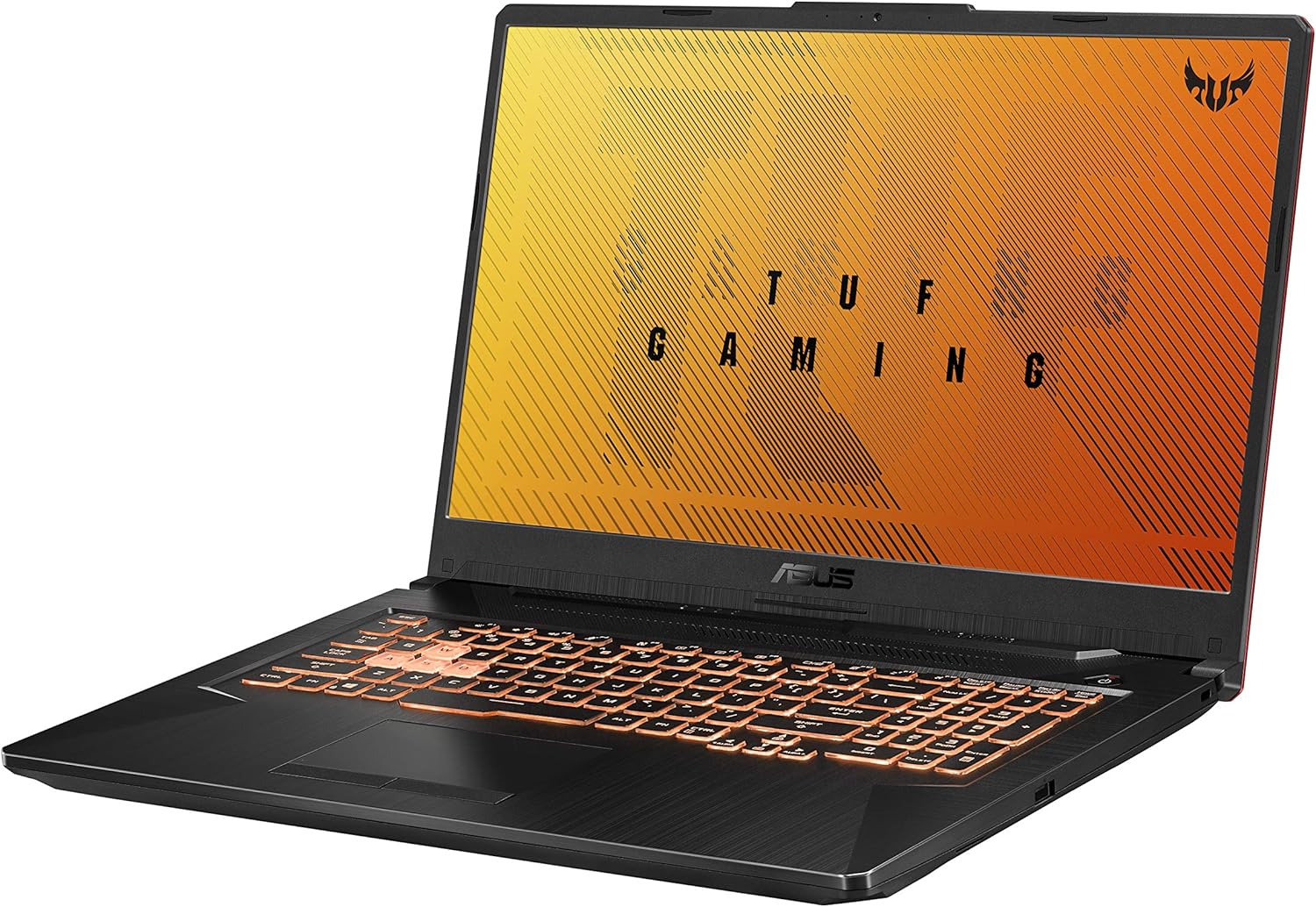
Figura 1: Angolat view of the ASUS TUF Gaming F17 laptop, showcasinid-disinn u t-tastiera tiegħu.
Setup
1. Il-ftuħ tal-kaxxa u l-ewwel xegħil
Carefully remove the laptop and its accessories from the packaging. Connect the power adapter to the laptop's power input port and then to a power outlet. The laptop is designed to power on automatically when connected to power for the first time. Follow the on-screen instructions to complete the initial Windows setup.
2. Konnessjoni Periferali
Your ASUS TUF Gaming F17 laptop offers various ports for connecting external devices:
- Portijiet USB: Connect external storage, mouse, keyboard, or other USB devices.
- Port HDMI: Qabbad ma' monitor jew TV estern għal display akbar.
- Port RJ45 (LAN): Għal konnessjoni ta' netwerk bil-fili.
- Jack Awdjo 3.5mm: Għal headphones jew kelliema esterni.
- Port USB-C: For versatile connectivity, including data transfer and display output (DisplayPort 1.4).

Figure 2: Left side of the laptop with power, RJ45, HDMI, USB 3.2 Gen 1 Type-A, USB 3.2 Gen 2 Type-C, and 3.5mm audio jack.

Figure 3: Right side of the laptop with a USB 2.0 Gen 1 port and Kensington Lock slot.
It-Tħaddim tal-Laptop Tiegħek
The ASUS TUF Gaming F17 is equipped with powerful components for an optimal gaming and computing experience.
Display u Grafika
Experience smooth visuals on the 17.3-inch Full HD (1920x1080) IPS-Type display with a 144Hz refresh rate. The NVIDIA GeForce GTX 1650 Ti 4GB GDDR6 graphics card ensures high frame rates and detailed graphics for your games and applications.

Figura 4: Quddiem view of the laptop with the display active, showing the narrow bezels.
Tastiera u Input
The laptop features an RGB backlit gaming keyboard, rated for 20-million keystroke durability, providing a responsive and customizable typing experience. The integrated touchpad supports multi-touch gestures for intuitive navigation.

Figura 5: Minn fuq għal isfel view of the laptop's keyboard, highlighting the RGB backlighting and full numpad.
Sistema Awdjo
Immerse yourself in rich, clear audio with DTS:X Ultra technology, delivering high-fidelity 7.1-channel virtual surround sound for headphones and stereo sound for speakers.

Figure 6: Visual representation of the DTS:X Ultra audio technology, showing sound projection from the laptop.
MyASUS Application
The MyASUS application provides a centralized hub for system updates, diagnostics, and customization options. It allows you to manage battery health, fan profiles, display settings, and more. You can also use it for easy file transfer between your PC and mobile devices.
Video 1: Official MyASUS Product Video. This video demonstrates the features and benefits of the MyASUS application, including system updates, diagnostics, and file transfer capabilities between devices.
Manutenzjoni
Sistema tat-tkessiħ
The ASUS TUF Gaming F17 features a patented Anti-Dust Cooling (ADC) system with dual fans to maintain optimal performance and extend the lifespan of components. The self-cleaning design prevents dust buildup, ensuring efficient heat dissipation.

Figure 7: Illustration of the laptop's self-cleaning dual fan cooling system, highlighting airflow and heat management.
Aġġornabbiltà
The laptop is designed for easy upgrades. You can expand the RAM and add additional SSD storage to enhance performance and capacity as needed. Refer to the official ASUS support resources for detailed instructions on component upgrades.

Figure 8: Internal diagram indicating the locations for upgradeable RAM modules and additional M.2 NVMe SSD and HDD slots.
Kura Ġenerali
- Keep the laptop clean by regularly wiping the screen and chassis with a soft, lint-free cloth.
- Żgura ventilazzjoni xierqa billi ma timblokkax il-ventijiet tal-arja.
- Avoid exposing the laptop to extreme temperatures or humidity.
Issolvi l-problemi
If you encounter issues with your ASUS TUF Gaming F17 laptop, consider the following basic troubleshooting steps:
- Ebda Qawwa: Kun żgur li l-adapter tal-enerġija huwa konness sew kemm mal-laptop kif ukoll ma' sokit tal-enerġija li jaħdem. Ipprova sokit differenti jekk meħtieġ.
- Kwistjonijiet tal-Wiri: If the screen is black, try pressing the function key to toggle the display output (e.g., Fn + F8). Ensure external monitors are properly connected.
- Tnaqqis fil-Prestazzjoni: Close unnecessary applications, check for background processes, and ensure the cooling vents are clear. Fans may increase speed during intensive tasks to maintain optimal temperature.
- Problemi tas-Software: Restart the laptop. If issues persist, check for Windows updates or use the MyASUS application for system diagnostics.
- Kwistjonijiet tal-Awdjo: Check volume levels, ensure headphones/speakers are properly connected, and verify audio drivers are up to date.
For more detailed troubleshooting or complex issues, refer to the official ASUS support websit jew ikkuntattja lis-servizz tal-konsumatur.
Speċifikazzjonijiet
| Karatteristika | Speċifikazzjoni |
|---|---|
| Mudell | FX706LI-ES53 |
| Wiri | 17.3-inch FHD (1920x1080) IPS-Type, 144Hz |
| Proċessur | Intel Core i5-10300H (Quad-core, up to 4.5 GHz) |
| Grafika | NVIDIA GeForce GTX 1650 Ti 4GB GDDR6 |
| RAM | 8GB DDR4 2933MHz |
| Ħażna | SSD ta' 512GB PCIe NVMe M.2 |
| Sistema Operattiva | Windows 10 Home (Aġġornament b'xejn għal Windows 11 meta jkun disponibbli) |
| Konnettività bla fili | Wi-Fi 6 (802.11ax) |
| Portijiet | 3x USB 3.0, 1x USB 2.0, 1x HDMI, 1x RJ45, 1x 3.5mm Audio Jack |
| Piż | 5.73 liri |
| Dimensjonijiet (LxWxH) | 15.71 x 10.59 x 1.02 pulzieri |
Garanzija u Appoġġ
Għal informazzjoni dettaljata dwar il-garanzija, jekk jogħġbok irreferi għad-dokumentazzjoni inkluża mal-prodott tiegħek jew żur is-sit uffiċjali tal-appoġġ tal-ASUS. website. ASUS provides various support resources to assist you with your device.
Manwal Uffiċjali għall-Utent (PDF)
A comprehensive user manual in PDF format is available for download. This document contains detailed instructions and information about your laptop's features and functions.
Niżżel il-Manwal tal-Utent (PDF)
ASUS Customer Support
If you require further assistance, technical support, or service, please contact ASUS customer support through their official channels. The MyASUS application also offers a "Contact ASUS" and "One-click diagnosis" feature for convenient support.
Ask a question about this manual
Ask about setup, troubleshooting, compatibility, parts, safety, or missing instructions. Manuals+ will review the question and use this page’s manual context to help answer it.