
Introduzzjoni
This manual provides detailed instructions for the safe and efficient use of your XO B26 Bluetooth 4.2 Wireless Earbud. Please read this manual thoroughly before using the product and retain it for future reference.
Prodott Overview
The XO B26 is a single Bluetooth 4.2 wireless earbud designed for mobile phones, offering ease of use and portability. It is crafted from high-quality materials to ensure durability and a secure fit.
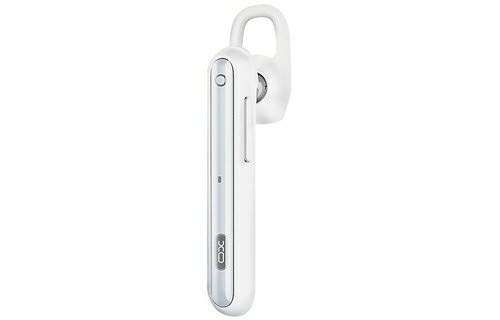
Image: The XO B26 Bluetooth Wireless Earbud, shown in white with a silver accent, featuring its ergonomic design and ear hook.
Karatteristiċi ewlenin:
- Bluetooth 4.2 connectivity for stable wireless connection.
- Disinn kompatt u ħafif għal portabbiltà faċli.
- Ergonomically designed for a secure and comfortable fit.
- Touch control method for intuitive operation.
Immaġni: Close-up view of the XO B26 earbud, highlighting the control button and sleek design.
Setup
1. Charging the Earbud
- Connect the charging cable (not included) to the earbud's charging port.
- Ipplaggja t-tarf l-ieħor tal-kejbil f'sors ta 'enerġija USB kompatibbli.
- Id-dawl indikatur juri l-istatus tal-iċċarġjar. Iċċarġjar sħiħ jieħu madwar 2 sigħat.
- Once fully charged, disconnect the earbud from the power source.
2. Tqabbil ma' Apparat
- Ensure the earbud is fully charged and turned off.
- Press and hold the multi-function button on the earbud until the indicator light flashes red and blue alternately, indicating it is in pairing mode.
- On your mobile phone or compatible device, enable Bluetooth and search for available devices.
- Select "XO B26" from the list of found devices.
- Once paired, the indicator light will flash blue slowly, and you may hear a confirmation tone.
- Jekk tintalab għal password, daħħal "0000".
Istruzzjonijiet Operattivi
Qawwa mixgħul/mitfi
- Qawwa Mixgħul: Press and hold the multi-function button for approximately 3 seconds until the blue indicator light flashes.
- Itfi: Press and hold the multi-function button for approximately 5 seconds until the red indicator light flashes and then turns off.
Making and Receiving Calls (Touch Control)
- Irrispondi Sejħa: Briefly tap the multi-function button when an incoming call rings.
- Tmiem Sejħa: Briefly tap the multi-function button during a call.
- Irrifjuta Sejħa: Agħfas u żomm il-buttuna multi-funzjoni għal madwar 2 sekondi waqt telefonata li tkun dieħla.
- Isemmi mill-ġdid l-Aħħar Numru: Agħfas darbtejn il-buttuna multi-funzjoni meta ma tkunx fuq telefonata.
Music Playback (Touch Control)
- Play/Pawsa: Briefly tap the multi-function button to play or pause music.
- Track li jmiss: Press and hold the multi-function button for approximately 2 seconds to skip to the next track.
- Kontroll tal-Volum: Volume is typically controlled via the connected device.
Manutenzjoni
Tindif
- Wipe the earbud with a soft, dry, lint-free cloth.
- Tużax prodotti tat-tindif li joborxu, solventi, jew prodotti tat-tindif bl-isprej.
- Żomm il-port tal-iċċarġjar ħieles mit-trab u l-fdalijiet.
Ħażna
- Store the earbud in a cool, dry place away from direct sunlight and extreme temperatures.
- Avoid storing near magnetic fields.
Kura tal-batterija
- Charge the earbud regularly, even if not in use, to maintain battery health.
- Evita li tiċċarġja l-batterija kompletament ta' spiss.
Issolvi l-problemi
| Problema | Soluzzjoni Possibbli |
|---|---|
| Earbud does not power on. | Ensure the earbud is fully charged. Press and hold the multi-function button for a longer duration. |
| Ma tistax tqabbad mat-tagħmir. | Make sure the earbud is in pairing mode (flashing red and blue). Turn off and on Bluetooth on your device. Move the earbud closer to your device. |
| No sound during music or calls. | Check the volume level on both the earbud and your connected device. Ensure the earbud is properly paired and connected. |
| Kwalità tal-ħoss ħażina. | Ensure there are no obstructions between the earbud and your device. Move closer to your device. Check for interference from other wireless devices. |
| Earbud not charging. | Verify the charging cable is securely connected. Try a different USB power source or cable. Ensure the charging port is clean. |
Speċifikazzjonijiet
| Karatteristika | Dettall |
|---|---|
| Brand | XO |
| Isem tal-Mudell | B26 |
| Kulur | Abjad |
| Verżjoni Bluetooth | 4.2 |
| Teknoloġija tal-Komunikazzjoni mingħajr Fili | Wireless |
| Apparati Kompatibbli | Multiple (Mobile Phones) |
| Metodu ta' Kontroll | Mess |
| Ħin tat-Tkellem | Madwar sagħtejn |
| Ħin tal-Mużika | Madwar sagħtejn |
| Ħin tal-Iċċarġjar | Madwar sagħtejn |
| Komponenti Inklużi | Kuxxini tal-widnejn |
| Piż tal-oġġett | 106 gramma |
| Dimensjonijiet tat-Tbaħħir | 17.8 x 3.4 x 0.8 ċm |
| ASIN | B08WT1RK59 |
Informazzjoni dwar is-Sigurtà
Please observe the following safety guidelines to prevent damage to the product or injury to yourself:
- Do not disassemble, repair, or modify the earbud.
- Keep the earbud away from water, moisture, and extreme temperatures.
- Evita espożizzjoni fit-tul għal livelli ta 'volum għoli biex tevita ħsara fis-smigħ.
- Żomm fejn ma jintlaħaqx mit-tfal u l-annimali domestiċi.
- Use only compatible charging accessories.
Garanzija u Appoġġ
Għal informazzjoni dwar il-garanzija jew appoġġ tekniku, jekk jogħġbok irreferi għad-dokumentazzjoni pprovduta fil-ħin tax-xiri jew ikkuntattja lill-bejjiegħ tiegħek. Żomm il-prova tax-xiri tiegħek għal kwalunkwe talba ta' garanzija.