
1. Introduzzjoni
This manual provides detailed instructions for the proper use, setup, and maintenance of your BOROFONE BC28 Bluetooth Wireless Earphone. Please read this manual thoroughly before using the product to ensure optimal performance and longevity. Keep this manual for future reference.
2. Kontenut tal-Pakkett
Ivverifika li l-oġġetti kollha huma preżenti fil-pakkett tal-prodott tiegħek:
- BOROFONE BC28 Bluetooth Wireless Earphone
- Kuxxini tal-widnejn (daqsijiet varji)
- Kejbil tal-Iċċarġjar USB (Mikro-USB)
- Manwal għall-Utent
3. Prodott Aktarview
The BOROFONE BC28 is a compact and lightweight wireless earphone designed for convenient audio playback and hands-free calling. It features Bluetooth V5.0 for stable connectivity and touch control for easy operation.
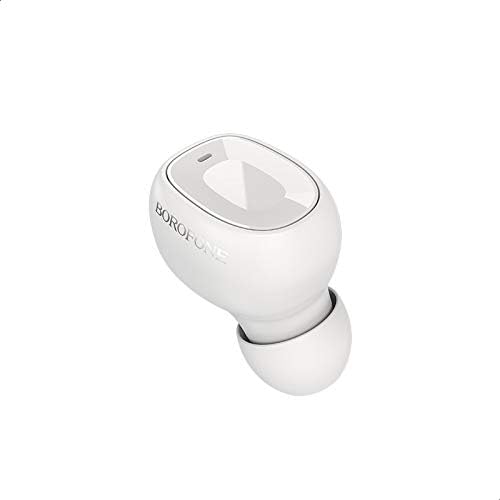
Figura 3.1: Quddiem view of the BOROFONE BC28 earphone, showing the main button and indicator light.
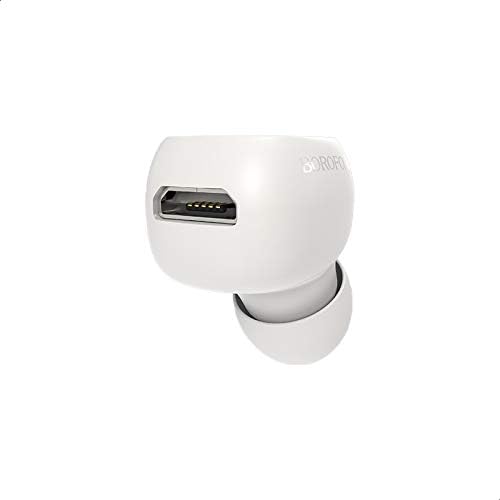
Figura 3.2: Ġenb view of the BOROFONE BC28 earphone, highlighting the charging port.
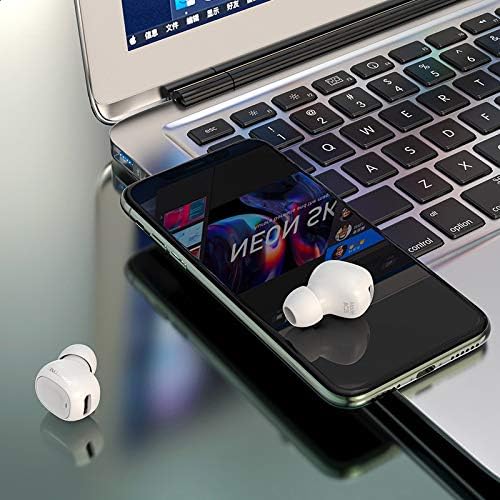
Figure 3.3: The BOROFONE BC28 earphone in use, connected to a smartphone and laptop.
4. Twaqqif u Tqabbil
Follow these steps to pair your BOROFONE BC28 earphone with your device:
- Iċċarġja l-Earphone: Before first use, fully charge the earphone. Refer to Section 6 for charging instructions.
- Qawwa Mixgħul: Press and hold the multi-function button on the earphone until the indicator light flashes blue and red, indicating it is in pairing mode.
- Attiva l-Bluetooth: Fuq l-ismartphone, it-tablet, jew apparat ieħor li jaħdem bil-Bluetooth tiegħek, mur fis-settings tal-Bluetooth u ixgħel il-Bluetooth.
- Fittex għal Apparati: Your device will automatically search for nearby Bluetooth devices.
- Select "BC28": From the list of available devices, select "BC28".
- Ikkonferma l-Imqabbad: Once paired, the earphone's indicator light will flash blue slowly, and you will hear an audio confirmation.
Note: The earphone will automatically attempt to reconnect to the last paired device when powered on.
5. Istruzzjonijiet Operattivi
5.1 Power On/Off
- Qawwa Mixgħul: Press and hold the multi-function button for approximately 3 seconds until the blue indicator light flashes.
- Itfi: Press and hold the multi-function button for approximately 5 seconds until the red indicator light flashes and then turns off.
5.2 Kontroll tal-Mużika
- Play/Pawsa: Agħfas il-buttuna multi-funzjoni darba waħda fil-qosor.
- Track li jmiss: Agħfas darbtejn il-buttuna multi-funzjoni.
- Track preċedenti: Agħfas tliet darbiet il-buttuna multi-funzjoni.
5.3 Kontroll tas-Sejħa
- Tweġiba/Tmiem Sejħa: Agħfas il-buttuna multi-funzjoni darba waħda fil-qosor.
- Irrifjuta Sejħa: Agħfas u żomm il-buttuna multi-funzjoni għal madwar 2 sekondi.
- Isemmi mill-ġdid l-Aħħar Numru: Agħfas darbtejn il-buttuna multi-funzjoni meta ma tkunx fuq telefonata.
6. Iċċarġjar
To charge your BOROFONE BC28 earphone:
- Connect the Micro-USB end of the charging cable to the charging port on the earphone.
- Qabbad it-tarf USB-A tal-kejbil tal-iċċarġjar ma' sors ta' enerġija USB (eż., port USB tal-kompjuter, adapter tal-ħajt).
- Id-dawl indikatur se jsir aħmar waqt l-iċċarġjar.
- Once fully charged (approximately 50 minutes), the indicator light will turn blue or turn off.
Informazzjoni dwar il-Batterija:
- Kapaċità tal-batterija: 40 mAh
- Ħin tal-Iċċarġjar: Madwar 50 minuta
- Ħin tax-Xogħol: Sa 4 sigħat
- Ħin ta' Standby: Sa 100 siegħa
7. Manutenzjoni
- Tindif: Use a soft, dry cloth to clean the earphone. Do not use harsh chemicals or abrasive materials.
- Ħażna: Aħżen il-earphone f'post frisk u niexef 'il bogħod mix-xemx diretta u minn temperaturi estremi.
- Espożizzjoni għall-Ilma: This earphone is not waterproof. Avoid exposure to water or excessive moisture.
- Kura tal-batterija: To preserve battery life, charge the earphone at least once every three months if not used regularly.
8 Issolvi l-problemi
| Problema | Kawża Possibbli | Soluzzjoni |
|---|---|---|
| Il-earphone ma jixgħelx. | Batterija baxxa. | Iċċarġja l-earphone kompletament. |
| Ma tistax tqabbad mat-tagħmir. | Il-earphone mhux fil-modalità ta' tqabbil; il-Bluetooth mitfi fuq l-apparat; wisq 'il bogħod mill-apparat. | Ensure earphone is in pairing mode (flashing red/blue). Turn on Bluetooth on your device. Move earphone closer to device (within 10 meters). |
| L-ebda ħoss wara t-tqabbil. | Volume too low; incorrect audio output selected on device. | Increase volume on both earphone and device. Check device's audio output settings. |
| Konnessjoni intermittenti. | Obstacles between earphone and device; interference; low battery. | Reduce distance and remove obstacles. Avoid areas with strong Wi-Fi or other Bluetooth signals. Charge the earphone. |
9. Speċifikazzjonijiet
| Isem tal-Mudell | BC28 |
| Verżjoni Bluetooth | V5.0 |
| Kapaċità tal-batterija | 40 mAh |
| Ħin tal-Iċċarġjar | Madwar 50 minuta |
| Ħin tax-Xogħol | Sa 4 sigħat |
| Ħin ta' Standby | Sa 100 sigħat |
| Dimensjonijiet (L x W x H) | 28 × 16 × 23 mm |
| Piż | 3 gramma |
| Metodu ta' Kontroll | Mess |
| Teknoloġija tal-Konnettività | Wireless (Bluetooth) |
| Fattur tal-Forma tal-Headphones | Fil-widnejn |
| Materjal | Materjali Imħallta |
10. Garanzija u Appoġġ
BOROFONE products are designed and manufactured to the highest quality standards. This product is covered by a limited warranty from the date of purchase. For specific warranty terms and conditions, please refer to the warranty card included in your package or contact BOROFONE customer support.
For technical support or inquiries, please visit the official BOROFONE webis-sit jew ikkuntattja lid-distributur lokali tiegħek.