
1. Introduzzjoni
This manual provides essential information for setting up, operating, maintaining, and troubleshooting your ASUS TUF Gaming A15 FA506II-AS53 laptop. Please read this manual thoroughly to ensure proper usage and to maximize the performance and lifespan of your device.
2. Prodott Aktarview
The ASUS TUF Gaming A15 FA506II-AS53 is a robust gaming laptop designed for performance and durability. It features a 15.6-inch 144Hz Full HD IPS-Type display, powered by an AMD Ryzen 5 4600H processor and NVIDIA GeForce GTX 1650 Ti graphics. The laptop includes 8GB DDR4 RAM and a 512GB PCIe SSD for fast loading and multitasking. Its design incorporates a durable MIL-STD-810H military standard construction and an Anti-Dust Cooling (ADC) system for extended longevity. The RGB backlit keyboard offers a 20-million keystroke durability.
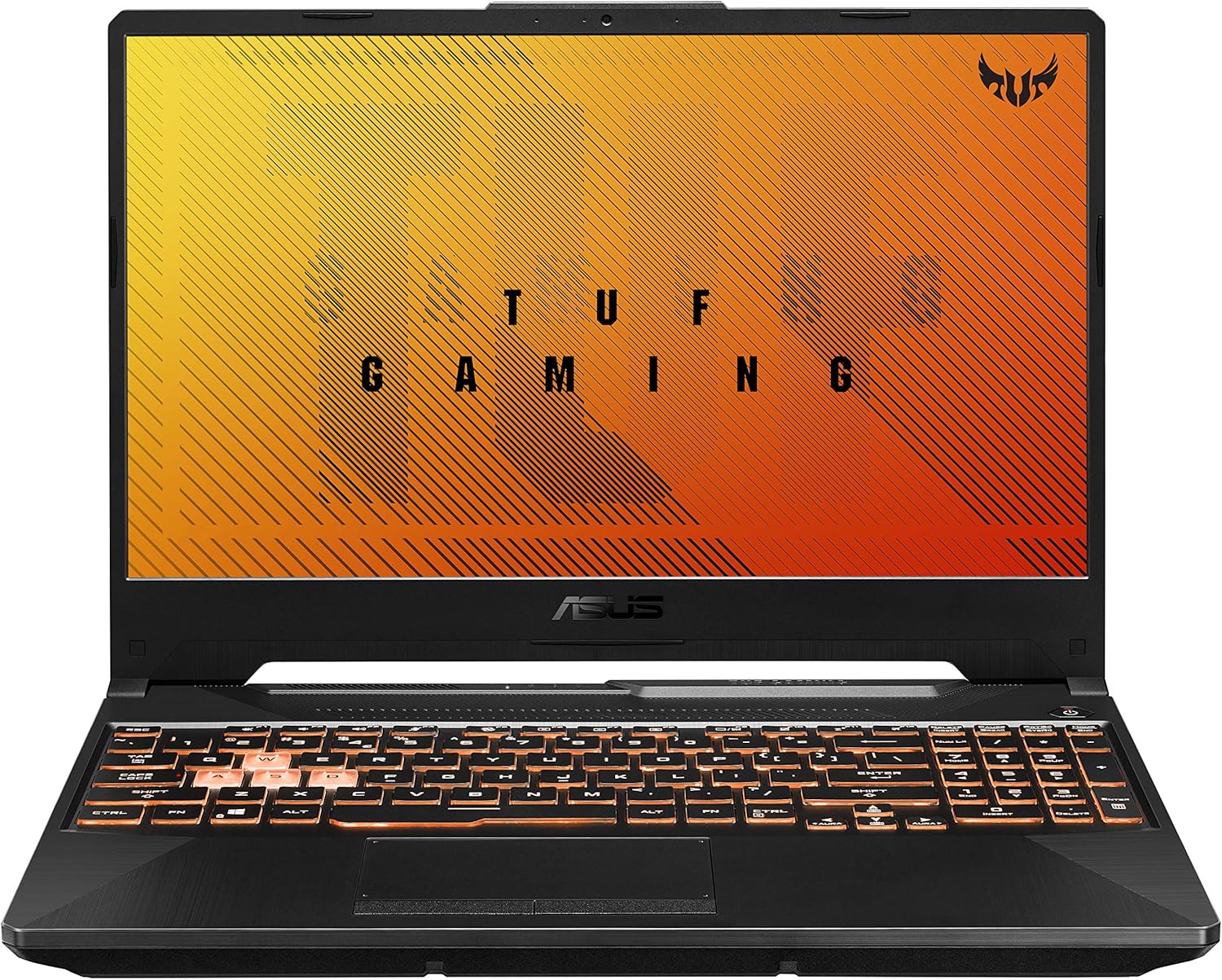
Figura 2.1: Angolat view of the ASUS TUF Gaming A15 laptop with its display open.
Karatteristiċi ewlenin:
- Proċessur: AMD Ryzen 5 4600H
- Grafika: NVIDIA GeForce GTX 1650 Ti 4GB GDDR6
- Wiri: 15.6-inch 144Hz FHD (1920x1080) IPS-Type
- Ħażna: SSD ta' 512GB PCIe NVMe M.2
- Memorja: 8GB DDR4 3200MHz RAM
- Sistema Operattiva: Windows 10 Home (Free upgrade to Windows 11 available)
- Durabilità: MIL-STD-810H military standard construction
- Tkessiħ: Dual fans with self-cleaning anti-dust technology
- Tastiera: RGB Backlit, 20-million keystroke durability
- Konnettività: Gigabit Wave 2 Wi-Fi 5 (802.11ac)
3. Setup Inizjali
3.1 Unboxing and Connecting Power
- Oħroġ il-laptop u l-aċċessorji kollha mill-imballaġġ bir-reqqa.
- Qabbad l-adapter tal-AC mal-port tad-dħul tal-enerġija tal-laptop u mbagħad waħħalha f'sokit tal-enerġija.
- Open the laptop lid and press the power button to turn on the device.

Figure 3.1: The ASUS TUF Gaming A15 laptop with its display open, ready for initial setup.
3.2 Konfigurazzjoni tas-Sistema Operattiva (Windows 10 Home)
Upon first boot, the laptop will guide you through the Windows 10 Home setup wizard. Follow the on-screen prompts to configure your region, language, network settings, and user account. It is recommended to connect to the internet during this process to ensure all necessary updates are downloaded.
During the setup, you will be asked to customize your device usage. Selecting 'Gaming' will optimize Windows 10 for gaming performance and suggest relevant tools and services.

Figura 3.2: Minn fuq għal isfel view of the ASUS TUF Gaming A15 keyboard, highlighting the WASD keys and RGB backlighting.
4. Portijiet u Konnettività
The ASUS TUF Gaming A15 offers a variety of ports for connecting peripherals and external displays.
4.1 Available Ports:
- USB 3.2 Ġen 1 Tip-A: Multiple ports for high-speed data transfer.
- USB 3.2 Ġen 2 Tip-Ċ: Supports DisplayPort 1.4 for external monitors.
- HDMI 2.0b: Għall-konnessjoni ma' displays jew televiżjonijiet esterni.
- Port tal-LAN RJ45: Għal konnessjoni tal-internet bil-fili.
- Jack tal-Awdjo Kombinat ta' 3.5mm: For headphones with microphone.
- Input ta' Enerġija: Għall-konnessjoni tal-adapter tal-AC.

Figure 4.1: Left side of the ASUS TUF Gaming A15 laptop, displaying the power input, RJ45, HDMI, USB-A, and USB-C ports.
4.2 Wireless Connectivity:
- Wi-Fi 5 (802.11ac): Provides fast wireless internet access.
- Bluetooth 5.0: For connecting wireless peripherals like headsets and mice.
5. Tastiera u Touchpad
The ASUS TUF Gaming A15 features a full-sized RGB backlit keyboard and a responsive touchpad.
5.1 RGB Backlit Keyboard:
- The keyboard offers customizable RGB backlighting, allowing you to personalize the lighting effects.
- The WASD keys are highlighted for gaming.
- Keys are rated for 20-million keystroke durability.
5.2 Touchpad:
The touchpad supports multi-touch gestures for intuitive navigation within Windows. It is designed for quick and accurate response.
6. Prestazzjoni
The ASUS TUF Gaming A15 is built for gaming and demanding tasks. Its AMD Ryzen 5 4600H processor and NVIDIA GeForce GTX 1650 Ti graphics card provide solid performance for 1080p gaming and everyday computing.
6.1 Gaming Performance:
The GTX 1650 Ti is capable of running many modern games at 1080p resolution with playable frame rates. For optimal performance, ensure your laptop is plugged in and set to a high-performance power profile.
6.2 Cooling System:
The laptop incorporates dual fans with self-cleaning anti-dust technology to maintain optimal temperatures during intensive use, preventing thermal throttling and extending component lifespan. While fans may become audible under heavy load, this is normal for gaming laptops.

Figure 6.1: Diagram illustrating the 'Lasting Cool' anti-dust cooling system of the ASUS TUF Gaming A15.
7. Manutenzjoni
Regular maintenance helps ensure the longevity and optimal performance of your ASUS TUF Gaming A15 laptop.
7.1 Tindif:
- Uża drapp artab u mingħajr suf biex tnaddaf l-iskrin u l-barra.
- Għal tbajja’ iebsa, neħħi ħafifampNaddaf id-drapp bl-ilma jew b'prodott tat-tindif tal-iskrin.
- Naddaf it-tastiera u t-touchpad regolarment biex tneħħi t-trab u l-fdalijiet.
- Ensure cooling vents are clear of obstructions to maintain airflow.
7.2 Aġġornamenti tas-Software:
Keep your operating system and drivers updated. Windows Update will handle OS updates, and the MyASUS application can assist with driver and firmware updates specific to your ASUS hardware.
7.3 Kura tal-Batterija:
- Evita li tiċċarġja l-batterija kompletament ta' spiss.
- For prolonged storage, charge the battery to about 50-60% and store the laptop in a cool, dry place.
- If primarily using the laptop while plugged in, consider using battery health management features in MyASUS to extend battery lifespan.
8 Issolvi l-problemi
Din it-taqsima tindirizza kwistjonijiet komuni li tista’ tiltaqa’ magħhom bil-laptop tiegħek.
8.1 Kwistjonijiet Komuni u Soluzzjonijiet:
- Il-laptop mhux qed jixgħel: Kun żgur li l-adapter tal-AC huwa konness sew u li s-sokit tal-enerġija jaħdem sew. Ipprova żomm il-buttuna tal-qawwa għal 15-20-il sekonda biex tagħmel hard reset.
- L-iskrin huwa vojt: Connect an external monitor to check if the display output is working. If it is, the laptop screen may require service. Try pressing Fn + F6 (or the appropriate function key for display toggle) to switch display modes.
- Prestazzjoni bil-mod: Check for background applications consuming resources. Ensure Windows and drivers are up to date. Consider upgrading RAM if frequently running demanding applications.
- Problemi ta' konnettività tal-Wi-Fi: Restart your router and modem. Ensure Wi-Fi drivers are updated. Check network settings in Windows.
- It-tastiera jew it-touchpad ma jirrispondux: Erġa' ibda l-laptop. Iċċekkja għal aġġornamenti tas-sewwieqa fil-Maniġer tal-Apparat.
8.2 MyASUS Application for Diagnostics and Support:
The MyASUS application provides tools for system diagnostics, updates, and direct contact with ASUS support. It can help identify and resolve many software and hardware issues.
Video 8.1: MyASUS Product Video. This video demonstrates the features and benefits of the MyASUS application, including system updates, diagnostics, and customer support options, helping users maintain and troubleshoot their ASUS devices.
9. Speċifikazzjonijiet
| Karatteristika | Speċifikazzjoni |
|---|---|
| Brand | ASUS |
| Isem tal-Mudell | ASUS TUF A16 Gaming Laptop (FA506II-AS53) |
| Daqs tal-Iskrin | 15.6 Pulzier |
| Riżoluzzjoni tal-Iskrin | 1920 x 1080 pixels (FHD IPS-Type) |
| Proċessur | AMD Ryzen 5 4600H (3 GHz) |
| RAM | 8 GB DDR4 3200MHz |
| Hard Drive | SSD ta' 512 GB PCIe NVMe M.2 |
| Koproċessur tal-Grafika | NVIDIA GeForce GTX 1650 Ti (4 GB GDDR6) |
| Sistema Operattiva | Windows 10 Home |
| Tip bla fili | 802.11ac (Wi-Fi 5) |
| Numru ta 'USB 3.0 Ports | 4 (includes USB 3.2 Gen 1 Type-A and USB 3.2 Gen 2 Type-C) |
| Piż tal-oġġett | 5.07 liri (2.3 kg) |
| Dimensjonijiet tal-Prodott | 13.97 x 0.87 x 9.92 pulzieri |
| Kulur | Bonfire Black |
| Batteriji | 1 batterija tal-jone tal-litju meħtieġa (inkluża) |
10. Garanzija u Appoġġ
Your ASUS TUF Gaming A15 laptop comes with a manufacturer's warranty. For specific warranty terms and conditions, please refer to the documentation included with your product or visit the official ASUS support website. Registering your product with ASUS can facilitate support and warranty claims.
10.1 Contacting ASUS Support:
For technical assistance, troubleshooting, or warranty service, you can contact ASUS customer support through their official website or the MyASUS application. Having your product's serial number (located on the bottom of the laptop or in the MyASUS app) ready will expedite the support process.
10.2 MyASUS Application:
The MyASUS application is pre-installed on your laptop and serves as a central hub for system information, diagnostics, software updates, and direct access to ASUS customer service. It is recommended to utilize this tool for managing your device and seeking support.