
Varmilo VBS108
Varmilo VBS108 Lure Bot Mechanical Keyboard
Manwal ta' Istruzzjoni
Introduzzjoni
Thank you for choosing the Varmilo VBS108 Lure Bot Mechanical Keyboard. This keyboard is designed for versatility and durability, featuring triple mode connectivity (Bluetooth 5.0, 2.4GHz Wireless, and USB-C), high-quality PBT dye-sub keycaps, and Cherry MX Brown switches for a tactile typing experience. This manual provides detailed instructions for setup, operation, maintenance, and troubleshooting to ensure optimal performance and longevity of your keyboard.
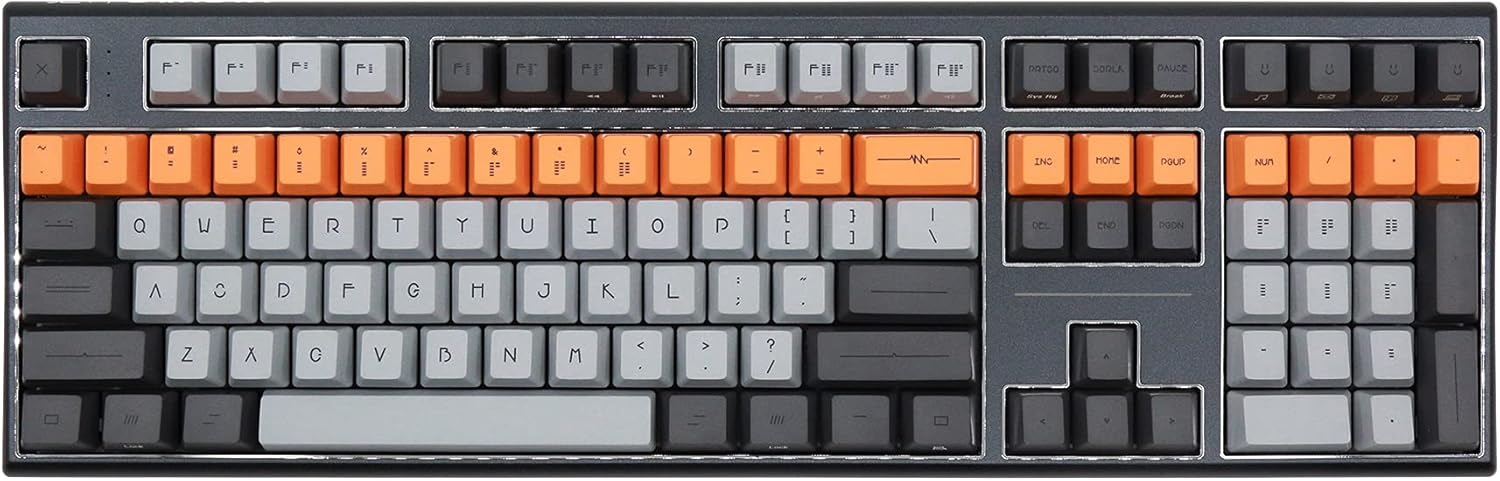
Figure 1: Varmilo VBS108 Lure Bot Mechanical Keyboard
Kontenut tal-Pakkett
Jekk jogħġbok kun żgur li l-oġġetti kollha huma preżenti fil-pakkett:
- Varmilo VBS108 Lure Bot Mechanical Keyboard
- USB-C għal USB-A Cable
- 2.4GHz Wireless Dongle (typically stored in the keyboard's battery compartment or a dedicated slot)
- Puller tal-Keycap (jista' jkun inkluż)
- Manwal għall-Utent (dan id-dokument)
Setup
The Varmilo VBS108 offers three connectivity modes: USB-C wired, 2.4GHz wireless, and Bluetooth 5.0.
1. Konnessjoni bil-Wajer USB-C
- Sib il-port USB-C fuq it-tastiera (ġeneralment fit-tarf ta' fuq).
- Qabbad tarf wieħed tal-kejbil USB-C provdut mat-tastiera.
- Qabbad it-tarf l-ieħor (USB-A) ma' port USB disponibbli fuq il-kompjuter tiegħek.
- It-tastiera tiġi rikonoxxuta awtomatikament u tkun lesta għall-użu.
2. Konnessjoni bla fili ta' 2.4GHz
- Sib id-dongle mingħajr fili ta' 2.4GHz.
- Ipplaggja l-dongle f'port USB disponibbli fuq il-kompjuter tiegħek.
- Ensure the keyboard is in 2.4GHz mode (refer to the keyboard's function key combinations or a physical switch if available).
- It-tastiera għandha tikkonnettja awtomatikament.
3. Konnessjoni Bluetooth 5.0
- Ensure the keyboard is in Bluetooth pairing mode. This typically involves holding down a specific Fn key combination (e.g., Fn + 1, Fn + 2, or Fn + 3 for different profiles) until an indicator light flashes. Consult your keyboard's specific key legend for Bluetooth pairing.
- Fuq il-kompjuter jew l-apparat tiegħek, iftaħ is-settings tal-Bluetooth.
- Fittex għal new devices and select "Varmilo VBS108" or a similar name from the list.
- Segwi kwalunkwe prompts fuq l-iskrin biex tlesti l-proċess ta 'tqabbil.
Operazzjoni
The Varmilo VBS108 keyboard includes various function key combinations for enhanced control.
Function Key Combinations (Fn + Key)
- Fn + F1-F12: Multimedia controls (play/pause, volume up/down, mute, etc.). Refer to the keycap legends for specific functions.
- Fn + Irbaħ: Ċavetta tal-illokkjar/ftuħ tal-Windows.
- Fn + Left Alt: Switch between macOS and Windows layouts (if supported).
- Fn + Q/W/E: Ibdel bejn Bluetooth profiles (jekk applikabbli).
- Fn + R: Switch to 2.4GHz wireless mode.
- Fn + T: Switch to USB-C wired mode.
- Fn + Backlight Keys: Adjust backlight brightness or effects (if applicable).
Adjustable Flip-out Feet
It-tastiera għandha 3-stage adjustable flip-out feet on the underside, allowing you to customize the typing angle for ergonomic comfort.

Figure 2: Adjustable Flip-out Feet
Manutenzjoni
Proper maintenance ensures the longevity and performance of your Varmilo keyboard.
Tindif tat-Tastiera
- Keycaps: Use a keycap puller to carefully remove keycaps. Clean them with a mild soap solution and a soft cloth, then rinse thoroughly and air dry completely before reattaching.
- Każ: Wipe the keyboard case with a soft, slightly damp, drapp mingħajr suf. Evita li tuża kimiċi ħarxa jew materjali li joborxu.
- Bejn iċ-Ċwievet: Use compressed air to remove dust and debris from between the key switches. A small brush can also be used for stubborn particles.

Figure 3: PBT Dye-Sub Keycaps
Issolvi l-problemi
If you encounter issues with your Varmilo VBS108 keyboard, try the following solutions:
- It-tastiera ma tirrispondix (Wajer): Kun żgur li l-kejbil USB-C huwa konness sew kemm mat-tastiera kif ukoll mal-kompjuter. Ipprova port jew kejbil USB differenti.
- Keyboard not responding (Wireless/Bluetooth):
- Iċċekkja l-livell tal-batterija.
- Ensure the keyboard is in the correct mode (2.4GHz or Bluetooth).
- For 2.4GHz, ensure the dongle is properly inserted and try a different USB port.
- For Bluetooth, unpair and re-pair the keyboard with your device. Ensure your device's Bluetooth is enabled.
- Iċ-ċwievet mhux qed jirreġistraw: Remove the keycap and check for any obstructions around the switch. Clean the area with compressed air.
- Konnessjoni intermittenti: Ensure there are no major sources of interference (e.g., other wireless devices) near the keyboard or dongle.
- Aġġornament tal-Firmware: Check the official Varmilo website for any available firmware updates for your model, which can resolve known issues.
Speċifikazzjonijiet
| Karatteristika | Dettall |
|---|---|
| Brand | Varmilo |
| Mudell | VBS108 Lure Bot |
| Teknoloġija tal-Konnettività | Bluetooth 5.0, 2.4GHz Wireless, USB-C |
| Tip ta' Swiċċ | Cherry MX Brown |
| Materjal Keycap | PBT Dye-Sub |
| Numru ta' Ċwievet | 104 |
| Apparati Kompatibbli | PC |
| Kulur | Cherry MX Brown (keyboard color scheme) |
| Karatteristika Speċjali | 3-Stage Adjustable Flip-out Feet |
Garanzija u Appoġġ
Varmilo products are designed for quality and reliability. For information regarding warranty coverage, technical support, or service, please refer to the warranty card included with your product or visit the official Varmilo websit. Tista' wkoll tikkuntattja lill-bejjiegħ bl-imnut mingħand min xtrajt il-prodott għall-assistenza.
Ask a question about this manual
Ask about setup, troubleshooting, compatibility, parts, safety, or missing instructions. Manuals+ will review the question and use this page’s manual context to help answer it.