
Introduzzjoni
The HUTT DDC55 Window Cleaner Robot is an intelligent device designed to automate the cleaning of various smooth surfaces such as windows, tiles, and mirrors. Featuring advanced AI navigation, strong suction, and a robust security system, it provides an efficient and safe cleaning experience. This manual provides essential information for the proper setup, operation, and maintenance of your DDC55 robot.

Image: The HUTT DDC55 Window Cleaner Robot, its remote control, and a stack of microfiber cleaning cloths.
Informazzjoni dwar is-Sigurtà
Jekk jogħġbok aqra l-istruzzjonijiet kollha tas-sigurtà bir-reqqa qabel ma tuża l-apparat. Jekk ma ssegwix dawn l-istruzzjonijiet, dan jista' jirriżulta f'xokk elettriku, nar, jew korriment serju.
- Ensure the safety rope is securely attached to a fixed object before operation, especially when cleaning high windows.
- Do not use the robot on cracked or damaged glass surfaces.
- Żomm idejk, xagħar, u ħwejjeġ maħlula 'l bogħod minn partijiet li jiċċaqilqu.
- Do not allow children or pets near the robot during operation.
- Use only the original power adapter and accessories provided with the device.
- Do not immerse the robot in water or other liquids.
- Jekk il-korda tal-enerġija tkun bil-ħsara, din trid tiġi sostitwita mill-manifattur jew minn aġent tas-servizz kwalifikat.
- The built-in UPS provides temporary power in case of power loss; retrieve the robot promptly if this occurs.
Kontenut tal-Pakkett
Ivverifika li l-oġġetti kollha huma preżenti fil-pakkett:
- HUTT DDC55 Window Cleaner Robot
- Kontroll mill-bogħod
- Adapter tal-Enerġija u Korda tal-Enerġija
- Ħabel tas-Sigurtà
- Microfiber Cleaning Cloths (12 pieces)
- Manwal għall-Utent (dan id-dokument)
Setup
Follow these steps to prepare your HUTT DDC55 for its first use:
- Prepare Cleaning Cloths: Wet and wring the microfiber cloths until they are damp but not dripping. For initial dry cleaning, use dry cloths.
- Attach Cloths: Place the prepared cloths over the two rotating pads on the bottom of the robot, ensuring they are securely attached.
- Waħħal il-Ħabel tas-Sigurtà: Securely attach the safety rope to the designated attachment point on the robot and then to a sturdy, fixed object indoors, such as a heavy piece of furniture or a window frame anchor.
- Qabbad l-Enerġija: Plug the power adapter into the robot and then into a power outlet. Ensure the connection is firm.
- Qawwa Mixgħul: Press the power button on the robot to turn it on. The indicator light will illuminate.

Image: Visual guide demonstrating the five setup steps: wetting cloths, attaching cloths, securing safety rope, plugging in power, and turning on the robot.
Istruzzjonijiet Operattivi
The HUTT DDC55 offers intelligent cleaning modes for various needs.
Cleaning Modes and Operation:
- Tindif Awtomatiku: Once powered on and placed on the surface, the robot will automatically detect the window frame and obstacles using its built-in AI chip. It will then initiate a cleaning path.
- Kontroll mill-bogħod: Use the provided remote control to select specific cleaning modes:
- Xellug għal-Lemin: Cleans the surface moving predominantly from left to right.
- Dritt għax-Xellug: Cleans the surface moving predominantly from right to left.
- Tindif tal-Post: Jiffoka fuq żona speċifika għal tindif intensiv.
- Automatic Suction Adjustment: The robot automatically adjusts its suction power (up to 3800Pa) based on the detected level of dirt, ensuring optimal cleaning performance.
- Ritorn għall-Bidu: After completing its cleaning cycle, the HUTT DDC55 will automatically return to its initial starting position for easy retrieval.
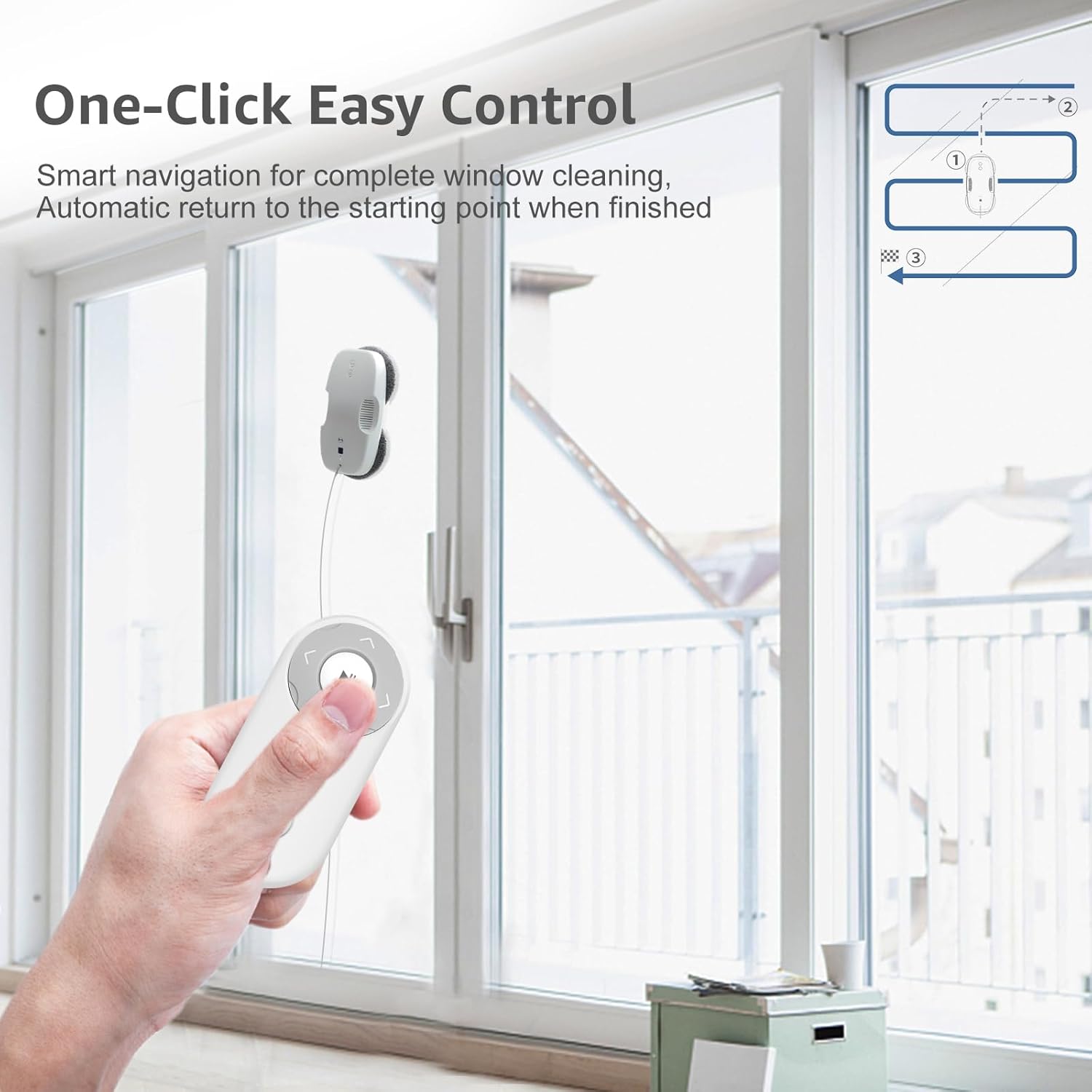
Image: A user operating the HUTT DDC55 robot on a large window using the remote control, illustrating its one-click easy control feature and cleaning path.
Spinning Wipe Technology:
The DDC55 utilizes a unique spinning wipe technology where two microfiber mops rotate continuously, pushing dirt towards a central intake hood for thorough cleaning. This method ensures strong cleanliness compared to traditional square window robots.

Image: A comparison diagram showing the circular motion of the HUTT DDC55's cleaning pads for superior dirt collection versus the linear motion of a square robot.
Adaptive Suction for Dirt Types:
The robot's intelligent system detects the type and amount of dirt, adjusting its suction power accordingly for optimal results. For example, it applies higher suction for oil stains and lower for light dust.

Image: An infographic detailing the automatic suction adjustment feature, showing different suction levels (2600Pa to 3800Pa) applied for various dirt types like rain stains, sand dust, mud spots, insect droppings, wall ash, and oil stains.
Manutenzjoni
Regular maintenance ensures the longevity and optimal performance of your HUTT DDC55.
- Ċraret tat-Tindif: The microfiber cleaning cloths can be easily removed and washed in a washing machine. Ensure they are clean and damp (not wet) before each use.
- Ġisem tar-Robot: Wipe the exterior of the robot with a soft, dry cloth. Do not use abrasive cleaners or immerse the device in water.
- Sensers: Periodically clean the sensors on the robot's underside with a dry, soft cloth to ensure accurate edge detection and navigation.
Issolvi l-problemi
If you encounter issues with your HUTT DDC55, refer to the following common problems and solutions:
| Problema | Kawża Possibbli | Soluzzjoni |
|---|---|---|
| Ir-robot ma jixgħelx. | No power connection; power adapter faulty. | Ensure power cord is securely plugged into robot and outlet. Check outlet functionality. |
| Robot slips or does not adhere to surface. | Cleaning cloths too wet; surface too dirty/slippery; suction motor issue. | Wring cloths thoroughly until damp. Clean surface of large debris first. Contact support if issue persists. |
| Robot stops mid-operation. | Power interruption; obstacle detected; low battery (UPS active). | Check power connection. Remove obstacles. Retrieve robot promptly if UPS is active. |
| Prestazzjoni fqira tat-tindif. | Dirty cloths; insufficient water/cleaning solution; heavily soiled surface. | Replace or wash cloths. Ensure cloths are adequately damp. Pre-clean heavily soiled areas manually. |
Speċifikazzjonijiet
Key technical specifications for the HUTT DDC55 Window Cleaner Robot:
- Isem tal-Mudell: DDC55
- Ditta: HUTT
- Kulur: Abjad
- Dimensjonijiet tal-Prodott: 32L x 16W x 13H ċentimetri
- Tip ta 'Kontrollur: Kontroll mill-bogħod
- Qawwa tal-ġbid: Up to 3800Pa (Frequency conversion strong suction)
- Mutur: Japan NIDEC Motor (Advanced brushless motor with 2700RPM)
- Livell ta' Storbju: 65dB (Low noise in daily life)
- Vertical Bearable Weight: 7.0KG
- Tip ta' filtru: Drapp
- Battery Life (UPS): Approximately 30 minutes (for power loss protection)
- Karatteristiċi Speċjali: AI Navigation, Security Protection System, Corded Portable, Cordless (UPS), Corded
- Rakkomandazzjoni tal-wiċċ: Window, Mirror, Shower Screens, Wooden Door, Tiles, and other smooth surfaces.
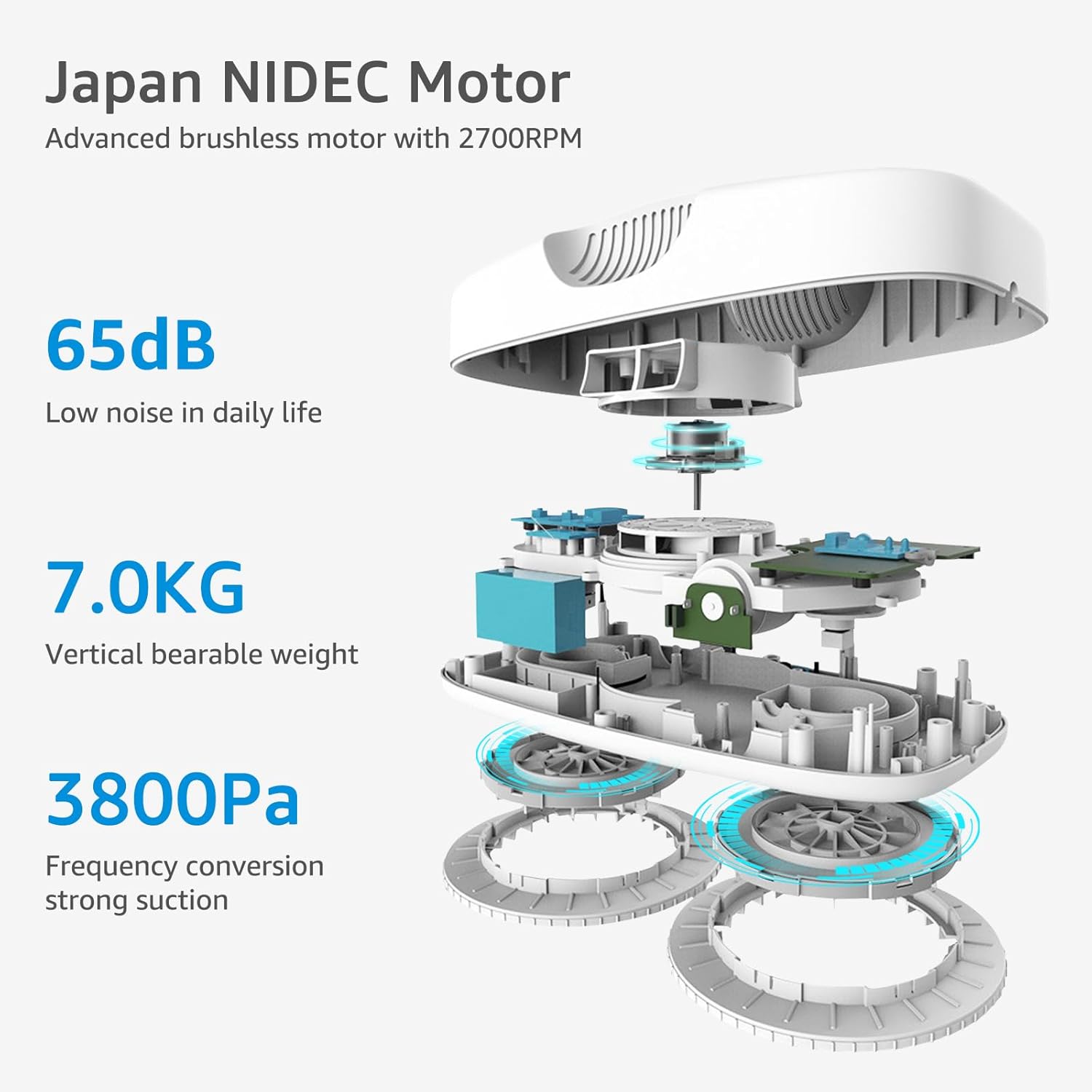
Image: An internal diagram of the HUTT DDC55 highlighting its Japan NIDEC Motor, 65dB low noise level, 7.0KG vertical bearable weight, and 3800Pa suction power.
Garanzija u Appoġġ
For warranty information and technical support, please refer to the warranty card included with your product or visit the official HUTT websit. Żomm l-irċevuta tax-xiri tiegħek bħala prova tax-xiri.
Riżorsi onlajn: For additional FAQs, video tutorials, and software updates, please visit the manufacturer's official support page.