
Introduzzjoni
This manual provides detailed instructions for the proper use and maintenance of your Conambo Trucker Bluetooth Headset 5.0. Please read this manual thoroughly before using the device to ensure optimal performance and longevity.
Kontenut tal-Pakkett
Malli tiftaħ il-pakkett, jekk jogħġbok ivverifika li l-oġġetti kollha li ġejjin huma inklużi:
- Conambo Trucker Bluetooth Headset (Model DE-JBT9)
- Cable tal-Iċċarġjar tal-USB-C
- Manwal għall-Utent

Image: The Conambo Trucker Bluetooth Headset, a USB-C charging cable, and the user manual are neatly arranged in the product packaging.
Prodott Overview
Familiarize yourself with the various components and controls of your headset.
- Faxxa tar-ras aġġustabbli: Allows for a customized and comfortable fit for various head sizes.
- Soft Protein Memory-Foam Earpad: Provides comfort for extended wear.
- Mikrofonu Gooseneck Flessibbli: Can be rotated 270 degrees for use on either the left or right ear, and adjusted for optimal voice pickup. Features a wind cover for clear audio.
- Buttuni tal-Kontroll: Located on the earpiece for easy access to power, volume, call management, and mute functions.
- Port tal-Iċċarġjar USB-C: Għall-iċċarġjar mill-ġdid tal-batterija tal-headset.

Image: A user demonstrates the adjustable headband, soft ear pad, and anti-slip pad for comfortable wear on either ear.
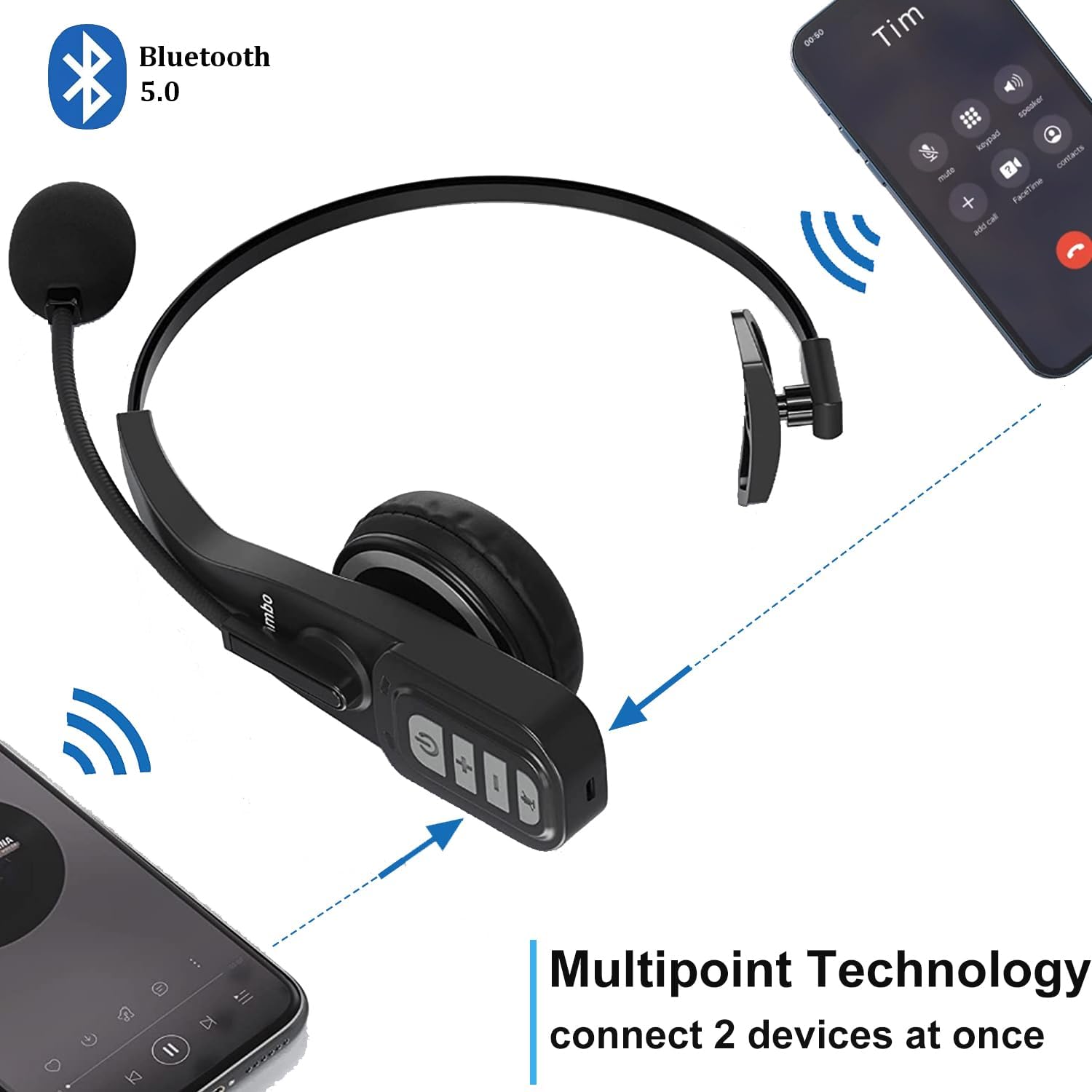
Image: Close-up of the headset's control panel, highlighting the volume up/down, power/call, and mute buttons.
Setup
1. Iċċarġjar tal-Headset
Before initial use, fully charge your headset. A full charge takes approximately 4 hours.
- Qabbad il-kejbil tal-iċċarġjar USB-C provdut mal-port tal-iċċarġjar fuq il-headset.
- Qabbad it-tarf l-ieħor tal-kejbil USB-C ma' sors ta' enerġija USB kompatibbli (eż., port USB tal-kompjuter, adapter tal-ħajt).
- The LED indicator on the headset will show charging status (refer to the LED indicator section for details).
2. Tqabbil ma' Apparat Bluetooth
The headset uses Bluetooth 5.0 technology for stable and fast connections. It supports multipoint connection, allowing simultaneous connection to two Bluetooth devices.
- Kun żgur li l-headset ikun iċċarġjat.
- Slide the power switch to the "ON" position. The headset will automatically enter pairing mode, indicated by a flashing LED light.
- On your device (e.g., smartphone, laptop, PC), enable Bluetooth and search for available devices.
- Select "A19" or "Conambo JBT900" (or similar model name) from the list of found devices to connect.
- Once connected, the LED indicator will become solid, confirming successful pairing.

Image: The headset is shown connected to two different smartphones, illustrating its multipoint technology feature.
Video: A demonstration of the Conambo JBT900 Bluetooth 5.0 Headset, showcasinil-karatteristiċi u l-faċilità tal-użu tiegħu.
Istruzzjonijiet Operattivi
Ġestjoni tas-Sejħiet
- Tweġiba/Tmiem Sejħa: Press the Phone Call button once.
- Irrifjuta Sejħa: Press and hold the Phone Call button for 2 seconds.
- Ixekkel/Istinka l-mikrofonu: During a call, press the Mute button (often the same as the Phone Call button or a dedicated button) once.
- Isemmi mill-ġdid l-Aħħar Numru: Double-press the Phone Call button.

Image: A woman wearing the headset, demonstrating the mute function during a call.
Kontroll tal-Mużika
- Play/Pawsa: Press the Phone Call button once.
- Volum 'il fuq/Niżżel: Use the dedicated Volume + and Volume - buttons.
- Track li jmiss: Agħfas u żomm il-buttuna Volum +.
- Track preċedenti: Agħfas u żomm il-buttuna tal-Volum -.
Assistent tal-Vuċi (Siri/Assistent tal-Google)
Press and hold the Mute button to activate your device's voice assistant for hands-free commands.
Kumdità u Aġġustabilità
The Conambo headset is designed for comfort during prolonged use.
- The headband is stretchable and can be adjusted to fit various head sizes.
- The soft protein memory-foam earpad ensures a comfortable fit on your ear.
- The microphone boom can be rotated 270 degrees, allowing you to wear the earpiece on either your left or right ear.

Image: A man wearing the headset, demonstrating the flexible microphone positioned for clear communication, highlighting its noise-cancelling capabilities.
Manutenzjoni
To ensure the longevity and optimal performance of your headset, follow these maintenance guidelines:
- Clean the earpad and microphone foam regularly with a soft, dry cloth.
- Avoid exposing the headset to extreme temperatures, moisture, or direct sunlight.
- Aħżen il-headset f'post frisk u niexef meta ma tkunx qed tuża.
- Do not attempt to disassemble or repair the headset yourself. Contact customer support for assistance.
Issolvi l-problemi
If you encounter any issues with your headset, please refer to the following common solutions:
- Il-headset mhux qed jixgħel: Kun żgur li l-headset huwa kompletament iċċarġjat.
- Ma tistax tgħaqqad: Make sure the headset is in pairing mode (flashing LED) and your device's Bluetooth is enabled and searching. Try restarting both the headset and your device.
- No audio/poor audio quality: Check the volume levels on both the headset and your connected device. Ensure the headset is within the 33ft wireless range of your device.
- Il-mikrofonu mhux qed jaħdem: Ensure the microphone is not muted. Adjust the microphone's position closer to your mouth.
Speċifikazzjonijiet
| Numru tal-Mudell | DE-JBT9 |
| Verżjoni Bluetooth | 5.0 |
| Teknoloġija tal-Konnettività | Bluetooth 5.0, Mingħajr Fili |
| Firxa Wireless | Sa 33 pied (10 metri) |
| Ħin tat-Tkellem | Sa 22 sigħat |
| Ħin tal-Iċċarġjar | Madwar sagħtejn |
| Ħin ta' Standby | Up to 360 hours (implied from images) |
| Kontroll tal-Ħoss | Kanċellazzjoni Attiva tal-Istorbju (għall-mikrofonu) |
| Piż tal-oġġett | 0.17 Kilogrammi (5.9 uqija) |
| Materjal | Leather, Soft protein memory-foam, Stretchable headband |
| Apparati Kompatibbli | Cellphones, Laptops, PC Call Center Equipment |
Garanzija u Appoġġ
For warranty information or technical support, please refer to the contact details provided in the included user manual or visit the official Conambo websit.