
Introduzzjoni
This manual provides detailed instructions for the installation, operation, and maintenance of your EKEN V7 HD 1080P Smart WiFi Video Doorbell. Please read this manual thoroughly before using the product to ensure proper functionality and safety. Keep this manual for future reference.
Kontenut tal-Pakkett
Iċċekkja li l-oġġetti kollha elenkati hawn taħt huma inklużi fil-pakkett tiegħek. Jekk xi oġġetti huma neqsin jew bil-ħsara, jekk jogħġbok ikkuntattja l-appoġġ għall-klijenti.

Image: The EKEN V7 Video Doorbell, two blue rechargeable batteries, and a dual-slot battery charger. These are the primary components included in the package.
- EKEN V7 HD 1080P Smart WiFi Video Doorbell
- Rechargeable Batteries (2 pcs)
- Ċarġer tal-batterija
- Bracket tal-Immuntar
- Viti tal-Immuntar u Ankri tal-Ħajt
- Manwal għall-Utent (dan id-dokument)
Prodott Overview
The EKEN V7 Video Doorbell is a smart security device designed to provide real-time video monitoring and two-way audio communication with visitors at your door. It features 1080P Full HD resolution, night vision, and a wide-angle lens for comprehensive coverage.

Immaġni: Quddiem view of the EKEN V7 Video Doorbell, showing the camera lens, motion sensor, and illuminated doorbell button.
Karatteristiċi ewlenin:
- Vidjo 1080P Full HD: Clear video streaming and recording.
- 166° Wide-angle Lens: Qasam wiesa' ta' view to cover your entryway.
- Viżjoni bil-lejl: Infrared LEDs for clear visibility in low-light conditions.
- Awdjo f'żewġ direzzjonijiet: Speak and listen to visitors remotely via the mobile app.
- Sejbien tal-Moviment PIR: Alerts you to movement at your door.
- Reżistenti għat-temp: Iddisinjat biex jiflaħ diversi kundizzjonijiet tat-temp.
- Konnettività WiFi 2.4G: Connects to your home network for remote access.
- Ħajja twila tal-batterija: Efficient power consumption for extended use.
- Ħażna Cloud: Optional cloud service for video recording storage.

Image: An infographic highlighting the key features of the EKEN V7 Video Doorbell, such as 1080P Full HD, PIR Motion Detection, Night Vision, 166° Wide-angle Camera Lens, Long Battery Life, and 7 Days Free Cloud Service.

Image: A visual representation comparing the doorbell's view during the day (color) and at night (monochrome infrared), demonstrating the 166-degree wide-angle lens.
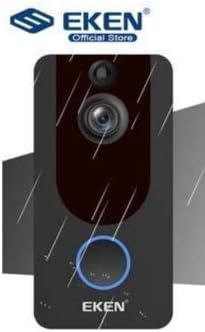
Image: The EKEN V7 Video Doorbell depicted with rain effects, illustrating its weather-resistant design suitable for outdoor installation.
Setup
1. Iċċarġjar tal-batteriji
- Insert the two rechargeable batteries into the provided battery charger.
- Qabbad il-ċarġer ma 'sors ta' enerġija.
- Allow the batteries to charge fully before first use. The indicator light on the charger will change when charging is complete.
2. Installing the Doorbell
- Agħżel post adattat ħdejn il-bieb tiegħek, u tiżgura li jkun hemm spazju ċar. view u sinjal tajjeb tal-Wi-Fi.
- Use the mounting bracket as a template to mark drill holes on the wall.
- Drill toqob u daħħal l-ankri tal-ħajt jekk meħtieġ.
- Waħħal il-bracket tal-immuntar mal-ħajt billi tuża l-viti pprovduti.
- Insert the charged batteries into the doorbell unit.
- Attach the doorbell unit to the mounting bracket, ensuring it clicks securely into place.
3. Konnessjoni mal-Wi-Fi u Setup tal-App
- Download the official EKEN doorbell app from your smartphone's app store (iOS or Android).
- Iftaħ l-app u oħloq kont jew idħol.
- Follow the in-app instructions to add your new doorbell device. This typically involves scanning a QR code on the doorbell or manually entering its ID.
- Connect the doorbell to your 2.4GHz Wi-Fi network. Ensure your phone is also connected to the same 2.4GHz network during setup.
- Ladarba tkun konness, tkun tista' view live video, receive notifications, and adjust settings through the app.
Istruzzjonijiet Operattivi
Live View u Awdjo Two-Way
- Open the EKEN app on your smartphone.
- Select your doorbell from the device list to access the live video feed.
- To speak to a visitor, tap the microphone icon in the app. To listen, ensure the speaker icon is enabled.

Image: A user communicating with a delivery person at their door using the EKEN V7 Video Doorbell's two-way audio feature through the mobile application.
Twissijiet ta' Sejbien ta' Moviment
- When motion is detected, the doorbell will send a push notification to your smartphone.
- Tektek in-notifika biex view il-feed dirett jew l-avveniment irreġistrat.
- Adjust motion sensitivity settings within the app to minimize false alerts.
Reġistrazzjoni u Daqq tal-vidjo
- The doorbell automatically records video when motion is detected or the doorbell button is pressed.
- Recorded videos are stored in the cloud (subscription may be required after initial free period) or on a local SD card (if supported and installed).
- Access and playback recorded events through the app's history or event log.

Image: The EKEN V7 Video Doorbell shown next to a smartphone displaying a live 1080P Full HD video feed, illustrating remote monitoring capabilities.
Manutenzjoni
- Tindif: Gently wipe the camera lens and doorbell surface with a soft, damp drapp. Evita prodotti tat-tindif jew solventi li joborxu.
- Ġestjoni tal-batterija: Recharge batteries when the app indicates low power. For optimal performance, consider having a spare set of charged batteries.
- Aġġornamenti tal-Firmware: Regularly check the app for available firmware updates for your doorbell. Updates can improve performance and add new features.
- Konnessjoni Wi-Fi: Ensure your Wi-Fi router is functioning correctly and the doorbell has a strong signal for uninterrupted operation.
Issolvi l-problemi
- Il-qanpiena tal-bieb mhux qed tikkonnettja mal-Wi-Fi:
- Ensure your Wi-Fi network is 2.4GHz. The doorbell does not support 5GHz networks. Check Wi-Fi password and signal strength. Try resetting the doorbell and your router.
- L-ebda allerti ta' skoperta ta' moviment:
- Verify that motion detection is enabled in the app settings. Adjust sensitivity levels. Ensure the doorbell's view ma jkunx ostakolat.
- Kwalità ħażina tal-vidjo jew dewmien:
- Check your Wi-Fi signal strength at the doorbell's location. Move the router closer or consider a Wi-Fi extender. Ensure your internet connection is stable.
- L-awdjo f'żewġ direzzjonijiet mhux qed jaħdem:
- Check microphone and speaker permissions for the app on your smartphone. Ensure the doorbell's microphone and speaker are not obstructed.
- Il-qanpiena tal-bieb mhux qed tixgħel:
- Ensure batteries are fully charged and correctly inserted. If using wired power, check connections.
Speċifikazzjonijiet
| Karatteristika | Dettall |
|---|---|
| Brand | EKEN |
| Mudell | V7 |
| Riżoluzzjoni ta' Reġistrazzjoni tal-Vidjo | Full HD ta '1080p |
| Teknoloġija tas-Sensor tar-Ritratti | CMOS |
| Teknoloġija tal-Konnettività | Wi-Fi (2.4GHz biss) |
| Karatteristiċi Speċjali | Night Vision, Two-Way Audio, PIR Motion Detection, Weather Resistant |
| Stabbilizzazzjoni tal-Immaġni | Nru |
| Referenza tal-Manifattur | Ia-112 |
| ASIN | B08PMXWFF3 |
| L-Ewwel Data Disponibbli | 17 ta’ Diċembru 2020 |
Garanzija u Appoġġ
For warranty information and technical support, please refer to the official EKEN webis-sit jew ikkuntattja lis-servizz tal-konsumatur tagħhom direttament. Id-dettalji dwar perjodi ta' garanzija speċifiċi u l-kanali ta' appoġġ tipikament jiġu pprovduti mad-dokumentazzjoni tax-xiri tiegħek jew fuq il-paġna tal-manifattur. websit.
Guaranteed software updates until: Unknown.