
1. Introduzzjoni
This manual provides essential information for setting up, operating, maintaining, and troubleshooting your Lenovo ThinkCentre M710q Tiny mini PC. The ThinkCentre M710q Tiny is a compact and powerful desktop computer designed for efficiency and reliability, suitable for various computing tasks. This unit is a renewed product, ensuring quality and performance.

Image: Microsoft Authorized Refurbisher logo, indicating the product has been professionally restored.
2. X'hemm fil-Kaxxa
Carefully unpack your ThinkCentre M710q Tiny and ensure all components are present:
- Lenovo ThinkCentre M710q Tiny Unit
- Adapter tal-Qawwa AC
- Tastiera USB
- Ġurdien USB
- (Note: Additional accessories such as speakers may vary with renewed products.)

Image: Included USB keyboard and mouse, essential for basic computer operation.
3. Karatteristiċi Fiżiċi u Portijiet
Familiarize yourself with the various ports and features on your ThinkCentre M710q Tiny for proper connectivity.
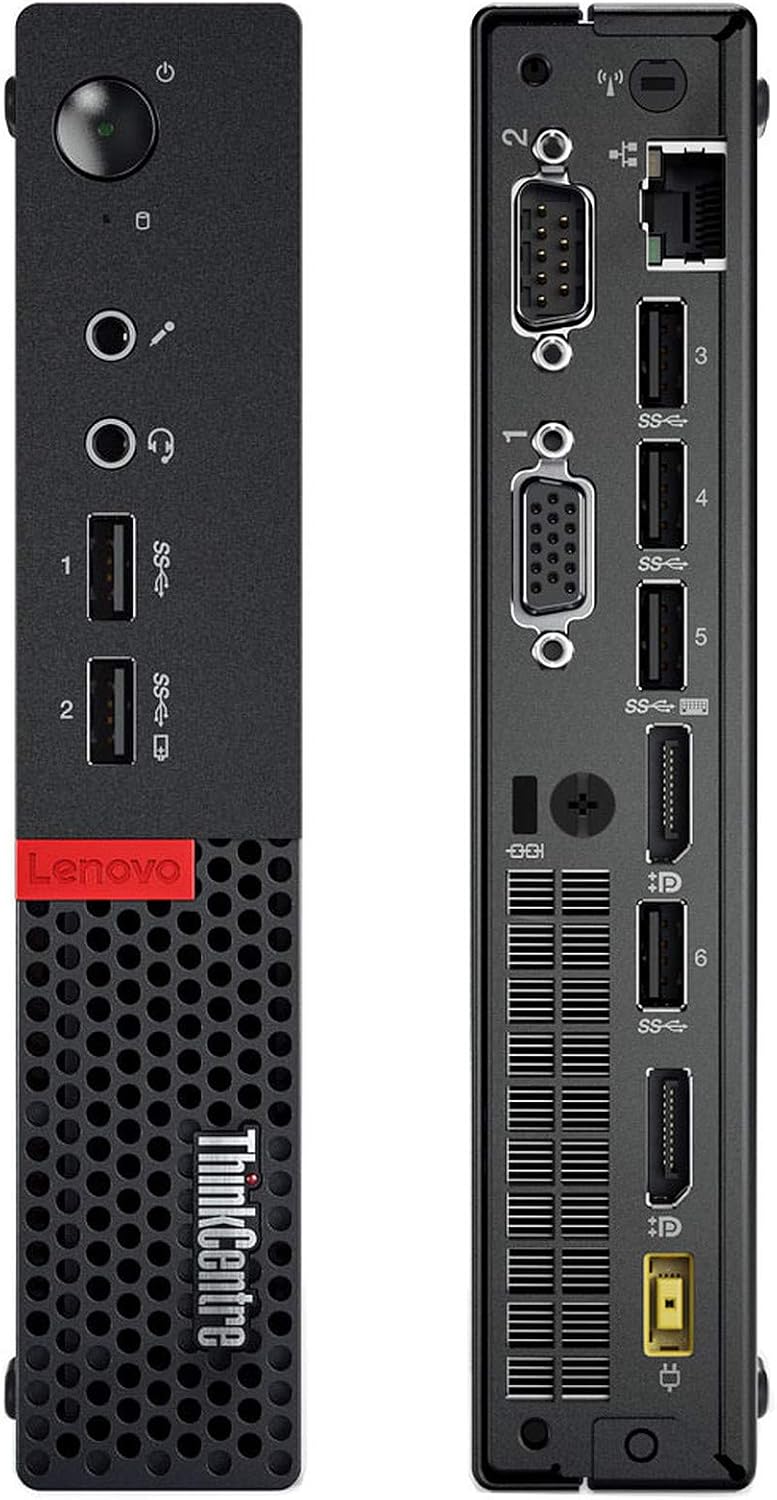
Immaġni: Quddiem u wara views of the Lenovo ThinkCentre M710q Tiny, highlighting all available ports.
Front Panel
- Buttuna tal-Qawwa: Biex tixgħel jew titfi l-apparat.
- Portijiet USB 3.0 (x2): Għall-konnessjoni ta' apparati USB b'veloċità għolja.
- Jack tal-headphone: Għall-ħruġ tal-awdjo għal headphones jew kelliema esterni.
- Mikrofonu Jack: For audio input from a microphone.
Panel ta' wara
- Portijiet USB 3.0 (x4): Additional ports for USB devices.
- DisplayPort (x2): For connecting digital displays.
- Port VGA (x2): For connecting analog displays.
- Port Ethernet: Għal konnessjoni ta' netwerk bil-fili.
- Konnettur tal-Qawwa: Għall-konnessjoni tal-adapter tal-enerġija AC.
4. Istruzzjonijiet ta' Setup
Follow these steps to set up your ThinkCentre M710q Tiny:
- Ikkonnettja l-Periferali:
- Connect your monitor(s) to the DisplayPort or VGA ports on the rear panel.
- Plug the USB keyboard and mouse into any available USB ports (front or rear).
- Connect any other desired peripherals such as external drives or speakers.
- Qabbad man-Netwerk:
- For a wired connection, plug an Ethernet cable into the Ethernet port on the rear panel.
- For Wi-Fi, the system is equipped with wireless capabilities. You will configure this during the initial Windows setup or later.
- Qabbad l-Enerġija:
- Connect the AC power adapter to the power connector on the rear of the unit.
- Plug the power adapter into a wall outlet or surge protector.
- L-Ewwel Bidu:
- Agħfas il-buttuna tal-qawwa fuq il-pannell ta 'quddiem.
- The system will boot into Windows 10 Pro. Follow any on-screen prompts to complete the initial setup, including language, region, and user account creation.
5. Istruzzjonijiet Operattivi
Once set up, your ThinkCentre M710q Tiny is ready for use:
- Power On/Off: Press the power button to turn the computer on. To shut down, click the Start button in Windows, then select Power > Shut down.
- Windows 10 Pro: Explore the Windows 10 Pro operating system. You can customize settings, install applications, and manage files.
- Konnettività tan-Netwerk: If using Wi-Fi, click the network icon in the taskbar to connect to your preferred wireless network. For wired connections, ensure the Ethernet cable is securely plugged in.
- Installazzjoni tas-Softwer: Install any necessary software or applications required for your work or personal use.
- Apparat USB: Connect USB storage devices, printers, or other peripherals to the available USB ports.
6. Manutenzjoni
Manutenzjoni regolari tgħin biex tiżgura l-lonġevità u l-prestazzjoni ottimali tal-mini PC tiegħek:
- Tindif: Keep the exterior of the unit clean with a soft, dry cloth. Ensure that the ventilation grilles are free from dust and obstructions to prevent overheating. Do not use liquid cleaners directly on the unit.
- Aġġornamenti tas-Software: Iċċekkja u installa regolarment aġġornamenti tal-Windows u aġġornamenti tad-drajvers biex tiżgura l-istabbiltà u s-sigurtà tas-sistema.
- Backup tad-Data: Periodically back up your important files and data to an external drive or cloud storage to prevent data loss.
- Protezzjoni Antivirus: Ensure your system has up-to-date antivirus software to protect against malware and viruses.
7 Issolvi l-problemi
If you encounter issues with your ThinkCentre M710q Tiny, try these common troubleshooting steps:
- Ebda Qawwa:
- Verify that the AC power adapter is securely connected to both the PC and a working power outlet.
- Iċċekkja jekk is-sokit tal-enerġija hux qed jaħdem billi tqabbad apparat ieħor.
- Ebda Display:
- Ensure the monitor is powered on and the video cable (DisplayPort or VGA) is securely connected to both the PC and the monitor.
- Try connecting the monitor to a different video port on the PC or using a different cable if available.
- Test the monitor with another device to confirm it is working.
- Prestazzjoni bil-mod:
- Agħlaq l-applikazzjonijiet bla bżonn li jkunu qed jaħdmu fl-isfond.
- Check disk space and free up storage if it is nearly full.
- Agħmel skenn sħiħ tas-sistema bis-softwer antivirus tiegħek.
- Periferali Mhux Jaħdem:
- Ensure the peripheral (keyboard, mouse, etc.) is properly connected to a USB port.
- Ipprova qabbad il-periferali ma' port USB differenti.
- Ibda mill-ġdid il-kompjuter.
- Ikkuntattja l-Appoġġ: If these steps do not resolve the issue, please contact the seller (TekRefurbs) for further assistance.
8. Speċifikazzjonijiet
Key technical specifications for the Lenovo ThinkCentre M710q Tiny:
| Karatteristika | Speċifikazzjoni |
|---|---|
| Proċessur | Intel Core i5-6500T (2.5 GHz, up to 3.6 GHz Turbo Boost) |
| RAM | 16 GB DDR4-2400MHz |
| Ħażna | 256 GB SSD |
| Grafika | Intel HD Graphics 630 |
| Sistema Operattiva | Windows 10 Pro 64-bit |
| Konnettività | WiFi, Ethernet |
| Portijiet | USB 3.0, DisplayPort, VGA, Headphone, Microphone |
| Piż tal-oġġett | Madwar 5 liri |
| Kulur | Iswed |
9. Garanzija u Appoġġ
As a renewed product, your Lenovo ThinkCentre M710q Tiny is backed by a return policy:
- Politika ta' Ritorn: This product is eligible for a 90-day refund or replacement policy. Please refer to your purchase documentation for specific terms and conditions.
- Appoġġ Tekniku: For any technical issues, questions, or support needs, please contact the seller, TekRefurbs, directly. They are best equipped to provide assistance for your renewed product.
- Microsoft Authorized Refurbisher: This product has been processed by a Microsoft Authorized Refurbisher, ensuring it meets high standards for quality and includes a genuine Windows 10 Pro license.