
1. Introduzzjoni
This manual provides detailed instructions for the installation, operation, and maintenance of your Foscam SD2 2MP PTZ Wi-Fi Dome IP Camera. Please read this manual thoroughly before using the product to ensure proper setup and functionality. Keep this manual for future reference.
2. Informazzjoni dwar is-Sigurtà
Biex tevita ħsara lill-prodott jew korriment lilek innifsek jew lil ħaddieħor, osserva l-prekawzjonijiet ta' sigurtà li ġejjin:
- Tiżgura l-provvista tal-enerġija voltage matches the camera's requirements (12V).
- Tesponix il-kamera għal temperaturi estremi, umdità, jew dawl tax-xemx dirett.
- Evita li tpoġġi l-kamera ħdejn kampi elettromanjetiċi qawwija.
- Tippruvax tiżżarma jew timmodifika l-kamera. Irreferi għal kull manutenzjoni f'idejn persunal kwalifikat.
- Żomm il-kamera u l-aċċessorji tagħha fejn ma jintlaħqux mit-tfal.
- Use only Foscam-approved accessories.
3. Kontenut tal-Pakkett
Ivverifika li l-oġġetti kollha huma preżenti fil-pakkett tiegħek:
- Foscam SD2 IP Camera
- Adapter tal-Enerġija
- Bracket tal-Immuntar u Viti
- Ethernet Cable (for initial setup or wired connection)
- Gwida ta 'Installazzjoni Mgħaġġla
4. Prodott Aktarview
The Foscam SD2 is a 2-megapixel PTZ (Pan-Tilt-Zoom) Wi-Fi dome IP camera designed for comprehensive surveillance. It features 4x optical zoom, a 118° wide viewing angle, and advanced human detection capabilities.
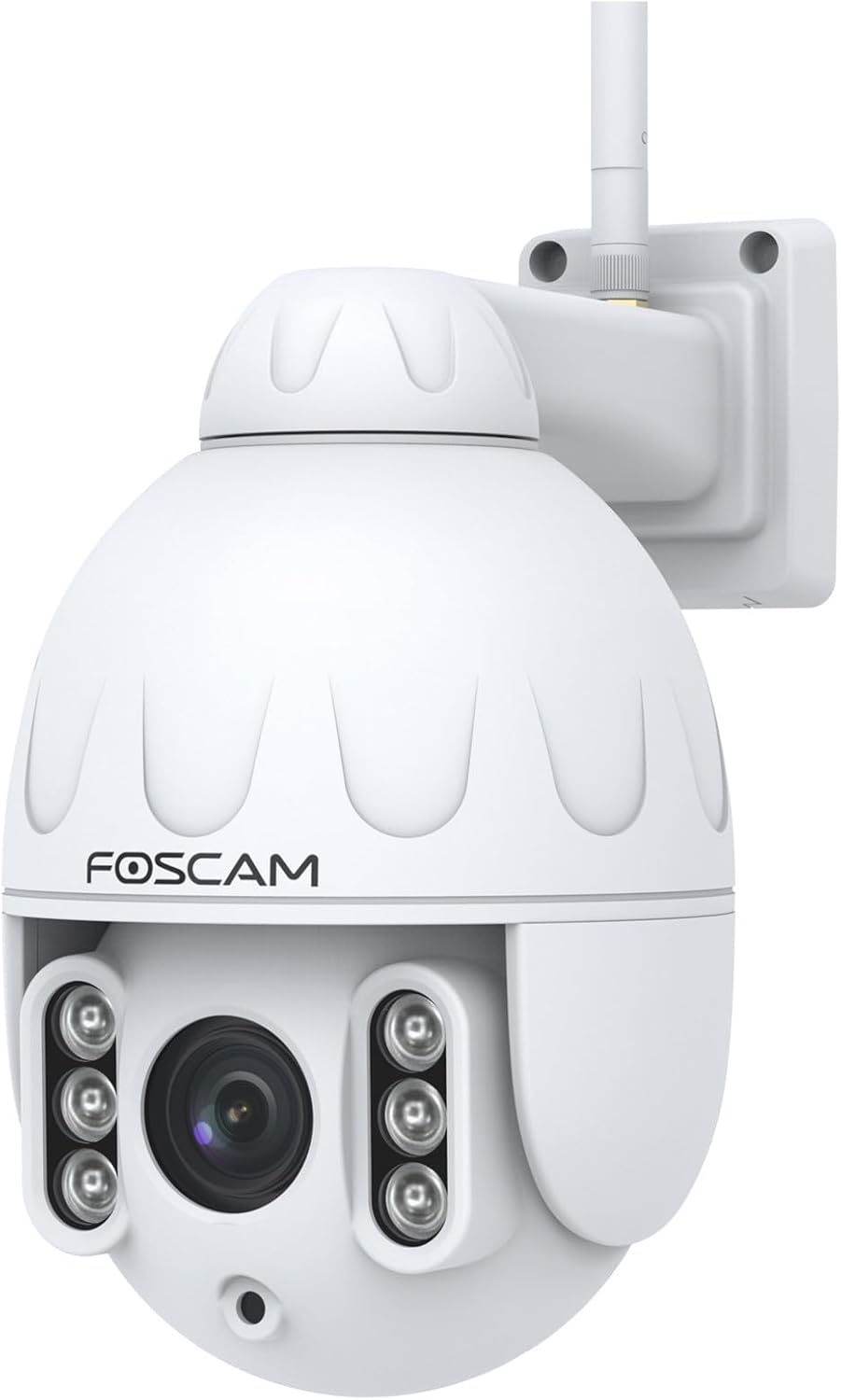
Figura 4.1: Quddiem view of the Foscam SD2 PTZ Dome IP Camera. This image shows the camera's main lens, infrared LEDs, and the Foscam logo on its white dome housing.

Figura 4.2: Ġenb view of the Foscam SD2 camera, illustrating the integrated mounting arm for wall installation. The antenna for Wi-Fi connectivity is visible at the top.

Figura 4.3: Wara view of the Foscam SD2 camera, showing the power and Ethernet cable connections. These cables are essential for providing power and network access to the device.
5. Setup
5.1 Installazzjoni Fiżika
The Foscam SD2 camera is designed for both indoor and outdoor use and can be wall-mounted.
- Agħżel Post: Select a suitable location that provides the desired viewing angle and is within range of your Wi-Fi network or an Ethernet connection. Ensure the mounting surface is sturdy enough to support the camera.
- Immonta l-Bracket: Use the provided mounting bracket as a template to mark drill holes on the wall. Drill the holes, insert wall anchors if necessary, and secure the bracket with the screws.
- Waħħal il-Kamera: Waħħal il-kamera sew mal-bracket immuntat.
- Qabbad l-Enerġija: Qabbad l-adapter tal-enerġija mal-kamera u daħħalha f'sokit tal-enerġija.

Figure 5.1: The Foscam SD2 camera shown mounted on an exterior white wall, demonstrating a typical installation scenario. The camera's antenna is visible, indicating Wi-Fi connectivity.
5.2 Konnessjoni tan-Netwerk
The Foscam SD2 supports dual-band Wi-Fi (2.4GHz/5GHz) or a wired Ethernet connection.
- Konnessjoni bil-fili (Mhux obbligatorja): Connect an Ethernet cable from your router to the camera's Ethernet port.
- Konnessjoni Wi-Fi: For wireless setup, proceed to install the Foscam app.
5.3 Installazzjoni tal-App u Setup Inizjali
To configure and control your camera, download the Foscam app on your smartphone or tablet.
- Niżżel l-App: Fittex għal "Foscam" in the App Store (iOS) or Google Play Store (Android) and install the official Foscam app.
- Oħloq Kont: Iftaħ l-app u segwi l-istruzzjonijiet fuq l-iskrin biex toħloq kont Foscam ġdid jew idħol jekk diġà għandek wieħed.
- Żid Kamera: Tap the "+" icon to add a new device. Follow the in-app wizard to connect your camera to your Wi-Fi network. This typically involves scanning a QR code on the camera or manually entering its details.
- Imla Setup: Once connected, you can name your camera and adjust initial settings.
6. Istruzzjonijiet Operattivi
6.1 Aċċess Remot u Live View
Access your camera's live feed and controls from anywhere using the Foscam app or web interface.
- Foscam App: Open the Foscam app, select your camera from the device list, and tap to view il-live stream.
- Web Interface/Foscam VMS: For PC access, open a web browser and navigate to the camera's IP address or use the Foscam VMS software.
6.2 Kontroll PTZ u Zoom Ottiku
The SD2 camera offers Pan, Tilt, and Zoom functionalities.
- Pan/Mejjel: Fil-live view, swipe your finger across the screen (or use directional controls in the app/web interface) to pan (rotate horizontally up to 350°) and tilt the camera.
- Zoom ottiku: Use the zoom controls within the app or web interface to activate the 4x optical zoom, allowing you to magnify specific areas without losing image quality.
6.3 Sejbien Intelliġenti tal-Mozzjoni (Sejbien mill-Bniedem)
The camera features intelligent motion detection that distinguishes human shapes from other objects, reducing false alarms.
- Ippermetti d-Detezzjoni: Navigate to the camera settings in the Foscam app. Locate the "Alarm" or "Detection" section.
- Configure Human Detection: Enable "Human Detection" and adjust sensitivity levels as needed.
- Issettja Notifiki: Configure push notifications to receive alerts on your smartphone when human motion is detected.
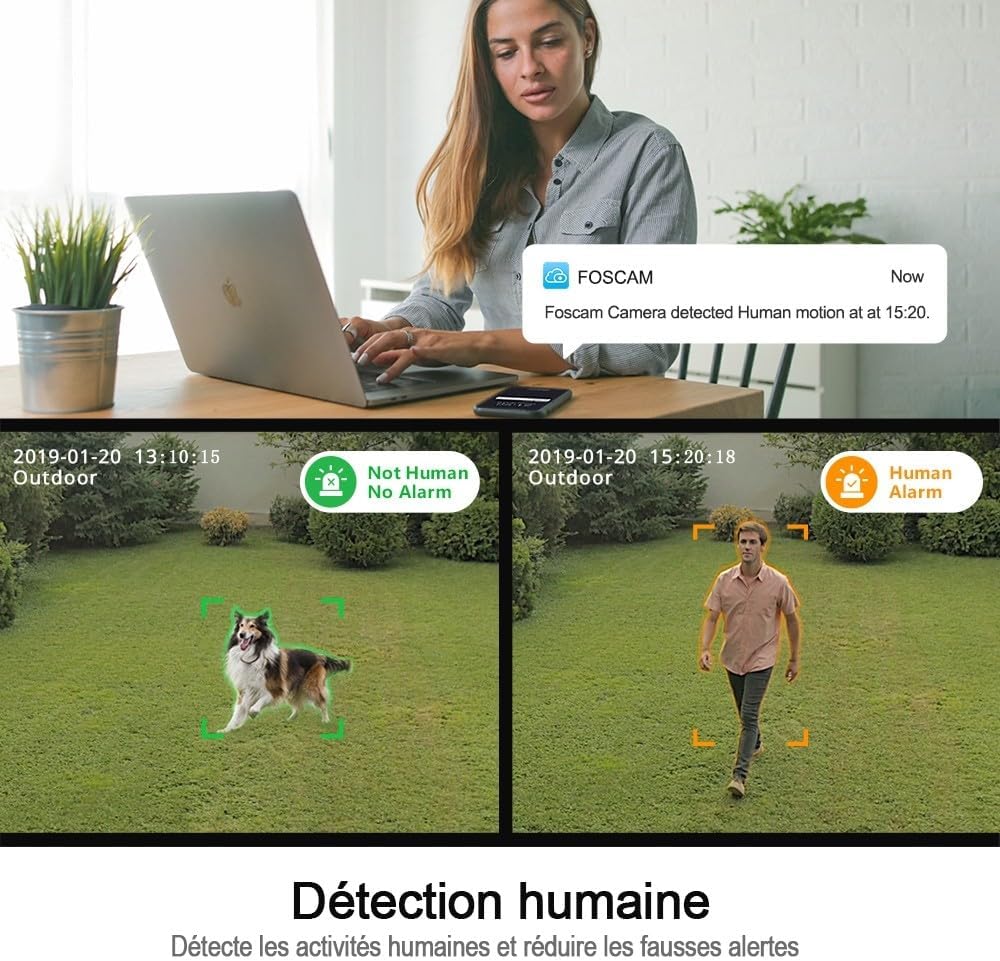
Figure 6.1: An illustration of the Foscam SD2's human detection feature. The image displays two scenarios: one where a dog is detected but not flagged as human, and another where a person is detected and triggers a human alarm, demonstrating the camera's ability to differentiate subjects.
6.4 Integrazzjoni tal-Kontroll tal-Vuċi
The Foscam SD2 is compatible with Amazon Alexa and Google Assistant for convenient voice control.
- Kontijiet tal-Kontijiet: In your Alexa or Google Home app, search for the Foscam skill/action and link your Foscam account.
- Skopri Mezzi: Allow the assistant to discover your camera.
- Kmandi bil-vuċi: Use commands like "Alexa, show me the [camera name]" or "Hey Google, show [camera name] on [display device]" to view il-feed dirett fuq displays intelliġenti kompatibbli.

Figure 6.2: This image demonstrates the Foscam SD2's compatibility with voice assistants like Google Assistant and Amazon Alexa. A smart display shows the camera's live feed, controlled by voice commands from a smart speaker.
6.5 Għażliet ta' Ħażna
The camera supports multiple storage methods for recorded footage.
- Foscam Cloud Storage: Subscribe to Foscam Cloud for secure off-site storage of your recordings.
- Ħażna tal-Kard SD: Insert a microSD card (up to 128GB, sold separately) into the camera's SD card slot for local storage.
7. Manutenzjoni
Regular maintenance ensures optimal performance and longevity of your Foscam SD2 camera.
- Tindif: Gently wipe the camera lens and housing with a soft, dry cloth. Do not use harsh chemicals or abrasive cleaners.
- Aġġornamenti tal-Firmware: Periodically check for and install firmware updates via the Foscam app to ensure your camera has the latest features and security enhancements.
- Iċċekkja tan-Netwerk: Ensure your Wi-Fi signal is strong and stable, especially for outdoor installations.
8 Issolvi l-problemi
If you encounter issues with your Foscam SD2 camera, refer to the following common solutions:
- Kamera Offline: Check power connection, Wi-Fi signal strength, and router status. Restart the camera and your router.
- Nru Live View: Ensure your internet connection is active. Check app permissions and camera settings.
- Kwalità Fqira tal-Immaġni: Clean the camera lens. Ensure adequate lighting. Check network bandwidth.
- Twissijiet ta' Moviment Foloz: Adjust motion detection sensitivity in the app. Ensure human detection is enabled if desired.
- Ma tistax tikkonnettja mal-Wi-Fi: Verify correct Wi-Fi password. Ensure camera is within router range. Try connecting to the 2.4GHz band if experiencing issues with 5GHz.
9. Speċifikazzjonijiet
| Numru tal-Mudell | SD2 |
| Brand | Foscam |
| Teknoloġija tal-Konnettività | Mingħajr fili (Wi-Fi 2.4GHz/5GHz) |
| Karatteristiċi Speċjali | Night Vision, PTZ (Pan-Tilt-Zoom), 4x Optical Zoom, Human Detection, Voice Control (Alexa/Google Assistant), IP66 Weatherproof |
| Riżoluzzjoni | 2-il Megapixel (1920 x 1080 pixel) |
| ViewIng Angolu | 118° |
| Pan Rotazzjoni | 350° |
| Qawwa | 12 Volts, 24 Watts |
| Materjal | Akriliku |
| Dimensjonijiet (L x W x H) | 10 x 5 x 1.27 ċm |
| Piż | 1 Kilogramma |
| Għażliet ta' Ħażna | Foscam Cloud, MicroSD Card (up to 128GB) |
| Kompressjoni tal-vidjo | H.264 |
10. Garanzija
The Foscam SD2 camera comes with a Garanzija ta' 2 snin mill-manifatturDin il-garanzija tkopri difetti fil-materjali u l-abbilità taħt użu normali. Jekk jogħġbok żomm il-prova tax-xiri tiegħek għal talbiet ta' garanzija. Il-garanzija ma tkoprix ħsara kkawżata minn użu ħażin, inċidenti, modifiki mhux awtorizzati, jew diżastri naturali.
11. Appoġġ
For technical assistance, troubleshooting, or further information, please visit the official Foscam support website or contact their customer service. Refer to the Foscam webis-sit għall-aktar informazzjoni ta' kuntatt u riżorsi ta' appoġġ aġġornati.
Riżorsi onlajn: www.foscam.com