
Introduzzjoni
This manual provides detailed instructions for the safe and efficient operation of your RUIZHI Lipo 80W 6A Professional Balance Charger. This high-performance microprocessor-controlled charger is designed to charge and discharge a wide variety of batteries, including LiPo/Li-Ion/Life (1-6S), NiMH/NiCd (1-15S), and Pb (2-20V) batteries. Please read this manual thoroughly before use to ensure proper functionality and safety.

Figure 1: RUIZHI Lipo 80W 6A Professional Balance Charger (Blue model)
Informazzjoni dwar is-Sigurtà
Always prioritize safety when operating this charger. Failure to follow these guidelines can result in property damage, injury, or fire.
- Qatt tħalli l-ċarġer waħdu while it is connected to a power source or charging/discharging a battery.
- Ensure the charger is placed on a heat-resistant, non-flammable, and non-conductive surface.
- Do not charge batteries near flammable materials jew fid-dawl tax-xemx dirett.
- Verify battery type and cell count settings match the battery being charged. Incorrect settings can cause severe damage or fire.
- Avoid reverse polarity connections. Always double-check the positive and negative terminals before connecting.
- Tippruvax tiċċarġja batteriji bil-ħsara jew minfuħin.
- Keep the charger away from moisture, dust, and extreme temperatures.
- Uża biss l-adapter tal-enerġija u l-kejbils ipprovduti.
- Dan l-apparat mhuwiex ġugarell. Żomm fejn ma jintlaħaqx mit-tfal.

Figure 2: Always ensure correct battery connections and avoid charging damaged batteries.
Prodott Overview
The RUIZHI B6 charger features a robust design with an intuitive interface for managing various battery types. Below is an overview of its components and ports.
Kontenut tal-Pakkett
- RUIZHI Lipo 80W 6A Professional Balance Charger
- Adapter tal-Enerġija AC/DC
- Kejbil tal-Enerġija AC
- Set of various battery connection cables

Figure 3: Included components: charger, power adapter, AC cable, and various battery cables.
Tqassim tal-Apparat u Portijiet
Familiarize yourself with the charger's display, buttons, and connection ports.

Figure 4: Front panel with LCD display and control buttons.
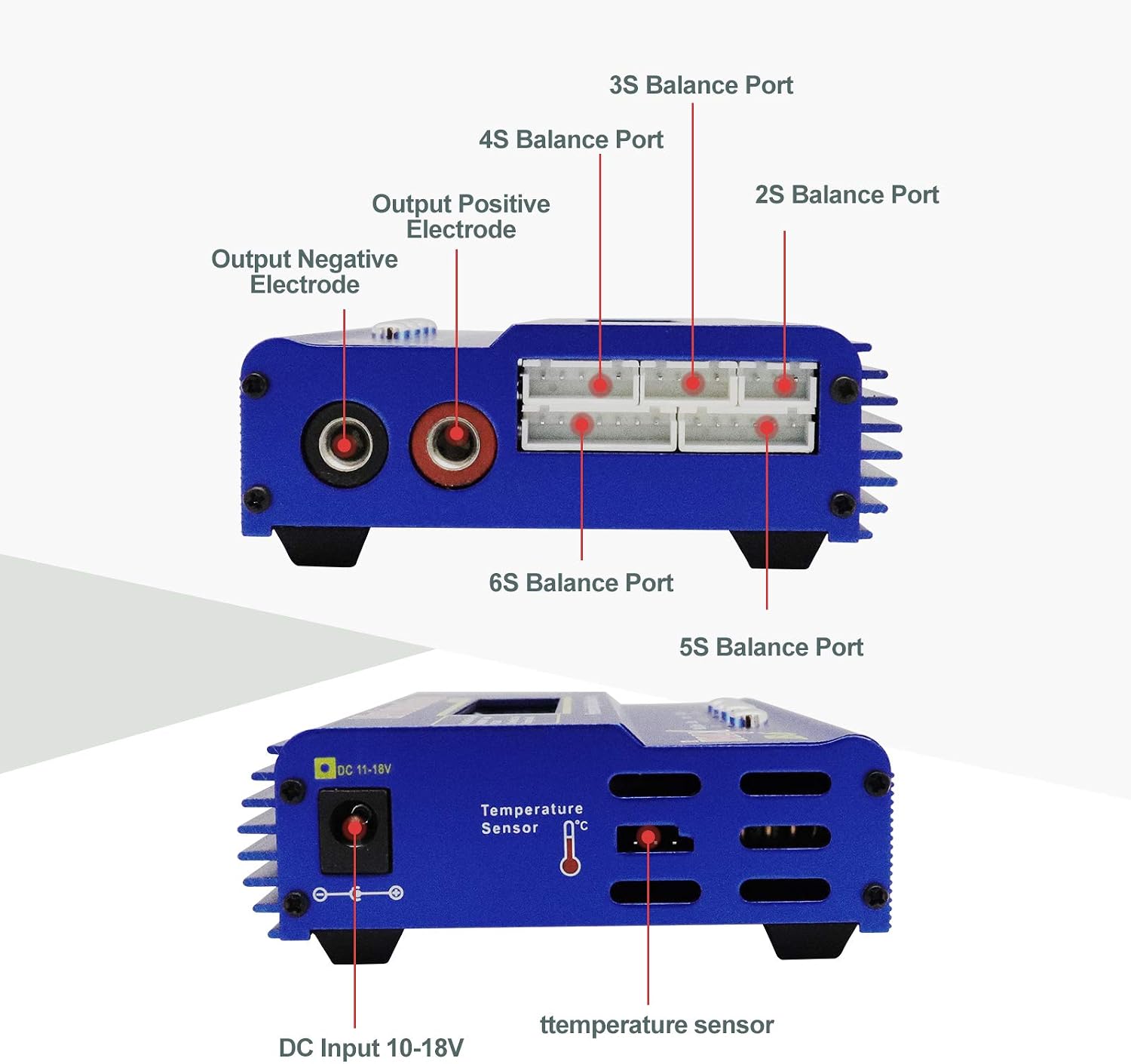
Figura 5: Ġenb view displaying output terminals, balance ports (2S-6S), and DC input (10-18V).
- Display LCD: Shows charging status, battery type, voltage, kurrenti, u parametri oħra.
- Buttuni tal-Kontroll: "Batt.Type/Stop", "Dec.", "Inc.", "Start/Enter" for navigation and setting adjustments.
- Terminali tal-ħruġ: Red (+) and Black (-) connectors for main battery connection.
- Balance Ports: Dedicated ports for 2S, 3S, 4S, 5S, and 6S LiPo/Li-Ion/Life batteries for balanced charging.
- DC Input (10-18V): Power input for the charger.
- Port tas-Sensor tat-Temperatura: For connecting an optional temperature sensor.
Setup
Follow these steps to set up your RUIZHI B6 charger for the first time.
- Qabbad l-Enerġija: Connect the AC power cable to the AC/DC power adapter, then plug the adapter into a wall outlet. Connect the DC output plug of the adapter to the DC Input port (10-18V) on the side of the RUIZHI B6 charger.
- Qawwa Mixgħul: The charger's LCD display should light up, indicating it is powered on and ready for operation.
- Ipprepara l-Batterija: Ensure your battery is in good condition and free from any physical damage.
- Qabbad il-batterija:
- For LiPo/Li-Ion/Life batteries, connect the main battery lead to the charger's output terminals (red to red, black to black). Then, connect the battery's balance lead to the appropriate balance port on the side of the charger (e.g., 3S port for a 3-cell battery).
- For NiMH/NiCd or Pb batteries, only connect the main battery lead to the charger's output terminals.

Figure 6: Charger connected to different battery types (LiPo, LiFe, NiMH/NiCd, Li-ion, PB).
Istruzzjonijiet Operattivi
This section details how to operate your RUIZHI B6 charger for various functions.
Passi Bażiċi ta' Operazzjoni
- Agħżel it-Tip tal-Batterija: Agħfas il-buttuna "Batt.Type/Stop" button to cycle through the main menu options. Select the desired battery type (e.g., LiPo, NiMH, Pb).
- Access User Settings: Once the battery type is selected, press the "Ibda/Daħħal" button twice to enter the parameter settings for that battery type.
- Aġġusta l-Parametri: Uża l-"Diċembru." u "Inc." buttons to adjust parameters such as charge current (Amps) and cell count (for Lithium batteries).
- Confirm and Start: After setting the parameters, hold the "Ibda/Daħħal" button for approximately 2 seconds. The charger will perform a battery check. Once confirmed, press "Ibda/Daħħal" again to begin the charging or discharging process.
- Waqqaf l-Operazzjoni: To stop any ongoing process, press the "Batt.Type/Stop"buttuna.
Charging Specific Battery Types
- LiPo/Li-Ion/Life Batteries:
- Select "LiPo BATT", "Li-Ion BATT", or "LiFe BATT".
- Choose between "Balance Charge", "Fast Charge", "Storage", or "Discharge". "Balance Charge" is recommended for optimal battery life and safety.
- Set the charge current (A) and cell count (S) to match your battery's specifications.
- Confirm and start.
- NiMH/NiCd Batteries:
- Select "NiMH BATT" or "NiCd BATT".
- Choose between "Charge", "Auto Charge", "Discharge", "Re-Peak", or "Cycle".
- Set the charge current (A) and confirm.
- Pb (Lead Acid) Batteries:
- Select "PB BATT".
- Choose between "Charge" or "Discharge".
- Set the charge current (A) and voltage (V) to match your battery.
Vidjows Istruttivi
For visual guidance on operating the charger, please refer to the following official instructional videos:
RUIZHI B6 Charger: Instructions for Use (English)
This video provides a comprehensive guide on how to use the RUIZHI B6 Balance Charger, covering menu navigation and basic charging procedures in English.
Haisito HB6 Lipo Charger 80W 6A Operation Guide
A detailed video demonstrating the operation of a similar 80W 6A Lipo charger, including setting charge parameters and starting the process.
B6V2 LiPo Balance Charger Overview
Dan il-video jipprovdi overview of the B6V2 LiPo Balance Charger, showcasing its features and basic usage for battery balancing and charging.
Manutenzjoni
Proper maintenance ensures the longevity and reliable performance of your charger.
- Tindif: Regularly wipe the charger with a soft, dry cloth. Do not use abrasive cleaners or solvents.
- Ħażna: Aħżen il-ċarġer f'post frisk u niexef 'il bogħod mix-xemx diretta u minn temperaturi estremi meta ma jkunx qed jintuża.
- Spezzjoni tal-Cable: Periodically inspect all cables and connectors for signs of wear, damage, or corrosion. Replace any damaged components immediately.
- Ventilazzjoni: Ensure the charger's ventilation openings are clear and unobstructed during operation to prevent overheating.
Issolvi l-problemi
If you encounter issues with your RUIZHI B6 charger, refer to the following common problems and solutions.
| Problema | Kawża Possibbli | Soluzzjoni |
|---|---|---|
| Il-ċarġer ma jixgħelx. | No power from outlet; faulty power adapter/cable; incorrect DC input voltage. | Check wall outlet and power connections. Ensure the power adapter is functioning. Verify DC input voltage huwa fi ħdan 10-18V. |
| Charging process does not start. | Incorrect battery type/cell count settings; poor battery connection; battery too low/damaged. | Double-check all settings match the battery. Ensure main and balance leads are securely connected. Inspect battery for damage. |
| Messaġġ ta' żball fuq il-wiri. | Batterija voltage error; connection error; internal fault. | Refer to the specific error code (if displayed) in the full manual (if available). Reconnect the battery. If the issue persists, contact support. |
| Il-ċarġer jisħon wisq. | Poor ventilation; high ambient temperature; internal fault. | Ensure adequate airflow around the charger. Operate in a cooler environment. If overheating continues, discontinue use and contact support. |
| Vol mhux preċiżtage qari. | Faulty balance cable; internal calibration issue. | Try a different balance cable. If the problem persists, the unit may require service. |
Note: The charger does not have protection against reverse polarity. Always ensure correct positive and negative connections to avoid damage.
Speċifikazzjonijiet
Detailed technical specifications for the RUIZHI B6 Balance Charger.
| Karatteristika | Speċifikazzjoni |
|---|---|
| Brand | RUIZHI |
| Numru tal-Mudell | B6 (Z0263) |
| Kulur | Blu |
| Dimensjonijiet tal-Prodott (L x W x H) | 26.6 x 15.9 x 4.9 ċm (10.47 x 6.26 x 1.93 pulzieri) |
| Input Voltage | 10-18V DC |
| Ħruġ Voltage | 18V DC |
| Firxa tal-Kurrent tal-Iċċarġjar | 0.1-6.0A |
| Firxa tal-Kurrent tal-Ħruġ | 0.1-2.0A |
| Max Charge Power | 80W |
| Qawwa Massima ta' Skariku | 5W |
| LiPo/Li-Ion/LiFe Cell Count | 1-6S |
| Għadd taċ-Ċelloli NiMH/NiCd | 1-15S |
| Pb Battery Voltage | 2-20V |
| Apparati Kompatibbli | RC cars, drones, airsoft guns |
| Numru ta' Portijiet | 1 (main output) + balance ports |
| UPC | 782903702464 |
Garanzija u Appoġġ
RUIZHI products are designed for reliability and performance. For warranty information or technical support, please refer to the documentation included with your purchase or contact your retailer. Keep your proof of purchase for warranty claims.