
Introduzzjoni
This manual provides essential information for the safe and efficient operation of your MEDION P64145 All-in-One Audio System. Please read it thoroughly before using the device and keep it for future reference.
Informazzjoni Importanti dwar is-Sigurtà
Always follow basic safety precautions when using this product to reduce the risk of fire, electric shock, and injury to persons. Keep this manual handy for future reference.
- Tesponix l-apparat għax-xita jew l-umdità.
- Timblokka l-ebda fetħiet tal-ventilazzjoni.
- Uża biss aċċessorji/aċċessorji speċifikati mill-manifattur.
- Irreferi l-manutenzjoni kollha lil persunal tas-servizz kwalifikat.
Kontenut tal-Pakkett
Kun żgur li l-oġġetti kollha huma preżenti u f'kundizzjoni tajba meta tiftaħhom:
- MEDION Life MD44125 P64145 AiO Audio System
- Kontroll mill-bogħod (inkl. batterija)
- Korda tal-enerġija
- Manwal għall-utent
Setup
1. Żpakkjar u Tqegħid
Carefully remove the audio system from its packaging. Place the unit on a stable, flat surface away from direct sunlight, heat sources, and excessive dust or moisture. Ensure adequate ventilation around the unit.
2. Connecting the Power and Antenna
Connect the provided power cord to the AC IN socket on the rear of the audio system, then plug the other end into a wall outlet. Extend the telescopic antenna on the rear of the unit for optimal FM and DAB+ radio reception. Adjust its position for the best signal quality.
Immaġni: Wara view of the MEDION P64145 audio system with the power cord connected and the telescopic antenna extended. This image demonstrates how to properly connect power and set up the antenna for improved radio signal reception.
3. Installazzjoni tal-Batterija tal-Kontroll mill-bogħod
Open the battery compartment on the remote control and insert the provided battery, observing the correct polarity.
Istruzzjonijiet Operattivi
1. Power On/Off
Agħfas il- QAWWA buttuna fuq l-unità jew fuq il-kontroll remot biex tixgħel jew titfi s-sistema.
2. Għażla tas-Sors
Agħfas il- SORS button repeatedly to cycle through available input sources: DAB+, FM, CD, USB, Bluetooth, AUX-in.
3. Tħaddim tar-Radju DAB+
- Select DAB+ mode.
- Is-sistema se tiskennja awtomatikament għal stazzjonijiet DAB+ disponibbli.
- Uża l- INTONA +/- buttons or rotary knob to navigate through stations.
- Agħfas OK biex tagħżel stazzjon.
- To save a station, press and hold a preset number button (1-30).
Vidjow: This video demonstrates selecting DAB+ radio, adjusting volume, and other functions on a similar MEDION micro audio system. It illustrates the user interface and controls for various audio modes.
4. Operazzjoni tar-Radju FM
- Agħżel modalità FM.
- Uża l- INTONA +/- buttons to manually tune or press and hold to auto-scan for the next available station.
- To save a station, press and hold a preset number button (1-30).
5. CD Playback
- Agħżel il-mod CD.
- Insert a CD (audio CD or MP3 CD) into the CD slot.
- The system will automatically begin playback.
- Użu DĦABBA/PAWŻA, STOP, AQBEŻ +/- buttuni għall-kontroll.

Immaġni: Quddiem view of the audio system highlighting the integrated CD player. This image shows where to insert CDs for playback.
6. Daqq USB
- Daħħal USB flash drive li jkun fih MP3 files fil-port USB.
- Agħżel il-modalità USB.
- Use the navigation buttons to browse and select tracks.
7. Streaming Bluetooth
- Select Bluetooth mode. The display will show "Pairing".
- On your smartphone or tablet, enable Bluetooth and search for "MEDION P64145".
- Select the device to pair. Once connected, you can stream audio wirelessly.

Immaġni: A smartphone displaying a music app connected via Bluetooth to the MEDION audio system. This image demonstrates wireless music streaming capability.
8. Konnessjoni AUX-in
Connect an external audio device (e.g., MP3 player) to the AUX-in port using a 3.5mm audio cable. Select AUX-in mode to play audio from the connected device.
9. Alarm and Sleep Timer
The system features an alarm function (wake via radio, alarm sound, CD, or USB) and a sleep timer. Refer to the detailed instructions in the full user manual for setting these features.
10. Settings tal-ħoss
Aġġusta l-ħoss profile using the equalizer settings. The system offers five selectable sound settings (Pop, Rock, Jazz, Classic, Flat) to optimize your listening experience.

Immaġni: Icons representing different sound equalizer presets (Pop, Rock, Jazz, Classic, Flat) available on the audio system. This image highlights the customizable sound options.
Manutenzjoni
- Tindif: Use a soft, dry cloth to clean the unit. Do not use liquid cleaners or aerosol sprays.
- CD Care: Immaniġġja s-CDs mit-truf tagħhom. Żommhom nodfa u ħielsa mill-grif.
- Ħażna: If not in use for an extended period, unplug the unit and store it in a cool, dry place.
Issolvi l-problemi
| Problema | Kawża Possibbli | Soluzzjoni |
|---|---|---|
| Ebda qawwa | Power cord not connected properly; Power outlet not working. | Iċċekkja l-konnessjoni tal-korda tal-enerġija; Ipprova sokit differenti. |
| L-ebda ħoss | Volum baxx wisq; Funzjoni Mute attiva; Sors mhux korrett magħżul. | Increase volume; Deactivate mute; Select correct source. |
| Riċeviment ħażin tar-radju | Antenna mhux estiża jew pożizzjonata b'mod korrett; Interferenza. | Extend and adjust antenna; Move unit away from other electronic devices. |
| Kwistjonijiet ta 'tqabbil tal-Bluetooth | Device not in pairing mode; Bluetooth disabled on external device. | Ensure system is in Bluetooth pairing mode; Enable Bluetooth on external device and retry pairing. |
Speċifikazzjonijiet
- Mudell: MEDION P64145 (MD44125)
- Qawwa tal-Ħruġ Awdjo: 15 Watt
- Tuner tar-Radju: DAB+, PLL-FM Stereo (30 presets each)
- CD Player: Supports Audio CD, MP3-CD
- Konnettività: Bluetooth, USB, AUX-in
- Karatteristiċi Speċjali: Alarm function, Sleep timer, Color display
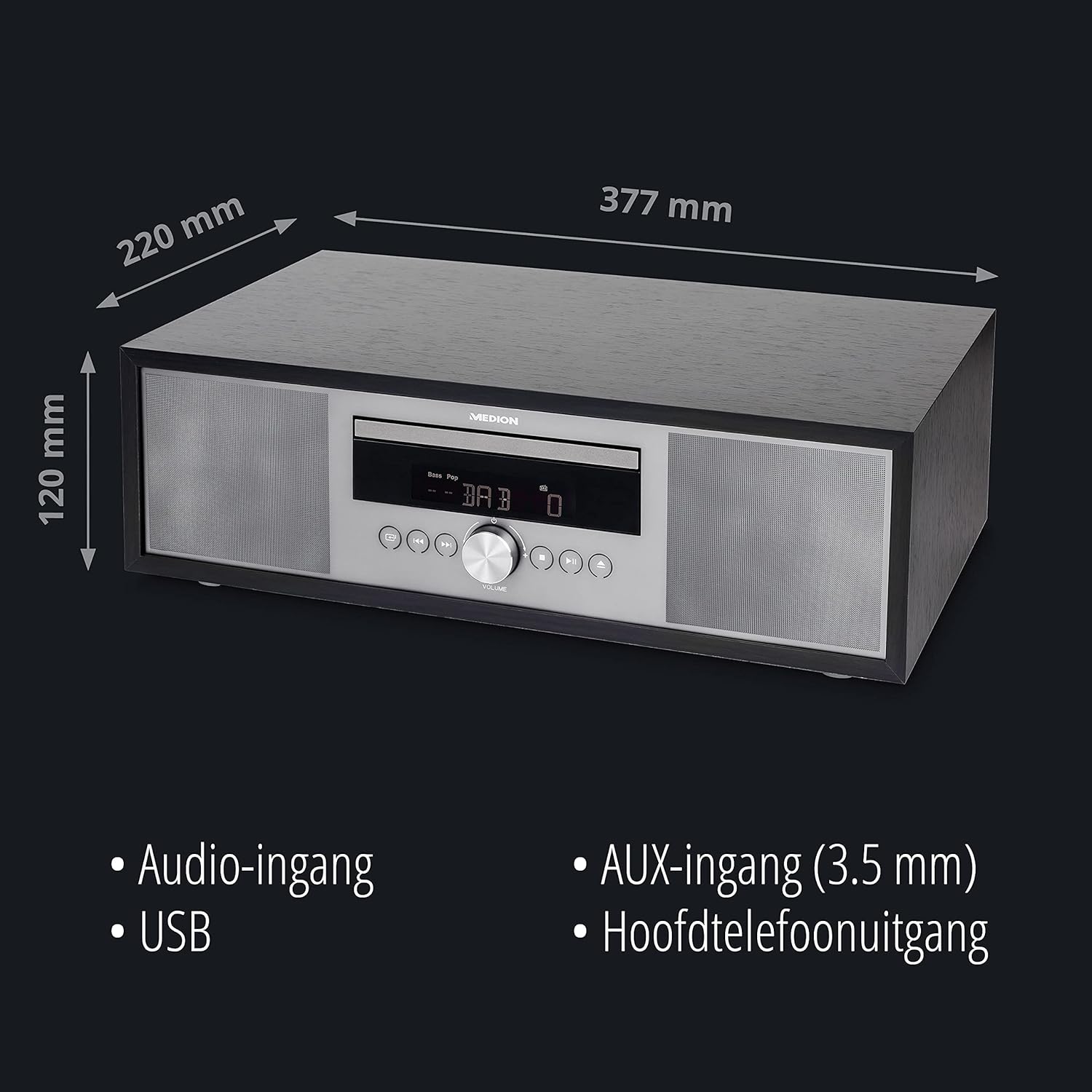
- Dimensjonijiet (madwar): 41.8 x 27.3 x 15.5 ċm
- Piż (madwar): 3.95 kg

Immaġni: The MEDION P64145 audio system with its dimensions indicated. This image provides a visual representation of the product's size.
Garanzija u Appoġġ
For warranty information, technical support, or service inquiries, please refer to the warranty card included in your package or visit the official MEDION websit. Żomm il-prova tax-xiri tiegħek għal talbiet ta' garanzija.