
1. Prodott Aktarview
The TrustFire T11R is a compact yet powerful rechargeable LED flashlight designed for various applications, including outdoor activities, emergency preparedness, and daily use. It features a LUMINUS SST-40 LED chip, delivering a maximum brightness of 1800 lumens and a beam distance of up to 276 meters. Its robust construction and versatile features make it a reliable lighting tool.

Image: The TrustFire T11R flashlight demonstrating its powerful beam in a dark outdoor environment.
2. Kontenut tal-Pakkett
Jekk jogħġbok iċċekkja l-pakkett biex tiżgura li l-oġġetti kollha huma preżenti:
- TrustFire T11R Flashlight (with pre-installed battery) x1
- Cable tal-Iċċarġjar USB-C x1
- Multi-language User Manual x1
- Spare Waterproof O-ring x1
- Lanyard x1

Image: All items included in the TrustFire T11R flashlight package, neatly arranged.
3. Speċifikazzjonijiet
| Karatteristika | Speċifikazzjoni |
|---|---|
| Sors tad-Dawl | LUMINUS SST-40 LED |
| Max Output tad-Dawl | 1800 Lumens |
| Distanza tar-raġġ | 276 Meters |
| Runtime | Up to 28 days (Moonlight mode) |
| Sors tal-Enerġija | Batterija tal-jone tal-litju rikarikabbli |
| Port tal-Iċċarġjar | USB Tip-Ċ |
| Klassifikazzjoni li ma jgħaddix ilma minnha | IP68 |
| Reżistenza għall-Impatt | 1 Meter |
| Materjal | Aerospace-grade 6061 Aluminum Alloy |
| Dimensjonijiet (D x W x H) | 30mm x 30mm x 129mm |
| Piż tal-oġġett | 130g |
| Karatteristiċi Speċjali | Dual Switch, Battery Level Indicator, Overcharge Protection, Smart Temperature Control |
4. Setup
4.1 Iċċarġjar inizjali
Before first use, fully charge the flashlight. The T11R comes with a pre-installed rechargeable battery.
- Sib il-port tal-iċċarġjar USB Type-C fuq it-torċa.
- Connect the provided USB-C cable to the flashlight and a compatible USB power source (e.g., computer, wall adapter, power bank).
- The indicator light on the neck switch will show the charging status: Aħmar indicates charging, Aħdar jindika l-iċċarġjar lest.

Image: The TrustFire T11R flashlight being charged via its USB-C port, showing the indicator light.
4.2 Attaching the Lanyard and Clip
Attach the lanyard to the tail cap for secure carrying. The stainless steel two-way clip can be attached to either end of the flashlight body for convenient carrying on pockets, belts, or bags.

Image: The TrustFire T11R flashlight demonstrating its versatile two-way clip for various carrying options.
5. Istruzzjonijiet Operattivi
5.1 Dual Switch Operation
The T11R features both a tail switch and a side switch for flexible control.
- Tail Switch: Press to turn the flashlight ON/OFF. A half-press allows for momentary illumination; release to turn off.
- Swiċċ tal-ġenb: Used for cycling through brightness modes and activating special modes.

Image: A visual guide to the dual switch system (tail and side switches) on the TrustFire T11R.
5.2 Qlib tal-Modalità
The T11R offers multiple lighting modes to suit different needs:
- From OFF, press the Iswiċċ tad-denb biex tixgħel.
- With the light ON, press the Swiċċ tal-Ġenb to cycle through modes: Dawl tal-qamar → Medju → Għoli → Turbo. The flashlight has a mode memory function and will turn on in the last used illumination mode.
- Modalità Strobe: From any illumination mode, press and hold the Swiċċ tal-Ġenb for 2 seconds to activate Strobe mode. Press again to return to the previous illumination mode.
- Modalità SOS: From Strobe mode, press and hold the Swiċċ tal-Ġenb for 2 seconds to activate SOS mode. Press again to return to the previous illumination mode.
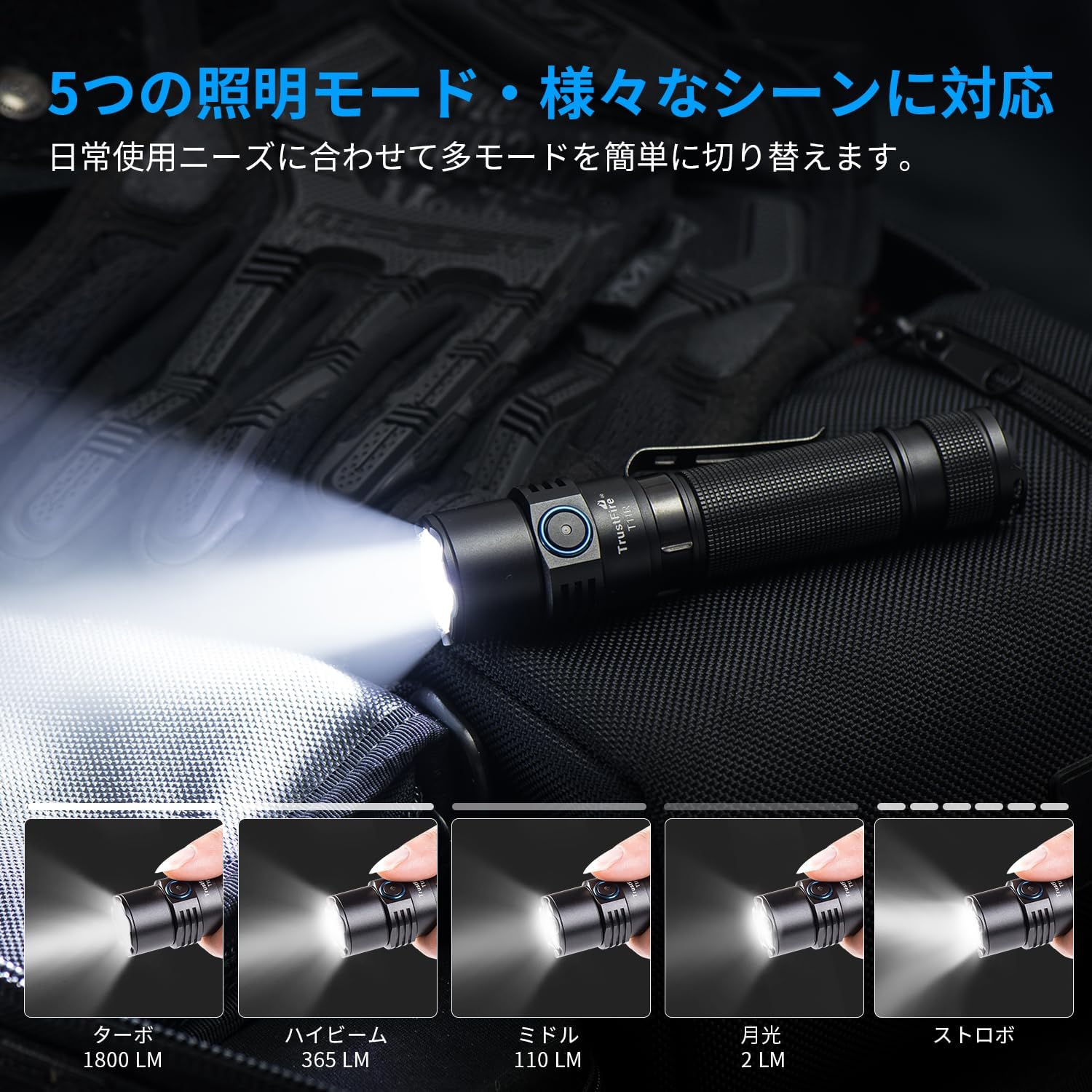
Image: The TrustFire T11R flashlight showcasing its various brightness levels and special modes.
5.3 Indikatur tal-Livell tal-Batterija
The indicator light on the neck switch displays the battery level:
- Aħdar: Kapaċità tal-batterija> 50%
- Oranġjo: Battery capacity 20% - 50%
- Aħmar: Battery capacity 5% - 20%
- Aħmar li jteptep: Battery capacity < 5%. The light will flash three times every minute.

Image: The TrustFire T11R flashlight's battery indicator light, illustrating different colors for various charge levels.
6. Manutenzjoni
6.1 Iċċarġjar
Regularly charge the flashlight to maintain optimal battery performance. Avoid completely draining the battery for extended periods.
6.2 Tindif
Naddaf il-qafas tat-torċa b'ċarruta ratba u damp drapp. Tużax prodotti tat-tindif jew solventi li joborxu. Żomm il-lenti nadifa għall-massimu tal-ħruġ tad-dawl.
6.3 O-ring Maintenance
To maintain the IP68 waterproof rating, periodically inspect and lubricate the O-rings with silicone grease. Replace O-rings if they appear damaged or worn. A spare O-ring is included in the package.

Image: The TrustFire T11R flashlight in water, highlighting its IP68 waterproof and impact-resistant design.
7 Issolvi l-problemi
- Il-flashlight ma tixgħel:
- Kun żgur li l-batterija hija kompletament iċċarġjata.
- Check if the tail cap is tightened securely.
- Verify that the battery is inserted with the correct polarity.
- Id-dawl huwa baxx jew jitteptep:
- Iċċarġja l-batterija.
- Naddaf il-kuntatti u l-ħjut tal-batterija b'ċarruta nadifa.
- Dħul tal-ilma:
- Check the O-rings for damage or improper seating. Replace if necessary.
- Ensure all parts are tightly screwed together.
If you encounter any issues not covered here, please contact TrustFire customer support for assistance.
8. Garanzija u Appoġġ
The TrustFire T11R flashlight comes with a garanzija ta 'sena from the date of purchase, covering manufacturing defects. This warranty does not cover damage caused by misuse, unauthorized modification, or normal wear and tear.
For warranty claims, technical support, or any product-related inquiries, please contact TrustFire customer service through the retailer where you purchased the product or visit the official TrustFire websit għal informazzjoni ta' kuntatt.
Jekk jogħġbok żomm il-prova tax-xiri tiegħek għal skopijiet ta' garanzija.