
1. Prodott Aktarview
Il-Kaxxa tat-Tastiera Ewin bit-Trackpad hija mfassla biex ittejjeb l-esperjenza tat-tablet tiegħek billi tipprovdi tastiera fiżika u trackpad multi-touch, u b'hekk tittrasforma t-tablet tiegħek f'għodda ta' produttività versatili. Għandha għata protettiva durabbli u funzjonijiet intelliġenti għal użu effiċjenti.

Immaġni 1.1: Kaxxa tat-Tastiera Ewin bit-Trackpad, wirjaasinUża t-tastiera u t-trackpad integrati b'tablet fil-modalità stand.
2. Kompatibilità
Din il-kaxxa tat-tastiera hija kompatibbli ma' diversi mudelli ta' iPad. Jekk jogħġbok ivverifika n-numru tal-mudell tal-iPad tiegħek biex tiżgura li joqgħod u jiffunzjona sew.
- iPad Air 4 10.9 pulzieri 2020: Numri tal-Mudell A2072, A2316, A2324, A2325
- iPad Pro ta' 11-il pulzier tat-3 Ġenerazzjoni 2021: Numri tal-Mudell A2301, A2459, A2460
- iPad Pro ta' 11-il pulzier tat-2 Ġenerazzjoni tal-2020: Numri tal-Mudell A2228, A2068, A2230, A2231
- iPad Pro 11-il pulzier tal-1 Ġenerazzjoni 2018: Numri tal-Mudell A1980, A2013, A1934

Immaġni 2.1: Gwida viżwali għall-kompatibilità tal-mudelli tal-iPad, inkluż l-iPad Pro ta' 11-il pulzier (2019), l-iPad Air 4 ta' 10.9 pulzieri (2020), u l-iPad Pro ta' 11-il pulzier (2020).
3. Kontenut tal-Pakkett
Malli tiftaħ il-pakkett, kun żgur li l-oġġetti kollha li ġejjin huma preżenti:
- 1 x Kaxxa tat-Tastiera Ewin
- 1 x Cable tal-Iċċarġjar tat-Tip-Ċ
- 1 x Manwal għall-Utent
Nota: L-iPad mhux inkluż.

Immaġni 3.1: Kontenut tal-pakkett tal-Ewin Keyboard Case, inkluż il-kaxxa, il-kejbil tal-iċċarġjar, u l-manwal.
4. Setup
4.1 Iċċarġjar tat-Tastiera
Qabel l-ewwel użu, iċċarġja t-tastiera kompletament. Qabbad il-kejbil tal-iċċarġjar tat-Tip Ċ ipprovdut mal-port tal-iċċarġjar tat-tastiera u ma' sors ta' enerġija USB. Id-dawl indikatur tal-iċċarġjar juri l-istatus tal-iċċarġjar.
- Ħin tal-Iċċarġjar: Madwar sagħtejn
- Ħin tal-Użu: 100+ siegħa
- Ħin ta' Standby: 130+ jum
4.2 Tqabbil tal-Bluetooth
- Kun żgur li t-tastiera hija ċċarġjata.
- Ixgħel it-tastiera billi tiżżerżaq is-swiċċ tal-enerġija. Id-dawl indikatur tal-Bluetooth jibda jteptep, u jindika li tinsab fil-modalità ta' tqabbil.
- Fuq l-iPad tiegħek, mur fuq Settings > Bluetooth.
- Ixgħel il-Bluetooth. L-iPad tiegħek se jfittex apparati disponibbli.
- Agħżel "Magnetic Keyboard 5.1 V81" (jew isem simili) mil-lista ta' "APPARAT OĦRA".
- Ladarba tkun konnessa, id-dawl indikatur tal-Bluetooth fuq it-tastiera jieqaf iteptep. It-tastiera terġa' tikkonnettja awtomatikament mal-iPad tiegħek fil-futur wara l-ewwel tqabbil.
4.3 Daħħal l-iPad
Allinja l-iPad tiegħek bir-reqqa mal-kaxxa u agħfas bil-mod f'postu. Kun żgur li t-truf kollha huma mqiegħda sew fil-qafas protettiv tal-kaxxa.

Immaġni 4.1: Dettaljata view tal-Keyboard Case tal-iPad, li turi l-karatteristiċi ewlenin tagħha inkluż it-touchpad tal-ġesti, il-konnettività Bluetooth, id-disinn ergonomiku, il-port tat-Tip C, u l-holder integrat tal-lapsijiet.
5. Istruzzjonijiet Operattivi
5.1 Funzjonijiet u Shortcuts tat-Tastiera
It-tastiera tipprovdi esperjenza komda ta' tajping b'disinn ewlieni fl-industrija u 22 tip ta' shortcuts għal produttività akbar.
Iffamiljarizza ruħek mas-shortcuts standard tat-tastiera għall-iPadOS tiegħek. Shortcuts komuni jinkludu:
- Kmand + H: Mur fil-Home Screen
- Kmand + Spazju: Iftaħ Fittex
- Kmand + Tab: Aqleb bejn apps miftuħa
- Kmand + C / Kmand + V: Ikkopja / Pejst
- Fn + Spazju: Ixgħel/Itfi t-Trackpad
5.2 Ġesti tat-Trackpad Intelliġenti
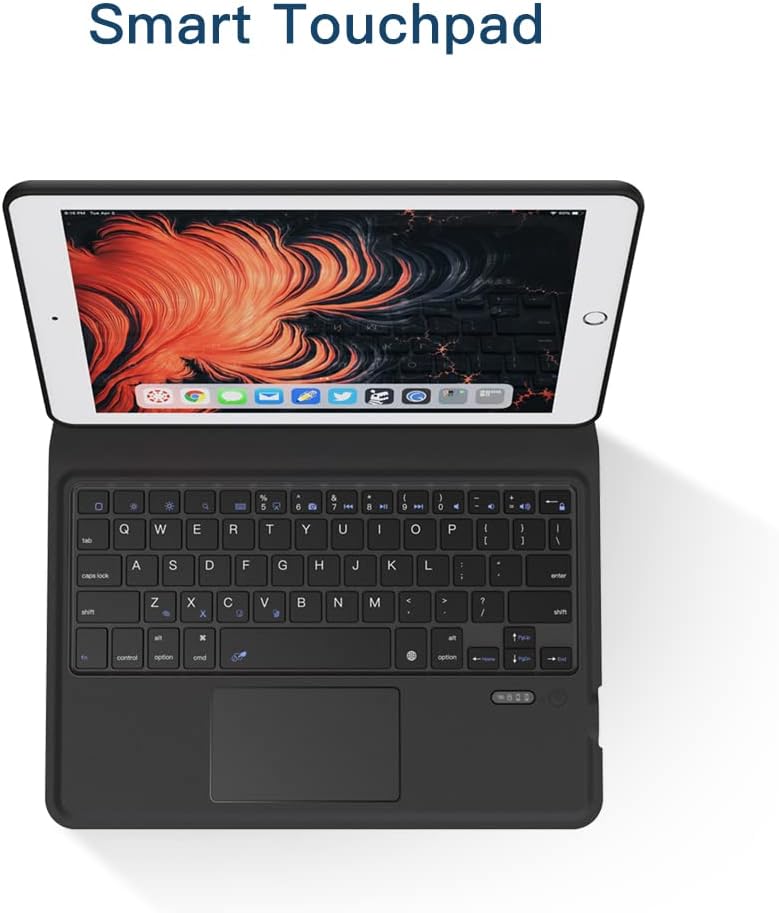
It-touchpad intelliġenti integrat jappoġġja 9 tipi ta' ġesti prattiċi tal-laptop, li jippermettu navigazzjoni u kontroll preċiżi. Kun żgur li "AssistiveTouch" huwa attivat fis-settings tal-iPad tiegħek jekk tixtieq tuża karatteristiċi avvanzati tat-touch.

Immaġni 5.1: Close-up tat-Touchpad Intelliġenti, li turi l-funzjonalità tiegħu għal kontroll preċiż.
5.3 Funzjoni ta' Sleep/Wake Awtomatika
Il-kaxxa għandha funzjoni awtomatika ta' rqad/qawmien biex tikkonserva l-ħajja tal-batterija. Meta tagħlaq il-kaxxa, l-iPad tiegħek jorqod, u meta tiftaħha, dan iqajjem.
Immaġni 5.2: Illustrazzjoni tal-karatteristika Auto Sleep, li tnaqqas il-konsum tal-batterija meta l-kaxxa tkun magħluqa.
5.4 Funzjoni tal-Istand
Il-kaxxa hija ddisinjata biex tinbidel awtomatikament f'stand stabbli għal użu komdu viewIt-tajping u l-kitba. Itwi l-bokkla tul it-tinja u ħalli l-kalamiti jassiguraw il-pożizzjoni tal-istand.

Immaġni 5.3: Dimostrazzjoni tal-funzjoni tal-istand tal-Kaxxa tat-Tastiera tal-iPad, li turi kif tintewa u titwaħħal manjetikament f'forma ta' viewing pożizzjoni.
6. Manutenzjoni
6.1 Tindif
Biex tnaddaf il-kaxxa tat-tastiera, imsaħ bil-mod il-parti ta' barra b'ċarruta ratba u damp drapp. Evita li tuża kimiċi ħarxa jew materjali li joborxu. Għall-buttuni tat-tastiera, uża pinzell artab jew arja kkompressata biex tneħħi t-trab u l-fdalijiet.
6.2 Kura tal-Batterija
Biex ittawwal il-ħajja tal-batterija, evita li tħott it-tastiera kompletament ta' spiss. Iċċarġjaha regolarment, anke jekk ma tkunx qed tużaha kontinwament. Aħżen l-apparat f'post frisk u niexef meta ma tkunx qed tużah għal perjodi twal.
7 Issolvi l-problemi
| Problema | Kawża Possibbli | Soluzzjoni |
|---|---|---|
| It-tastiera mhux qed tikkonnettja permezz tal-Bluetooth. | Batterija baxxa; Bluetooth mhux attivat fuq l-iPad; it-tastiera mhix fil-modalità ta' tqabbil; interferenza. | Iċċarġja t-tastiera. Kun żgur li l-Bluetooth huwa mixgħul fis-settings tal-iPad. Itfi t-tastiera u ixgħelha biex terġa' tidħol fil-modalità ta' tqabbil. Ersaq eqreb lejn l-iPad. |
| It-trackpad mhux qed jirrispondi. | Trackpad diżattivat; problema tas-softwer; wiċċ maħmuġ. | Agħfas Fn + Spacebar biex tattiva/tiddiżattiva t-trackpad. Erġa' ibda l-iPad u t-tastiera. Naddaf il-wiċċ tat-trackpad. |
| Iċ-ċwievet mhux qed jirrispondu. | Batterija baxxa; problema ta' konnessjoni. | Iċċarġja t-tastiera. Erġa' qabbad il-konnessjoni Bluetooth. |
| L-iPad ma jorqodx/jqum awtomatikament. | Settings tal-iPad; il-kaxxa mhux magħluqa sew. | Kun żgur li "Lock/Unlock" huwa attivat fis-settings tal-iPad (Settings > Display & Brightness > Lock/Unlock). Kun żgur li l-kaxxa hija magħluqa għalkollox. |
8. Speċifikazzjonijiet
| Karatteristika | Dettall |
|---|---|
| Brand | Ewin |
| Numru tal-Mudell | Tastiera EWIN |
| Apparati Kompatibbli | iPad Air 4 10.9 pulzieri (2020), iPad Pro 11-il pulzier (2018/2020/2021) |
| Konnettività | Bluetooth Wireless |
| Karatteristika Speċjali | Trackpad Integrat, Detentur tal-Lapes, Auto Sleep/Wake, Funzjoni Stand |
| Tip ta 'qoxra | Każ iebes |
| Daqs Massimu tal-Apparat Kompatibbli | 10.9 Pulzier |
| Piż tal-oġġett | 1.48 liri (madwar 0.67 kg) |
| Dimensjonijiet tal-Pakkett | 11.34 x 7.99 x 1.3 pulzieri (madwar 28.8 x 20.3 x 3.3 ċm) |

Immaġni 8.1: Illustrazzjoni tal-mekkaniżmu tat-tastiera Scissor Switch, li tindika tajping li jirrispondi u komdu.

Immaġni 8.2: Dettall tad-disinn tal-Kaxxa tax-Xagħar, li jippromwovi d-dissipazzjoni tas-sħana għat-tablet.

Immaġni 8.3: Rappreżentazzjoni viżwali tad-disinn reżistenti għax-xokkijiet tal-kaxxa, li joffri protezzjoni mtejba kontra l-waqgħat.
9. Garanzija u Appoġġ
Il-prodotti Ewin huma manifatturati bi standards ta’ kwalità għolja. Għal informazzjoni dwar il-garanzija jew appoġġ tekniku, jekk jogħġbok irreferi għad-dettalji ta’ kuntatt ipprovduti fuq l-imballaġġ tal-prodott jew fuq is-sit uffiċjali ta’ Ewin. websit. Żomm l-irċevuta tax-xiri tiegħek għal pretensjonijiet ta' garanzija.