
1. Introduzzjoni
The Keychron K3 is a compact 75% layout mechanical keyboard designed for enhanced productivity and a superior typing experience. Featuring 84 keys, RGB backlighting, and hot-swappable low-profile Keychron Optical Brown Switches, it offers versatility for both Mac and Windows users. This manual provides detailed instructions for setting up, operating, maintaining, and troubleshooting your Keychron K3 keyboard.

Figura 1: Minn fuq għal isfel view of the Keychron K3 keyboard, highlighting its compact 75% layout.
2. Setup
2.1 Għażliet ta' Konnettività
The Keychron K3 supports both wireless Bluetooth 5.1 and wired USB Type-C connections. You can seamlessly switch between up to 3 connected devices (laptop, PC, tablet, phone) in Bluetooth mode.

Figure 2: The Keychron K3 can connect to up to three devices simultaneously via Bluetooth.
2.2 Kompatibilità tas-Sistema Operattiva
The K3 is designed with a unique Mac layout, including all necessary multimedia keys, while also being fully compatible with Windows. Extra keycaps for both Windows and Mac operating systems are included to allow for customization based on your preferred OS.

Figure 3: The keyboard is compatible with both macOS and Windows operating systems.
2.3 Saqajn Aġġustabbli
The keyboard features two-level adjustable rubber feet, allowing you to set the typing angle to either 6 or 9 degrees for optimal ergonomic comfort.

Figure 4: Adjustable feet allow for 6 or 9-degree typing angles.
3. It-Tħaddim tat-Tastiera
3.1 Ultra-Slim Design and Switches
The K3 features a redesigned low-profile Keychron optical switch, which is 40% slimmer than conventional mechanical switches. This design results in a shorter pre-travel and total travel distance, providing faster input and feedback. The reinforced aluminum body contributes to its thin and lightweight profile.
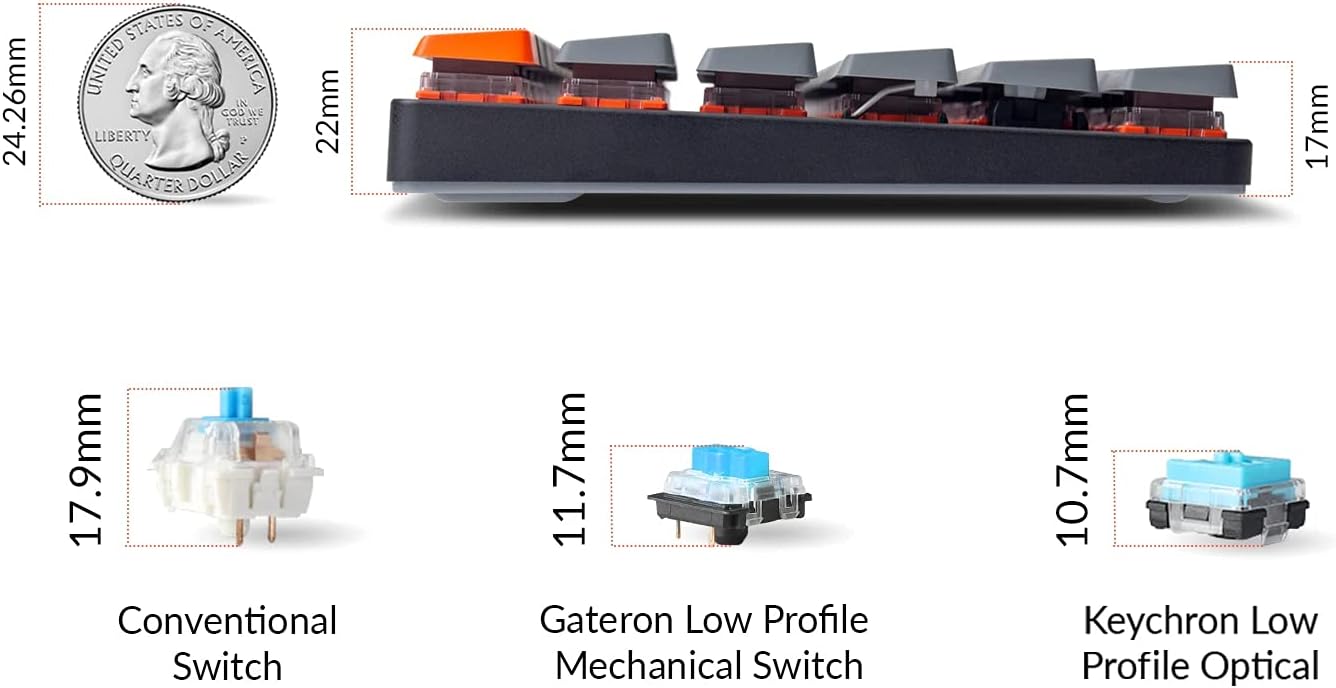
Figure 5: The ultra-slim design and low-profile optical switches are significantly thinner than conventional switches.
3.2 Swiċċijiet li jistgħu jinbidlu bis-sħana
The K3 allows for easy hot-swapping of every low-profile optical switch without soldering. This enables you to customize your typing experience. Please note that this keyboard is not compatible with conventional MX style mechanical switches. The pre-installed low-profile optical Brown switch offers tactile responsiveness with a lifespan of up to 70 million keystrokes.

Figura 6: Id-disinn li jista' jiġi sostitwit bis-sħana jippermetti sostituzzjoni faċli tas-swiċċ.
3.3 Backlighting RGB
The Keychron K3 features various RGB backlight settings, allowing you to adjust the keyboard brightness and lighting effects to suit your preference. There are 18 types of RGB backlight options available.

Figure 7: The keyboard features vibrant RGB backlighting with multiple effects.
4. Manutenzjoni
4.1 Tindif
To maintain your keyboard's performance and appearance, regularly clean the keycaps and chassis. Use a soft, lint-free cloth, slightly dampened with water or a mild cleaning solution. For deeper cleaning, you can carefully remove the keycaps using a keycap puller (not included) and clean underneath.
4.2 Batterija u Iċċarġjar
The Keychron K3 is equipped with a rechargeable battery for wireless use. Connect the keyboard to a USB Type-C power source using the provided cable to charge. The battery life can vary based on usage and RGB backlight settings. It supports NKRO on wired mode and 6KRO on wireless mode.
5 Issolvi l-problemi
- Kwistjonijiet ta' Konnettività Bluetooth: Ensure the keyboard is in Bluetooth mode and fully charged. Try re-pairing the keyboard with your device. If issues persist, try resetting the Bluetooth connection on both the keyboard and your device.
- RGB Backlight Dimness: If the RGB backlight appears dim, ensure the keyboard is fully charged or connected via USB-C. Adjust the brightness settings using the designated function keys.
- Spacebar Feel: Some users may find the spacebar to have a slightly different feel compared to other keys. This is generally due to the stabilizer design. While not a defect, if it significantly impacts your typing experience, ensure the keycap is seated correctly.
- Iċ-Ċwievet Ma Jirrispondux: Check if the keyboard is properly connected (wired or Bluetooth). If in wired mode, ensure the USB-C cable is securely plugged into both the keyboard and your computer. If in Bluetooth mode, verify the connection and battery level. For hot-swappable switches, ensure the switch is fully seated in its socket.
6. Speċifikazzjonijiet
| Karatteristika | Dettall |
|---|---|
| Dimensjonijiet tal-Prodott | 12 x 4.56 x 0.86 pulzieri (12"T x 4.56"W x 0.86"Għ) |
| Piż tal-oġġett | 14.1 uqija |
| Numru ta' Ċwievet | 84 |
| Teknoloġija tal-Konnettività | Bluetooth 5.1 & USB Type-C |
| Deskrizzjoni tat-Tastiera | Logħob |
| Apparati Kompatibbli | Laptop, PC, Pillola |
| Backlight tat-Tastiera | RGB (18 types of backlight settings) |
| Swiċċijiet | Baxx-Profile Keychron Optical Brown Switch (Hot-swappable) |
| Karatteristiċi Speċjali | Hot-swappable low profile Optical switches, Reinforced body structure, Two level adjustable rubber feet |

Figure 8: Detailed specifications for Keychron Low Profile Swiċċijiet ottiċi.
7. Garanzija u Appoġġ
For detailed warranty information and further support, please refer to the official Keychron website or the included documentation. Digital versions of the user manuals are available for download:
For additional assistance, you may contact Keychron customer support through their official channels.