
1. Introduzzjoni
This manual provides essential information for setting up, operating, and maintaining your ASUS ProArt Display 27" Monitor PA278CV. Designed for professionals requiring color accuracy and versatile connectivity, this monitor features a WQHD (2560 x 1440) IPS panel with 100% sRGB and 100% Rec. 709 color gamut, Calman Verified ΔE < 2 color accuracy, and a range of connectivity options including USB-C with 65W Power Delivery, DisplayPort, and HDMI.
Please read this manual thoroughly before using your monitor to ensure proper installation and optimal performance.
2. Informazzjoni dwar is-Sigurtà
Osserva l-prekawzjonijiet ta' sigurtà li ġejjin biex tevita ħsara lill-monitor u tiżgura s-sigurtà tal-utent:
- Poġġi l-monitor fuq wiċċ stabbli u ċatt biex tevita li jaqa'.
- Twaqqafx il-fetħiet tal-ventilazzjoni.
- Uża biss l-adapter tal-enerġija u l-kejbils ipprovduti mill-manifattur.
- Żomm il-monitor 'il bogħod mill-ilma, l-umdità, u temperaturi estremi.
- Tippruvax tagħmel manutenzjoni tal-monitor int stess. Irreferi għal kull manutenzjoni f'idejn persunal kwalifikat.
- Aqla 'l-monitor mill-iżbokk tad-dawl qabel it-tindif.
3. X'hemm fil-Kaxxa
Iċċekkja li l-oġġetti kollha li ġejjin huma inklużi fil-pakkett tiegħek:
- ASUS ProArt Display PA278CV LCD monitor
- Korda tal-enerġija
- Kejbil USB-C
- Cable HDMI
- Cable DisplayPort
- Rapport ta' Kalibrazzjoni
- Gwida Quick Start
- Karta ta' Garanzija

4. Setup
4.1. Assemblea Fiżika
Carefully remove the monitor and stand components from the packaging. Attach the stand base to the stand column, then secure the assembled stand to the back of the monitor. Ensure all connections are firm.

4.2. Konnettività
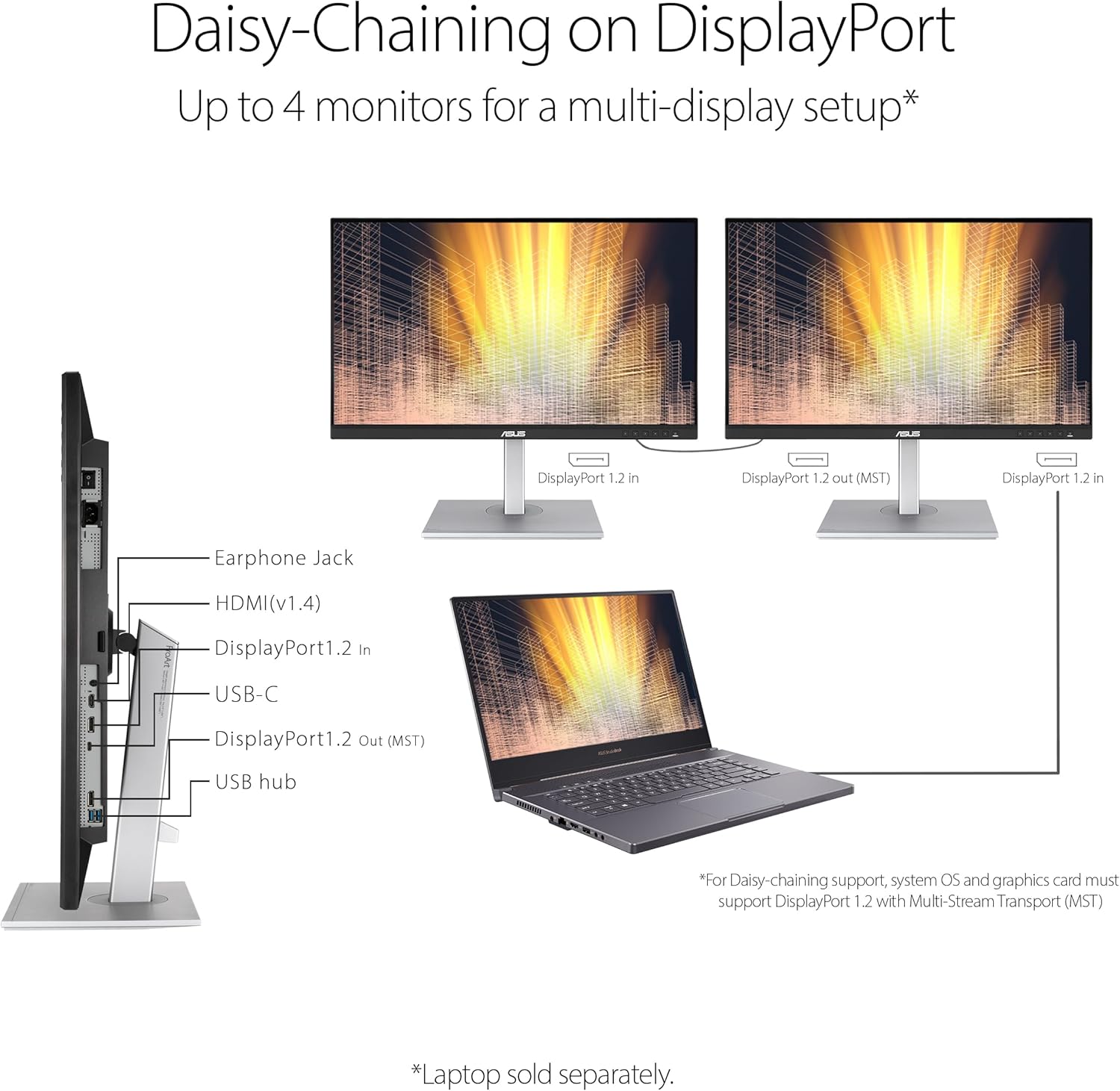
The PA278CV offers extensive connectivity options:
- USB-C: Connect your laptop or Mac for video, data transmission, and up to 65W power delivery via a single cable.
- DisplayPort: For high-resolution video input and daisy-chaining.
- HDMI: Standard video input for various devices.
- Hub USB 3.1: Connect peripherals directly to the monitor.
- Jack Awdjo 3.5mm: Għal apparati awdjo esterni.


4.3. DisplayPort Daisy-Chaining
The monitor supports DisplayPort daisy-chaining, allowing you to connect up to four monitors for a multi-display workstation using a single DisplayPort cable from your source device to the first monitor, and then from the first monitor to subsequent monitors. Ensure your system and graphics card support DisplayPort 1.2 with Multi-Stream Transport (MST).
4.4. Aġġustamenti Ergonomiċi
The PA278CV features an ergonomic stand that allows for height adjustment, tilt, swivel, and pivot to optimize your viewing comfort and workflow.
- Aġġustament Għoli: Adjust the monitor height up to 150 mm.
- Mejjel: Aġġusta l-angolu tal-iskrin minn +35° sa -5°.
- Dawwar: Dawwar l-iskrin orizzontalment minn +45° sa -45°.
- Pivot: Rotate the screen vertically from +90° to -90° for portrait mode.

5. Istruzzjonijiet Operattivi
5.1. Power On/Off
Press the power button located on the front right bottom bezel of the monitor to turn it on or off. The power indicator light will illuminate when the monitor is on.
5.2. Menu tal-Wiri fuq l-Iskrin (OSD).
Use the buttons on the front right bottom bezel to navigate the OSD menu. The OSD menu allows you to adjust various display settings, including brightness, contrast, color temperature, and input source.
5.3. Color Accuracy and Modes
The PA278CV is factory pre-calibrated for excellent Delta E < 2 color accuracy, ensuring precise color reproduction. It supports 100% sRGB and 100% Rec. 709 color gamuts.


5.4. ProArt Palette
Utilize the ASUS ProArt Palette to customize your display via a range of parameters, allowing for fine-tuning of color, brightness, and other settings to match your specific creative needs.

5.5. Karatteristiċi tal-Kura tal-Għajnejn
The monitor incorporates ASUS Eye Care technology to reduce eye strain during prolonged use:
- Filtru tad-Dawl Blu: Reduces harmful blue light emissions. Adjustable levels are available through the OSD menu.
- Teknoloġija Ħieles Flikkjaturi: Eliminates screen flickering to minimize eye fatigue.
- Anti-glare Screen: Inaqqas ir-riflessjonijiet mid-dawl ambjentali.
6. Manutenzjoni
6.1. Tindif tal-Iskrin
Biex tnaddaf l-iskrin, imsaħ bil-mod b'ċarruta ratba u mingħajr suf. Għal marki persistenti, imsaħ bil-modampLaħlaħ id-drapp bl-ilma jew b'tindif tal-iskrin ħafif u mhux abrażiv. Evita li tuża prodotti tat-tindif ibbażati fuq l-alkoħol jew kimiċi ħarxa.
6.2. Tindif tas-Casing
Imsaħ il-monitor casing with a soft, dry cloth. Do not use liquid or aerosol cleaners directly on the casing.
6.3. Ħażna
Jekk se taħżen il-monitor għal perjodu estiż, skonnettja l-kejbils kollha u aħżnu f'post frisk u niexef, preferibbilment fl-imballaġġ oriġinali tiegħu.
7 Issolvi l-problemi
Jekk tiltaqa' ma' problemi bil-monitor tiegħek, irreferi għall-problemi u s-soluzzjonijiet komuni li ġejjin:
- Ebda Qawwa: Ensure the power cord is securely connected to both the monitor and a working power outlet. Check the power indicator light.
- Ebda Sinjal: Verify that the video cable (USB-C, DisplayPort, or HDMI) is correctly connected to both the monitor and your computer. Ensure the correct input source is selected in the OSD menu.
- Skrin li jteptep: Check the video cable connection. Ensure the refresh rate is set correctly in your computer's display settings.
- Image Distortion/Blurry: Adjust the resolution and refresh rate in your computer's display settings to match the monitor's native resolution (2560 x 1440 at 75Hz).
- Ineżattezza tal-Kulur: Ensure the monitor is set to a suitable ProArt Preset mode. If you have a colorimeter, perform a calibration.
If the problem persists after trying these steps, contact ASUS customer support.
8. Speċifikazzjonijiet
| Karatteristika | Speċifikazzjoni |
|---|---|
| Brand | ASUS |
| Numru tal-Mudell | PA278CV |
| Daqs tal-Iskrin | 27 Pulzier |
| Tip ta 'Wiri | LED IPS |
| Riżoluzzjoni Nattiva | 2560 x 1440 (WQHD) |
| Riffriskar Rata | 75 Hz |
| Ħin ta' Rispons | 5 Millisekondi |
| Gamut tal-Kulur | 100% sRGB, 100% Rec. 709 |
| Eżattezza tal-Kulur | Calman Verified, ΔE < 2 |
| Luminożità | 350 cd/m² |
| Proporzjon ta' Kuntrast | 1000:1 |
| ViewIng Angolu | 178 Degrees (H/V) |
| Konnettività | 1x HDMI, 1x DisplayPort, 1x USB-C (DP Alt Mode, 65W PD), 3x USB 3.0, 1x 3.5mm Audio |
| Konsum tal-Enerġija | 65 Watts |
| Item Dimensions (DxWxH) | 14.72"D x 24.21"W x 8.98"H |
| Piż tal-oġġett | 18.52 Liri |
| Tip ta 'Immuntar | Immuntar mal-ħajt (kompatibbli mal-VESA) |
| Karatteristiċi Addizzjonali | Height Adjustment, Mac Compatible, Pivot Adjustment, Tilt Adjustment, Adaptive-Sync |
9. Garanzija u Appoġġ
9.1. Informazzjoni dwar Garanzija
The ASUS ProArt Display PA278CV monitor comes with a Garanzija tal-Manifattur ta' 3 Snin. For detailed terms and conditions, please refer to the warranty card included in your product packaging or visit the official ASUS support websit.
9.2. Appoġġ għall-Klijent
Għal assistenza teknika, soluzzjoni ta' sitwazzjonijiet, jew mistoqsijiet dwar is-servizz, jekk jogħġbok żur is-sit uffiċjali tal-appoġġ tal-ASUS website or contact their customer service hotline. Have your product model number (PA278CV) and serial number ready when contacting support.