
1. Introduzzjoni
Thank you for choosing the XTUGA ES USB/MP3/Bluetooth Professional Audio Mixer. This manual provides essential information for the safe and efficient operation of your mixer. Please read it thoroughly before use and retain it for future reference.
The XTUGA ES series mixers (ES802/ES1202) are designed for professional audio applications, offering features such as USB/MP3 playback and recording, Bluetooth connectivity, built-in digital effects, and +48V phantom power for condenser microphones. Its ultra-thin design and robust metal chassis make it suitable for various environments, including DJ setups, stage performances, and recording studios.
2. Istruzzjonijiet tas-Sigurtà
- Provvista tal-Enerġija: Uża biss l-adapter tal-enerġija speċifikat. Kun żgur li l-volumtage taqbel mal-provvista tal-enerġija lokali tiegħek.
- Ventilazzjoni: Timblokkax il-fetħiet tal-ventilazzjoni. Kun żgur li jkun hemm fluss tal-arja adegwat madwar l-unità biex tevita li tisħon iżżejjed.
- Ilma u Umdità: Do not expose the mixer to rain, moisture, or any liquids. Do not place objects filled with liquids on the mixer.
- Sorsi tas-Sħana: Keep the mixer away from heat sources such as radiators, heat registers, stoves, or other apparatus (including amplifiers) li jipproduċu sħana.
- Tindif: Clean only with a dry cloth. Disconnect the power before cleaning.
- Servizzi: Tippruvax isservi dan il-prodott int stess. Irreferi l-manutenzjoni kollha lil persunal tas-servizz kwalifikat.
- L-ertjar: Żgura ertjar xieraq biex tevita xokk elettriku.
- Ġestjoni tal-Kejbil: Ipproteġi l-kurduni tal-enerġija milli wieħed jimxi fuqhom jew jinqata’, partikolarment ħdejn il-plakek, is-sokits tal-konvenjenza, u l-punt minn fejn joħorġu mill-apparat.
3. Prodott Aktarview
The XTUGA ES series mixer features a compact, durable design with a comprehensive set of controls for versatile audio mixing. It includes multiple input channels, a 3-band equalizer per channel, built-in digital effects, and various connectivity options.

Figura 3.1: Quddiem view of the XTUGA ES Series Professional Audio Mixer, showing all input channels, faders, EQ knobs, and the central control panel with USB/MP3 display.
Karatteristiċi ewlenin:
- Kanali: Available in 8 or 12 mono channel configurations with stereo inputs.
- Preampliifikaturi: High-quality microphone preampliifikaturi.
- Ekwalizzazzjoni: 3-band EQ on each mono channel for precise tone shaping.
- Konnettività: USB/MP3 playback and recording, Bluetooth function for wireless audio streaming.
- Qawwa fantasma: +48V phantom power for condenser microphones.
- Effetti Diġitali: Built-in digital effects processor.
- Monitoraġġ: Headphone monitoring and dual 12-band main level display.
- Disinn Durabbli: Ultra-thin metal chassis for durability and portability.
4. Setup
4.1 Konnessjoni tal-Enerġija
- Kun żgur li s-swiċċ tal-enerġija tal-mixer ikun fil-pożizzjoni "OFF".
- Connect the provided power adapter to the mixer's power input.
- Ipplaggja l-adapter tal-enerġija f'bokk tal-enerġija AC adattat.
- Turn the mixer's power switch to "ON". The power indicator will illuminate.
4.2 Konnessjonijiet tal-Input
The mixer supports various input sources:
- Mikrofoni: Connect microphones to the XLR inputs (MIC) on each channel. For condenser microphones requiring phantom power, ensure the +48V button is activated (see Section 5.2).
- Apparati fil-Livell tal-Linja: Connect instruments, keyboards, or other line-level devices to the 1/4" TRS/TS LINE inputs on each channel.
- Inputs Stereo: Use the dedicated stereo input channels for devices like CD players or external media players.
4.3 Konnessjonijiet ta' Output
- Riżultat Prinċipali: Qabbad l-ispikers ewlenin tiegħek jew amplifier to the MAIN L/R outputs (XLR or 1/4" TRS).
- Ħruġ tal-headphones: Qabbad il-headphones mal-output tal-PHONES għall-monitoraġġ.
- Ibgħat AUX: Use the AUX SEND output to connect to external effects processors or monitor speakers.
4.4 Konnessjoni mal-Kompjuter (USB)
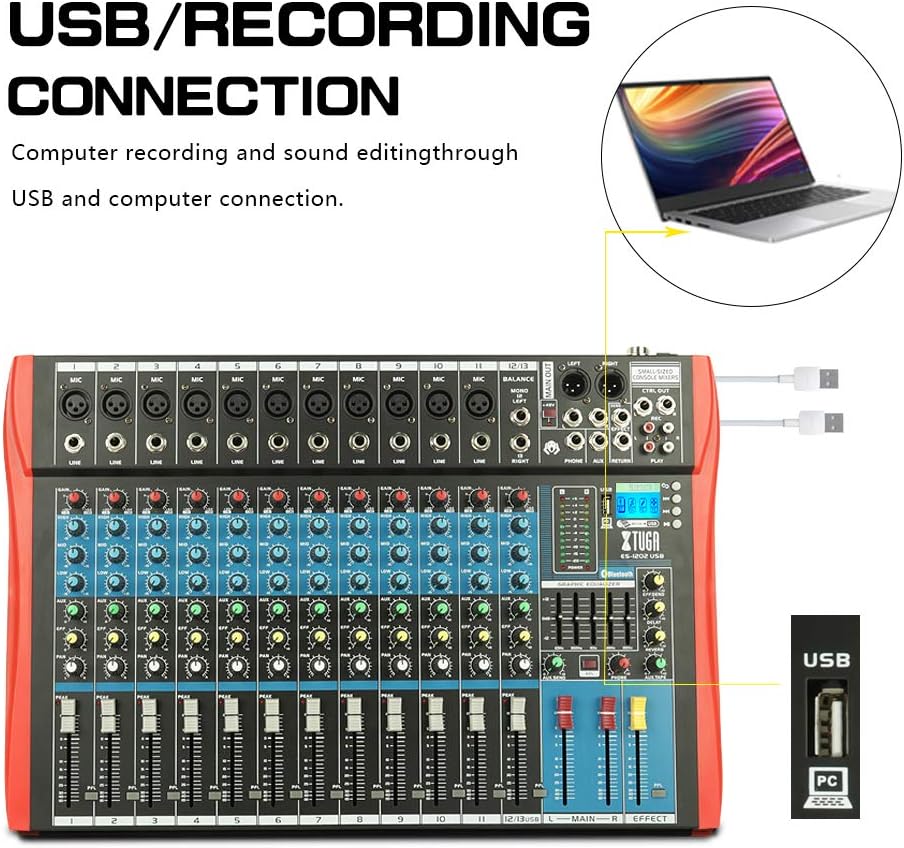
Figura 4.1: Diagram illustrating the USB connection for computer recording and sound editing. Connect the mixer's USB port to your computer using a standard USB cable.
To use the mixer with a computer for recording or playback:
- Connect a USB cable from the mixer's USB port to an available USB port on your computer.
- The mixer will typically be recognized as a standard audio device. No special drivers are usually required for basic functionality.
- Select the mixer as your input/output device in your computer's sound settings or digital audio workstation (DAW) software.
5. Istruzzjonijiet Operattivi
5.1 Kontrolli tal-Kanal
- QLIGĦ: Adjusts the input sensitivity for each channel. Set this to achieve a strong signal without clipping (the PEAK LED should only flash occasionally).
- EQ (GĦOLJA, MIDJA, BASSA): Ekwalizzatur bi 3 baned biex jifforma t-ton ta' kull kanal.

Figura 5.1: Visual representation of the 3-band EQ frequency response curves. The HIGH band boosts/cuts above 12kHz, the MID band sweeps from 250Hz to 6kHz, and the LOW band boosts/cuts below 80Hz.
- GĦOLJA: Adjusts frequencies above 12 kHz (±15 dB).
- MID: Adjusts frequencies between 150 Hz and 3.5 kHz (±15 dB). This is a sweepable mid-range control.
- BAXX: Adjusts frequencies below 80 Hz (±15 dB).
- EFFETT: Sends a portion of the channel signal to the built-in effects processor.
- PAN: Adjusts the stereo position of the channel signal (left to right).
- FADER TAL-KANAL: Controls the output level of each individual channel to the main mix.
- LED PEAK: Jixgħel meta s-sinjal tad-dħul ikun għoli wisq, u jindika potenzjal ta' qtugħ. Naqqas il-GAIN jekk dan l-LED jixgħel ta' spiss.
5.2 +48V Phantom Power
The mixer provides +48V phantom power for condenser microphones. To activate:
- Ensure all channel faders and the main fader are set to their minimum positions.
- Connect your condenser microphone(s) to the XLR inputs.
- Press the +48V PHANTOM POWER button. An indicator light will confirm activation.
- Gradually raise the channel faders and main fader to the desired levels.
Caution: Do not activate phantom power when dynamic microphones or other devices not requiring +48V are connected, as this may cause damage.
5.3 Konnessjoni Bluetooth

Figura 5.2: Close-up of the Bluetooth and MP3 control panel, showing the digital LCD display and control buttons.
Biex tikkonnettja apparat Bluetooth:
- Press the "MODE" button on the MP3 player section until "Bluetooth" is selected on the digital display.
- On your mobile phone, tablet, or other Bluetooth-enabled device, search for available Bluetooth devices.
- Select "XTUGA MIXER" (or similar name) from the list to pair.
- Once paired, you can play audio from your device through the mixer.
5.4 USB/MP3 Playback and Recording
The mixer supports U-DISK MP3 playback and direct recording to a USB drive.
- Daqq MP3: Daħħal USB flash drive li jkun fih MP3 files into the USB port. The mixer will automatically detect and begin playing the files. Use the control buttons (PLAY/PAUSE, PREV, NEXT) on the MP3 player section to navigate.
- Reġistrazzjoni: To record the main mix to a USB drive, ensure a formatted USB drive is inserted. Press the "REC" button on the MP3 player section to start recording. Press it again to stop.
5.5 Effetti Diġitali
The mixer includes a built-in digital effects processor. Use the "EFFECT" knob on each channel to send signal to the effects. The main "EFFECT" fader controls the overall level of the effects return to the main mix. Adjust the effect type and parameters using the dedicated controls in the effects section.
5.6 Monitoraġġ
Connect headphones to the PHONES jack to monitor the main mix. The PHONES level knob controls the headphone volume. The main LED meters provide a visual indication of the main output level.

Figura 5.3: Close-up of the main LED level meters, showing output levels for Left (L) and Right (R) channels, along with the USB and PC connection ports.
6. Manutenzjoni
- Tindif: Regularly wipe the mixer's surface with a soft, dry, lint-free cloth. Do not use abrasive cleaners, solvents, or waxes.
- Ħażna: When not in use for extended periods, store the mixer in a cool, dry place, away from direct sunlight and extreme temperatures. Cover the unit to protect it from dust.
- Kura tal-Cable: Evita li tgħawweġ jew iddawwar il-kejbils b'mod eċċessiv. Skonnettja l-kejbils billi tiġbed il-plagg, mhux il-kejbil innifsu.
7 Issolvi l-problemi
| Problema | Kawża Possibbli | Soluzzjoni |
|---|---|---|
| Ebda output tal-ħoss |
|
|
| Ħoss distort |
|
|
| Il-Bluetooth mhux qed jgħaqqad |
|
|
| USB/MP3 not playing or recording |
|
|
8. Speċifikazzjonijiet
| Karatteristika | Speċifikazzjoni |
|---|---|
| Brand | XTUGA |
| Mudell | ES802/1202 |
| Numru ta 'Kanali | 8 jew 12 (skont il-mudell) |
| Teknoloġija tal-Konnettività | Awżiljarju, Bluetooth, USB |
| Sors tal-Enerġija | Corded Elettriku |
| Rispons ta' Frekwenza | Microphone line input to any output: ±1.5 dB, 20 Hz ~ 20 KHz |
| Distorsjoni Armonika Totali + Storbju | Sensitivity -30dB, Mix output +14dBu <0.02% @ 1 KHz or EQ (stereo input) |
| Crosstalk (1 KHz) | Channel mute > 90 dB, Fader off > 90 dB, AUX send port closed > 83 dB |
| Mono EQ (Q(MF): 1.5) | Low: 80Hz ± 15dB, Mid (sweepable): 150Hz-3.5KHz ± 15dB, High: 12 KHz ± 15 dB |
| Stereo EQ (Q(MF): 0.8) | Low: 80Hz ± 15dB, Mid: 720Hz ± 15dB, High: 12KHz ± 15dB |
| Konsum tal-Enerġija | Inqas minn 35 W |
| Temperatura operattiva | 5°C sa +40°C |
| Input Awdjo | XLR, Line, and Digital Inputs |
| UPC | 784124158662 |
| GTIN | 784124158662 |
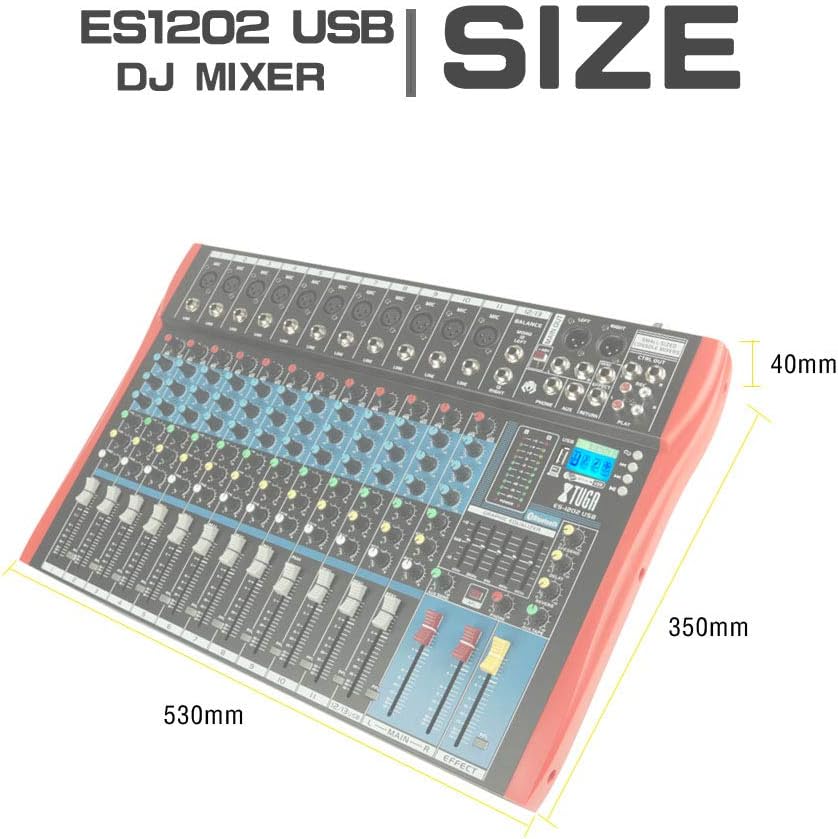
Figura 8.1: Dimensions of the XTUGA ES1202 USB Mixer, showing approximate measurements of 530mm (width), 350mm (depth), and 40mm (height).
9. Garanzija u Appoġġ
9.1 Informazzjoni dwar Garanzija
XTUGA products are designed and manufactured to high-quality standards. For specific warranty terms and conditions, please refer to the warranty card included with your product or contact your local XTUGA distributor or retailer. Keep your proof of purchase for warranty claims.
9.2 Appoġġ għall-Klijent
If you encounter any issues or have questions regarding your XTUGA ES USB/MP3/Bluetooth Professional Audio Mixer that are not covered in this manual, please contact XTUGA customer support or your authorized dealer for assistance. Please have your model number (ES802/1202) and purchase information ready when contacting support.