
DOOGEE S40 Pro
DOOGEE S40 Pro Manwal għall-Utent tat-Telefown imħatteb
Mudell: S40 Pro
Introduzzjoni
The DOOGEE S40 Pro is a rugged smartphone designed for durability and performance in challenging environments. It features a 5.45-inch display, Android 10, a 4650mAh battery, and dual rear cameras. This manual provides essential information for setting up, operating, maintaining, and troubleshooting your device.

Immaġni: Quddiem u wara view of the DOOGEE S40 Pro rugged phone, showcasinid-disinn robust tiegħu u l-modulu tal-kamera.
1. Setup
1.1 Tneħħija tal-kaxxa u l-kontenut tal-pakkett
Carefully unbox your DOOGEE S40 Pro. Verify that all standard accessories are included in the package.

Image: Contents of the DOOGEE S40 Pro package, including the phone, power adapter, USB cable, user manual, and warranty information.
- DOOGEE S40 Pro Smartphone
- Adapter tal-Enerġija
- Cable USB
- Manwal għall-Utent
- Karta ta' Garanzija
1.2 Installazzjoni tal-Karta SIM u l-Karta SD
The DOOGEE S40 Pro supports dual SIM cards and an expandable SD card for additional storage. Locate the SIM tray on the side of the device.
- Use the provided SIM ejector tool to open the SIM card tray.
- Carefully place your Nano-SIM cards and/or microSD card into the designated slots on the tray. Ensure the gold contacts are facing down.
- Imbotta t-trej bil-mod lura fit-telefon sakemm ikun laħlaħ mal-qafas tal-apparat.
1.3 Iċċarġjar inizjali
Qabel l-ewwel użu, huwa rakkomandat li l-apparat jiġi ċċarġjat kompletament.
- Qabbad il-kejbil USB mal-adapter tal-enerġija.
- Plug the USB cable into the charging port of the phone.
- Ipplaggja l-adapter tal-enerġija f'iżbokk tal-ħajt.
- L-indikatur tal-iċċarġjar se jidher fuq l-iskrin. Ħalli t-telefon jiċċarġja sakemm l-ikona tal-batterija tidher mimlija.
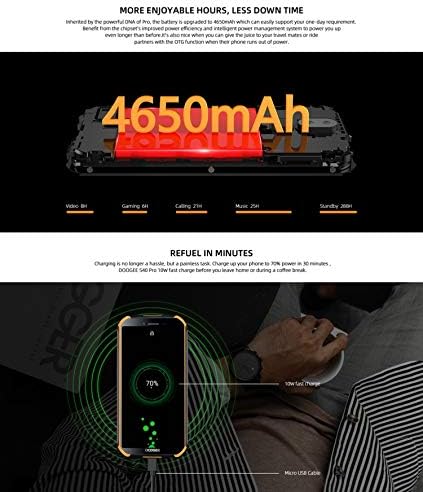
Image: The DOOGEE S40 Pro connected to a charger, showing the charging animation and battery percentage.
1.4 Power On/Off
- Biex Tixgħel: Agħfas u żomm il-buttuna tal-Power (li tinsab fuq in-naħa tal-lemin) sakemm jidher il-logo ta' DOOGEE.
- Biex Tifi: Agħfas u żomm il-buttuna tal-Enerġija sakemm jidher il-menu tal-għażliet tal-enerġija. Agħżel "Itfi" u kkonferma.
- Biex terġa' tibda: Mill-menù tal-għażliet tal-enerġija, agħżel "Erġa' ibda" u kkonferma.
2. Istruzzjonijiet Operattivi
2.1 Navigazzjoni Bażika
The DOOGEE S40 Pro operates on Android 10.0 and uses a touchscreen for navigation.
- Tektek: Touch the screen once to select an item or open an application.
- Swipe: Iddreggja subgħajk fuq l-iskrin biex tiskrollja minn paġni jew listi.
- Agħfas biex Tiżżumja: Poġġi żewġ swaba' fuq l-iskrin u mexxihom 'il bogħod minn xulxin jew lejn xulxin biex tagħmel zoom in jew zoom out.
- Stampa Twila: Press and hold an item to access additional options or move icons.
2.2 Sejħiet u Messaġġi
- Tagħmel Sejħiet: Iftaħ l-app tat-Telefon, daħħal in-numru, u tektek l-ikona tas-sejħa.
- Jirċievu Sejħiet: Swipe up to answer or down to decline an incoming call.
- Tibgħat Messaġġi: Open the Messages app, tap the new message icon, enter the recipient and message, then tap send.
2.3 Użu tal-Kamera
The S40 Pro features dual rear cameras (13MP Sony primary sensor + 2MP portrait camera) and a front camera for selfies.

Image: Diagram highlighting the AI Rear Dual Camera setup on the DOOGEE S40 Pro, showing the 13MP Sony sensor and 2MP portrait camera, along with exampir-ritratti.
- Iftaħ l-app tal-Kamera mill-iskrin tad-dar tiegħek jew mill-kexxun tal-apps.
- Ibdel bejn il-kameras ta' quddiem u ta' wara billi tuża l-ikona tal-bdil tal-kamera.
- Tektek il-buttuna tax-shutter biex tieħu ritratt.
- Explore different modes like Portrait, Video, and Panorama.
2.4 Il-Ftuħ tal-Marka tas-Swaba'
The device includes a rear-mounted fingerprint sensor for quick and secure unlocking.

Image: Illustration of the fingerprint unlock feature on the DOOGEE S40 Pro, showing a finger interacting with the rear-mounted sensor.
- Mur fuq Settings > Sigurtà u post > Marki tas-swaba'.
- Segwi l-istruzzjonijiet fuq l-iskrin biex tirreġistra l-marki tas-swaba’ tiegħek.
- Once registered, simply place your finger on the sensor to unlock the phone.
2.5 NFC and Google Pay
The DOOGEE S40 Pro supports NFC (Near Field Communication) for convenient data transmission and mobile payments like Google Pay.

Image: Visual representation of NFC functionality for Google Pay and data transmission, and the 3.5mm headphone jack on the DOOGEE S40 Pro.
- To enable NFC: Mur fuq Settings > Apparati konnessi > NFC u ixgħelha.
- Google Pay: Ensure Google Pay is set up with your payment methods. Tap your phone to compatible terminals for contactless payments.
2.6 Konnettività
- Wi-Fi: Qabbad ma' netwerks mingħajr fili permezz ta' Settings > Netwerk u internet > Wi-Fi.
- Bluetooth: Imqabbad ma' apparati Bluetooth permezz ta' Settings > Apparati konnessi > Bluetooth.
- USB: Connect to a computer using the provided USB cable for file trasferiment jew iċċarġjar.
- Jack tal-headphones ta' 3.5mm: Plug in wired headphones for audio.
3. Manutenzjoni
3.1 Karatteristiċi Robusti u Durabilità
The DOOGEE S40 Pro is built to withstand harsh conditions, featuring IP68 water and dust resistance and MIL-STD-810G certification for drops and extreme temperatures.

Image: The DOOGEE S40 Pro submerged in water, dropped onto concrete, and surviving a fall, illustrating its IP68 and MIL-STD-810G durability.
- Reżistenza għall-Ilma (IP68): Can withstand submersion up to 1.5 meters for 30 minutes. Ensure all port covers are securely closed before exposure to water.
- Dust Resistance (IP68): Protetti bis-sħiħ kontra d-dħul tat-trab.
- Drop Resistance (MIL-STD-810G): Iddisinjat biex jiflaħ waqgħat sa 1.2 metri fuq uċuħ iebsin.
- Reżistenza għat-temperatura: Operates in extreme temperatures from -55°C to 70°C.

Image: The DOOGEE S40 Pro shown in extreme cold (-55°C) and hot (70°C) environments, highlighting its robust temperature tolerance.
3.2 Tindif tal-Apparat Tiegħek
To clean your DOOGEE S40 Pro:
- Imsaħ l-iskrin u l-korp b'ċarruta ratba u mingħajr suf.
- Għal ħmieġ iebsa, dampLaħlaħ id-drapp ftit bl-ilma. Evita kimiċi ħarxa jew materjali li joborxu.
- If the device has been exposed to saltwater, rinse it thoroughly with fresh water and dry it completely before charging.
3.3 Aġġornamenti tas-Software
Iċċekkja regolarment għal aġġornamenti tas-softwer biex tiżgura prestazzjoni u sigurtà ottimali.
- Mur fuq Settings > Sistema > Aġġornament tas-sistema.
- Follow the on-screen prompts to download and install any available updates. Ensure your device has sufficient battery and a stable internet connection during updates.
4 Issolvi l-problemi
| Problema | Soluzzjoni Possibbli |
|---|---|
| L-apparat ma jixgħelx. | Ensure the battery is charged. Connect to a charger and wait a few minutes before attempting to power on again. If unresponsive, try a forced restart by holding the Power button for 10-15 seconds. |
| Il-batterija tiskula malajr. | Check for background apps consuming power. Reduce screen brightness. Disable Wi-Fi, Bluetooth, or GPS when not in use. Perform a software update. |
| Ma tistax tikkonnettja mal-Wi-Fi. | Kun żgur li l-Wi-Fi huwa attivat. Erġa' ibda r-router u t-telefon tiegħek. Insieh in-netwerk u erġa' qabbad. |
| It-telefon huwa bil-mod jew ma jirrispondix. | Close unnecessary background apps. Clear cache. Restart the device. If issues persist, consider a factory reset (back up data first). |
| Il-kamera ma taħdimx. | Restart the phone. Clear the Camera app's cache and data in Settings > Apps. Ensure no other app is using the camera. |
5. Speċifikazzjonijiet
Key technical specifications for the DOOGEE S40 Pro:
- Isem tal-Mudell: S40 Pro
- Sistema Operattiva: Android 10.0
- Wiri: 5.45 inches, LCD, 1440 x 720 resolution
- RAM: 4 GB
- Ħażna Interna: 64 GB (espandibbli permezz ta' microSD)
- Batterija: 4650mAh
- Kamera ta' wara: Dual Back Cameras (13MP Sony primary + 2MP portrait)
- Kamera ta' quddiem: Iva
- Proċessur: Octa Core (CPU speed: 1.8 GHz, CPU model: Snapdragon)
- Konnettività: 4G Cellular, Wi-Fi, Bluetooth, USB, GPS, NFC
- Karatteristiċi Speċjali: Touchscreen, Fingerprint Sensor, 3.5mm Headphone Jack
- Durabilità: IP68 Water & Dust Resistant, MIL-STD-810G Drop Resistant
- Kulur: Iswed
- X'hemm fil-kaxxa: Adapter, USB Cable
6. Garanzija u Appoġġ
For warranty information and customer support, please refer to the warranty card included in your product package or visit the official DOOGEE websit. Żomm il-prova tax-xiri tiegħek għal talbiet ta' garanzija.
- Uffiċjali Websit: www.doogee.cc (Jekk jogħġbok innota: Dan huwa terminu riżervat) URL, refer to your product's specific documentation for the correct support websit.)
- Servizz tal-Klijent: Contact details may be found on the official webis-sit jew il-karta tal-garanzija tiegħek.
Dokumenti Relatati - S40 Pro
 |
Manwal tal-Utent tal-Ismartphone DOOGEE S40 - Gwida Uffiċjali Esplora l-ismartphone DOOGEE S40 b'dan il-manwal komprensiv għall-utent. Tgħallem dwar is-setup, karatteristiċi bħall-ġestjoni tas-sejħiet, l-illokkjar tal-iskrin, id-dettalji tal-batterija, u l-linji gwida essenzjali tas-sigurtà għad-DOOGEE S40 tiegħek. |
 |
Návod k obsluze DOOGEE S40 Pro: Kompletní průvodce funkcemi a bezpečností Podrobný návod k obsluze pro smartphone DOOGEE S40 Pro. Zjistěte, jak používat funkce telefonu, přenos souborů, telefonování, zprávy, prohlížeč a důležité bezpečnostní pokyny. |
 |
DOOGEE Shoot 1 Smartphone Overview u Speċifikazzjonijiet A over komprensivaview tal-ismartphone DOOGEE Shoot 1, li jagħti dettalji dwar l-ispeċifikazzjonijiet ewlenin tiegħu, il-karatteristiċi tal-kamera, l-għażliet ta’ konnettività, id-dimensjonijiet, u l-kontenut tal-pakkett. Jinkludi twissijiet essenzjali dwar is-sigurtà tal-batterija. |
 |
D16 Smartwatch Quick Start Guide and User Manual Concise guide for the D16 smartwatch, covering setup, features, care, safety, and technical specifications. Learn how to download the Gloryfit app, pair your device, and use its health monitoring functions. |
 |
DOOGEE Tab A9 Tablet PC WiFi Version - Specifications Detailed specifications for the DOOGEE Tab A9 Tablet PC with WiFi. Features include Android 15, 10.1-inch HD IPS display, Unisoc T310 processor, 12GB RAM, 64GB ROM, and a 6580mAh battery. |
 |
DOOGEE N55 Smartphone: Specs, Features, and What's Included Discover the DOOGEE N55 smartphone, featuring a 6.56-inch HD+ IPS display, Android 14, Spreadtrum T606 processor, 4GB RAM, 128GB storage, 50MP rear camera, and 5150mAh battery. |
Ask a question about this manual
Ask about setup, troubleshooting, compatibility, parts, safety, or missing instructions. Manuals+ will review the question and use this page’s manual context to help answer it.