
1. Prodott Aktarview
The Fractal Design Pop Mini Air RGB PC Case (Model: FD-C-POR1M-01) is a mini-tower computer case designed to accommodate mATX and Mini ITX motherboards. It features a tempered glass side panel, three pre-installed 120mm Aspect RGB fans, and a mesh front panel for optimal airflow. The case also includes convenient storage solutions and cable management features.

Quddiem view of the Fractal Design Pop Mini Air RGB PC Case, showcasing the mesh panel and illuminated RGB fans.

Intern view of the Fractal Design Pop Mini Air RGB PC Case, highlighting the spacious layout and component compatibility.
2. Setup u Installazzjoni
2.1 Unpacking the Case
Neħħi l-kaxxa tal-PC mill-imballaġġ tagħha bir-reqqa. Spezzjona għal kwalunkwe ħsara waqt it-trasport. Żomm il-materjali tal-imballaġġ kollha għal trasport jew talbiet ta' garanzija fil-futur.
2.2 It-Tneħħija tal-Panelli tal-Ġenb
The tempered glass side panel is secured by two thumbscrews at the rear. Unscrew these and gently pull the panel away from the chassis. The opposite side panel can be removed similarly.

Rear angle view of the PC case, showing the thumbscrews for the tempered glass side panel.
2.3 Installazzjoni tal-Motherboard
The Pop Mini Air supports mATX and Mini ITX motherboards. Install your motherboard onto the pre-installed standoffs. Ensure all screws are tightened securely.
2.4 Installazzjoni tal-Provvista tal-Enerġija
The power supply mounts at the bottom rear of the case. Slide the power supply into its designated bay and secure it with screws from the rear. The case supports ATX power supplies up to 170mm in length.
2.5 Installazzjoni tad-Drive tal-Ħażna
The case offers versatile storage options:
- SSD Trays: Two SSD trays are located behind the motherboard tray. These trays can be easily removed for installation and can also be mounted on the power supply cover for display.
- HDD/SSD Bays: Two removable storage trays are located in the bottom section of the case, supporting both 3.5-inch and 2.5-inch drives.
- 5.25" Bays: Two neatly concealed 5.25" bays with a storage drawer and magnetic cover are accessible at the front bottom of the case.

Intern ta' wara view showing SSDs mounted on the motherboard tray.
2.6 Graphics Card and CPU Cooler Installation
The case supports graphics cards as long as 405mm and CPU coolers up to 170mm tall. Install these components according to their respective manufacturer's instructions.
2.7 Ġestjoni tal-Cable
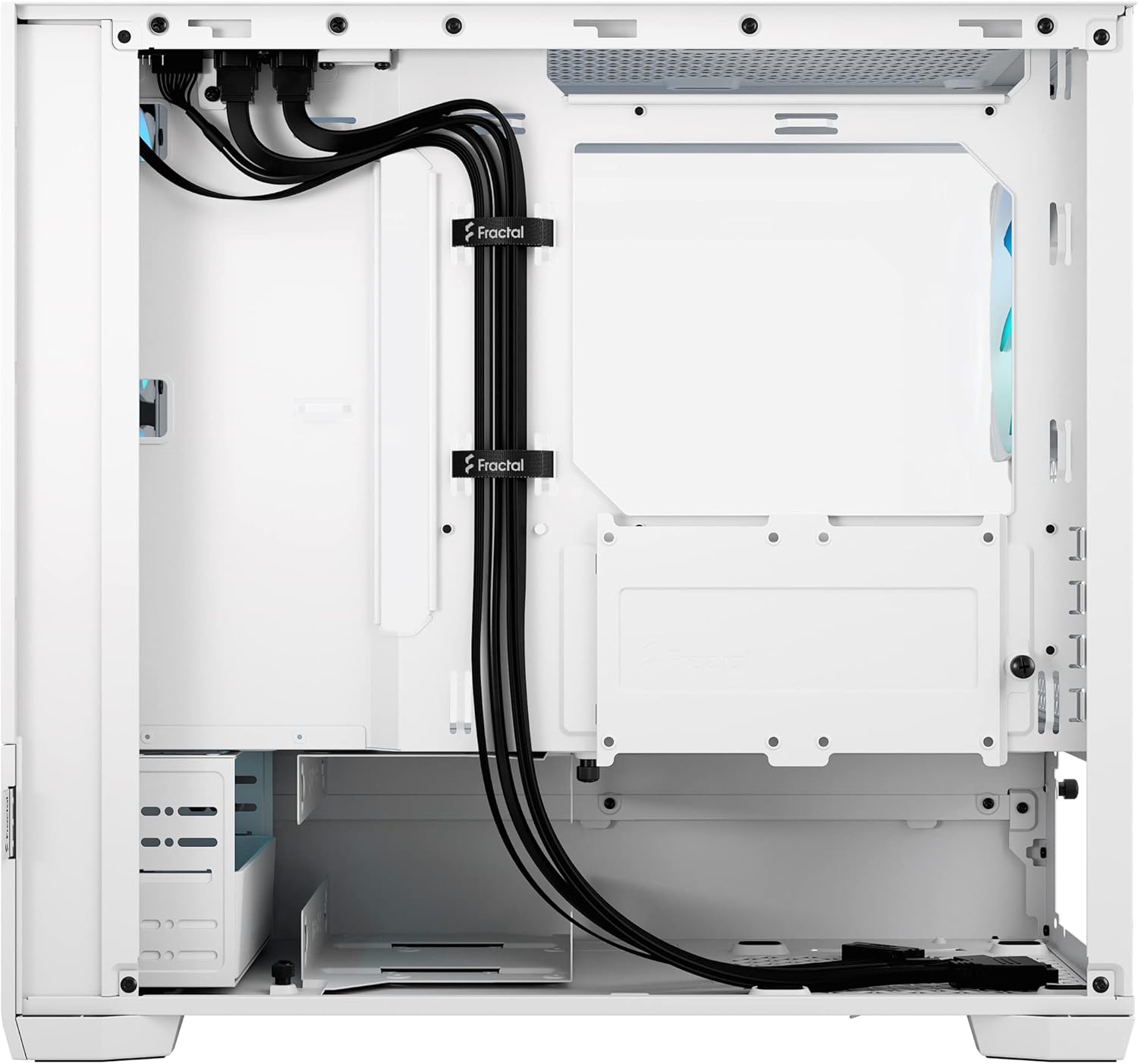
Utilize the multiple large cable routing channels and pre-installed Velcro cable ties behind the motherboard tray to manage cables effectively. This ensures optimal airflow and a clean build appearance.

Intern ta' wara view demonstrating cable management options.
3. Tħaddim tal-Kaxxa tal-PC
3.1 Pannell tal-I/O ta' Quddiem
The front I/O panel is located on the top right side of the case and includes:
- 1 x USB Type-C connection (Note: May require an optional accessory for full functionality)
- 2 x portijiet USB 3.0
- 1 x USB 2.0 port
- Jack tal-headphone
- Jack tal-mikrofonu
- Small button for RGB controller
- Larger power button

Close-up of the top I/O panel with USB ports, audio jacks, and power/RGB buttons.
3.2 RGB Fan Control
The three pre-installed Aspect RGB fans can be controlled via a dedicated button on the top I/O panel or connected to your motherboard's ARGB header for software control. Pressing the button cycles through various colors and lighting effects. Pressing and holding the button will stop on the current color.
Wirja uffiċjali tal-vidjo tal-prodottasing the Fractal Design Pop series, including RGB lighting effects and design features.
4. Manutenzjoni
4.1 Tindif tal-Filtru tat-Trab
The case features a removable magnetic dust filter on the top panel and a pull-out filter at the rear for the power supply. Regularly clean these filters to maintain optimal airflow and prevent dust buildup inside the case.
Top dust filter being removed for cleaning, revealing the fan mounts underneath.
4.2 Tindif Ġenerali
Use a soft, dry cloth to wipe down the exterior of the case. For the tempered glass panel, use a glass cleaner and a microfiber cloth to avoid scratches.
5 Issolvi l-problemi
5.1 Fans Not Spinning/RGB Not Lighting Up
- Check all fan power connections to the motherboard or power supply.
- Ensure ARGB cables are securely connected to the motherboard header or the case's integrated RGB controller.
- If using the integrated controller, press the RGB button on the I/O panel to cycle through modes or ensure it's not turned off.
5.2 Poor Airflow/High Temperatures
- Verify that all fans are spinning correctly and oriented for proper airflow (front fans intake, rear/top fans exhaust).
- Clean all dust filters to ensure unrestricted airflow.
- Ensure no cables are obstructing fan blades or airflow paths.
5.3 Il-Portijiet I/O ta' Quddiem Mhux Jiffunzjonaw
- Check that all front I/O cables (USB, audio) are correctly connected to the corresponding headers on your motherboard.
- Ensure the USB Type-C cable is connected to a compatible header on your motherboard (if applicable, as some models may require an optional accessory).
6. Speċifikazzjonijiet
| Karatteristika | Dettall |
|---|---|
| Isem tal-Mudell | Pop Mini Air RGB White Core - Tempered Glass Clear Tint |
| Numru tal-Mudell | FD-C-POR1M-01 |
| Kompatibbiltà tal-motherboard | mATX / Mini ITX |
| Tip ta' Każ | Mini-Torri |
| Dimensjonijiet (LxWxH) | 17.01 x 8.46 x 15.47 pulzieri (madwar 432 x 215 x 393 mm) |
| Piż tal-oġġett | 15.93 liri (madwar 7.23 kg) |
| Materjal | Ħġieġ ittemprat, Azzar |
| Fannijiet installati minn qabel | 3 x 120mm Aspect RGB fans |
| Max GPU Tul | 405 mm |
| Max CPU Cooler Għoli | 170 mm |
| Tip ta' Immuntar tal-Provvista tal-Enerġija | Rear Mount (ATX up to 170mm) |
| Drive Bays | Up to 2 x 3.5" HDD, 6 x 2.5" SSD (or 1 x 3.5" HDD and 5 x 2.5" SSD with one optical bay in use), 2 x 5.25" ODD |
| I/O quddiem | 1 x USB Type-C, 2 x USB 3.0, 1 x USB 2.0, Audio In/Out, RGB Control Button, Power Button |

Diagram showing the dimensions of the Fractal Design Pop Mini Air RGB PC Case.
7. Garanzija u Appoġġ
For warranty information and technical support, please visit the official Fractal Design website or contact their customer service. Keep your purchase receipt and product model number (FD-C-POR1M-01) handy for any inquiries.
Il-pjanijiet ta' protezzjoni huma disponibbli għax-xiri separatament:
- Pjan ta' Protezzjoni ta' Sentejn: $13.49
- Pjan ta' Protezzjoni ta' Sentejn: $17.99
- Complete Protect: $16.99/xahar (tkopri x-xiri kollu eliġibbli tal-passat u tal-futur)