
ASUS Prime B450M-A II
Manwal tal-Utent tal-Motherboard ASUS Prime B450M-A II AMD AM4
Model: Prime B450M-A II | Brand: ASUS
Introduzzjoni
The ASUS Prime B450M-A II motherboard provides a robust foundation for your PC build, supporting Ryzen 5000, 3rd, 2nd, and 1st Gen AMD Ryzen processors. It features a comprehensive set of controls for cooling, a robust power design, and immersive onboard audio, making it suitable for both new builders and those looking to upgrade.
Il-karatteristiċi ewlenin jinkludu:
- AMD AM4 Socket compatibility with a wide range of Ryzen CPUs.
- USB 3.2 Gen 2 for ultra-fast data transfer and onboard M.2 support.
- Optimized cooling with VRM and PCH heatsinks, and flexible fan controls via ASUS Fan Xpert 2 plus.
- Enhanced durability with LANGuard, DRAM overcurrent protection, and SafeSlot Core.
- PC DIY friendly features like BIOS Flashback and ASUS UEFI BIOS.
- Outstanding gaming audio with dedicated PCB layers and premium capacitors.
- Aura Sync RGB and Armoury Crate Utility for customization.
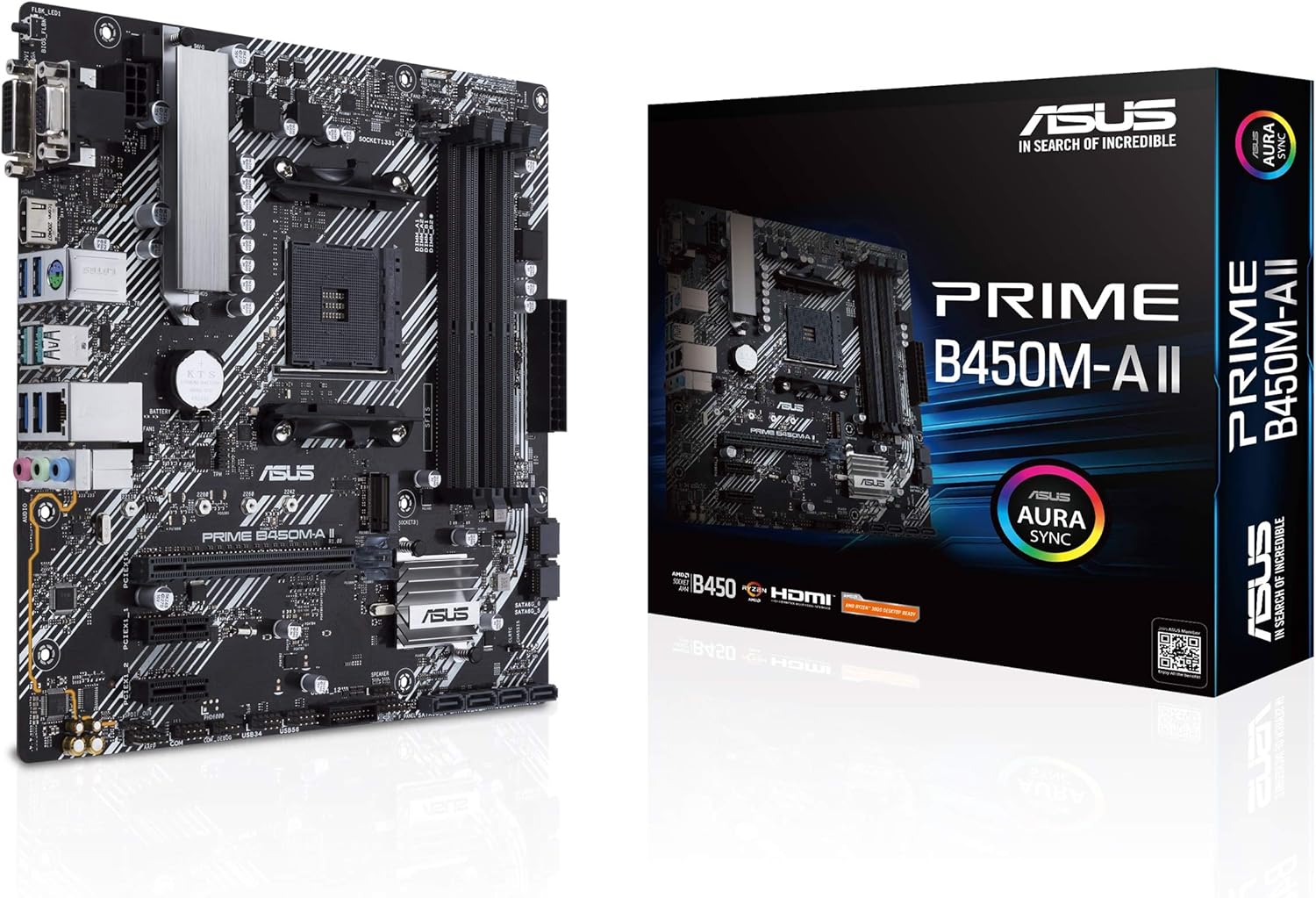
Figure 1: The ASUS Prime B450M-A II motherboard alongside its retail packaging.
Setup
1. Tneħħija tal-kaxxa u l-Kontenut tal-Pakkett
Before beginning installation, ensure all components are present and undamaged. The package typically includes the motherboard, a user guide, a support DVD, SATA cables, M.2 screw package, and a rear I/O panel shield.

Figure 2: Typical contents found within the ASUS Prime B450M-A II motherboard packaging, including the motherboard, user guide, support DVD, SATA cables, M.2 screw package, and rear I/O panel shield.
2. Installazzjoni Fiżika
Carefully install the motherboard into your PC case, ensuring proper alignment with standoffs. Connect all necessary power cables, including the 8-pin PWR connector and the main 24-pin power connector.

Figura 3: Aktarview of the motherboard highlighting the 8-pin PWR connector, 4-pin CPU fan header, 4-pin CHA fan header, and VRM heatsink with thermal pads for enhanced power delivery and cooling.
2.1. Installazzjoni tas-CPU
Install your AMD AM4 socket compatible CPU into the designated socket on the motherboard. Ensure correct orientation and secure the retention arm.
2.2. Installazzjoni tar-RAM
This motherboard supports up to 128GB DDR4 RAM across four DIMM slots, with speeds up to 4400 (O.C.) MHz. Insert RAM modules firmly into the slots until the clips lock into place.
2.3. M.2 SSD and Storage Installation
Utilize the onboard M.2 slot for high-speed NVMe SSDs (PCIe 3.0 x4 & SATA mode supported). Connect SATA drives to the available SATA ports.

Figure 4: The motherboard showcasing its productivity features, including 4 DIMM slots supporting up to 128GB DDR4 4400MHz (O.C.), LED-illuminated design, Realtek codec, audio shielding, premium Japanese audio capacitors, dedicated audio PCB layers, 32Gb/s M.2 support (PCIe 3.0 x4 & SATA mode), and USB 3.2 Gen 1 front panel connector.
2.4. Graphics Card and Expansion Slots
Install your graphics card into the primary PCIe x16 slot. The SafeSlot Core safeguards provide enhanced retention and shearing resistance. Additional PCIe x1 slots are available for other expansion cards.
2.5. Connecting Peripherals (Rear I/O)
Connect your display via HDMI 2.0b, DVI, or D-Sub ports. Utilize the USB 3.2 Gen 2 (10Gbps), USB 3.2 Gen 1, and USB 2.0 ports for peripherals. The motherboard also features Realtek LAN and audio jacks.

Figura 5: Dettaljat view of the motherboard's rear I/O panel, featuring the BIOS Flashback button, D-Sub, DVI-D, HDMI, PS/2, 2x USB 3.2 Gen 2, 2x USB 3.2 Gen 1, Realtek LAN, and audio jacks.
Operazzjoni
1. Konfigurazzjoni tal-BIOS/UEFI
The ASUS exclusive UEFI BIOS provides an intuitive interface for system configuration. Access the BIOS during startup by pressing the designated key (usually DEL or F2). Here you can adjust boot order, fan curves, and other system settings.
Il- Flashback tal-BIOS feature allows you to update the BIOS without a CPU, memory, or graphics card installed, which is particularly useful for supporting newer CPU generations.
2. Installazzjoni tas-sewwieq
After installing your operating system (Windows 10 64-bit or Windows 7 64-bit recommended), install the latest drivers for the chipset, audio, LAN, and other components. These can be found on the included support DVD or downloaded from the official ASUS support websit.
3. Utilitajiet tas-Softwer
Utilize ASUS software for enhanced control and customization:
- Kaxxa tal-Armerija: A centralized software suite for managing system settings, drivers, and Aura Sync lighting.
- Aura Sync RGB: Synchronize LED effects across compatible PC gear. The motherboard includes an RGB header for additional lighting strips and an audio LED on the back of the board.

Figure 6: The motherboard illustrating features for personalization, including the 4-pin RGB header, audio LED on the back of the board, and LED-illuminated control for PCIe slot and trace paths.
Manutenzjoni
1. Tindif
Regularly clean your PC components to prevent dust buildup, which can lead to overheating. Use compressed air to clear dust from heatsinks, fans, and other areas. Ensure the system is powered off and unplugged before cleaning.
2. Aġġornamenti tal-BIOS
Keeping your BIOS up to date is crucial for system stability, compatibility with new hardware (especially newer Ryzen CPUs like the 5000 series), and performance improvements. Visit the official ASUS support site, search for your motherboard model (Prime B450M-A II), navigate to the "Support" tab, then "Drivers and Tools," and finally "BIOS and Firmware" to download the latest version. Follow the instructions provided by ASUS for a safe update process.
3. Verifiki tal-Komponenti
Periodically check all cable connections (power, SATA, front panel) to ensure they are secure. Verify that all fans (CPU, chassis) are spinning correctly and are free of obstructions. Monitor system temperatures using software utilities to ensure optimal cooling performance.
Issolvi l-problemi
Jekk tiltaqa' ma' problemi bil-motherboard tiegħek, ikkunsidra l-passi komuni li ġejjin għas-soluzzjoni tal-problemi:
- Ebda Qawwa/Ebda POST:
- Kun żgur li l-kejbils tal-enerġija kollha (24-pin ATX, 8-pin CPU) huma konnessi sew.
- Erġa' poġġi l-moduli tar-RAM. Ipprova boot b'RAM stick wieħed biss.
- CMOS ċar (irreferi għall-manwal tal-motherboard għall-post tal-jumper jew it-tneħħija tal-batterija).
- Ebda Display:
- Verify the monitor cable is connected to the graphics card (if dedicated) or motherboard (if using integrated graphics).
- Erġa' poġġi l-karta grafika f'postha.
- Ittestja b'kejbil jew monitor tad-displej differenti.
- Boot Issues/OS Not Loading:
- Check boot order in BIOS.
- Ensure storage drives are properly connected and detected.
- Run a diagnostic check on your storage drive.
- Periferali Mhux Rilevat:
- Ipprova port USB differenti.
- Update USB drivers.
- Check device manager for conflicts.
Għal aktar dettalji dwar is-soluzzjoni tal-problemi, irreferi għall-gwida komprensiva official user manual (PDF).
Speċifikazzjonijiet
| Karatteristika | Dettall |
|---|---|
| Brand | ASUS |
| Isem tal-Mudell | B450M-A II |
| Socket tas-CPU | Sokit AM4 |
| Proċessuri Kompatibbli | Ryzen 5000, 3rd/2nd/1st Gen AMD Ryzen CPUs |
| Tip ta' Ċipset | AMD B450 |
| Teknoloġija tal-Memorja RAM | DDR4 |
| Veloċità tal-Memorja | Up to 4400 MHz (O.C.) |
| RAM Massima Appoġġjata | 128GB (4 slots DIMM) |
| Interface tal-Ħażna | 1 x M.2 slot (PCIe 3.0 x4 & SATA mode), SATA 6Gb/s |
| Portijiet USB | USB 3.2 Gen 2 (10Gbps), USB 3.2 Gen 1, USB 2.0 |
| Output tal-vidjo | HDMI 2.0b, DVI, D-Sub |
| LAN | Realtek Gigabit Ethernet |
| Fattur tal-Formola | Mikro ATX |
| Dimensjonijiet tal-oġġett LxWxH | 9.6 x 9.5 x 2 pulzieri |
| Piż tal-oġġett | 2.1 liri |
| Sistema Operattiva | Windows 10 64-bit, Windows 7 64-bit |
Garanzija u Appoġġ
The ASUS Prime B450M-A II motherboard is built with durability in mind, featuring all-round protection technologies like LANGuard, DRAM overcurrent protection, overvoltagProtezzjoni elettronika, salvagwardji SafeSlot Core, u I/O ta' wara tal-azzar li ma jissaddadx.
For detailed warranty information, technical support, and the latest drivers and utilities, please visit the official ASUS support webis-sit jew irreferi għall-informazzjoni komprensiva user manual (PDF) provdut mal-prodott tiegħek.
Tista 'wkoll iżżur il- Ħanut tal-ASUS fuq Amazon għal aktar informazzjoni u riżorsi dwar il-prodott.
Ask a question about this manual
Ask about setup, troubleshooting, compatibility, parts, safety, or missing instructions. Manuals+ will review the question and use this page’s manual context to help answer it.