
1. Introduzzjoni
The Ewent EW1538 Dual Monitor Desk Mount is designed to create an ergonomic and space-saving workspace. This gas spring-powered desk mount allows you to position two monitors (13-27 inches, 2-7 kg each) at your ideal height and viewing angle with ease. Its flexible adjustments help reduce strain on your neck, back, and shoulders, promoting a more comfortable and productive environment. The integrated cable management system keeps your workspace tidy.

Image 1.1: Ewent EW1538 Dual Monitor Desk Mount without monitors.
2. Informazzjoni dwar is-Sigurtà
Please read all instructions carefully before assembly and use. Failure to follow these instructions may result in property damage, serious injury, or death.
- Kapaċità tal-piż: Do not exceed the maximum weight capacity of 7 kg (15.4 lbs) per monitor. Ensure your monitors are within the specified weight range.
- Daqs tal-Monitor: This mount is suitable for monitors between 13 and 27 inches.
- Kompatibbiltà VESA: Ensure your monitors have VESA mounting patterns (75x75mm or 100x100mm).
- Ħxuna tal-Iskrivanija: Verify your desk is thick enough and structurally sound to support the combined weight of the mount and monitors.
- Punti ta' Qbid: Be aware of moving parts and potential pinch points during assembly and adjustment. Keep hands clear.
- Assemblea: Assemble the product exactly as described in this manual. Do not modify the mount.
- Tfal: Keep children away from the assembly area. Small parts may be a choking hazard.
3. Kontenut tal-Pakkett
Before assembly, ensure all parts are present and undamaged. If any parts are missing or damaged, contact your retailer for assistance.
- Bażi Desk
- Arblu Prinċipali
- Assemblea tad-Driegħ tal-Monitor Doppju
- Pjanċi tal-Immuntar VESA (x2)
- Kit tal-Ħardwer (viti, woxers, spacers)
- Allen Keys / Wrenches
- Klipps għall-Immaniġġjar tal-Kejbils
4. Istruzzjonijiet ta' Setup
Follow these steps to assemble and install your Ewent EW1538 Dual Monitor Desk Mount.
4.1. Attach Base to Pole
- Place the desk base on a stable surface.
- Insert the main pole into the designated slot on the desk base.
- Secure the pole to the base using the provided screws and an Allen key from underneath the base. Tighten firmly.
4.2. Attach Monitor Arm Assembly to Pole
- Slide the dual monitor arm assembly onto the main pole.
- Adjust the arm to your desired initial height and secure it by tightening the locking screw on the back of the arm assembly with an Allen key.

Immaġni 4.1: Fuqview of the monitor mount components and assembly.
4.3. Waħħal il-Pjanċi VESA mal-Monituri
- Poġġi l-monitor tiegħek b'wiċċu 'l isfel bir-reqqa fuq wiċċ artab u nadif.
- Attach a VESA mounting plate to the back of each monitor using the appropriate screws and washers from the hardware kit. Ensure the screws are tightened securely but do not overtighten.

Image 4.2: Detail of VESA plate attachment to a monitor.
4.4. Mount Monitors to Arms
- With assistance, carefully lift each monitor and slide the VESA plate attached to the monitor onto the corresponding arm bracket.
- Ensure the monitor is securely seated on the bracket. Some brackets may have a quick-release or locking mechanism; engage it if present.
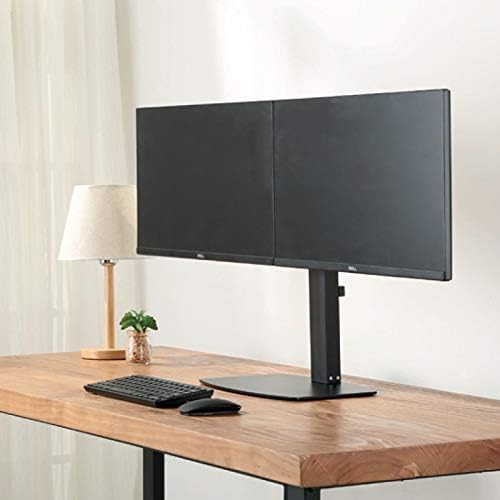
Stampa 4.3: Quddiem view of two monitors mounted on the desk stand.
4.5. Aġġusta t-Tensjoni tar-Rebbiegħa tal-Gass
- The gas spring tension may need adjustment to properly support your monitor's weight.
- Locate the tension adjustment screw on the arm (usually near the VESA plate or the arm pivot point).
- If the monitor sags, turn the screw clockwise to increase tension. If the monitor floats up too easily, turn the screw counter-clockwise to decrease tension. Adjust until the monitor stays in place when moved.
4.6. Ġestjoni tal-Kejbil
- Route your monitor cables (power, video) through the integrated cable management clips or channels on the monitor arms and down the main pole.
- This helps keep your workspace organized and prevents cable clutter.
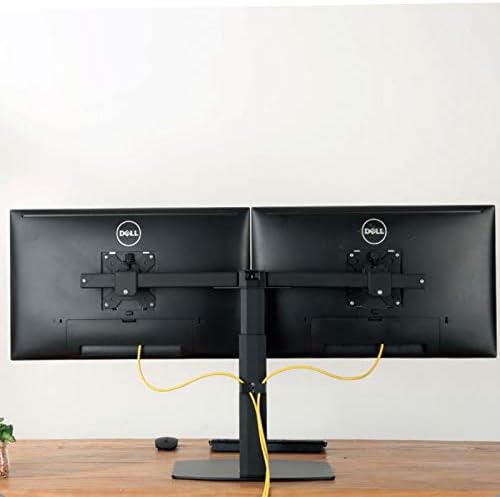
Stampa 4.4: Wara view illustrating cable management with monitors mounted.
5. Istruzzjonijiet Operattivi
The Ewent EW1538 offers various adjustments for optimal viewkumdità.
- Aġġustament Għoli: Imbotta jew iġbed il-monitor bil-mod 'il fuq jew 'l isfel biex taġġusta l-għoli tiegħu. Il-mekkaniżmu tal-molla tal-gass se jżommu f'postu.
- Aġġustament tal-inklinazzjoni: Tilt the monitor screen up or down to reduce glare and find your preferred viewangolu tal-ing.
- Aġġustament tad-dawran: Swivel the monitor left or right to share your screen or adjust your viewing pożizzjoni.
- Rotazzjoni: Dawwar il-monitor 360 grad biex taqleb bejn l-orjentazzjonijiet orizzontali u vertikali.

Image 5.1: Monitors adjusted to different orientations (landscape and portrait).
6. Manutenzjoni
Manutenzjoni regolari tiżgura l-lonġevità u l-funzjonament xieraq tal-muntatura tal-monitor tiegħek.
- Tindif: Naddaf il-muntatura b'ċarruta ratba, damp drapp. Evita prodotti tat-tindif jew solventi li joborxu.
- Iċċekkja l-Konnessjonijiet: Iċċekkja l-viti u l-konnessjonijiet kollha perjodikament biex tiżgura li jibqgħu ssikkati. Erġa' ssikka jekk meħtieġ.
- Rebbiegħa tal-Gass: The gas spring is designed for long-term use and generally requires no maintenance. If adjustment becomes difficult, re-check the tension setting.
7 Issolvi l-problemi
If you encounter issues with your monitor mount, refer to the following common solutions:
| Problema | Kawża Possibbli | Soluzzjoni |
|---|---|---|
| Monitor sags or drops | It-tensjoni tal-molla tal-gass hija baxxa wisq għall-piż tal-monitor. | Increase gas spring tension by turning the adjustment screw clockwise. |
| Monitor floats up too easily | It-tensjoni tal-molla tal-gass hija għolja wisq għall-piż tal-monitor. | Decrease gas spring tension by turning the adjustment screw counter-clockwise. |
| Il-moniters mhumiex livellati | Minor height discrepancy between arms or VESA plates. | Adjust the individual VESA plate height or arm tilt to level the monitors. |
| Il-muntatura tħossha instabbli | Base screws are loose or desk is not sturdy. | Ensure all assembly screws are tightened. Verify desk stability. |
8. Speċifikazzjonijiet
- Mudell: EW1538
- Ditta: Ewent
- Kompatibbiltà tad-Daqs tal-Iskrin: 13 - 27 pulzieri
- Kapaċità tal-piż: 2 - 7 kg (4.4 - 15.4 lbs) per monitor
- Kompatibbiltà VESA: 75x75mm, 100x100mm
- Moviment: Height adjustment (gas spring), Tilt (up to 15 degrees), Swivel, 360° Rotation
- Materjal: Metall durabbli u kostruzzjoni tal-plastik
- Kulur: Iswed
- Piż tal-Prodott: Madwar 6 kg (13.2 lbs)
9. Garanzija u Appoġġ
For warranty information or technical support, please refer to the documentation provided with your purchase or visit the official Ewent website. Contact details for customer service can typically be found there.