
1. Introduzzjoni
This manual provides essential information for the safe and effective use of your Lenovo Smartwatch R1. Please read this manual thoroughly before using the device to ensure proper operation and to prevent damage.
2. Prodott Aktarview
The Lenovo Smartwatch R1 is a versatile wearable device designed to integrate seamlessly with your smartphone, offering features such as activity tracking, heart rate monitoring, and notification alerts. It features a 1.33-inch TFT touchscreen display and IP68 water resistance.

Figura 2.1: Quddiem view of the Lenovo Smartwatch R1 displaying the time and date.

Figura 2.2: Proġett tal-ġenbfile of the smartwatch, showcasing its design and strap texture.

Figure 2.3: Various colored straps and bezels, illustrating the customization options for the smartwatch.

Figure 2.4: Display of various watch faces and key features, including continuous heart rate monitoring.
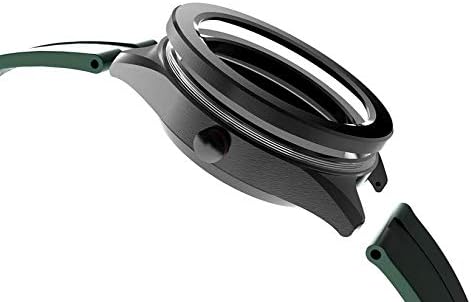
Figura 2.5: Dettaljat view of the watch casing and the strap attachment point.
3. Setup
3.1. Iċċarġjar tal-Ismartwatch
Before first use, fully charge your Lenovo Smartwatch R1. Connect the provided charging cable to the charging port on the back of the watch and plug the USB end into a standard USB power adapter (not included) or a computer USB port. The watch display will indicate charging status. A full charge typically takes approximately 2 hours.
3.2. Tixgħil / Mitfi
- Biex Tixgħel: Press and hold the side button until the Lenovo logo appears on the screen.
- Biex Tifi: Agħfas u żomm il-buttuna tal-ġenb, imbagħad agħżel 'Itfi' mill-għażliet fuq l-iskrin.
3.3. It-tqabbil mal-Ismartphone Tiegħek
- Download the official Lenovo Smartwatch application from your smartphone's app store (compatible with iOS 8.0+ and Android 4.4+).
- Kun żgur li l-Bluetooth huwa attivat fuq l-ismartphone tiegħek.
- Open the Lenovo Smartwatch app and follow the on-screen instructions to create an account or log in.
- Agħżel 'Żid Apparat' jew 'Imqabbad Apparat Ġdid' fl-app.
- The app will search for available devices. Select 'Lenovo R1' from the list.
- Ikkonferma t-talba ta' tqabbil kemm fuq l-ismartphone tiegħek kif ukoll fuq l-ismartwatch.
4. Istruzzjonijiet Operattivi
4.1. Navigazzjoni Bażika
The Lenovo Smartwatch R1 features a 1.33-inch TFT touchscreen for navigation.
- Swipe 'l fuq/'l isfel: Skrollja fil-menus jew fin-notifiki.
- Swipe Xellug/Lemin: Aċċessa widgets differenti jew settings rapidi.
- Tektek: Agħżel oġġett jew iftaħ applikazzjoni.
- Agħfas il-Buttuna tal-Ġenb: Erġa' lura għall-iskrin tad-dar jew qajjem l-apparat.
4.2. Karatteristiċi ewlenin
- Monitoraġġ tar-Rata tal-Qalb: The smartwatch provides 24-hour continuous heart rate monitoring. Access this feature from the main menu or a dedicated widget.
- Traċċar tal-Attività: Track steps, distance, calories burned, and sleep patterns. Data is synchronized with the companion app.
- Notifiki: Receive call, message, and app notifications directly on your wrist after successful pairing with your smartphone.
- Uċuħ tal-Għassa: Customize your watch face through the device settings or the companion app.
4.3. Using the Companion App
The Lenovo Smartwatch app on your smartphone provides a comprehensive overview of your health data, allows for device settings customization, and enables firmware updates. Ensure your watch is connected via Bluetooth to synchronize data and apply settings.
5. Manutenzjoni
5.1. Cleaning the Smartwatch
Naddaf l-ismartwatch tiegħek regolarment biex iżżomm id-dehra u l-funzjonalità tiegħu.
- Imsaħ l-iskrin u l-korp b'ċarruta ratba, damp, drapp mingħajr ħelu.
- For the strap, use mild soap and water, then rinse thoroughly and dry completely before wearing.
- Evita li tuża kimiċi ħarxa, prodotti tat-tindif li joborxu, jew solventi.
5.2. Reżistenza għall-Ilma (IP68)
The Lenovo Smartwatch R1 is rated IP68, meaning it is resistant to dust and can withstand immersion in water up to 1.5 meters for up to 30 minutes. It is suitable for daily use, such as hand washing or light rain. It is not recommended for swimming, diving, or high-pressure water activities.
5.3. Kura tal-batterija
- Evita temperaturi estremi, li jistgħu jnaqqsu l-ħajja tal-batterija.
- Iċċarġja l-apparat regolarment, imma evita li tħallih skarikat kompletament għal perjodi twal.
- Uża biss il-kejbil tal-iċċarġjar ipprovdut.
6 Issolvi l-problemi
6.1. L-Apparat Mhux Qed Jixgħel
- Kun żgur li l-apparat ikun iċċarġjat kompletament. Qabbad mal-ċarġer għal mill-inqas 30 minuta.
- Ipprova agħfas u żomm il-buttuna tal-ġenb għal 10-15-il sekonda biex terġa' tibda.
6.2. Ma tistax tqabbad ma' Smartphone
- Verify Bluetooth is enabled on your smartphone and the smartwatch.
- Ensure the smartwatch is within range of your smartphone.
- Erġa' ibda kemm l-ismartphone tiegħek kif ukoll l-ismartwatch.
- Clear the Bluetooth cache on your smartphone (if applicable) and try pairing again.
- Ensure the Lenovo Smartwatch app is up to date.
6.3. Inaccurate Heart Rate Readings
- Ensure the watch is worn snugly on your wrist, about one finger-width above your wrist bone.
- Naddaf is-sensor fuq wara tal-arloġġ.
- Evita moviment eċċessiv waqt il-qari.
6.4. L-Iskrin Ma Jirrispondix
- Restart the smartwatch by holding the side button.
- Kun żgur li l-iskrin ikun nadif u niexef.
7. Speċifikazzjonijiet
| Karatteristika | Speċifikazzjoni |
|---|---|
| Brand | Lenovo |
| Isem tal-Mudell | R1 |
| Wiri | 1.33-inch TFT Touchscreen |
| Riżoluzzjoni tal-Wiri | 240 x 240 pixel |
| Sistema Operattiva | Ilbes OS |
| Konnettività | Bluetooth 4.0 |
| Kapaċità tal-batterija | 280 mAh Polimer tal-litju |
| Ħajja tal-Batterija (Użu Normali) | 7-10 ijiem |
| Ħajja tal-batterija (Standby) | Sa 30 jum |
| Reżistenza għall-Ilma | IP68 |
| Kompatibilità | iOS 8.0+ / Android 4.4+ |
| Sensuri | 24h Continuous Heart Rate Monitor |
| GPS | L-ebda GPS |
| Dimensjonijiet | 36.58 x 12.7 x 27.94 ċm |
| Piż | 65 g |
| Komponenti Inklużi | Smartwatch, Charging Cables |
| Lingwi Appoġġjati | German, Spanish, French, English, Italian |
8. Garanzija u Appoġġ
Għal informazzjoni dwar il-garanzija u appoġġ tekniku, jekk jogħġbok irreferi għall-karta tal-garanzija inkluża mal-prodott tiegħek jew żur is-sit uffiċjali tal-appoġġ ta' Lenovo. websit. Żomm l-irċevuta tax-xiri tiegħek bħala prova tax-xiri.