
Prodott Overview
The XIAOMI Redmi 9I is a feature-rich smartphone designed for everyday use. This manual provides essential information for setting up, operating, maintaining, and troubleshooting your device.
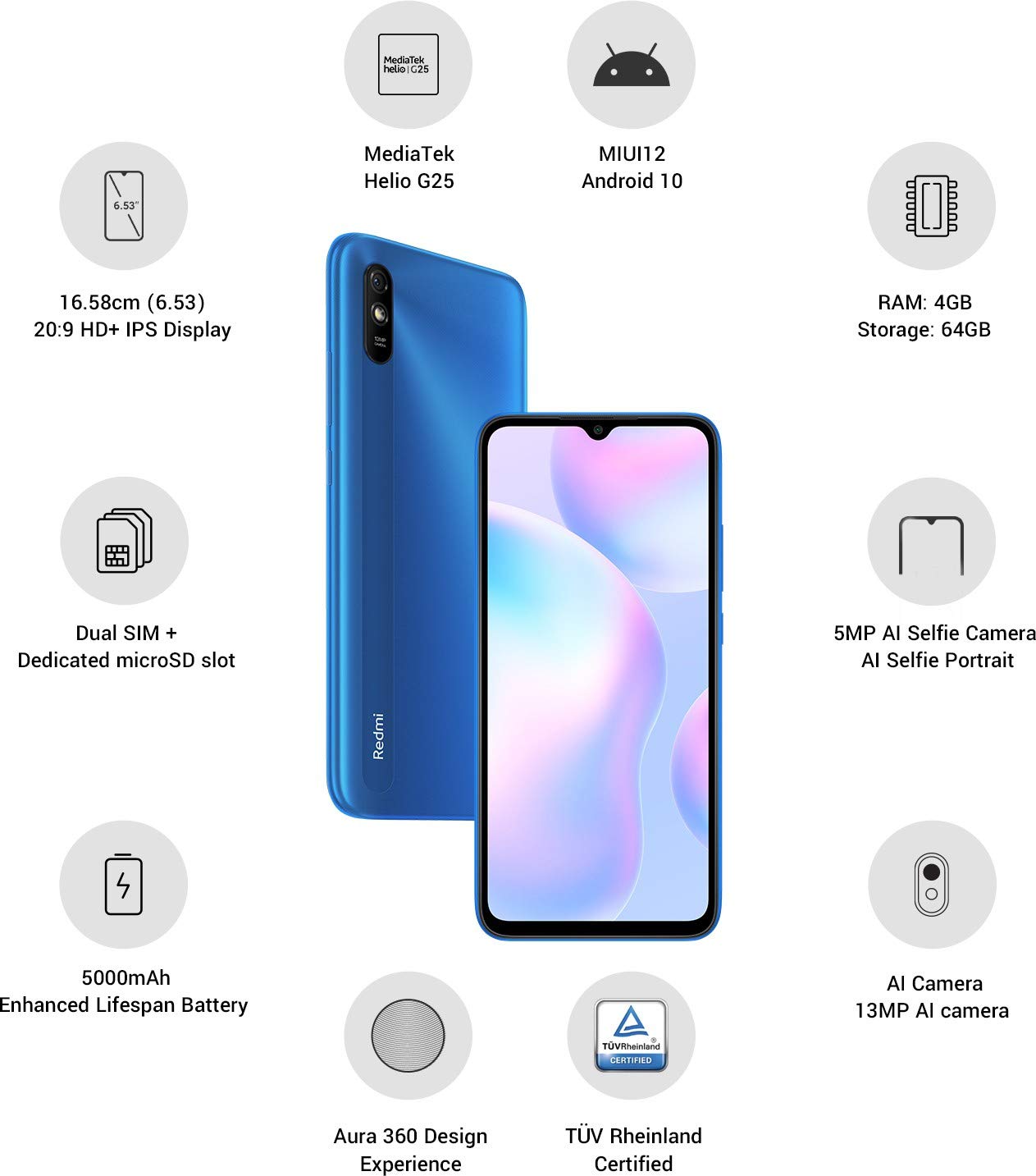
Immaġni: Fuqview of the Xiaomi Redmi 9I highlighting key features such as the 6.53-inch HD+ IPS Display, MediaTek Helio G25 processor, MIUI12 Android 10, 4GB RAM, 64GB Storage, Dual SIM + dedicated microSD slot, 5000mAh battery, 5MP AI Selfie Camera, 13MP AI Camera, Aura 360 Design Experience, and TÜV Rheinland Certification.
Gwida ta' Setup
1. Unboxing u Spezzjoni Inizjali
Neħħi l-oġġetti kollha mill-imballaġġ bir-reqqa. Kun żgur li l-komponenti li ġejjin huma preżenti:
- XIAOMI Redmi 9I Smartphone
- Adapter tal-Enerġija
- Kejbil USB Type-C
- Għodda Ejector SIM
- Gwida ta' Bidu Mgħaġġel (jekk inkluża)
2. Daħħal il-Karta(i) SIM u l-Karta MicroSD
Locate the SIM card tray on the side of your device. Use the provided SIM ejector tool to open the tray. Insert your Nano SIM card(s) and/or a microSD card into the designated slots. Ensure the cards are correctly oriented as shown in the diagram below. Gently push the tray back into the phone until it clicks into place.

Immaġni: Ġenb view of the Xiaomi Redmi 9I, illustrating the location of the SIM card tray. The tray is designed to hold dual Nano SIM cards and a dedicated microSD card.
3. Iċċarġjar tal-Apparat
Before first use, fully charge your Redmi 9I. Connect the USB Type-C cable to the phone's charging port (located at the bottom) and the other end to the power adapter. Plug the adapter into a wall outlet. The charging indicator will appear on the screen.

Immaġni: Taħt view of the Xiaomi Redmi 9I, showing the USB Type-C charging port and speaker grille.
4. Tixgħel u Konfigurazzjoni Inizjali
Press and hold the Power button (located on the right side of the device) until the XIAOMI logo appears. Follow the on-screen instructions to complete the initial setup, including language selection, Wi-Fi connection, Google account setup, and security settings.

Immaġni: Ġenb view of the Xiaomi Redmi 9I, clearly showing the power button and volume rocker on the right edge of the device.
Istruzzjonijiet Operattivi
Navigazzjoni Bażika
- Mess: Tap icons to open apps, select items, or confirm actions.
- Swipe: Slide your finger across the screen to scroll, switch between home screens, or navigate within apps.
- Oqros: Uża żewġ swaba’ biex tagħmel zoom in jew zoom out fuq ir-ritratti u web paġni.
- Stampa Twila: Press and hold an item for additional options or to move icons.
Nagħmlu Sejħiet u Tibgħat Messaġġi
Tap the Phone icon to access the dialer. Enter a number or select a contact. Tap the Messages icon to compose and send text messages.
Konnessjoni man-Netwerks
- Wi-Fi: Mur fuq Settings > Wi-Fi, ixgħel il-Wi-Fi, u agħżel in-netwerk mixtieq. Daħħal il-password jekk tintalab.
- Bluetooth: Mur fuq Settings > Bluetooth, turn Bluetooth on, and pair with compatible devices.
- Dejta Mobbli (4G): Kun żgur li s-SIM card tiegħek hija attiva u li d-dejta mobbli hija attivata Settings > SIM cards u netwerks mobbli.
Uża l-Kamera
Tap the Camera icon to open the camera application. The Redmi 9I features a 13MP rear camera and a 5MP front camera. Switch between modes (Photo, Video, Portrait, etc.) by swiping across the screen. Tap the shutter button to capture photos or start/stop video recording.

Immaġni: Wara view of the Xiaomi Redmi 9I, showcasing the 13MP AI camera module and the Redmi branding.
Manutenzjoni
Tindif tat-Tagħmir Tiegħek
Uża drapp artab u mingħajr suf biex tnaddaf l-iskrin u l-qafas tat-telefon tiegħek. Evita li tuża kimiċi ħarxa jew materjali li joborxu, li jistgħu jagħmlu ħsara lid-displej jew lill-finitura. Għal tbajja' persistenti, neħħi ftit.ampLaħlaħ id-drapp bl-ilma jew b'prodott tat-tindif tal-iskrin iddisinjat għall-elettronika.
Aġġornamenti tas-Software
Iċċekkja u installa aġġornamenti tas-softwer regolarment biex tiżgura prestazzjoni ottimali, sigurtà, u aċċess għal karatteristiċi ġodda. Mur fuq Settings > Dwar it-telefon > Verżjoni MIUI biex tiċċekkja għal aġġornamenti.
Kura tal-batterija
The Redmi 9I is equipped with a 5000 mAh Lithium-Polymer battery. To prolong battery life:
- Evita temperaturi estremi.
- Tħallix il-batterija tixxotta kompletament qabel ma terġa' tiċċarġjaha ta' spiss.
- Uża l-ċarġer u l-kejbil oriġinali.
- Ottimizza l-użu tal-batterija fi Settings > Batterija u prestazzjoni.
Ġestjoni tal-Ħażna
L-apparat tiegħek jiġi b'ħażna interna ta' 64GB. Biex timmaniġġja l-ħażna b'mod effettiv:
- Ħassar regolarment bla bżonn files, ritratti, u vidjows.
- Iddiżinstalla l-applikazzjonijiet mhux użati.
- Uża s-servizzi tal-ħażna fuq il-cloud.
- Mexxi bil-kbir files to an inserted microSD card.
Issolvi l-problemi
This section addresses common issues you might encounter with your Redmi 9I.
Apparat Mhux Jixgħel
- Ensure the battery is charged. Connect the phone to its charger for at least 30 minutes.
- Agħfas u żomm il-buttuna tal-Power għal 10-15-il sekonda biex terġa' tibda.
Poor Network Connectivity
- Iċċekkja jekk is-SIM card tiegħek hijiex imdaħħla sew.
- Toggle Airplane Mode on and off (swipe down from the top for Quick Settings).
- Ibda mill-ġdid it-tagħmir tiegħek.
- Verify your mobile data plan is active and you are in an area with network coverage.
Applikazzjonijiet li Jiġġarraf jew Jiffriża
- Agħlaq u erġa' iftaħ l-app problematika.
- Neħħi l-cache u d-dejta tal-app (Settings > Apps > Immaniġġja l-apps > [Isem tal-App] > Ħassar id-dejta).
- Kun żgur li l-app hija aġġornata għall-aħħar verżjoni tagħha.
- Ibda mill-ġdid it-telefon tiegħek.
L-iskrin ma jirrispondix
- Forza l-istartjar mill-ġdid tal-apparat billi żżomm il-buttuna tal-Enerġija agħfas.
- If the issue persists, consider a factory reset (Twissija: Dan se jħassar id-dejta kollha fuq it-telefon tiegħek. Agħmel backup tad-dejta importanti l-ewwel. Mur fuq Settings > Dwar it-telefon > Reset tal-fabbrika).
Speċifikazzjonijiet
| Karatteristika | Dettall |
|---|---|
| Brand | XIAOMI |
| Mudell | Redmi 9I |
| Sistema Operattiva | Android 9.0 (MIUI12) |
| RAM | 4 GB |
| Ħażna Interna | 64 GB |
| Proċessur | Snapdragon (2 GHz CPU Speed) |
| Tip ta 'Wiri | LCD |
| Daqs tal-Iskrin | 6.53 Pulzier |
| Kamera ta' wara | 13 MP |
| Kamera ta' Quddiem | 5 MP |
| Kapaċità tal-batterija | 5000 Milliamp Hours (Lithium-Polymer) |
| Slot tal-Kard SIM | Dual SIM (Nano) |
| Konnettività | 4G, Wi-Fi, Bluetooth, USB Type C |
| GPS | GLONASS |
| Materjal | Plastik |
| Livell ta 'Reżistenza għall-Ilma | Reżistenti għall-Ilma |
Informazzjoni dwar Garanzija
The XIAOMI Redmi 9I comes with a Garanzija ta' 1 snin mill-manifattur from the date of purchase. This warranty covers manufacturing defects under normal use. For detailed terms and conditions, please refer to the warranty card included in your product packaging or visit the official XIAOMI support websit.
Appoġġ għall-Klijent
If you encounter issues not covered in this manual or require further assistance, please contact XIAOMI customer support. You can typically find contact information (phone numbers, email, chat support) on the official XIAOMI webis-sit jew permezz tat-taqsima tal-appoġġ fis-settings tat-tagħmir tiegħek.
Before contacting support, please have your device's model number (Redmi 9I) and serial number ready. The serial number can usually be found in Settings > Dwar it-telefon > Status.