
Homcloud AS-DM2
Homcloud Smart Wi-Fi 2-Channel In-Wall Dimmer Module
Model: AS-DM2
1. Prodott Aktarview
The Homcloud AS-DM2 is an intelligent 2-channel Wi-Fi dimmer module designed for in-wall installation. It allows for remote control of lighting via a smartphone application, as well as integration with smart home voice assistants like Amazon Alexa and Google Home. This module provides convenient dimming capabilities for compatible light sources.
Karatteristiċi ewlenin:
- 2-channel Wi-Fi smart dimmer module for in-wall installation.
- Remote control via dedicated smartphone application.
- Compatibility with Amazon Alexa and Google Home for voice control.
- Supports both physical switch control and app control.

Image 1.1: The Homcloud Smart Wi-Fi 2-Channel Dimmer Module, showcasing id-disinn kompatt tiegħu.
2. Informazzjoni dwar is-Sigurtà
Please read all safety warnings and instructions carefully before installation and operation. Failure to follow these instructions may result in electric shock, fire, or serious injury.
- Installazzjoni Professjonali Rakkomandata: Electrical installation should be performed by a qualified electrician.
- Mitfi qabel l-Installazzjoni: Dejjem skonnettja l-enerġija mis-circuit breaker qabel ma tinstalla jew tagħmel manutenzjoni fuq l-apparat.
- Voltage Kompatibilità: Kun żgur li l-volum tal-modulutage rating (220-240V~ 50Hz) matches your electrical system.
- Limiti tat-Tagħbija: Do not exceed the maximum load capacity of 2x100W. Overloading can cause damage or fire.
- Użu fuq ġewwa biss: Dan l-apparat huwa ddisinjat għall-użu fuq ġewwa f'postijiet niexfa.
- Żomm 'il bogħod mill-Ilma: Tesponix l-apparat għall-ilma jew l-umdità.
3. Kontenut tal-Pakkett
Ivverifika li l-komponenti kollha huma preżenti fil-pakkett:
- 1 x Homcloud Smart Wi-Fi 2-Channel Dimmer Module (AS-DM2)
- 1 x Manwal tal-Utent (dan id-dokument)
4. Speċifikazzjonijiet
| Speċifikazzjoni | Valur |
|---|---|
| Brand | Homcloud |
| Mudell | AS-DM2 |
| Tip ta' Installazzjoni | Mount Wall |
| Apparati Kompatibbli | Amazon Alexa, Google Home, iOS, Android |
| Dimensjonijiet tal-Pakkett (L x W x H) | 29.4 x 5.9 x 2.7 ċm |
| Komponenti Inklużi | Swiċċ Wi-Fi |
| Referenza tal-Prodott | AS-DM2 |
| Materjal | Plastik |
| Modalità Operattiva | ON-OFF (Dimming functionality via app/smart home) |
| Tip ta' Kuntatt | Buttuna Virtwali |
| Terminal | Invita |
| Tip ta 'Ċirkwit | 2-mod |
| Tip ta' Attwatur | Imbotta Buttuna |
| International Protection Rating (IP Code) | IP00 |
| Tagħbija Max | 2x100W |
| Voltage | 220-240V ~ 50Hz |

Image 4.1: Product label showing model, voltage, and maximum load specifications.
5. Setup u Installazzjoni
Importanti: Kun żgur li l-enerġija hija skonnettjata mis-circuit breaker qabel tibda l-installazzjoni.
5.1 Dijagramma tal-Wiring
Refer to the following diagram for correct wiring. The module supports 2-way switching configurations.
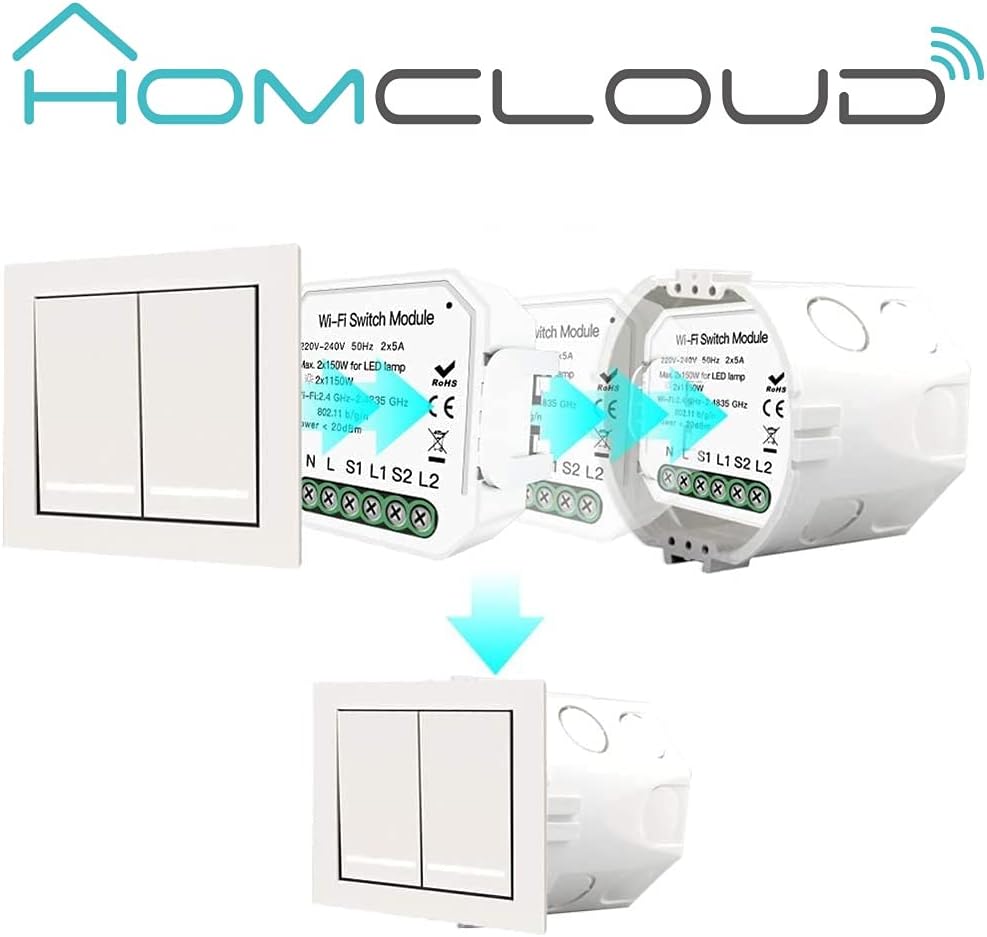
Image 5.1: Wiring diagram for a 2-gang, 2-way setup. Connect Neutral (N), Live (L), and switch inputs (S1, S2) to the module. L1 and L2 are outputs to the lights.
5.2 Installazzjoni Fiżika
- Skonnettja l-Enerġija: Turn off the main power supply to the circuit at your home's circuit breaker.
- Ipprepara l-Wajers: Identify the Live (L), Neutral (N), and switch wires (S1, S2, L1, L2) in your wall box.
- Qabbad Wajers: Connect the wires to the corresponding terminals on the Homcloud dimmer module as shown in the wiring diagram (Image 5.1). Ensure all connections are secure.
- Daħħal il-Modulu: Carefully place the dimmer module into the wall box behind your existing switch. Ensure it fits without obstruction.


Image 5.2: The dimmer module is designed to be installed discreetly behind a standard wall switch, fitting into the existing wall box.
5.3 Installazzjoni u Tqabbil tal-App
- Niżżel l-App: Download the Homcloud Smart Home Solutions app from the App Store (iOS) or Google Play Store (Android). You can use the QR codes provided below or visit smartapp.tuya.com/homcloudsmart.
- Reġistrazzjoni/Idħol: Iftaħ l-app u rreġistra kont ġdid jew idħol b'wieħed eżistenti.
- Żid Apparat: Power on the circuit at the breaker. The module should enter pairing mode (often indicated by a blinking light). In the app, tap 'Add Device' or the '+' icon.
- Agħżel it-Tip ta' Apparat: Choose 'Lighting' or 'Dimmer' from the device list.
- Qabbad mal-Wi-Fi: Follow the in-app instructions to connect the module to your 2.4GHz Wi-Fi network. Ensure your phone is also connected to the same Wi-Fi network.
- Tqabbil Komplet: Ladarba tkun konness, tista' tbiddel isem l-apparat u tassenjah ma' kamra.

Image 5.3: QR codes for downloading the Homcloud Smart Home Solutions app from Apple App Store and Google Play Store.
6. Istruzzjonijiet Operattivi
6.1 App Control
Once paired, you can control the dimmer module directly from the Homcloud app:
- Mixgħul/Mitfi: Tap the power icon to turn the connected lights on or off.
- Dimming: Use the slider or specific percentage controls within the app interface to adjust the brightness level.
- Skedar: Set schedules or timers for automatic on/off or dimming routines.
- Ħolqien tax-Xena: Create custom scenes to control multiple devices simultaneously.

Image 6.1: Screenshot of the Homcloud app interface, demonstrating remote control capabilities for the dimmer module.
6.2 Physical Switch Control
The module retains functionality with your existing physical wall switch. A short press typically toggles the light on/off, while a long press may initiate dimming (depending on switch type and configuration).
6.3 Smart Home Integration (Alexa/Google Home)
To enable voice control, link your Homcloud account to Amazon Alexa or Google Home:
- Iftaħ l-App tad-Dar Intelliġenti: Iftaħ l-app Amazon Alexa jew Google Home.
- Ippermetti Ħila/Azzjoni: Fittex għal and enable the 'Homcloud' skill (for Alexa) or 'Homcloud' action (for Google Home).
- Kont tal-Kont: Log in with your Homcloud app credentials when prompted.
- Skopri Mezzi: Ladarba tkun illinkjat, itlob lill-assistent tal-vuċi tiegħek biex jiskopri apparati ġodda (eż. "Alexa, skopri l-apparati tiegħi" jew "Ħej Google, sinkronizza l-apparati tiegħi").
- Kmandi bil-vuċi: Issa tista' tuża kmandi bil-vuċi bħal:
- "Alexa, turn on [Light Name]"
- "Hey Google, dim [Light Name] to 50%"
- "Alexa, turn off [Light Name]"

Image 6.2: The Homcloud system supports multiple users controlling a single device, or a single user controlling multiple devices, enhancing smart home flexibility.
7. Manutenzjoni
The Homcloud dimmer module requires minimal maintenance.
- Tindif: If necessary, gently wipe the surface of the wall switch (not the module itself) with a soft, dry cloth. Do not use harsh chemicals or abrasive cleaners.
- Aġġornamenti tal-Firmware: Periodically check the Homcloud app for available firmware updates for your device. Updates can improve performance and add new features.
8 Issolvi l-problemi
If you encounter issues with your Homcloud dimmer module, try the following troubleshooting steps:
| Problema | Kawża Possibbli | Soluzzjoni |
|---|---|---|
| Apparat mhux qed jikkonnettja mal-Wi-Fi | Incorrect Wi-Fi password; Module too far from router; 5GHz Wi-Fi network; Module not in pairing mode. | Ensure correct 2.4GHz Wi-Fi password. Move module closer to router. Confirm module is blinking for pairing. Reset module if necessary (refer to app for reset procedure). |
| Lights not dimming or flickering | Incompatible bulb type; Overload; Wiring issue. | Ensure bulbs are dimmable LED or incandescent. Check total wattage does not exceed 2x100W. Verify wiring connections are secure. |
| Is-swiċċ fiżiku mhux qed jaħdem | Incorrect wiring of S1/S2 terminals; Loose connection. | Double-check wiring according to Image 5.1. Ensure switch wires are securely connected to S1/S2. |
| Module loses connection frequently | Weak Wi-Fi signal; Network interference; Cloud connection issues. | Improve Wi-Fi signal strength (e.g., Wi-Fi extender). Reduce interference from other devices. Restart module and router. |
| Only one channel works | Wiring error for L2; Faulty channel. | Verify the L2 output wiring to the light. If wiring is correct, the module may be faulty. |
| Delay in light turning on/off | Normal operation for some smart dimmers; Network latency. | A slight delay (e.g., 1-2 seconds) can be normal for Wi-Fi controlled dimmers. Ensure stable Wi-Fi connection. |
| Interference with S1/S2 inputs (multiple buttons) | Sensitive inputs picking up induced currents. | Consider adding small capacitors (e.g., 1.5 microFarad 400V) between S1/S2 inputs and Neutral to filter interference, especially in complex multi-button setups. Consult a qualified electrician. |
9. Garanzija u Appoġġ
9.1 Informazzjoni dwar Garanzija
Homcloud products are designed for reliability and performance. For specific warranty terms and conditions, please refer to the warranty card included with your product or visit the official Homcloud websit. Żomm l-irċevuta tax-xiri tiegħek bħala prova tax-xiri għal talbiet ta' garanzija.
9.2 Appoġġ għall-Klijent
For technical assistance, troubleshooting, or product inquiries, please visit the official Homcloud webis-sit jew ikkuntattja l-appoġġ għall-klijenti tagħhom:
- Websit: www.homcloud.com
- Appoġġ għall-App: Use the 'Feedback' or 'Help' section within the Homcloud app.
Ask a question about this manual
Ask about setup, troubleshooting, compatibility, parts, safety, or missing instructions. Manuals+ will review the question and use this page’s manual context to help answer it.