
1. Introduzzjoni
The Amcrest AMCPFA134-B Waterproof Junction Box is designed to provide a secure and weather-resistant enclosure for the wiring and connections of compatible Amcrest Bullet Cameras. This junction box helps protect cables from environmental elements and tampering, ensuring a clean and professional installation.
2. Karatteristiċi tal-prodott
- Kompatibilità: Fits most Amcrest Bullet Cameras with a 1.3-inch / 3.5-inch diameter.
- Ġestjoni tal-Kejbil: Designed for hiding wires and connectors, offering rear and bottom access for cable routing.
- Disinn li ma jgħaddix ilma minnu: Provides a waterproof enclosure to protect internal connections.
- Kostruzzjoni Durabbli: Made from Aluminum and SECC for long-lasting performance.
3. Kontenut tal-Pakkett
Ivverifika li l-komponenti kollha huma preżenti qabel l-installazzjoni:
- Amcrest AMCPFA134-B Waterproof Junction Box
- Viti tal-Immuntar u Plugs tal-Ħajt
- Gasket tal-Gomma
4. Setup u Installazzjoni
Follow these steps to properly install your Amcrest AMCPFA134-B Waterproof Junction Box with a compatible bullet camera.
- Preparazzjoni: Ensure the mounting surface is clean and capable of supporting the weight of the junction box and camera.
- Immarkar tat-Toqob tat-Tħaffir: Place the junction box on the desired mounting location. Use a pencil or marker to mark the positions for the mounting screws.
- Tħaffir: Drill pilot holes at the marked locations. If mounting on masonry or concrete, insert the provided wall plugs into the drilled holes.
- Rotot tal-kejbil: Route the camera's cables through the designated cable entry points on the junction box (rear or bottom access).
- Mounting the Junction Box: Secure the junction box to the mounting surface using the provided screws. Ensure it is firmly attached.
- Konnessjoni tal-Kamera: Connect the camera's cables inside the junction box. Ensure all connections are secure and properly insulated.
- Twaħħil tal-Kamera: Mount the compatible Amcrest bullet camera onto the junction box. The junction box has pre-drilled holes designed to align with various Amcrest bullet camera bases. Secure the camera using its mounting screws.
- Issiġillar: Ensure the rubber gasket is properly seated between the junction box and the camera base to maintain a waterproof seal.
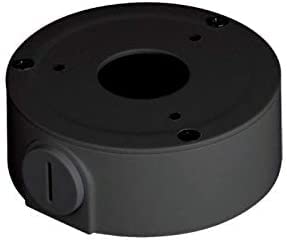
Image of the Amcrest AMCPFA134-B Waterproof Junction Box, designed for secure camera mounting and cable management.
5. Istruzzjonijiet Operattivi
The AMCPFA134-B is a passive accessory designed to house and protect camera wiring. Once installed, it requires no direct operation. Its function is to provide a secure and waterproof environment for your camera's connections.
6. Manutenzjoni
To ensure the longevity and effectiveness of your junction box:
- Spezzjoni Perjodika: Annually inspect the junction box for any signs of wear, damage, or loose connections.
- Tindif: Gently wipe the exterior of the junction box with a damp drapp biex tneħħi l-ħmieġ jew id-debris. Evita li tuża kimiċi ħarxa.
- Integrità tas-Siġill: Check the rubber gasket for cracks or deterioration, especially in harsh weather conditions, to ensure the waterproof seal remains intact.
7 Issolvi l-problemi
If you experience issues with your camera system after installing the junction box, consider the following:
- No Power/Signal: Carefully open the junction box and verify that all cable connections are secure and correctly wired. Ensure no wires are pinched or damaged.
- Dħul tal-Ilma: If moisture is found inside the box, check the rubber gasket for proper seating and any damage. Ensure all screws are tightened evenly to create a complete seal.
- Immuntar maħlul: If the junction box feels loose, re-tighten the mounting screws. If the wall plugs are compromised, consider using new ones or relocating the box slightly.
8. Speċifikazzjonijiet
| Attribut | Dettall |
|---|---|
| Numru tal-Mudell | AMCPFA134-B |
| Brand | Amcrest |
| Materjal | Aluminum & SECC |
| Kulur | Iswed |
| Tip Finish | Matte |
| Tip ta' Installazzjoni | Invita |
| Piż tal-oġġett | 0.29 Kilogrammi |
| UPC | 854088008256 |
| GTIN | 854088008256 |
9. Garanzija u Appoġġ
Garanzija: This product comes with a 1-Year Warranty provided by Amcrest.
Appoġġ: For technical assistance, troubleshooting, or warranty claims, please visit the official Amcrest support website or contact their customer service directly. Refer to the Amcrest webis-sit għall-aktar informazzjoni ta' kuntatt u riżorsi ta' appoġġ aġġornati.