
1. Introduzzjoni
The rockspace AC2100 Dual Band WiFi Range Extender is designed to expand your existing WiFi network coverage, eliminate dead zones, and provide a stable, high-speed internet connection throughout your home or office. This device supports both 2.4 GHz and 5 GHz bands, offering versatile connectivity options for various devices.
X'hemm fil-Kaxxa:
- 1 x rockspace AC2100 WiFi Extender
- 1 x Gwida Quick Start

Figure 1: rockspace AC2100 WiFi Range Extender
2. Istruzzjonijiet ta' Setup
The rockspace AC2100 WiFi Range Extender offers two primary methods for setup: WPS (Wi-Fi Protected Setup) and Web Konfigurazzjoni tal-Browser.
2.1. Konfigurazzjoni tal-WPS (Rakkomandat għal konfigurazzjoni rapida)
- Ipplaggja: Plug the extender into an electrical outlet in the same room as your WiFi router.
- Stenna għall-LED tal-Enerġija: Wait until the Power LED on the extender turns solid blue.
- Agħfas WPS fuq ir-Router: Press the WPS button on your main WiFi router.
- Agħfas WPS fuq l-Estensur: Within 2 minutes, press the WPS button on the rockspace extender.
- Osserva l-LED tas-Sinjal: The Signal LED on the extender will start blinking. Once it turns solid blue, the connection is successful.
- Riloka Extender: Unplug the extender and move it to a location halfway between your router and the WiFi dead zone. Ensure the Signal LED remains solid blue for optimal performance.

Figure 2: Easy setup using the WPS button
2.2. Web Setup tal-browser
- Ipplaggja: Plug the extender into an electrical outlet in the same room as your WiFi router.
- Connect to Extender's WiFi: On your computer or mobile device, connect to the WiFi network named "rockspace_EXT" or "rockspace_EXT_5G". Do not enter any password.
- Miftuħa Web Browser: Iftaħ a web browser (eż., Chrome, Firefox) u ittajpja re.rockspace.local or 192.168.0.254 fil-bar tal-indirizz.
- Idħol: Oħloq password ġdida għall-login meta tintalab.
- Agħżel il-Modalità: Choose "Repeater Mode" or "Access Point Mode" based on your needs.
- Agħżel Netwerk: Select your existing WiFi network (SSID) from the list and enter its password.
- Ikkonferma Settings: Follow the on-screen instructions to complete the setup. The extender's WiFi name will typically be your original network name with "_EXT" appended.
- Riloka Extender: Unplug the extender and move it to a suitable location. Ensure the Signal LED is solid blue for a good connection.
3. Modi Operattivi
The rockspace AC2100 WiFi Range Extender supports two main operating modes:
3.1. Modalità Ripetitur (Default)
Fil-Modalità Ripetitur, l-estensur jikkonnettja mingħajr fili mar-router eżistenti tiegħek u amplifies its signal, extending coverage to areas with weak or no signal. This is ideal for eliminating WiFi dead zones.
3.2. Modalità tal-Punt ta' Aċċess (AP)
In AP Mode, the extender connects to your router via an Ethernet cable and broadcasts a new wireless network. This is ideal for converting a wired network into a wireless one or for providing a dedicated wireless access point in a specific area.

Figure 3: Extender operating in Repeater and Access Point modes
4. Karatteristiċi ewlenin
- Konnettività bi Faxxa Doppja: Supports both 2.4 GHz (up to 300 Mbps) and 5 GHz (up to 1734 Mbps) bands for a combined speed of up to 2100 Mbps, optimizing WiFi network transmission.
- Kopertura Estiża: Boosts WiFi signal to wider coverage areas, up to 1292 sq.ft, effectively eliminating WiFi dead zones.
- Smart Signal Switch (4T4R MU-MIMO): Equipped with high-quality PCB dual-band antennas and 4T4R MU-MIMO technology, the repeater automatically selects the high-quality channel for stable, reliable, and fast internet. It switches to networks with stronger signals to keep devices connected even when moving.
- Penetrazzjoni Qawwija tal-Ħajt: Works effectively with optical routers for strong signal penetration on the 5 GHz band, suitable for multi-storey houses or large bungalows.
- Port Gigabit Ethernet: Features a full Gigabit port for high-speed wired connections, allowing you to connect devices like smart TVs, gaming consoles, or Blu-ray players directly for enhanced speeds. Supports IPv6 protocol for smooth HD streaming and gaming.
- Kompatibilità Universali: Compatible with any wireless WiFi Router, Gateway, or Access Point. Extends WiFi signal to various devices including mobile phones, PCs, and smart home devices.
- Visual Signal Lights: Blue indicates a good connection, while red indicates a weak connection, guiding you to find the perfect location for installation.
- Antenni Aġġustabbli: The upper antennas can rotate by 270 degrees, and the lower ones by 180 degrees, allowing for optimized signal direction.
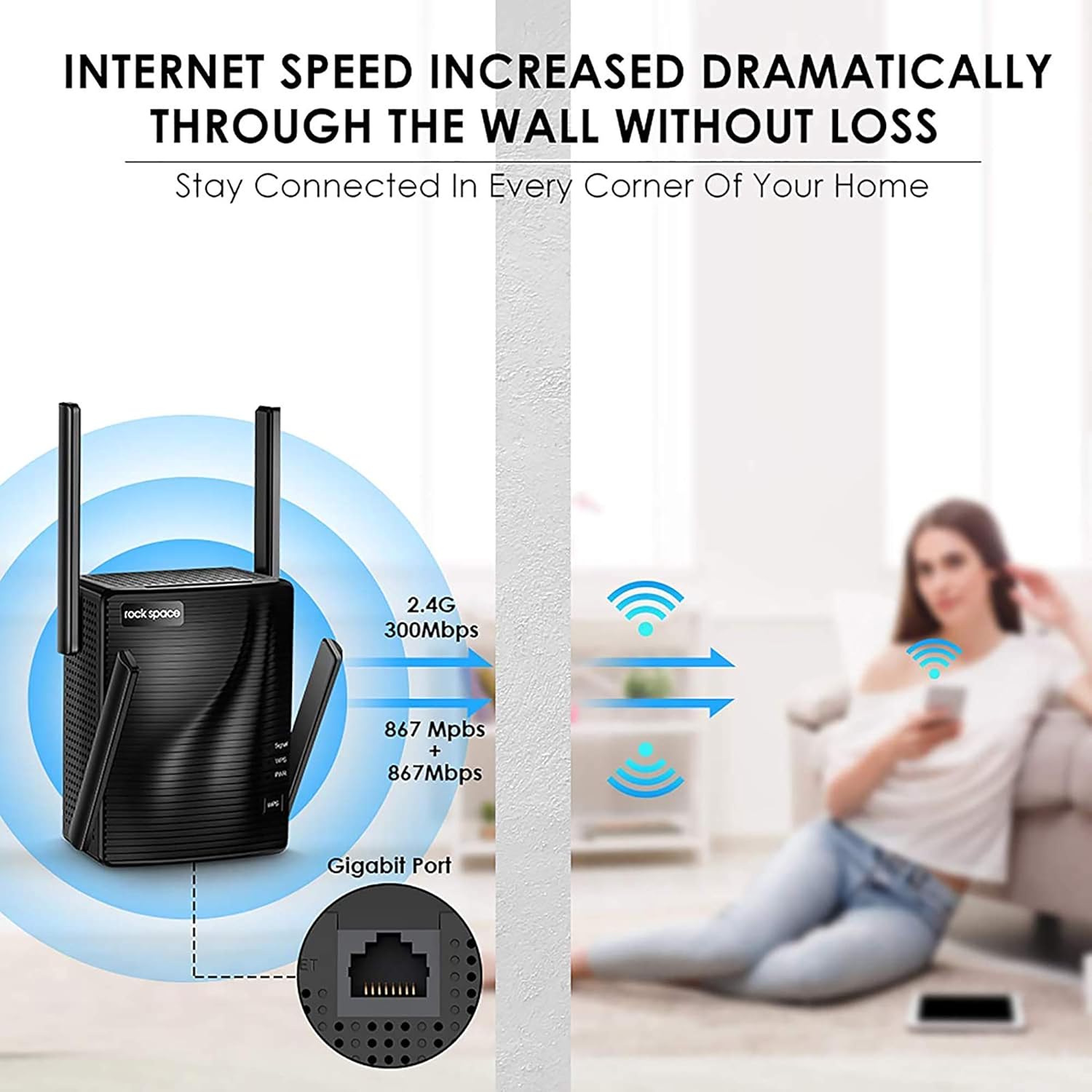
Figure 4: Enhanced internet speed and wall penetration

Figure 5: 4T4R MU-MIMO technology for ultimate Wi-Fi signal
5. Manutenzjoni
- Poġġiment ottimali: For best performance, place the extender in an open area, away from obstructions like large metal objects, thick walls, or other electronic devices that may cause interference.
- Tindif regolari: Keep the device clean and free from dust to ensure proper ventilation and prevent overheating.
- Aġġornamenti tal-Firmware: Periodically check the rockspace official webis-sit għal kwalunkwe aġġornament tal-firmware disponibbli biex tiżgura prestazzjoni u sigurtà ottimali.
- Resetting the Extender: If you experience persistent issues or wish to reconfigure the extender, you can perform a factory reset. Locate the Reset button (usually a small pinhole) on the device. Use a paperclip or a thin object to press and hold the button for about 8-10 seconds until the LEDs flash. The extender will then reboot with factory default settings.
6 Issolvi l-problemi
- No Internet Access After Setup:
- Check the Signal LED: If it's red, the extender is too far from the router. Relocate it closer.
- Verify Router Password: Ensure you entered the correct WiFi password during setup.
- Restart Devices: Restart your router, extender, and connected devices.
- Sinjal Dgħajjef jew Skonnettjar Frekwenti:
- Relocate Extender: Move the extender closer to your router or to a more central location.
- Adjust Antennas: Orient the external antennas for better signal reception.
- Check for Interference: Avoid placing the extender near large electronic appliances (microwaves, refrigerators) or metal objects.
- Ma nistax naċċessa Web Paġna ta' Ġestjoni:
- Verify Connection: Ensure your device is connected to the extender's WiFi network (e.g., "rockspace_EXT").
- Clear Browser Cache: Clear your web il-cache u l-cookies tal-browser, jew ipprova browser differenti.
- Reset Extender: Perform a factory reset if the issue persists.
7. Speċifikazzjonijiet
| Karatteristika | Dettall |
|---|---|
| Brand | ispazju blat |
| Numru tal-Mudell | RSD0617 |
| Tip bla fili | 802.11a/b/g/n |
| Rata ta' Trasferiment tad-Data | 2100 Megabits Kull Sekonda |
| Klassi ta' Banda ta' Frekwenza | Doppju Banda (2.4 GHz u 5 GHz) |
| Żona ta' Kopertura | Sa 1292 sq.ft |
| Port Ethernet | Port Ethernet Gigabit |
| Antenni | 4 High Performance External Antennas |
| Dimensjonijiet (LxWxH) | 4.6 x 4.25 x 5.8 pulzieri |
| Piż | 13.1 uqija |
8. Informazzjoni Importanti
8.1. Informazzjoni dwar is-Sigurtà
Please be careful when using electricity. Always ensure the device is plugged into a suitable power outlet and avoid overloading circuits.
8.2. Ċaħda Legali
Please note that the Wi-Fi extender only extends the Wi-Fi coverage; it cannot boost the speed of your original router or maintain the exact same speed as the original router.
9. Garanzija u Appoġġ
For warranty information, technical support, or further assistance, please refer to the contact details provided in your product packaging or visit the official rockspace websit. Żomm l-irċevuta tax-xiri tiegħek għal pretensjonijiet ta' garanzija.
Telefon ta' Appoġġ Tekniku: +1-833-816-6558 (EST: 9:00-17:00 / PDT: 06:00-14:00 Monday to Friday)
Email: techsupport@rockspace.cc
Websit: www.rockspace.cc


