
1. Introduzzjoni
1.1 Prodott Fuqview
The Renkforce RF-HC-100 is a compact 16-megapixel trail camera designed for outdoor monitoring. It features a time-lapse function, night vision capabilities, and a durable, camouflage brown housing. This camera is suitable for wildlife observation, property surveillance, and other outdoor recording needs.
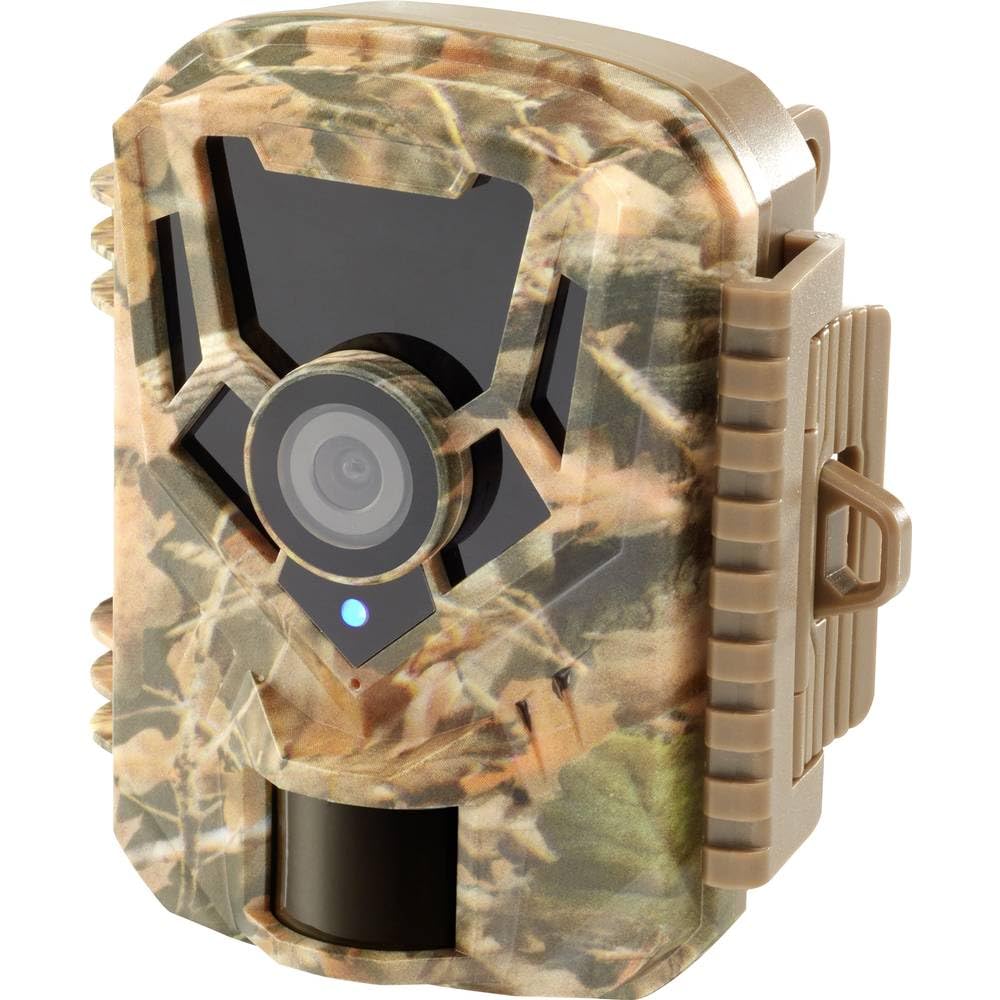
Immaġni: Naħa ta' quddiem view of the Renkforce RF-HC-100 Trail Camera, showcasing its compact design and camouflage pattern.

Immaġni: Quddiem view of the Renkforce RF-HC-100 Trail Camera, highlighting the main lens and motion sensor.
1.2 Kontenut tal-Pakkett
- 1 x Renkforce RF-HC-100 Trail Camera Unit
- Note: Additional accessories such as mounting straps, USB cables, or user manuals may be included depending on the specific package.
2. Informazzjoni dwar is-Sigurtà
- Aqra l-istruzzjonijiet kollha bir-reqqa qabel ma tħaddem l-apparat.
- Do not expose the camera to extreme temperatures, direct sunlight for prolonged periods, or corrosive liquids.
- Ensure the battery compartment is properly sealed to maintain the IP65 weather resistance.
- Armi l-batteriji skont ir-regolamenti lokali. Tħallatx batteriji qodma u ġodda jew tipi differenti ta’ batteriji.
- Żomm l-apparat fejn ma jintlaħaqx mit-tfal.
- Tippruvax tiżżarma jew timmodifika l-kamera, għax dan jannulla l-garanzija u jista' jikkawża ħsara.
3. Karatteristiċi tal-prodott
The Renkforce RF-HC-100 Trail Camera offers the following key features:
- Immaġini b'Riżoluzzjoni Għolja: 16 Megapixel effective capture resolution for clear photos and 1080p video recording.
- Viżjoni bil-lejl: Equipped with color night vision for monitoring in low-light conditions.
- Time-Lapse Function: Capture images at set intervals to observe long-term events.
- Slot tal-Kard SD: Supports external SD cards for ample storage of photos and videos.
- Reżistenza għat-temp: IP65 international protection rating ensures durability in various outdoor environments.
- Disinn kompatt: Miniature form factor with a camouflage brown finish for discreet placement.
- Angolu Wide View: 90-degree angle of view biex tkopri żona wiesgħa.
- Konnettività: Features wired connectivity (USB, AV ports) and Wi-Fi protocol for data transfer and control via application.
- Għażliet ta 'Immuntar: Includes support for wall mounting.
4. Setup
4.1 Installazzjoni tal-batterija
- Iftaħ il-kaxxa tal-kamera billi tiftaħ il-klipps tal-ġenb.
- Sib il-kompartiment tal-batterija.
- Insert the required number of AA batteries (not included) according to the polarity markings (+/-).
- Agħlaq il-kompartiment tal-batterija sew.
4.2 Installazzjoni tal-Kard SD
- Bil-kaxxa tal-kamera miftuħa, sib is-slott tal-kard SD.
- Insert a compatible SD card (up to 32GB, Class 10 recommended) into the slot with the metal contacts facing down until it clicks into place.
- Biex tneħħiha, imbotta l-kard SD 'il ġewwa mill-ġdid sakemm toħroġ 'il barra.

Image: The Renkforce RF-HC-100 Trail Camera with its housing open, revealing the control panel, USB, AV, and DC ports, and the ON/SETUP/OFF switch.
4.3 Immuntar tal-Kamera
The camera can be mounted using a strap or a wall mount bracket (if included or purchased separately).
- Immuntar taċ-Ċinga: Thread a mounting strap through the slots on the back of the camera and secure it to a tree or pole.
- Immuntar tal-ħajt: Use the integrated mounting points or a compatible wall mount bracket to attach the camera to a flat surface. Ensure the camera is stable and pointed in the desired direction.
5. Istruzzjonijiet Operattivi
5.1 Mixgħul/Mitfi u Għażla tal-Modalità
Locate the ON/SETUP/OFF switch inside the camera housing.
- MITFI: Powers off the camera.
- SETUP: Enters setup mode, allowing you to configure settings via the internal display.
- FUQ: Activates the camera for recording based on the configured settings.
5.2 Configuring Settings
In SETUP mode, use the navigation buttons (if available) to access the menu and adjust parameters such as:
- Riżoluzzjoni tar-Ritratti/Vidjo
- Sensittività tas-Sensor PIR
- Dewmien fl-iskoperta
- Intervall ta' Time-Lapse
- Data u Ħin
- Recording Mode (Photo, Video, Photo+Video, Time-Lapse)
5.3 Irkupru tad-Dejta
Biex taċċessa rrekordjati files:
- Permezz tal-USB: Connect the camera to a computer using a USB cable. The camera will appear as a removable disk.
- Permezz ta' Karta SD: Remove the SD card from the camera and insert it into a computer's card reader.
6. Manutenzjoni
- Tindif: Use a soft, dry cloth to clean the camera lens and housing. For stubborn dirt, a slightly damp Jista' jintuża drapp, iżda kun żgur li ma tidħolx umdità fl-apparat.
- Sostituzzjoni tal-batterija: Ibdel il-batteriji meta jidher l-indikatur ta’ batterija baxxa jew meta l-prestazzjoni tiddegrada.
- Ġestjoni tal-Karta SD: Regularly format the SD card (after backing up important data) to maintain optimal performance and prevent errors.
- Ħażna: Meta ma tkunx qed tużaha għal perjodi twal, neħħi l-batteriji u aħżen il-kamera f'post frisk u niexef 'il bogħod mix-xemx diretta.
7 Issolvi l-problemi
| Problema | Kawża Possibbli | Soluzzjoni |
|---|---|---|
| Il-kamera ma tixgħelx. | Low or dead batteries; incorrect battery installation; power switch in OFF position. | Replace batteries; ensure correct polarity; set switch to ON or SETUP. |
| Kwalità fqira tal-immaġni/vidjow. | Lenti maħmuġa; kundizzjonijiet ta' dawl baxx; settings ta' riżoluzzjoni mhux korretti. | Clean the lens; ensure adequate lighting or use night vision; adjust resolution settings. |
| Il-kamera mhux qed tirrekordja. | SD card full or faulty; incorrect mode selected; PIR sensor blocked. | Format or replace SD card; select appropriate recording mode; clear sensor path. |
| Ma tistax tikkonnettja mal-kompjuter. | Faulty USB cable; camera not in correct mode; driver issues. | Try a different USB cable; ensure camera is in connection mode (if applicable); try another computer or card reader. |
8. Speċifikazzjonijiet
| Isem tal-Mudell | RF-HC-100 (RF-4466574) |
| Effective Capture Resolution | 16 Megapixels |
| Riżoluzzjoni tal-vidjo | 1080p |
| Dimensjonijiet (L x W x H) | 21 x 12 x 9 ċm (8.27 x 4.72 x 3.54 pulzieri) |
| Piż | 186 Gramma (0.41 libbra) |
| Teknoloġija tal-Konnettività | Wired (USB, AV), Wi-Fi Protocol (for control/transfer) |
| Karatteristiċi Speċjali | Local Recording, Night Vision (Color Night Vision) |
| Użu Ambjent | Barra |
| Klassifikazzjoni tal-Protezzjoni Internazzjonali | IP65 |
| Sors tal-Enerġija | Manual Operation (Battery-powered, batteries not included) |
| Wattage | 1.5 Watts |
| View Angolu | 90 Grad |
| Kulur | Camouflage Brown |
| Materjal | Metal (internal) |
| Tip Muntaġġ | Appoġġ tal-Immonta tal-Ħajt |
9. Garanzija u Appoġġ
Renkforce provides support for its products. Spare parts availability is indicated for 1 year from the date of purchase. For technical assistance, troubleshooting beyond this manual, or warranty claims, please refer to the contact information provided with your product packaging or visit the official Renkforce websit.