
1. Introduzzjoni
The MZHOU 6 Port SATA PCIe 3.0 Expansion Card is designed to expand the SATA connectivity of your desktop computer. Utilizing the ASM1166 chipset, this card provides six SATA 6Gbps ports, allowing you to connect additional storage devices such as hard drives and SSDs. It is compatible with PCIe x4, x8, and x16 slots and supports various Windows and Linux operating systems. This card operates as a non-RAID controller, providing direct access to each connected drive.
2. Prodott Aktarview
This expansion card offers a straightforward solution for increasing storage capacity in your desktop PC. Key features include:
- 6 SATA 3.0 Ports: Provides six independent SATA 6Gbps ports for connecting multiple storage devices.
- Trasferiment tad-Dejta b'Veloċità Għolja: Supports transfer rates of up to 6.0Gbps, 3.0Gbps, and 1.5Gbps, ensuring compatibility with various SATA devices.
- ASM1166 Chipset: Equipped with the reliable ASM1166 controller for stable performance.
- PCIe 3.0 Interface: Compatible with PCIe x4, x8, and x16 slots, offering broad system compatibility.
- Hot-Swappable Support: Allows for connecting and disconnecting drives without system shutdown.
- Kompatibilità wiesgħa tas-sistema operattiva: Supports Windows XP/7/8/10 and Linux operating systems.
- Integrated Heatsink: Designed with a heatsink to manage chip temperature and enhance stability.

Image: The ASM1166 chipset, central to the card's functionality.

Image: Integrated heatsink for optimal thermal management.
3. Kontenut tal-Pakkett
Jekk jogħġbok ivverifika li l-oġġetti kollha huma preżenti fil-pakkett tiegħek:
- 1x MZHOU 6 Port SATA PCIe 3.0 Expansion Card
- 6x SATA Data Cables
- 1x Baxxa Profile Parentesi
- 1x SATA Power Cable

Image: Package contents showing the expansion card and accessories.
4. Speċifikazzjonijiet
| Karatteristika | Deskrizzjoni |
|---|---|
| Numru tal-Mudell | New 6SATA |
| Chipset | ASM1166 |
| Interface | PCIe 3.0 x4 (compatible with x4, x8, x16 slots) |
| Portijiet SATA | 6x SATA 3.0 (6Gbps) |
| Kompatibilità b'lura | SATA 2.0 (3Gbps), SATA 1.0 (1.5Gbps) |
| Sistemi Operattivi Appoġġjati | Windows XP/7/8/10, Linux |
| Appoġġ għal Hot-Swap | Iva |
| Appoġġ RAID | No (Non-RAID controller) |

Image: System compatibility and supported PCIe slots.

Image: Data transfer speed comparison for different SATA versions.
5. Gwida għall-Installazzjoni
Follow these steps to install the MZHOU 6 Port SATA PCIe 3.0 Expansion Card into your desktop computer:
- Mitfi u Skonnettja: Itfi l-kompjuter tiegħek kompletament u skonnettja l-kejbil tal-enerġija mis-sokit tal-ħajt.
- Kaxxa Miftuħa tal-Kompjuter: Neħħi l-pannell tal-ġenb tal-kaxxa tal-kompjuter tiegħek biex taċċessa l-motherboard.
- Sib is-Slott tal-PCIe: Identify an available PCIe x4, x8, or x16 slot on your motherboard.
- Neħħi l-Għatu tas-Slott: Remove the corresponding metal slot cover from the back of your computer case. If using a small form factor PC, you may need to replace the standard bracket on the card with the included low-profile parentesi.
- Daħħal il-Karta tal-Espansjoni: Carefully align the expansion card with the chosen PCIe slot and press it firmly until it is securely seated. Ensure the card's gold contacts are fully inserted into the slot.
- Sikura l-Kard: Use a screw to secure the expansion card's bracket to the computer case.
- Connect SATA Drives: Connect your SATA hard drives or SSDs to the SATA ports on the expansion card using the provided SATA data cables. Each port is labeled (SATA1-SATA6).
- Qabbad l-Enerġija: Connect the included SATA power cable from your power supply unit (PSU) to the expansion card if it has a power input, or ensure your SATA drives are powered directly from the PSU. Note: This specific card typically draws power directly from the PCIe slot, but some models may require additional power. Refer to the card's physical design.
- Agħlaq il-Kaxxa u Ixgħelha: Replace the computer case side panel, reconnect the power cable, and power on your computer.
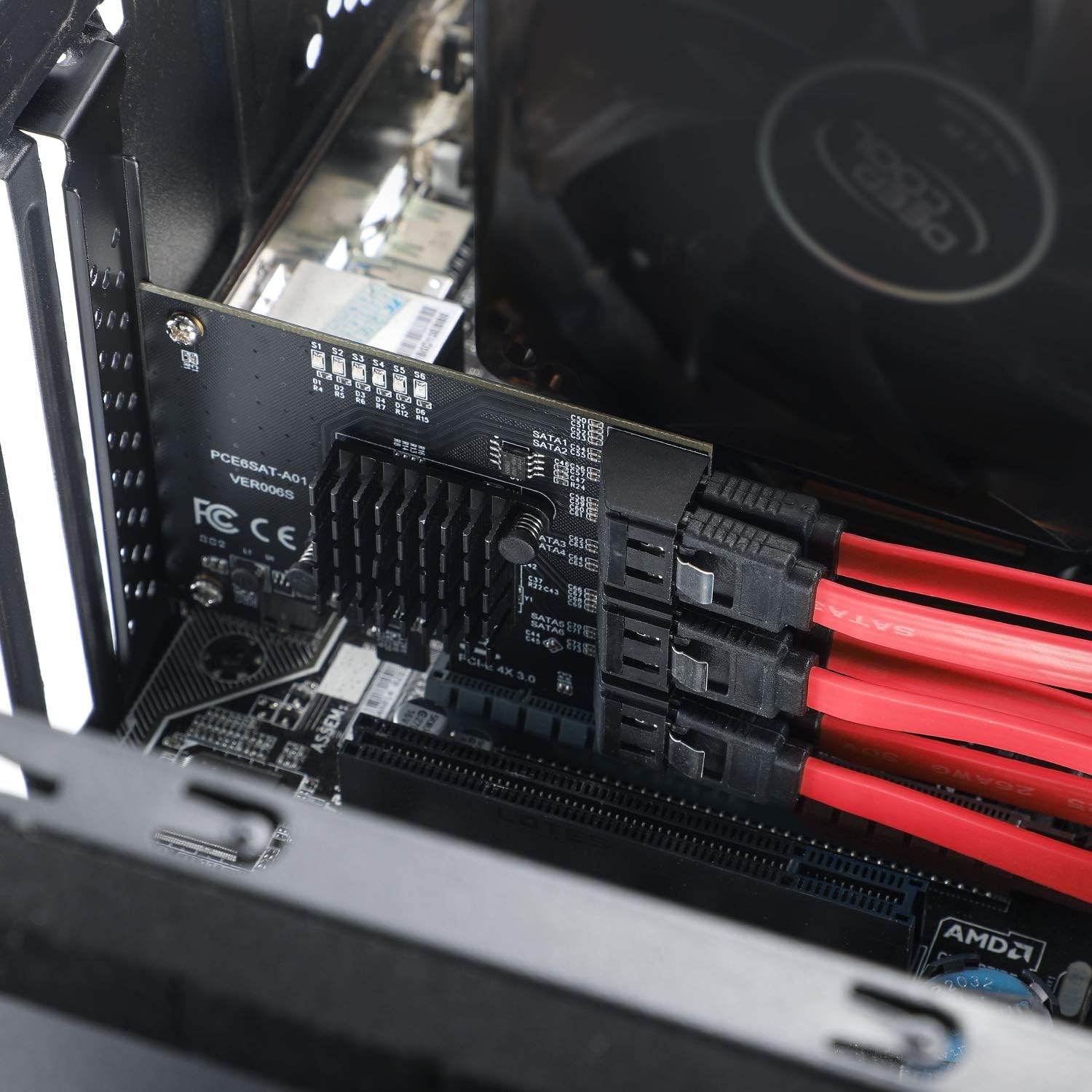
Image: Expansion card installed in a PC case with SATA cables connected.
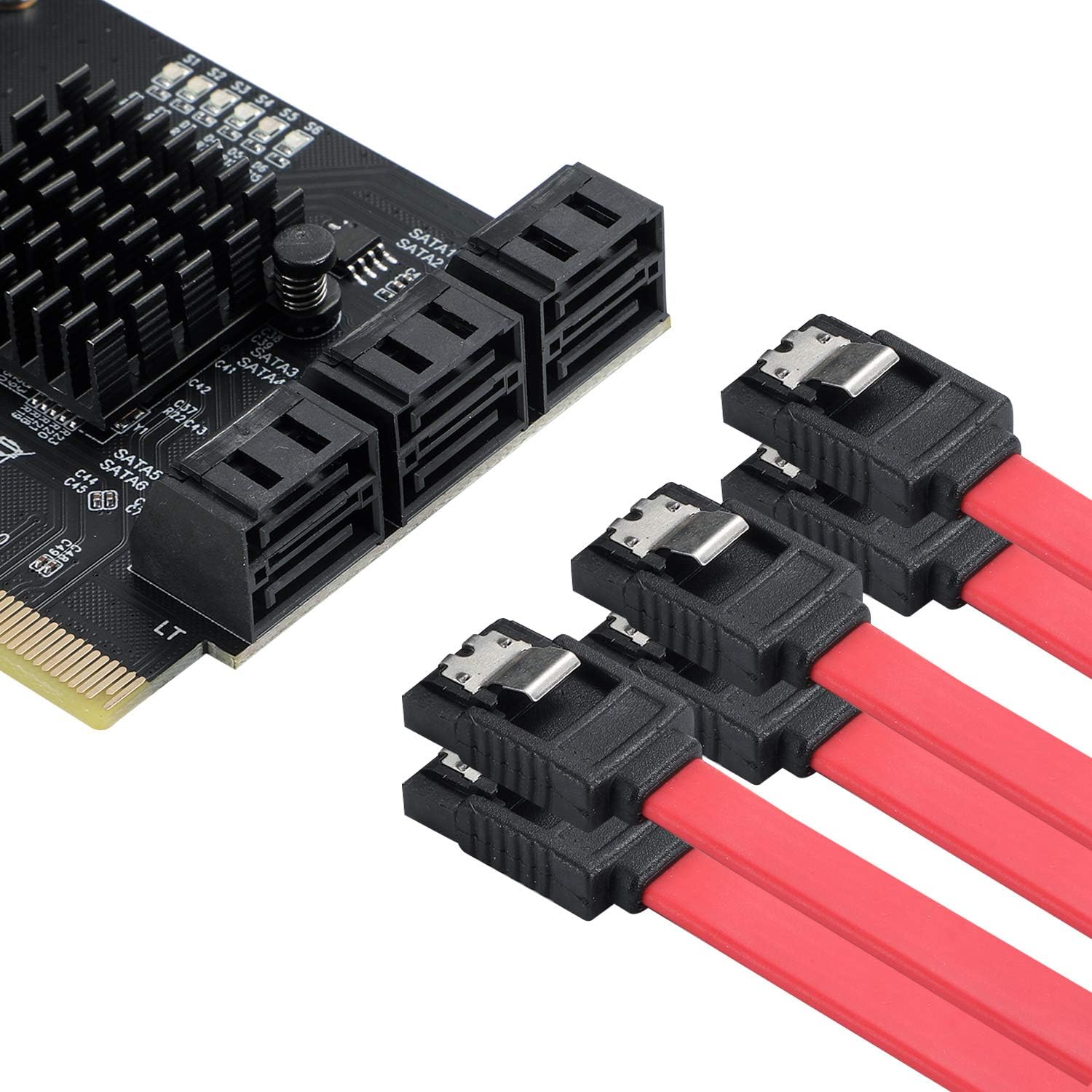
Image: Detail of SATA ports and cable connections.
6. Istruzzjonijiet Operattivi
The MZHOU 6 Port SATA PCIe 3.0 Expansion Card is designed for plug-and-play operation with most modern operating systems. No additional drivers are typically required for basic functionality.
- Sejbien Awtomatiku: Upon system boot, your operating system (Windows 7/8/10, Linux) should automatically detect the new SATA controller and any connected drives.
- Accessing Drives:
- For new drives: New drives may need to be initialized, partitioned, and formatted through Disk Management (Windows) or a disk utility (Linux) before they appear in File Explorer/My Computer.
- For existing drives: Existing drives with data should appear automatically once detected.
- Sostituzzjoni sħuna: The card supports hot-swapping. You can connect or disconnect SATA drives while the system is running. Ensure proper unmounting procedures are followed in your operating system before physically disconnecting a drive to prevent data loss.
- Indikaturi LED: The card features LED indicators (S1-S6) that illuminate when a SATA drive is connected and active on the corresponding port.

Image: LED status indicators for each SATA port.
Image: Supported operating systems.
7 Issolvi l-problemi
If you encounter issues with your MZHOU 6 Port SATA PCIe 3.0 Expansion Card, refer to the following common solutions:
- Sewwieq Mhux Skoperti:
- Kun żgur li l-kard hija mdaħħla sew fl-islott tal-PCIe.
- Verify that SATA data cables are securely connected to both the card and the drives.
- Confirm that all connected drives are receiving power from your PSU.
- Check your system's BIOS/UEFI settings to ensure the PCIe slot is enabled and not conflicting with other hardware.
- Għal drives ġodda, kun żgur li huma inizjalizzati u fformattjati fl-utilità tal-ġestjoni tad-diski tas-sistema operattiva tiegħek.
- Veloċitajiet Baxxi tat-Trasferiment tad-Dejta:
- Ensure you are using SATA 3.0 compatible drives and cables.
- Verify the card is installed in a PCIe 3.0 compatible slot. While compatible with PCIe 2.0, performance may be reduced.
- The card's bandwidth is shared among all six ports. Simultaneous heavy usage of multiple drives may lead to shared bandwidth limitations.
- Instabbiltà/Ħsarat tas-Sistema:
- Kun żgur li l-unità tal-provvista tal-enerġija (PSU) tiegħek għandha biżżejjed ilmatage to power all connected components, including the new drives.
- Check for any loose connections within your PC.
- Kun żgur li l-BIOS/UEFI tal-motherboard tiegħek hija aġġornata.
- Kwistjonijiet tas-sewwieq: While typically plug-and-play, if issues persist, visit the MZHOU support website for the latest drivers for the ASM1166 chipset.
8. Manutenzjoni
To ensure the longevity and optimal performance of your MZHOU 6 Port SATA PCIe 3.0 Expansion Card:
- Żomm Nadif: Periodically clean your computer's interior to prevent dust buildup on the card and its heatsink, which can affect cooling. Use compressed air for this purpose.
- Aċċerta ruħek li l-Fluss tal-Arja jkun: Maintain good airflow within your computer case to prevent overheating of components.
- Konnessjonijiet sikuri: Ensure all cables (SATA data and power) remain securely connected.
9. Garanzija u Appoġġ
The MZHOU 6 Port SATA PCIe 3.0 Expansion Card comes with a garanzija ta 'sena mid-data tax-xiri.
For technical support, driver downloads, or warranty claims, please contact MZHOU customer service. You can typically find contact information on the official MZHOU webis-sit jew permezz tal-kanali ta' appoġġ tal-bejjiegħ bl-imnut tiegħek.
MZHOU is committed to providing high-quality product quality and sales service. If you have any questions or require assistance, please feel free to consult us at any time.