1. Introduzzjoni
This manual provides essential information for the safe and effective use of your Sony MHC-V43D High Power Party Speaker. Please read these instructions thoroughly before operating the unit and retain them for future reference.

Figura 1: Quddiem view of the Sony MHC-V43D Party Speaker.
Karatteristiċi ewlenin:
- Jet Bass Booster: Enhances bass for powerful sound.
- Party Light & Speaker Light: Illuminates your space with dynamic lighting effects.
- Karaoke & Guitar Input: Connect microphones and guitars for interactive entertainment.
- Kontroll tal-ġesti: Manage music playback and effects with simple hand movements.
- NFC and Bluetooth Connectivity: Seamless wireless audio streaming.
- Music Center App Compatibility: Control speaker functions from your smartphone.
- Fiestable App Integration: Access DJ Control, Illumination, Karaoke, and Motion Control features.
- Built-in CD/DVD Player: Enjoy your favorite discs.
- USB and HDMI Connectivity: Versatile media playback options.
2. Setup
2.1 X'hemm fil-Kaxxa
- AC Cord (1U)
- FM Antenna (1U)
- Batteries (2U)
- Remote Control (1U)
- Setup Guide (1U)
2.2 Tqegħid Inizjali
Place the speaker on a stable, flat surface. Ensure adequate ventilation around the unit to prevent overheating. Avoid placing it near heat sources or in direct sunlight.
2.3 Konnessjoni tal-Enerġija
- Connect the supplied AC power cord to the AC IN port on the rear of the speaker.
- Plug the other end of the AC power cord into a wall outlet (240 Volts).
2.4 Konnessjoni tal-Antenna FM
Connect the supplied FM antenna to the FM ANTENNA terminal on the rear of the speaker for improved radio reception.
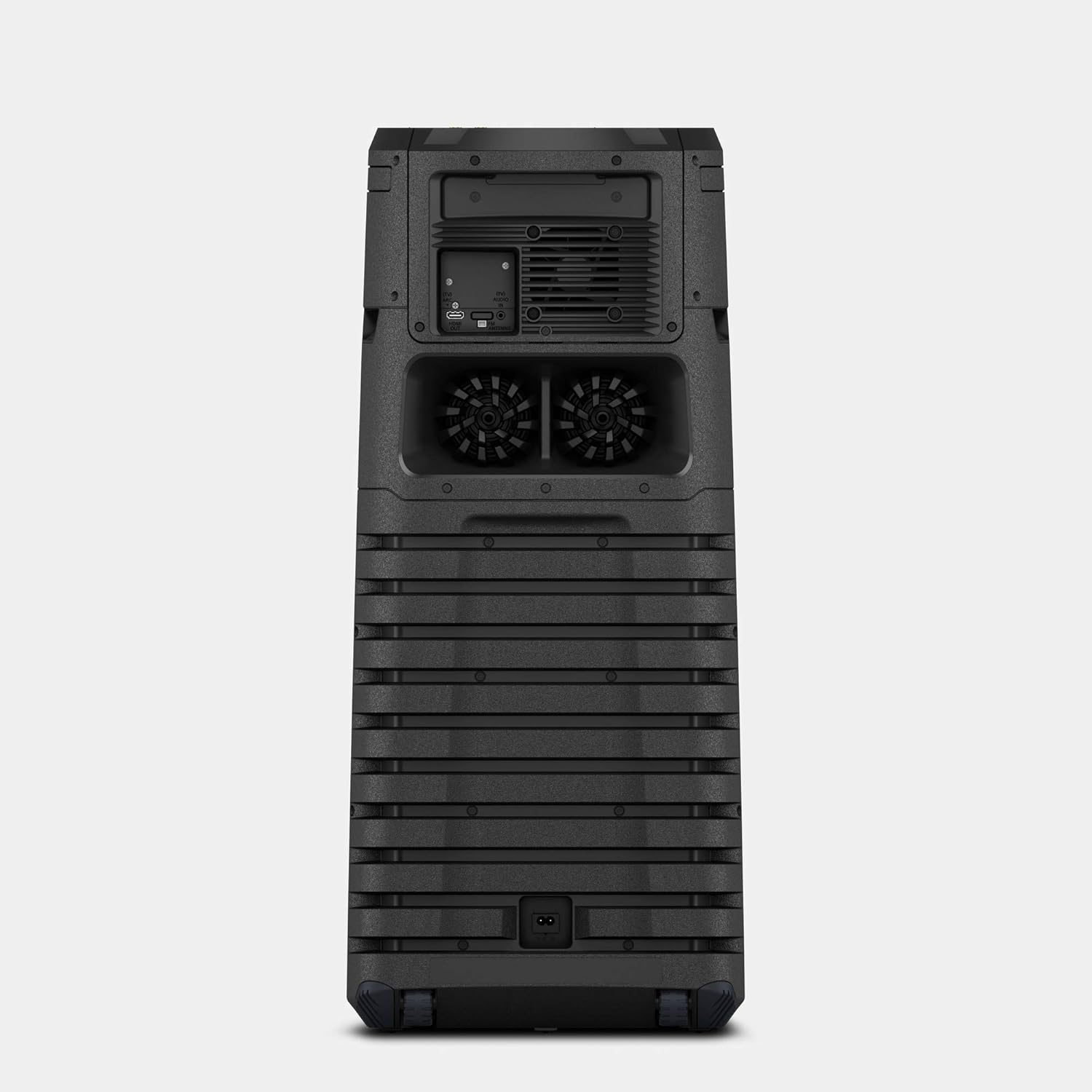
Figure 2: Rear panel connections including AC IN and FM Antenna port.
3. Istruzzjonijiet Operattivi
3.1 Kontrolli Bażiċi
The main controls are located on the top panel of the speaker. These include power, volume, playback controls, and function selection buttons.

Figure 3: Top panel controls for power, volume, and function selection.
3.2 Bluetooth and NFC Connectivity
Biex tikkonnettja mingħajr fili:
- Tqabbil Bluetooth: Press the Bluetooth button on the speaker or remote control. On your device, search for "MHC-V43D" and select to pair.
- NFC (Near Field Communication): Touch your NFC-enabled smartphone to the N-Mark on the speaker for instant pairing.
3.3 Karaoke and Guitar Input
The speaker features two microphone/guitar inputs for karaoke and live performances.
- Connect your microphone or guitar to the MIC/GUITAR jacks on the top panel.
- Adjust the MIC/GUITAR LEVEL and VOCAL FADER controls as needed.
3.4 Kontroll tal-Ġesti
Control various functions by waving your hand over the gesture control panel on the top of the speaker.
- Volum 'il fuq/Niżżel: Twist your hand right/left.
- Aqbeż Track: Shake your hand left/right.
- Pawża/Ilgħab: Move your hand up/down.

Figure 4: Demonstrating gesture control for music playback.
3.5 Music Center and Fiestable App
Enhance your experience by downloading the Sony Music Center and Fiestable apps on your smartphone.
- Music Center: Manage music playback, sound settings, and speaker grouping.
- Fiestable: Access party features like DJ Control, Illumination, Karaoke, and Motion Control.
3.6 Media Playback (CD/DVD, USB, HDMI)
- CD/DVD: Insert a disc into the disc tray. Select the 'Disc' function.
- USB: Connect a USB device to the USB port. Select the 'USB' function.
- HDMI: Connect to a TV or other device using an HDMI cable. Select the 'HDMI' function.
4. Manutenzjoni
4.1 Tindif
- Imsaħ il-parti ta’ barra tal-ispiker b’ċarruta ratba u niexfa.
- Do not use abrasive pads, scouring powder, or solvents such as alcohol or benzene.
4.2 Ħażna
Meta ma tkunx qed tużah għal perjodi twal, aħżen l-ispiker f'post frisk u niexef 'il bogħod mix-xemx diretta u minn temperaturi estremi.
5 Issolvi l-problemi
5.1 Ebda Qawwa
- Ensure the AC power cord is securely connected to both the speaker and the wall outlet.
- Iċċekkja jekk is-sokit tal-ħajt hux qed jaħdem sew billi tqabbad apparat ieħor.
5.2 Ebda Ħoss
- Verify the volume level on both the speaker and the connected device.
- Ensure the correct input source (Bluetooth, USB, CD/DVD, HDMI) is selected.
- Check all cable connections for wired inputs.
5.3 Kwistjonijiet ta' Tqabbil tal-Bluetooth
- Kun żgur li l-kelliem ikun fil-mod ta 'tqabbil Bluetooth.
- Ensure your device's Bluetooth is enabled and within range (approx. 10 meters).
- Delete the speaker from your device's Bluetooth list and attempt to re-pair.
6. Speċifikazzjonijiet
| Karatteristika | Dettall |
|---|---|
| Isem tal-Mudell | MHC-V43D |
| Tip ta 'Immuntar | Floor Permanenti |
| Materjal | Plastik |
| Tip ta' Kelliem | Bookshelf/Outdoor |
| Karatteristika Speċjali | NFC Enabled |
| Użi Rakkomandati | Għal Smartphones jew Pilloli |
| Apparati Kompatibbli | Smartphone, Pillola |
| Dijametru tas-Subwoofer | 12 Pulzier |
| Surround Sound Channel Konfigurazzjoni | 2.1 |
| Kulur | Iswed |
| Dimensjonijiet tal-Prodott | 32.9D x 35W x 79.5H Ċentimetri |
| Piż tal-oġġett | 14 kg 500 g |
| Huwa Waterproof | VERU |
| Firxa Massima (Bluetooth) | 10 metres / 30 Feet |
| Metodu ta' Kontroll | Mess |
| Teknoloġija tal-Komunikazzjoni mingħajr Fili | Bluetooth |
| Sors tal-Enerġija | Corded Elettriku |
| Wattage | 400 Watts |
| Rispons ta' Frekwenza | 20000 Hz |
7. Garanzija u Appoġġ
7.1 Informazzjoni dwar Garanzija
This product comes with a Limited Warranty. Please refer to the warranty card included in your package for specific terms and conditions.
7.2 Appoġġ għall-Klijent
For any queries, technical assistance, or service requests, please contact Sony India Private Limited customer care:
- Numru ta' Kura tal-Klijent: 080 6500 6500
- Email: sonyindia.care@ap.sony.com
Indirizz tal-Importatur: Sony India Private Limited, A-18, Mohan Co-operative Industrial Estate, Mathura Road, NEW DELHI 110044, INDIA.