
1. Prodott Aktarview
The Victrix Gambit Gaming Headset offers both wireless and wired connectivity for versatile use with Xbox One, Xbox Series X|S, and PC. Designed for competitive gaming, it features Dolby Atmos surround sound, 50mm HD speaker drivers, and a bi-directional noise-canceling microphone.

Image 1.1: The Victrix Gambit Gaming Headset, showcasing its sleek black design and over-ear cups.

Image 1.2: The Victrix Gambit headset highlighting its dual wireless and wired modes for home and tournament play.
2. Istruzzjonijiet ta' Setup
2.1 Kontenut tal-Pakkett
- Victrix Gambit Gaming Headset
- Wireless USB Dongle
- 3.5mm Audio Cable with In-line Controls
- Cable tal-Iċċarġjar tal-USB
- Manwal għall-Utent (dan id-dokument)
2.2 Iċċarġjar tal-Headset
Before initial use, fully charge the headset. Connect the USB charging cable to the headset's charging port and to a powered USB port (e.g., console, PC, or USB wall adapter). The LED indicator will show charging status.
2.3 Wireless Connection (Xbox/PC)
- Insert the wireless USB dongle into an available USB port on your Xbox console or PC.
- Power on the headset by pressing and holding the Power button until the LED indicator illuminates.
- The headset and dongle should automatically pair. A solid LED on both indicates a successful connection.
- If pairing does not occur automatically, press the pairing button on the USB dongle, then press and hold the Power/Pairing button on the headset until the LED flashes rapidly, then becomes solid.
2.4 Wired Connection (3.5mm)
For wired use or tournament play, connect the supplied 3.5mm audio cable from the headset's 3.5mm port to your controller or device's audio jack. The headset will automatically switch to wired mode.
3. It-Tħaddim tal-Headset
3.1 Power On/Off
- Qawwa Mixgħul: Press and hold the Power button on the headset until the LED illuminates.
- Itfi: Press and hold the Power button until the LED turns off.
3.2 Volume and Audio Controls
The headset features on-ear controls for convenient audio adjustments.

Image 3.1: Close-up of the headset's right earcup, showing the power button, mode switch, and game/chat balance dial.
- Volum Master: Use the volume dial on the earcup to adjust the overall audio level.
- Bilanċ tal-Logħba/Chat: Use the dedicated dial to balance game audio and chat volume.
- Swiċċ tal-Modalità: Toggle between different audio modes or profiles if available (refer to specific software for customization).
3.3 Użu tal-Mikrofonu
The bi-directional noise-canceling microphone ensures clear communication.

Image 3.2: The flexible boom microphone of the Victrix Gambit headset, designed for clear voice capture.
- Dawwar biex Tmut: Flip the microphone boom arm upwards to mute the microphone. Flip it down to unmute.
- Monitoraġġ tal-Mikrofonu: The headset may offer a three-stage mic monitor. Adjust this feature through the headset's companion software on PC or console settings to hear your own voice feedback.
3.4 Dolby Atmos Integration
The headset includes integrated Dolby Atmos for immersive surround sound. A lifetime subscription is included. Ensure Dolby Atmos is enabled in your console or PC audio settings for the best experience.
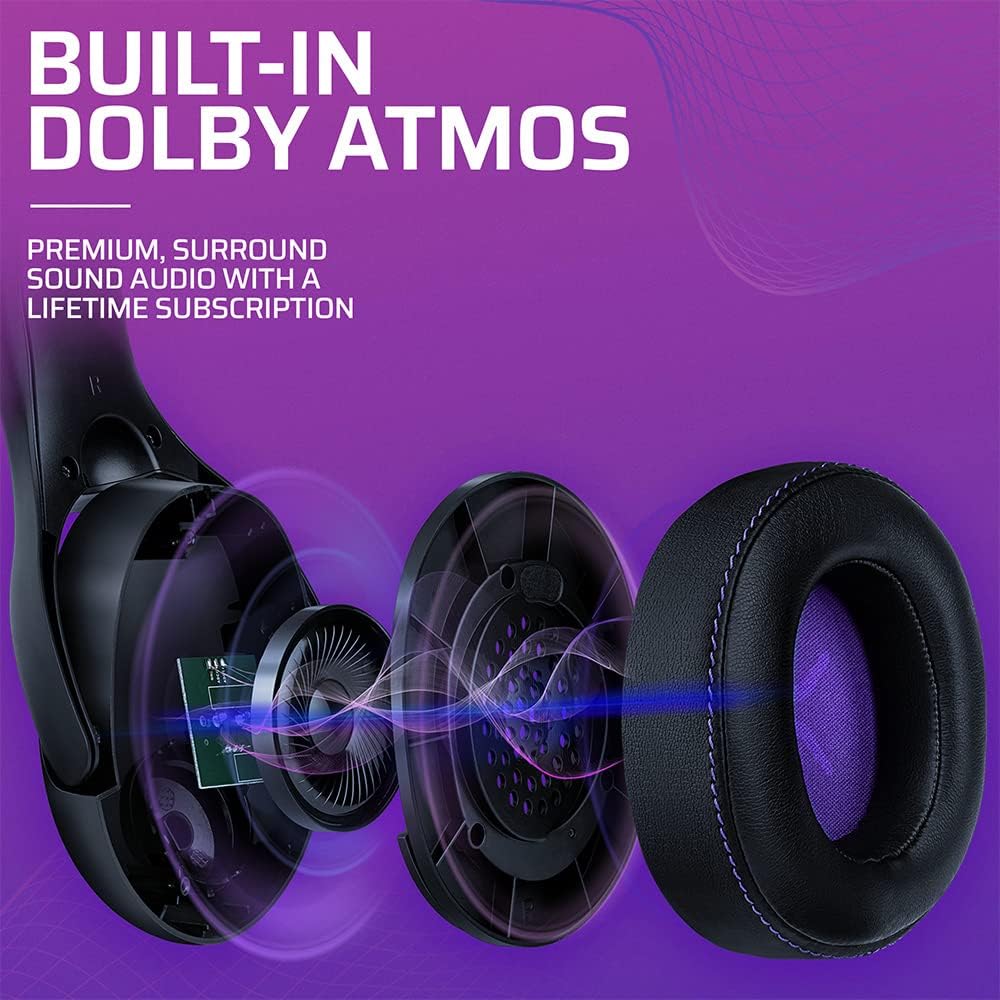
Immaġni 3.3: Sploda view of the Victrix Gambit earcup, illustrating the 50mm speaker drivers and the audio waves representing Dolby Atmos sound.
4. Manutenzjoni
4.1 Tindif
- Uża drapp artab u niexef biex tnaddaf l-uċuħ tal-headset.
- Għall-earcups, imsaħ bil-mod b'adamp drapp u soluzzjoni ta’ sapun ħafif jekk meħtieġ, imbagħad nixxef sew. Evita umdità eċċessiva.
- Tużax kimiċi ħarxa jew tindif li joborxu.
4.2 Ħażna
Store the headset in a cool, dry place away from direct sunlight and extreme temperatures. Avoid placing heavy objects on the headset to prevent damage.
4.3 Kura tal-Batterija
To prolong battery life, avoid fully discharging the headset frequently. Charge the headset regularly, even if not in use for extended periods.
5 Issolvi l-problemi
5.1 Bla Awdjo
- Ensure the headset is powered on and properly paired (for wireless) or connected (for wired).
- Check the volume levels on the headset, your console/PC, and the game/application.
- Ivverifika li l-apparat tal-ħruġ tal-awdjo korrett huwa magħżul fis-settings tas-sistema tiegħek.
- For wireless, try re-pairing the headset with the USB dongle.
5.2 Il-Mikrofonu Mhux Jaħdem
- Ensure the microphone is flipped down (unmuted).
- Check microphone input settings on your console/PC and in-game chat settings.
- Ivverifika li l-apparat korrett tad-dħul tal-mikrofonu huwa magħżul fis-settings tas-sistema tiegħek.
- Ittestja l-mikrofonu b'applikazzjoni jew apparat ieħor jekk possibbli.
5.3 Kwistjonijiet ta' Konnettività
- Wireless: Ensure the USB dongle is securely plugged in. Try a different USB port. Move closer to the dongle to rule out range issues.
- Wajer: Ensure the 3.5mm cable is fully inserted into both the headset and the device. Try a different 3.5mm cable if available.
5.4 Headset Not Charging
- Ensure the USB charging cable is securely connected to both the headset and a powered USB port.
- Ipprova port USB jew kejbil tal-iċċarġjar differenti.
- Iċċekkja li s-sors tal-enerġija huwa attiv.
6. Speċifikazzjonijiet
| Numru tal-Mudell | 049-003-NA |
| Konnettività | Wireless (USB Dongle, up to 12.19 meters range), Wired (3.5mm audio cable) |
| Sewwieqa tal-Ispeaker | 50mm HD |
| Teknoloġija Awdjo | Dolby Atmos (lifetime subscription included) |
| Mikrofonu | Bi-directional, Noise-Canceling, Flip-to-Mute |
| Batterija | 1 Lithium-ion (inkluża) |
| Dimensjonijiet (L x W x H) | 1 x 260.4 x 215.9 ċm |
| Piż | 610 gramma |
| Kompatibilità | Microsoft Xbox One, Xbox Series X|S, PC |
7. Informazzjoni dwar Garanzija
For detailed warranty information, please refer to the official PDP webis-sit jew il-karta tal-garanzija inkluża mal-imballaġġ tal-prodott tiegħek. It-termini u l-kundizzjonijiet tal-garanzija jistgħu jvarjaw skont ir-reġjun.
8. Appoġġ għall-Klijent
If you encounter any issues or have questions not covered in this manual, please contact PDP customer support. Visit the official PDP website for support contact details, FAQs, and additional resources.


