
PowerPac PPFS212B 2-in-1 Dual-Usage Stand Fan Instruction Manual
Model: PPFS212B
1. Informazzjoni Importanti dwar is-Sigurtà
Jekk jogħġbok aqra l-istruzzjonijiet kollha bir-reqqa qabel ma tuża dan l-apparat u żommhom għal referenza futura. Jekk ma ssegwix dawn l-istruzzjonijiet, dan jista' jirriżulta f'xokk elettriku, nar, jew korriment serju.
- Tiżgura l-voltagIl-volum indikat fuq it-tikketta tal-klassifikazzjoni jaqbel mal-provvista tal-elettriku prinċipali tiegħektage.
- Tgħaddasx il-fann, il-plagg, jew il-korda fl-ilma jew f'likwidi oħra.
- Unplug the fan from the power outlet before cleaning, assembling, or disassembling parts.
- Keep fingers, pencils, or any other objects out of the fan grille when it is running.
- Tħaddimx il-fann b'korda jew plagg bil-ħsara. Ikkuntattja persunal tas-servizz kwalifikat għat-tiswija.
- This appliance is equipped with thermal fuse protection against overheating. If the fan stops working unexpectedly, unplug it and allow it to cool before attempting to restart.
- Dan l-apparat mhuwiex maħsub għall-użu minn persuni (inklużi tfal) b’kapaċitajiet fiżiċi, sensorji jew mentali mnaqqsa, jew nuqqas ta’ esperjenza u għarfien, sakemm ma jkunux ingħataw superviżjoni jew struzzjoni dwar l-użu tal-apparat minn persuna responsabbli għas-sigurtà tagħhom. .
2. Prodott Aktarview
The PowerPac PPFS212B is a versatile 2-in-1 dual-usage stand fan designed for efficient cooling in indoor environments. It features 7 blades for maximum airflow, 3-speed settings, and an oscillation function for wider air distribution. The fan is equipped with thermal fuse protection for enhanced safety.
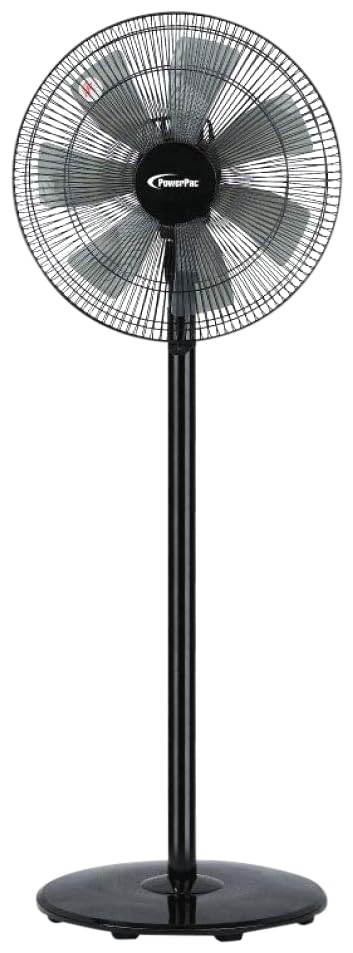
Image: PowerPac PPFS212B 2-in-1 Dual-Usage Stand Fan, showcasing its black finish and stand configuration.
3. Kontenut tal-Pakkett
Please check the package contents upon opening to ensure all parts are present and undamaged:
- 1 x PowerPac PPFS212B Stand Fan (includes fan head, stand pole, and base)
4. Istruzzjonijiet tal-Assemblea
Follow these steps to assemble your PowerPac PPFS212B fan:
- Agħmel bir-reqqa l-komponenti kollha mill-imballaġġ.
- Attach the stand pole to the fan base. Ensure it is securely fastened according to the markings or locking mechanism.
- Mount the fan head assembly onto the top of the stand pole. Align the connection points and secure it firmly.
- Ensure all screws and fasteners are tightened to prevent wobbling during operation.
- Place the assembled fan on a stable, flat surface.
Image: Illustrative diagram of the PowerPac PPFS212B fan assembly, showing the base, stand, and fan head components.
5. Istruzzjonijiet Operattivi
To operate your PowerPac PPFS212B fan:
- Ipplaggja l-korda tad-dawl fi żbokk elettriku adattat.
- Power On/Off: Press the 'ON/OFF' button (or corresponding button) on the control panel to turn the fan on or off.
- Aġġustament tal-veloċità: Press the 'SPEED' button repeatedly to cycle through the 3 available speed settings (Low, Medium, High).
- Funzjoni ta 'Oxxillazzjoni: Press the 'OSC' button (or corresponding button) to activate or deactivate the oscillation feature, which allows the fan head to sweep from side to side.
- When finished, press the 'ON/OFF' button to turn off the fan and unplug it from the power outlet.
6. Manutenzjoni u Tindif
Regular cleaning and maintenance will help ensure optimal performance and longevity of your fan:
- Dejjem aqla l-fann mill-provvista tal-enerġija qabel it-tindif.
- Uża artab, damp cloth to wipe the exterior surfaces of the fan. Do not use abrasive cleaners, solvents, or harsh chemicals.
- To clean the fan blades, carefully remove the front grille (if detachable) according to the product design. Wipe the blades with a soft cloth. Ensure all parts are dry before reassembling.
- Tħallix l-ilma jqattar fil-kaxxa tal-mutur.
- Aħżen il-fann f'post frisk u niexef meta ma jkunx qed jintuża għal perjodi twal.
7 Issolvi l-problemi
If you encounter issues with your fan, refer to the following table for common problems and solutions:
| Problema | Kawża Possibbli | Soluzzjoni |
|---|---|---|
| Il-fann ma jixgħelx. | Ebda provvista ta 'enerġija. Thermal fuse activated. | Iċċekkja jekk il-plagg huwiex imdaħħal sew fl-iżbokk. Kun żgur li l-iżbokk tad-dawl huwa funzjonali. Unplug and allow the fan to cool down for 30 minutes before restarting. |
| Fluss tal-arja dgħajjef jew xejn. | Il-veloċità tal-fann hija baxxa wisq. Ix-xfafar tal-fann huma maħmuġin. | Żid l-issettjar tal-veloċità tal-fann. Unplug the fan and clean the blades as per maintenance instructions. |
| Il-fann ma joxxillax. | Il-funzjoni tal-oxxillazzjoni hija mitfija. | Press the 'OSC' button to activate oscillation. |
| Storbju mhux tas-soltu waqt it-tħaddim. | Partijiet sfużi. Tfixkil. | Unplug the fan and check for any loose components or obstructions around the blades or motor. Tighten any loose parts. |
Jekk il-problema tippersisti wara li tipprova dawn is-soluzzjonijiet, jekk jogħġbok ikkuntattja l-appoġġ għall-klijenti.
8. Speċifikazzjonijiet
| Karatteristika | Speċifikazzjoni |
|---|---|
| Brand | PowerPac |
| Numru tal-Mudell | PPFS212B |
| Tip | 2-in-1 Dual-Usage Stand Fan |
| Numru ta' Xfafar | 7 |
| Numru ta' Veloċitajiet | 3 |
| Sors tal-Enerġija | Corded Elettriku |
| Wattage | 50 watt |
| Metodu ta' Kontroll | Imbotta Buttuna |
| Karatteristiċi Speċjali | Oscillating, Thermal Fuse Protection |
| Materjal | Plastik |
| Użu fuq ġewwa/barra | Ġewwa |
| Kulur | Iswed |
9. Garanzija u Appoġġ
This PowerPac PPFS212B fan comes with a garanzija ta 'sena mid-data tax-xiri. Din il-garanzija tkopri difetti fil-manifattura taħt kundizzjonijiet normali ta' użu.
For warranty claims, technical support, or any inquiries regarding your product, please contact PowerPac customer service. Keep your proof of purchase for warranty validation.