Introduzzjoni
This manual provides essential information for the safe and efficient use of your Lenovo ThinkPad X1 Extreme Gen 3 laptop. Please read this manual thoroughly before operating your device to ensure optimal performance and longevity. Keep this manual for future reference.
Setup
Spakkjar u Spezzjoni Inizjali
Carefully remove all components from the packaging. Verify that all items listed in the packing list are present and undamaged. If any items are missing or damaged, contact your retailer immediately.

Figura 1: Quddiem view of the Lenovo ThinkPad X1 Extreme Gen 3 laptop.
Qawwa tal-Konnessjoni
Connect the power adapter to the laptop's power input port and then to a wall outlet. The battery will begin charging automatically. It is recommended to fully charge the battery before initial use.
L-Ewwel Boot u s-Setup tas-Sistema Operattiva
Agħfas il-buttuna tal-qawwa biex tixgħel il-laptop. Segwi l-istruzzjonijiet fuq l-iskrin biex tlesti s-setup tal-Windows 10 Pro, inkluż l-għażla tal-lingwa, il-konnessjoni tan-netwerk, u l-ħolqien tal-kont tal-utent.
It-Tħaddim tal-Laptop Tiegħek
Tastiera u TrackPoint
The ThinkPad X1 Extreme Gen 3 features a full-size keyboard and a TrackPoint pointing device for precise cursor control. The TrackPoint is located in the center of the keyboard, with corresponding buttons below the spacebar.
Touchpad Użu
The multi-touch touchpad supports various gestures for navigation, including scrolling, zooming, and switching applications. Refer to Windows settings for customizing touchpad gestures.
Konnessjoni ta' Apparati Esterni
Your laptop is equipped with multiple ports for connecting peripherals. These include USB ports, an HDMI port, and a headphone/microphone combo jack. Refer to the specifications section for a complete list of ports.
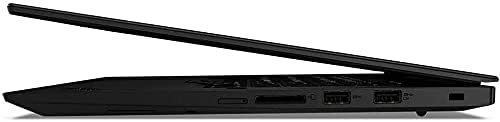
Figura 2: Ġenb view illustrating the connectivity ports of the laptop.
Manutenzjoni
Tindif tal-Laptop
Uża drapp ratba u mingħajr ħelu ftit dampLaħlaħ bl-ilma jew b'tindif tal-iskrin biex tnaddaf id-displej. Għat-tastiera u x-chassis, uża drapp artab. Evita kimiċi ħarxa jew materjali li joborxu.
Kura tal-batterija
To maximize battery life, avoid extreme temperatures and store the laptop with a partial charge if not used for extended periods. Periodically discharge and recharge the battery fully.
Aġġornamenti tas-Software
Regularly check for and install operating system and driver updates to ensure optimal performance, security, and compatibility.
Issolvi l-problemi
Kwistjonijiet Komuni u Soluzzjonijiet
- Il-laptop ma jixgħelx: Kun żgur li l-adapter tal-enerġija huwa konness sew u li l-batterija hija ċċarġjata. Ipprova żomm il-buttuna tal-enerġija għal 10-15-il sekonda biex twettaq hard reset.
- L-iskrin huwa vojt: Check if the laptop is in sleep mode. Press any key or the power button to wake it up. Verify external display connections if applicable.
- Prestazzjoni bil-mod: Close unnecessary applications. Check for background processes consuming high resources. Ensure sufficient free disk space.
- Problemi ta' konnettività tal-Wi-Fi: Restart your router and modem. Check network settings on the laptop. Ensure Wi-Fi drivers are up to date.
Għal kwistjonijiet aktar kumplessi, irreferi għall-appoġġ ta' Lenovo websit jew ikkuntattja lis-servizz tal-konsumatur.
Speċifikazzjonijiet
| Karatteristika | Dettall |
|---|---|
| Isem tal-Mudell | ThinkPad X1 Extreme Gen 3 |
| Proċessur | Intel Core i5-10210U Quad Core (1.6GHz-4.2GHz) |
| Sistema Operattiva | Windows 10 Pro 64bit English |
| Karta Grafika | NVIDIA GeForce GTX 1650 Ti |
| Wiri | 15.6" Full HD IPS 250nits Anti-Glare (1920 x 1080) |
| RAM | 32 GB DDR4 |
| Hard Drive | 1 GB SSD |
| Wireless | 802.11 AC Wireless with Bluetooth 5.0 |
| Tastiera | Single Pointing Non-backlit Keyboard, English |
| Piż tal-oġġett | 4.24 liri |
| Dimensjonijiet tal-Prodott | 14.2 x 9.7 x 0.7 pulzieri |
| Kulur | Iswed |
| Karatteristika Speċjali | Qarrej tal-marki tas-swaba' |
Garanzija u Appoġġ
For warranty information, please refer to the warranty card included with your product or visit the official Lenovo support website. Technical support and service options are available through Lenovo's customer service channels.
Appoġġ Lenovo Websit: support.lenovo.com