
COMEXION BH-M100
COMEXION BH-M100 Trucker Bluetooth Headset User Manual
Model: BH-M100
Introduzzjoni
Thank you for choosing the COMEXION BH-M100 Trucker Bluetooth Headset. This headset is designed to provide stable and clear audio for calls and music, featuring a noise-canceling microphone and comfortable wear for extended periods. This manual will guide you through the setup, operation, and maintenance of your new headset to ensure optimal performance.
Kontenut tal-Pakkett
Jekk jogħġbok ivverifika li l-oġġetti kollha huma preżenti fil-pakkett tiegħek:
- COMEXION Bluetooth Headset (BH-M100)
- Cable tal-Iċċarġjar tal-USB-C
- Manwal għall-Utent
Prodott Overview
Familiarize yourself with the components and controls of your BH-M100 headset:
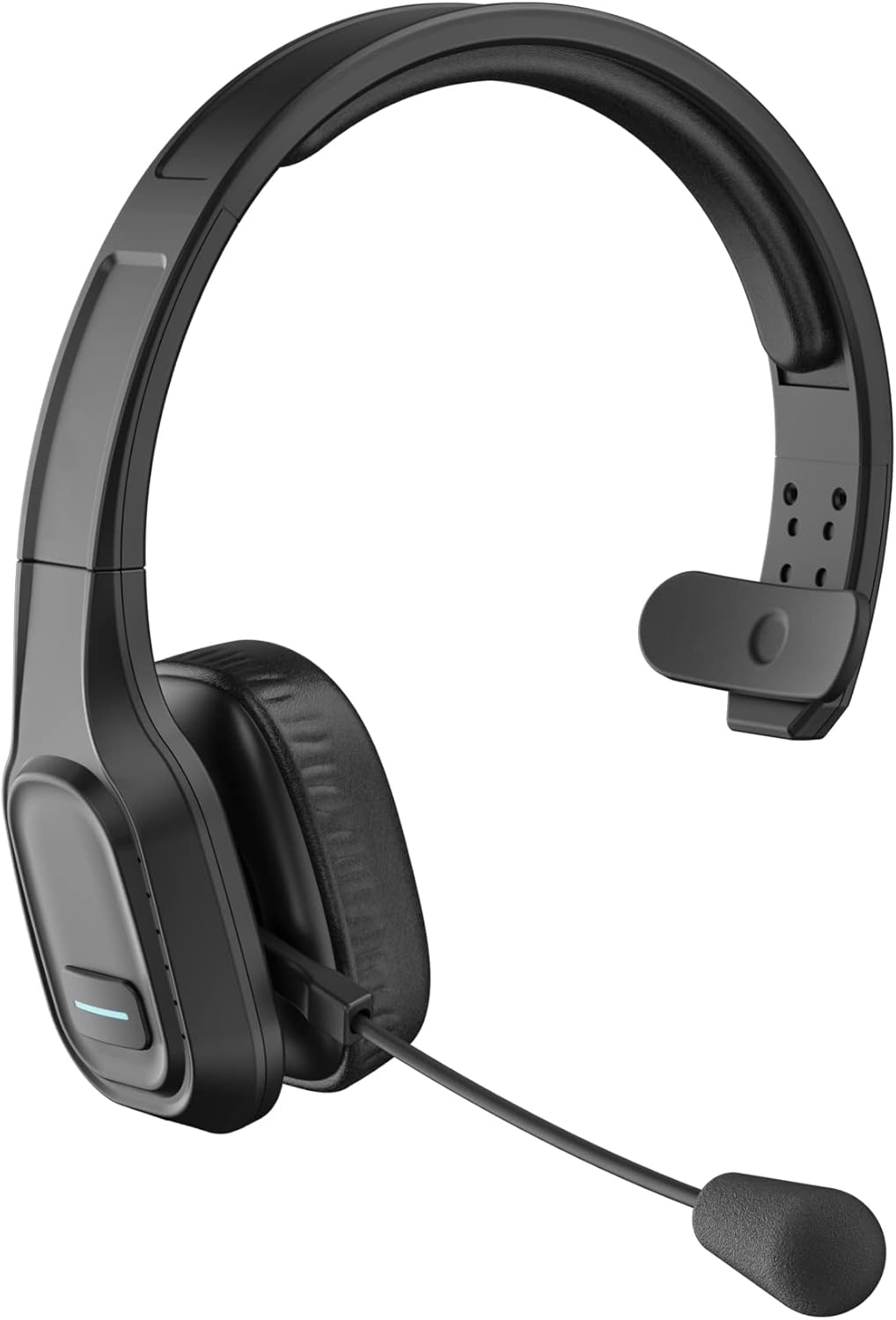
Figure 1: COMEXION BH-M100 Trucker Bluetooth Headset - Front View
Headset Controls and Ports

Figura 2: Ġenb view of the headset highlighting the Multi-Function Button (MFB), Volume +/- (Next/Previous Song), Microphone Mute Button & LED Indicator, Type-C Charge Port, and Microphone.
- Buttuna Multi-Funzjoni (MFB): Used for power on/off, play/pause music, answer/end calls.
- Volume + / Next Song: Press to increase volume, long press for next song.
- Volume - / Previous Song: Press to decrease volume, long press for previous song.
- Microphone Mute Button & LED Indicator: Press to mute/unmute the microphone. The LED indicates mute status.
- Port ta' Ċarġ tat-Tip C: Għall-iċċarġjar tal-headset.
- Mikrofonu: Adjustable boom microphone with noise-canceling capabilities.
Setup
1. Iċċarġjar tal-Headset
Qabel l-ewwel użu, iċċarġja l-headset tiegħek kompletament. Iċċarġjar sħiħ jieħu madwar 1.5 sigħat.
- Connect the provided USB-C charging cable to the headset's Type-C Charge Port.
- Qabbad it-tarf l-ieħor tal-kejbil ma' sors ta' enerġija USB (eż., port USB tal-kompjuter, adapter tal-ħajt).
- L-indikatur LED se juri aħmar waqt l-iċċarġjar u jsir blu meta jkun iċċarġjat kompletament.

Figure 3: Headset battery life indicators, including 1.5 hours charging time.
2. It-tqabbil mat-Tagħmir Tiegħek
The BH-M100 uses Bluetooth 5.0 for quick, efficient, and stable connections. It can pair with two devices simultaneously.
- Qawwa Mixgħul: Long press the Multi-Function Button (MFB) until the LED indicator flashes blue and red alternately, indicating pairing mode.
- Attiva l-Bluetooth: Fuq l-apparat tiegħek (smartphone, laptop, tablet), attiva l-Bluetooth.
- Fittex u Qabbad: In your device's Bluetooth settings, search for "BH-M100" and select it to connect.
- Konferma: Once connected, the LED indicator on the headset will turn solid blue. You will also hear an audible confirmation.

Figure 4: The headset supports simultaneous connection to two devices.
Nota: If connecting to a PC without built-in Bluetooth, a USB dongle (not included with BH-M100, available with BH-M100 with Dongle variant) may be required.
Istruzzjonijiet Operattivi
Ġestjoni tas-Sejħiet
- Tweġiba/Tmiem Sejħa: Agħfas l-MFB darba.
- Irrifjuta Sejħa: Agħfas fit-tul l-MFB.
- Ixekkel/Istinka l-mikrofonu: Press the Microphone Mute Button once. (Note: Mute function on BH-M100 without Dongle is only for cell phones. For PC applications like Skype or Zoom, mute via software settings.)
Kontroll tal-Volum
- Żid il-Volum: Agħfas il-buttuna Volume +.
- Naqqas il-Volum: Agħfas il-buttuna tal-Volum -.
Aġġustament tal-Mikrofonu
The 270° rotatable microphone allows for flexible positioning on either the right or left side, ensuring optimal voice pickup.

Figure 5: The directional microphone can be adjusted for optimal voice clarity and muted during conversations.
Comfort and Wearing
The headset is designed for all-day comfort with soft protein leather earmuffs and an adjustable headband.
- Aġġusta l-faxxa tar-ras biex taqbel komdu fuq rasek.
- Position the ear cup over one ear, allowing the other ear to remain open to your surroundings.
- Rotate the microphone boom to align with your mouth for clear communication.

Figure 6: Features ensuring comfort for all-day wear, including adjustable headband, soft ear pad, anti-slip pad, and 270° rotatable microphone.
Manutenzjoni
To ensure the longevity and optimal performance of your headset, follow these maintenance guidelines:
- Naddaf il-kuxxinetti tal-widnejn u l-faxxa tar-ras regolarment b'ċarruta ratba u niexfa.
- Evita li tesponi l-headset għal temperaturi estremi, umdità, jew dawl tax-xemx dirett.
- Tużax tindif jew solventi li joborxu.
- Aħżen il-headset f'post frisk u niexef meta ma tkunx qed tuża.
Issolvi l-problemi
If you encounter issues with your headset, please refer to the following common problems and solutions:
- Il-headset ma jixgħelx: Kun żgur li l-headset huwa kompletament iċċarġjat.
- Ma tistax tgħaqqad: Make sure the headset is in pairing mode (flashing blue and red LED). Ensure Bluetooth is enabled on your device and it's within range (10 meters). Try restarting both the headset and your device.
- Poor sound quality/connection: Ensure your device's Bluetooth driver is updated (especially for laptops). Turn off other Bluetooth devices nearby. Test in a quieter environment.
- Mute button not working on PC: The mute button on the BH-M100 without a dongle only works for cell phones. For PC applications (Skype, Zoom, Teams), use the mute function within the software.
- Cannot connect to a device without Bluetooth: The BH-M100 requires Bluetooth connectivity. For non-Bluetooth devices, consider the BH-M100 with Dongle variant.
Speċifikazzjonijiet
| Karatteristika | Dettall |
|---|---|
| Isem tal-Mudell | BH-M100 |
| Brand | COMEXION |
| Teknoloġija tal-Konnettività | Bluetooth 5.0 |
| Teknoloġija tal-Komunikazzjoni mingħajr Fili | Bluetooth |
| Tqegħid tal-widnejn | Fuq Widnejn |
| Kontroll tal-Ħoss | Kanċellazzjoni Attiva tal-Istorbju (Mikrofonu) |
| Ħin tal-Iċċarġjar | 1.5 Sigħat |
| Continuous Talking Time | Sa 30-il Siegħa |
| Ħin ta' Standby | Sa 400-il Siegħa |
| Medda Bluetooth | 10 Meters |
| Piż tal-oġġett | 4.9 uqija |
| Dimensjonijiet tal-Prodott | 8.86 x 7.28 x 2.95 pulzieri |
| Materjal | Ġilda Faux |
Garanzija u Appoġġ
COMEXION offers a Lifetime Extended Warranty for your BH-M100 headset. To activate your warranty and access technical support, please scan the QR code provided on the warranty card included in your package or visit the official COMEXION websit.
The warranty provides:
- Lifetime Extended Warranty
- Replacement at no cost if return window closed
- Technical support for any usage problems
For further assistance, please refer to the contact information provided on the official COMEXION websit.
Ask a question about this manual
Ask about setup, troubleshooting, compatibility, parts, safety, or missing instructions. Manuals+ will review the question and use this page’s manual context to help answer it.