
1. Introduzzjoni
Grazzi tax-xiriasing the Tengsen M1 MP3 Player. This device is designed to provide a versatile multimedia experience, featuring Bluetooth 5.0 connectivity, a full touch screen, HD video playback, HiFi audio, FM radio, voice recording, e-book functionality, and a pedometer. This manual will guide you through the setup, operation, and maintenance of your new device.
2. Informazzjoni dwar is-Sigurtà
- Tesponix l-apparat għal temperaturi estremi, dawl tax-xemx dirett, jew umdità għolja.
- Evita li twaqqa’ jew tissuġġetta l-apparat għal impatti qawwija.
- Żomm l-apparat 'il bogħod mill-ilma u likwidi oħra.
- Uża biss il-kejbil tal-iċċarġjar ipprovdut u adapter tal-enerġija kompatibbli.
- Tippruvax iżarma jew isewwi l-apparat lilek innifsek. Ikkuntattja l-appoġġ tal-klijent għall-assistenza.
- Listen to audio at moderate volumes to prevent hearing damage.
3. Kontenut tal-Pakkett
Jekk jogħġbok iċċekkja l-pakkett għall-oġġetti li ġejjin:
- Tengsen M1 MP3 Player
- Kejbil tal-Iċċarġjar USB (Tip Ċ)
- Earphones bil-fili
- Manwal għall-Utent

Image: Tengsen M1 MP3 Player with USB cable and wired earphones.
4. Prodott Aktarview
The Tengsen M1 features a durable metal body and a 4.0-inch full touch screen for intuitive navigation. It includes a built-in speaker and supports various multimedia functions.

Immaġni: Quddiem view of the Tengsen M1 MP3 Player.
5. Setup
5.1 Iċċarġjar inizjali
Before first use, fully charge the device. Connect the USB charging cable to the player's Type-C port and the other end to a USB power adapter or computer. The battery indicator will show charging status.
5.2 Power On/Off
- Biex Tixgħel: Agħfas u żomm il-buttuna tal-qawwa sakemm l-iskrin jixgħel.
- Biex Tifi: Agħfas u żomm il-buttuna tal-qawwa, imbagħad agħżel 'Itfi' fuq l-iskrin.
5.3 Trasferiment Files
Connect the MP3 player to your computer using the provided USB cable. The device will appear as a removable disk. You can then drag and drop music, video, and e-book files into the respective folders on the player's internal 16GB storage.
5.4 Espansjoni tal-Ħażna
The device supports a Micro TF card up to 128GB (not included). Insert the card into the designated slot to expand storage capacity for more files.
6. Istruzzjonijiet Operattivi
6.1 Navigazzjoni Bażika
The Tengsen M1 features a full touch screen. Swipe left/right or tap icons to navigate through menus and applications. Use the back arrow icon to return to the previous screen.

Image: The 4.0-inch full touch screen allows for easy operation, similar to a smartphone.
6.2 Daqq tal-Mużika
Tap the 'Music' icon to access your audio library. The player supports MP3, WMA, OGG, APE, FLAC, WAV, AAC-LC, ACELP, and M4A formats. You can create playlists and enjoy high-resolution audio through headphones or the built-in speaker.

Image: The device features a built-in speaker for direct audio playback.
6.3 Konnettività Bluetooth
The M1 player features Bluetooth 5.0 for wireless audio. Go to 'Settings' > 'Bluetooth' to enable and pair with your Bluetooth headphones or speakers. Nota: This device cannot connect to mobile phones via Bluetooth.

Image: Bluetooth 5.0 provides a stable wireless connection for audio accessories.
6.4 Daqq tal-Vidjo
Tap the 'Video' icon to play video files. The player supports high-resolution 720p and 1080p video playback without format conversion. Compatible formats include AVI, MKV, MPG, MPEG, RM, RMVB, VOB, MOV, FLV, ASF, DAT, MP4, and 3GP.
Image: The device supports 1080P HD video playback.
6.5 Radju FM
Plug in the wired earphones (they act as an antenna) and select the 'Radio' application. Scan for available stations and save your favorites.
6.6 Reġistratur tal-Vuċi
Open the 'Record' application to use the built-in voice recorder. You can record lectures, meetings, or personal notes.
6.7 E-book Reader
Access the 'E-book' application to read text files. Ensure your e-book files are in a compatible format (e.g., TXT) and transferred to the device.
6.8 Pedometru
The 'Pedometer' function tracks your steps, making it suitable for sports and fitness activities. Activate it from the main menu to monitor your activity.
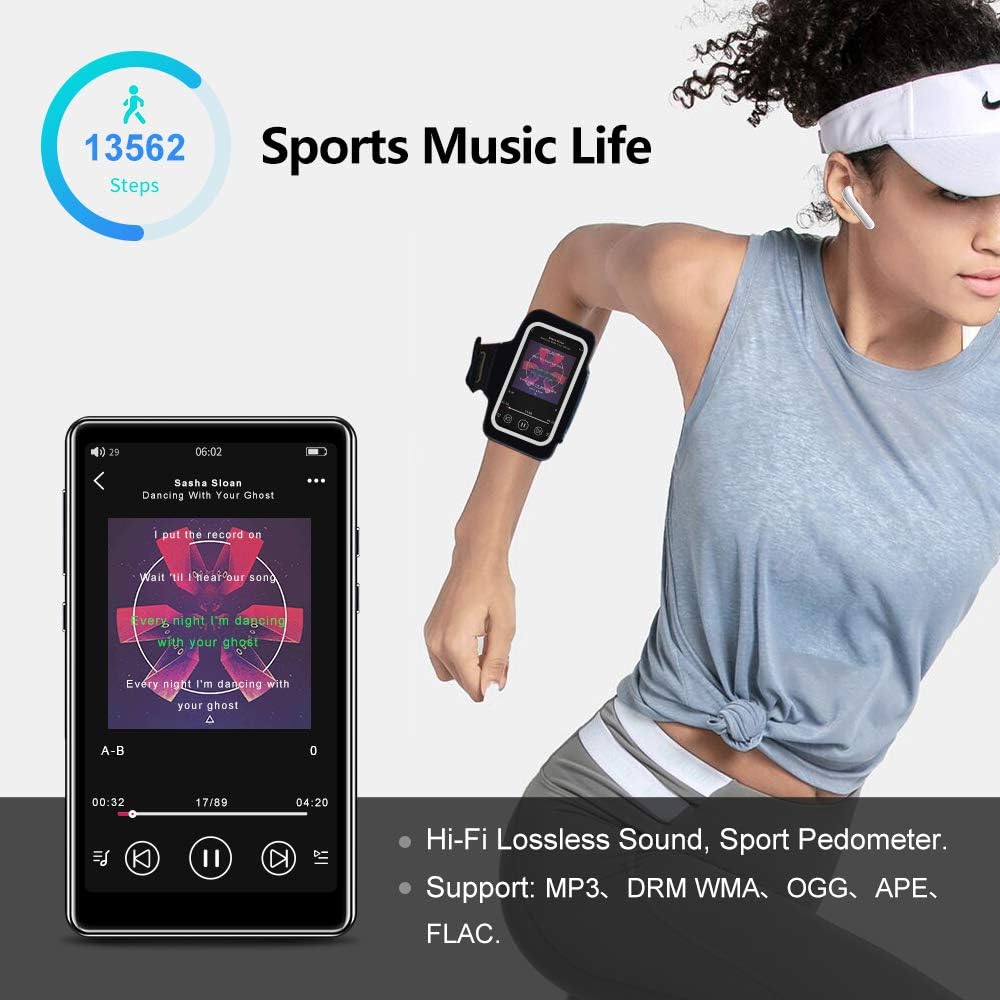
Image: The pedometer function supports tracking steps during sports activities.
7. Manutenzjoni
7.1 Tindif tal-Apparat
Use a soft, dry, lint-free cloth to clean the screen and body of the player. Do not use abrasive cleaners or solvents.
7.2 Kura tal-Batterija
The device has a built-in 1400mAh lithium-ion battery. To prolong battery life, avoid fully discharging it frequently and store the device in a cool, dry place when not in use for extended periods. A full charge provides over 20 hours of music playback or 8+ hours of video playback with wired earphones.

Image: The 1400mAh battery provides extended usage time.
8 Issolvi l-problemi
- Apparat mhux qed jixgħel: Kun żgur li l-batterija hija ċċarġjata. Qabbad ma' sors ta' enerġija u erġa' pprova.
- Problemi bil-konnessjoni Bluetooth: Ensure Bluetooth is enabled on both the player and the accessory. Keep devices within range and try re-pairing.
- L-ebda ħoss mill-kelliem: Check volume settings. Ensure headphones are not plugged in if you intend to use the speaker.
- Filemhux qed nilgħab: Ivverifika li l- file format is supported by the player. Ensure files mhumiex korrotti.
- L-iskrin ma jirrispondix: Try restarting the device by holding the power button. If the issue persists, contact support.
9. Speċifikazzjonijiet
| Brand | Tengsen |
| Isem tal-Mudell | M1 |
| Ħażna Interna | 16 GB |
| Ħażna espansibbli | Up to 128 GB (Micro TF card, not included) |
| Verżjoni Bluetooth | 5.0 |
| Daqs tal-Iskrin | 4.0 Pulzier |
| Kapaċità tal-batterija | 1400 mAh Lithium-ion |
| Formati Awdjo | MP3, WMA, OGG, APE, FLAC, WAV, AAC-LC, ACELP, M4A |
| Formati tal-vidjo | AVI, MKV, MPG, MPEG, RM, RMVB, VOB, MOV, FLV, ASF, DAT, MP4, 3GP (supports 720p, 1080p) |
| Karatteristiċi Speċjali | Full Touch Screen, Built-in Speaker, FM Radio, Voice Recorder, E-book, Pedometer |
| Konnettività | Bluetooth, USB Type-C |
10. Garanzija u Appoġġ
This product comes with a standard manufacturer's warranty. Please refer to the warranty card included in your package for specific terms and conditions. For technical support, troubleshooting assistance, or warranty claims, please contact the retailer or manufacturer directly.