
1. Introduzzjoni
The Flysky FS-CPD02 is an optical RPM (Revolutions Per Minute) telemetry module designed for use with compatible Flysky RC systems. This module allows users to monitor the rotational speed of a motor or propeller in real-time, providing valuable data for optimizing performance and ensuring safe operation of remote-controlled models. It utilizes photo induction (optical) technology to detect RPM.
2. Informazzjoni dwar is-Sigurtà
- Always ensure proper wiring and connections to avoid short circuits or damage to the module and other components.
- Jopera fil-volum speċifikattage range (4.0-6.5V DC) to prevent malfunction or permanent damage.
- Keep the module away from moisture, extreme temperatures, and strong electromagnetic interference.
- Ensure the optical sensor is clean and unobstructed for accurate readings.
- Dan il-prodott huwa rakkomandat għal utenti minn 15-il sena 'l fuq.
3. Kontenut tal-Pakkett
Ivverifika li l-pakkett tiegħek fih l-oġġetti li ġejjin:
- 1x Flysky FS-CPD02 Optical RPM Telemetry Module
- Kejbils ta' Konnessjoni
4. Prodott Aktarview
The FS-CPD02 module is a compact unit designed for easy integration into your RC model. It features an optical sensor for non-contact RPM measurement and connects to your Flysky receiver via an iBus port or similar telemetry input.
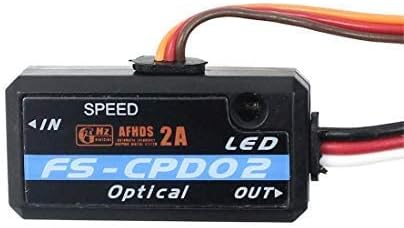
Stampa 1: Quddiem view of the Flysky FS-CPD02 Optical RPM Telemetry Module, showing the 'SPEED' label, 'FS-CPD02 Optical' branding, and 'IN'/'OUT' ports. This image displays the compact black casing with a multi-colored wire harness extending from one side.
Il-karatteristiċi ewlenin jinkludu:
- Optical RPM Sensing: Utilizes photo induction for accurate, non-contact speed measurement.
- Firxa wiesgħa ta' RPM: Monitors speeds up to 60,000 RPM/mins.
- Disinn kompatt: Small and lightweight for minimal impact on model performance.
- Telemetry Integration: Compatible with Flysky iBus telemetry systems for real-time data display on your transmitter.
5. Setup u Installazzjoni
Follow these steps to properly install and connect your FS-CPD02 module:
- Qabbad mar-Riċevitur: Connect the module's output cable to a compatible telemetry port on your Flysky receiver. The FS-CPD02 is directly compatible with iA4B and iA6B receivers. For iA10 receivers, a conversion cable may be required. Ensure the polarity is correct.
- Immonta l-Modulu: Securely mount the FS-CPD02 module within your model using double-sided tape or a suitable mounting method. Ensure it is protected from vibrations and potential impact.
- Position the Optical Sensor: The optical sensor (located on the module) needs a clear line of sight to a rotating part of your model, such as a propeller blade or a marked section of a motor shaft. For accurate readings, ensure there is a distinct contrast (e.g., a black mark on a white surface, or vice-versa) on the rotating part that the sensor can detect. The sensor should be positioned close enough to reliably detect the mark without interfering with the rotating component.
- Konnessjoni tal-Enerġija: The module draws power directly from the receiver, operating within the 4.0-6.5V DC range. No separate power supply is typically needed if your receiver provides adequate power.
- Setup tat-Trasmettitur: Power on your Flysky transmitter (e.g., FS-i6, i10, iT4S) and navigate to the telemetry settings. Ensure the FS-CPD02 module is recognized and enabled. You may need to perform a sensor discovery function on your transmitter.

Image 2: The FS-CPD02 module shown with its attached multi-colored wiring harness, featuring a standard servo-style connector at the end. This illustrates the module's compact size and its primary connection interface.

Immaġni 3: Minn fuq għal isfel view of the FS-CPD02 module and its wiring. This image highlights the module's small form factor and the various connectors, including the main power/data connector and a smaller auxiliary connector, indicating its integration capabilities.

Image 4: The reverse side of the FS-CPD02 module, revealing its mounting screws and the entry point for the wiring harness. This view emphasizes the module's construction and how the wires are securely attached.

Immaġni 5: Komprensiva view of the FS-CPD02 module with its entire length of connection cables laid out. This image provides a clear perspective on the cable length and the various connectors, aiding in understanding its installation requirements.
6. Istruzzjonijiet Operattivi
Once installed and configured, the FS-CPD02 module will transmit RPM data to your compatible Flysky transmitter. Refer to your transmitter's instruction manual for specific details on how to display telemetry data.
- Qawwa Mixgħul: Turn on your transmitter, then your model (receiver).
- Access Telemetry: On your transmitter, navigate to the telemetry display screen. You should see the RPM data from the FS-CPD02 module.
- Monitor RPM: As the motor or propeller rotates, the RPM value will update in real-time.
7. Manutenzjoni
- Żomm Nadif: Regularly inspect the optical sensor for dust, dirt, or obstructions. Clean gently with a soft, dry cloth if necessary.
- Iċċekkja l-Konnessjonijiet: Periodically verify that all connections are secure and free from corrosion.
- Ħażna: Aħżen il-modulu f'ambjent niexef u frisk meta ma jkunx qed jintuża.
8 Issolvi l-problemi
- No RPM Data Displayed:
- Ensure the module is correctly connected to the receiver's telemetry port.
- Verify that the receiver is compatible and properly bound to the transmitter.
- Perform a sensor discovery on your transmitter.
- Check the optical sensor's alignment and ensure the rotating part has a clear, contrasting mark.
- Confirm the module is receiving power (4.0-6.5V DC).
- Qari tal-RPM mhux preċiż:
- Naddaf is-sensor ottiku.
- Adjust the sensor's position relative to the rotating part for optimal detection.
- Ensure the contrasting mark on the rotating part is clear and consistent.
- Check for strong ambient light or reflections that might interfere with the optical sensor.
- Il-Modulu Mhux Jixgħel:
- Check all power connections and ensure they are secure and correctly polarized.
- Verify that the receiver is providing power within the specified voltagfirxa e.
9. Speċifikazzjonijiet
| Karatteristika | Speċifikazzjoni |
|---|---|
| Mudell | FS-CPD02 |
| Tip | RPM Telemetry Module (Photo Induction/Optical) |
| Monitor Range of Speed | 60,000 RPM/mins |
| Input tal-Enerġija | 4.0-6.5V DC |
| Piż | 6.8g |
| Dimensjonijiet | 31mm x 15mm x 8.5mm |
| Riċevituri Kompatibbli | iA4B (directly), iA6B (directly), iA10 (with conversion cable) |
| Trasmettituri Kompatibbli | FS-i6, FS-i10, FS-iT4S, and other telemetry-capable Flysky transmitters |
10. Garanzija u Appoġġ
Flysky products are designed for reliability and performance. For warranty information, please refer to the documentation provided with your original purchase or visit the official Flysky website. For technical support, contact Flysky customer service through their official channels.