
1. Introduzzjoni
The ASUS MW203 is a multi-device wireless silent mouse designed for comfort and versatility. It offers seamless connectivity across up to three devices using 2.4GHz RF or Bluetooth 3.0/5.0, features adjustable DPI settings, and boasts a long battery life. This manual provides detailed instructions for setting up, operating, and maintaining your ASUS MW203 mouse.
2. Prodott Aktarview
Familiarize yourself with the components and features of your ASUS MW203 mouse.

Figura 2.1: Fuqview of ASUS MW203 mouse features, including durable switches, battery life, LED indicator, DPI switch, ergonomic shape, silent buttons, and multi-device connectivity.
Karatteristiċi ewlenin:
- Disinn Ergonomiku: Features rubberized sides for comfortable long-term use.
- Swiċċijiet Durabbli: Equipped with switches rated for a 10-million-click lifespan.
- Ħajja twila tal-batterija: Up to 13 months of battery life.
- Swiċċ DPI: Adjustable DPI settings (1000/1600/2400) for precise control.
- Buttuni Siekta: Almost-silent mouse buttons for quiet operation.
- Konnettività Multi-Apparat: Simultaneously connects with up to 3 devices via 2.4GHz RF, Bluetooth 5.0, and Bluetooth 3.0.
- Indikatur LED: Provides status for DPI switch and low battery.

Figura 2.2: Qiegħ view of the ASUS MW203 mouse, showing the battery compartment, USB dongle storage, 2.4GHz/Bluetooth connection mode switch, pairing/connection button, and power on/off switch.
3. Setup
3.1. Installazzjoni tal-batterija
- Sib il-kompartiment tal-batterija fuq in-naħa ta' taħt tal-maws.
- Iftaħ l-għatu tal-kompartiment tal-batterija.
- Daħħal batterija AA waħda, waqt li tiżgura l-polarità korretta (+/-).
- Agħlaq l-għatu tal-kompartiment tal-batterija sew.
3.2. Connecting via 2.4GHz USB Nano Receiver
- Locate the USB Nano Receiver stored inside the battery compartment of the mouse.
- Remove the USB Nano Receiver.
- Plug the USB Nano Receiver into an available USB port on your computer (PC or Laptop).
- Turn on the mouse using the Power On/Off switch on the bottom.
- Set the 2.4GHz / Bluetooth connection mode switch to the "1" position (2.4GHz mode).
- Your computer should automatically detect and install the necessary drivers. The mouse is ready for use.
3.3. Konnessjoni permezz tal-Bluetooth
- Turn on the mouse using the Power On/Off switch on the bottom.
- Set the 2.4GHz / Bluetooth connection mode switch to either "2" (Bluetooth 3.0) or "3" (Bluetooth 5.0) depending on your device's compatibility.
- Press and hold the Pairing/Connection button on the bottom of the mouse for 3 seconds until the LED indicator starts blinking, indicating pairing mode.
- On your computer (PC or Laptop) or compatible device (e.g., tablet), navigate to the Bluetooth settings.
- Fittex għal new devices and select "ASUS MW203" from the list.
- Follow any on-screen prompts to complete the pairing process. The LED indicator will stop blinking once connected.
4. Istruzzjonijiet Operattivi
4.1. Funzjonijiet Bażiċi tal-Maws
- Ikklikkja Xellug: Azzjoni primarja, għażla.
- Ikklikkja bil-lemin: Menù tal-kuntest.
- Scroll Wheel: Skrollja 'l fuq/'l isfel mid-dokumenti jew web paġni. Tista' wkoll tiġi ppressata għall-funzjonalità tal-ikklikkja tan-nofs.
- Buttuni tal-ġenb: Typically configured for "Back" and "Forward" navigation in web browsers u file esploraturi.

Figura 4.1: The ASUS MW203 features almost-silent buttons, allowing for quiet operation in various environments.
4.2. Aġġustament tad-DPI
The DPI (Dots Per Inch) button, located below the scroll wheel, allows you to adjust the mouse sensitivity. Press the DPI button to cycle through the available settings:
- 1000 DPI: For precise control and slower cursor movement.
- 1600 DPI: Standard setting for general use.
- 2400 DPI: For faster cursor movement, suitable for larger screens or quick navigation.
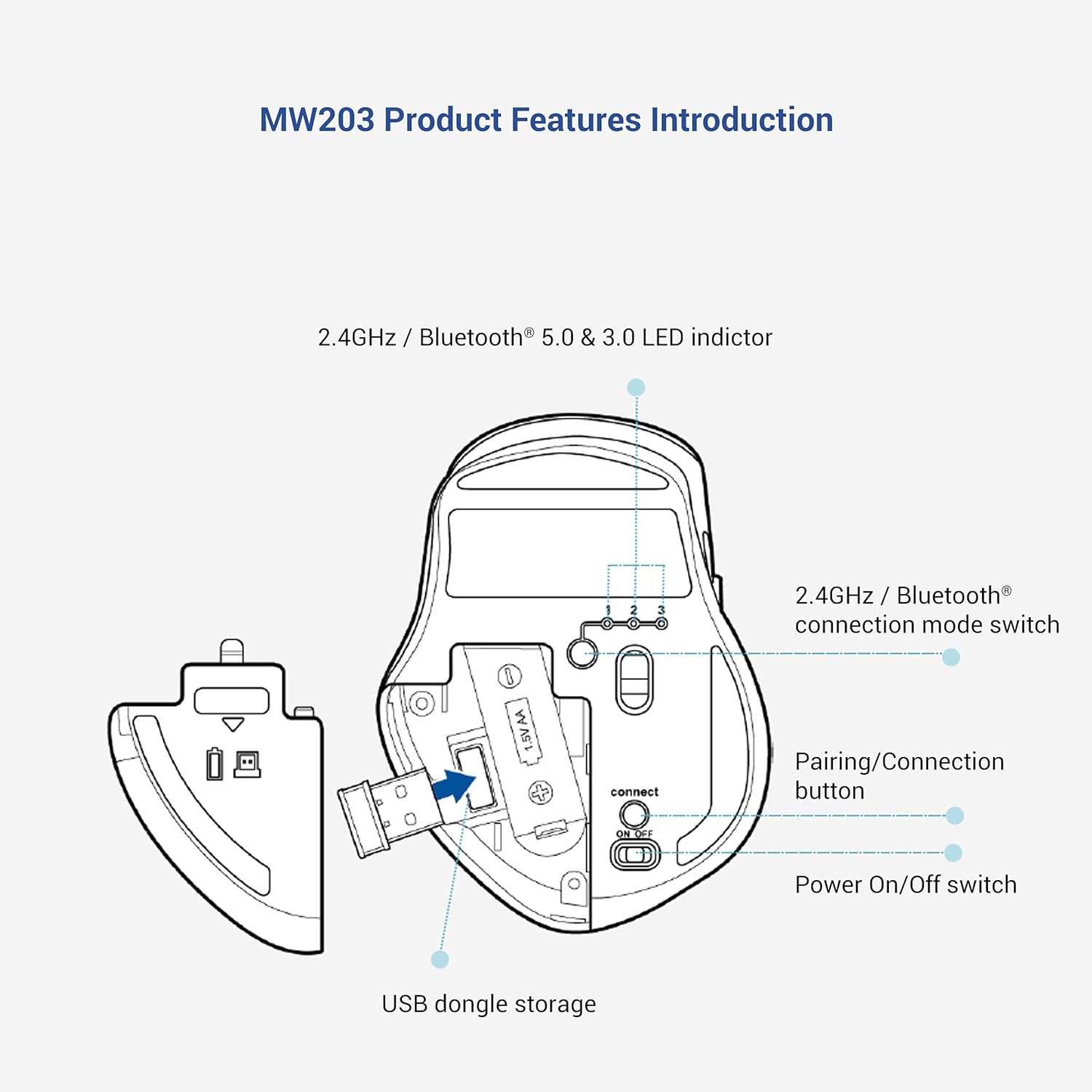
Figura 4.2: The DPI switch allows selection between 1000, 1600, and 2400 DPI for customized cursor speed.
5. Multi-Device Connection
The ASUS MW203 mouse can be paired with up to three different devices. Use the 2.4GHz / Bluetooth connection mode switch on the bottom of the mouse to switch between connected devices.
- Pożizzjoni 1: 2.4GHz RF connection (via USB Nano Receiver).
- Pożizzjoni 2: Bluetooth 3.0 connection.
- Pożizzjoni 3: Bluetooth 5.0 connection.
To switch between devices, simply move the connection mode switch to the desired position. The mouse will automatically connect to the previously paired device for that channel.

Figura 5.1: The ASUS MW203 allows convenient switching between three connected devices with a single click of the mode switch.
6. Informazzjoni dwar il-batterija
The ASUS MW203 mouse operates on one AA battery, providing up to 13 months of usage depending on usage patterns.
6.1. Auto Sleep Mode
To conserve battery life, the mouse features an auto sleep mode that activates after a period of inactivity. To wake the mouse, simply nudge it or click any button. It will reconnect automatically without delay.

Figura 6.1: The auto sleep mode efficiently prolongs battery life up to 13 months.
6.2. Indikatur tal-Batterija Baxxa
The LED indicator on the mouse will signal when the battery level is low, prompting you to replace the AA battery.
7. Manutenzjoni
7.1. Tindif tal-Maws
To maintain optimal performance, regularly clean your mouse.
- Uża drapp ratba u mingħajr ħelu ftit dampImlaħlaħ bl-ilma jew b'soluzzjoni ħafifa tat-tindif biex timsaħ il-barra.
- Evita li tuża kimiċi ħarxa jew materjali li joborxu.
- Kun żgur li l-ebda likwidu ma jidħol fil-komponenti interni tal-maws.
- Clean the optical sensor on the bottom with a dry cotton swab if tracking issues occur.
7.2. Sostituzzjoni tal-batterija
When the low battery indicator lights up, replace the AA battery as described in Section 3.1. Dispose of used batteries responsibly according to local regulations.
8 Issolvi l-problemi
- Il-maws ma jirrispondix:
- Kun żgur li l-maws ikun mixgħul.
- Iċċekkja l-livell tal-batterija u ibdel jekk meħtieġ.
- Verify the connection mode switch is set correctly (2.4GHz, BT3.0, or BT5.0).
- For 2.4GHz, ensure the USB Nano Receiver is securely plugged into a working USB port.
- Għall-Bluetooth, kun żgur li l-Bluetooth huwa attivat fuq l-apparat tiegħek u li l-maws huwa mqabbad. Ipprova erġa' waħħal jekk il-konnessjoni tintilef.
- Konnessjoni intermittenti jew dewmien:
- Mexxi l-maws eqreb lejn ir-riċevitur/apparat.
- Evita li tuża l-maws fuq uċuħ metalliċi, li jistgħu jinterferixxu mas-sinjali mingħajr fili.
- Ensure there are no other strong wireless devices causing interference.
- Try a different USB port for the receiver.
- Traċċar mhux preċiż:
- Naddaf is-senser ottiku fil-qiegħ tal-maws.
- Uża l-maws fuq wiċċ nadif, mhux riflettiv, u uniformi (eż., mouse pad).
- Adjust the DPI setting to a lower value if the cursor is too jumpy.
- Scroll wheel issues:
- Ensure the scroll wheel is free of debris.
- If the scroll wheel is erratic, try cleaning around it with compressed air.
9. Speċifikazzjonijiet
| Brand | ASUS |
| Isem tal-Mudell | MW203 |
| Teknoloġija tal-Konnettività | 2.4GHz RF (USB), Bluetooth 5.0, Bluetooth 3.0 |
| Teknoloġija ta 'Sejbien tal-Moviment | Ottiċi |
| Settings DPI | 1000 / 1600 / 2400 DPI |
| Numru ta' Buttuni | 6 (Left, Right, Scroll Wheel, DPI, 2 Side Buttons) |
| Orjentazzjoni tal-Idejn | Dritt |
| Sors tal-Enerġija | 1 x Batterija AA (inkluża) |
| Ħajja Medja tal-Batterija | Sa 13 Xhur |
| Sistemi Operattivi Kompatibbli | Windows 10, Chrome OS |
| Apparati Kompatibbli | Laptop, PC |
| Piż tal-oġġett | 96 Gramm |
| Dimensjonijiet tal-oġġett (L x W) | 10.5L x 8W Ċentimetri |
| Kontenut tal-Kaxxa | 1x ASUS MW203 Wireless Mouse, 1x AA Battery, 1x USB Nano Receiver |
| Materjal tal-għeluq | Lastiku |
| Product Finish Type | Matte |
10. Garanzija u Appoġġ
The ASUS MW203 Multi-Device Wireless Silent Mouse comes with a Garanzija ta' 1 snin fuq il-ħardwer provduti mill-manifattur mid-data tax-xiri.
Appoġġ għall-Klijent:
For technical assistance, warranty claims, or product inquiries, please contact ASUS customer support.
- Toll-Free Support (India): 1800-209-0365 (Mon - Sat | 9am - 6pm)
- Manifattur: ASUS, Dongguan Intech Electronics Corp.
- Importatur (l-Indja): ASUS INDIA PRIVATE LIMITED, 402, Supreme chambers, 17/18, Shah Industrial Estate, Veer Desai Road, Andheri (west), Mumbai 400053, India

Figura 10.1: ASUS Assurance offers reliable quality support, including worry-free doorstep replacement for ASUS accessories. Scan the QR code for more information: https://qr.asus.com/bccd
11. Vidjo tal-Prodott
Ara l-filmat uffiċjali tal-prodott għal viżwali aktar 'il fuqview of the ASUS MW203 Multi-Device Wireless Silent Mouse.
Vidjo 11.1: An fuqview of the ASUS MW203 Multi-Device Wireless Silent Mouse, highlighting its ergonomic design, power source, and operating system compatibility.