
1. Introduzzjoni
This manual provides instructions for the NETUM 80x50mm Thermal Receipt Paper Rolls. These rolls are designed for use with compatible thermal printers to produce clear, durable receipts and transaction records. Understanding the proper handling and usage of thermal paper ensures optimal print quality and extends the life of your printed documents.
2. Karatteristiċi tal-prodott
- Daqs: 80 x 50 mm, 4 rolls per pack. Specifically designed for NETUM NT-8003DD thermal printers, also suitable for card machines, cash registers, and credit card terminals in various retail and hospitality environments.
- Thermal Cash Register Rolls: These rolls have a slightly glossy finish compared to standard paper rolls. Thermal paper is advantageous as it does not require ink, relying solely on heat for printing.
- Materjali riċiklabbli: The core of the roll is made of cardboard, not plastic. Both the paper and the core are environmentally friendly.
- Kompatibilità Wiesgħa: Suitable for all types of 80mm thermal receipt printers, including NETUM 80mm, Munbyn 80mm, and other compatible models.

This image shows four white thermal paper rolls, highlighting the product's primary form.
3. Setup u Installazzjoni
Loading thermal paper into your printer is a straightforward process. Always refer to your specific thermal printer's manual for detailed instructions, as procedures may vary slightly between models.
- Open Paper Compartment: Open the printer's paper cover or compartment.
- Remove Old Roll: Remove any remaining paper core or old roll.
- Daħħal Romblu Ġdid: Place the new NETUM thermal paper roll into the compartment, ensuring the paper feeds from the bottom and the thermal side (usually the smoother, slightly glossy side) faces the print head. Incorrect orientation will result in blank prints.
- Karta tal-Għalf: Iġbed biċċa żgħira ta' karta 'l barra mit-tarf tat-tqattigħ.
- Agħlaq il-Qoxra: Close the paper cover securely until it clicks into place. The printer should automatically feed the paper and be ready for use.
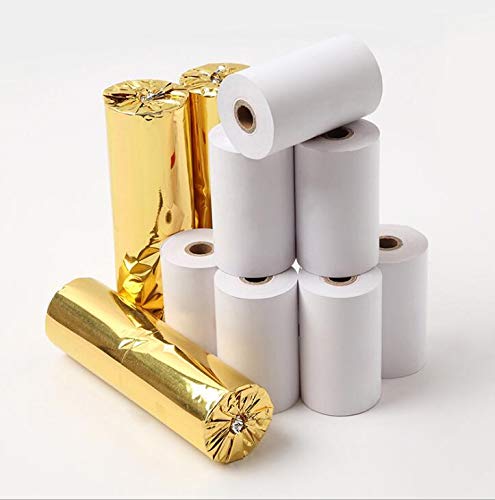
This image illustrates the thermal paper rolls, some still in their protective gold foil packaging, and others unwrapped, showing the product as it might appear upon delivery.
4. Istruzzjonijiet Operattivi
Once the thermal paper is correctly loaded, your printer is ready to operate. Thermal printing relies on heat to activate the paper's coating, producing text and images without the need for ink cartridges or ribbons.
Ensure your printer is connected to its power source and data input (e.g., USB, Bluetooth, Wi-Fi) as per its own instructions. Send print commands from your point-of-sale (POS) system, cash register, or other compatible device. The printer will then generate the receipt on the thermal paper.

This image displays several thermal paper rolls, with one roll partially unrolled to reveal a sample receipt printout, demonstrating the paper's printing capability.
5. Manutenzjoni
To ensure the longevity and print quality of your NETUM thermal paper rolls, proper storage and handling are essential.
- Kundizzjonijiet tal-Ħżin: Store rolls in a cool, dry place, away from direct sunlight, high temperatures, and humidity. Exposure to heat, light, or certain chemicals can cause the thermal coating to degrade prematurely, leading to faded or blank prints.
- Immaniġġjar: Avoid touching the thermal surface excessively, as oils from skin can also affect print quality over time.
6 Issolvi l-problemi
If you encounter issues with printing, consider the following common troubleshooting steps:
- Stampi Vojta: Check if the thermal paper roll is loaded correctly. The thermal side must face the print head. Try flipping the roll if unsure.
- Faded or Incomplete Prints: This can be caused by old paper, prolonged exposure to heat/light, or a dirty/worn print head. Ensure paper is stored correctly. Clean the printer's thermal print head according to the printer manufacturer's instructions.
- Ġammijiet tal-karti: Ensure the paper roll is inserted straight and not too tightly. Trim any uneven edges before loading. Do not force paper into the printer.
If problems persist, consult your thermal printer's user manual or contact NETUM customer support.
7. Speċifikazzjonijiet
| Speċifikazzjoni | Dettall |
|---|---|
| Dimensjonijiet tal-Pakkett | 32.7 x 4.6 x 4.6 ċm |
| L-Ewwel Data Disponibbli | 10 ta’ Ġunju 2020 |
| Manifattur | NETUM |
| Numru tal-Mudell tal-Oġġett | NT-Rprinters |
| Pajjiż ta' Oriġini | Iċ-Ċina |
| Brand | NETUM |
| Product Type/Color | 4 rolls of 80 x 50 thermal paper |
| Piż tal-oġġett | 60 Gramm |
| Tlestija tal-Karta | Tleqq |
| Roll Dimensions | 80 x 50 mm |
8. Garanzija u Appoġġ
Informazzjoni dwar il-garanzija: For details regarding product warranty and return policies, please refer to the purchase platform's terms and conditions. Generally, products can be returned within 30 days of receipt if you change your mind. For defective or damaged products, consult the specific return policy.
Appoġġ tal-Manifattur: For further assistance or inquiries, you can visit the official NETUM store on Amazon: NETUM Official Store.