
URANT ASDIOFJ2
URANT Super Boost WiFi Extender Instruction Manual
Model: ASDIOFJ2
Prodott Overview
The URANT Super Boost WiFi Extender is designed to amplify your existing wireless signal, extending coverage up to 2500 feet. Featuring 4 external advanced antennas and a data transfer rate of 1200 MBPS, this dual-band device ensures a strong and stable internet connection throughout your home or office. It also includes LAN/Ethernet ports for wired connections.

Image: The URANT Super Boost WiFi Extender, a black rectangular device with four adjustable antennas, plugged into a wall outlet. Green indicator lights are visible on its front panel.
Setup Istruzzjonijiet
Setting up your URANT WiFi Extender is a straightforward process. Follow these steps for a quick and easy installation:
- Qawwa Mixgħul: Plug the WiFi Extender into a power outlet near your existing router. Wait for the Power indicator light to turn solid green.
- WPS Setup (Recommended):
- Locate the WPS button on your existing wireless router.
- Agħfas il-buttuna WPS fuq ir-router tiegħek.
- Within 2 minutes, press the WPS button on the URANT WiFi Extender (located on the front panel, typically labeled "WPS").
- The extender's signal lights will flash and then turn solid, indicating a successful connection.

Image: Illustration showing two hands pressing WPS buttons on a router and the URANT WiFi Extender, with a signal wave indicating connection. Text reads "Easy Setup One Button Operation".
- Manual Setup (Alternative): If your router does not have a WPS button or if WPS setup fails, refer to the detailed instructions in the included quick start guide for browser-based setup.
- Riloka Extender: Once connected, unplug the extender and move it to a location between your router and the area with poor Wi-Fi coverage. Ensure the signal lights remain strong after relocation.
- Qabbad Apparat: Your extended network will appear with your original network name followed by "_EXT" (e.g., "MyHomeWiFi_EXT"). Connect your devices to this new network.
Modi Operattivi
The URANT Super Boost WiFi Extender supports multiple operating modes to suit various networking needs:
- Modalità Ripetitur: This is the most common mode, extending the range of your existing wireless network. The extender receives the wireless signal from your main router and re-broadcasts it, effectively eliminating Wi-Fi dead zones.

Image: A diagram illustrating three operating modes: AP Mode, Repeater Mode, and Router Mode. The Repeater Mode section shows a wireless router connecting wirelessly to the extender, which then extends the signal to WLAN clients and a wired connection.
- Modalità AP (Modalità Punt ta' Aċċess): In this mode, the extender connects to your wired router via an Ethernet cable and transforms your wired network into a wireless one. This is useful for adding Wi-Fi capability to a non-wireless router.
Image: A diagram illustrating three operating modes: AP Mode, Repeater Mode, and Router Mode. The AP Mode section shows a wired router connected via Ethernet to the extender, which then provides a wireless signal to WLAN clients.
- Modalità Router: The extender can function as a basic wireless router, connecting directly to a modem via an Ethernet cable to create a new wireless network.
Image: A diagram illustrating three operating modes: AP Mode, Repeater Mode, and Router Mode. The Router Mode section shows a modem connected via Ethernet to the extender, which then provides a wireless signal to WLAN clients.
The extender also features an extra Ethernet port, allowing you to connect a wired device (like a game console or smart TV) directly to your Wi-Fi network for a stable connection.

Image: The URANT WiFi Extender with two Ethernet ports labeled WAN and LAN. An illustration shows the signal passing through a wall, emphasizing its long-range capability. Text reads "High-speed Signal Through The Wall Without Loss".
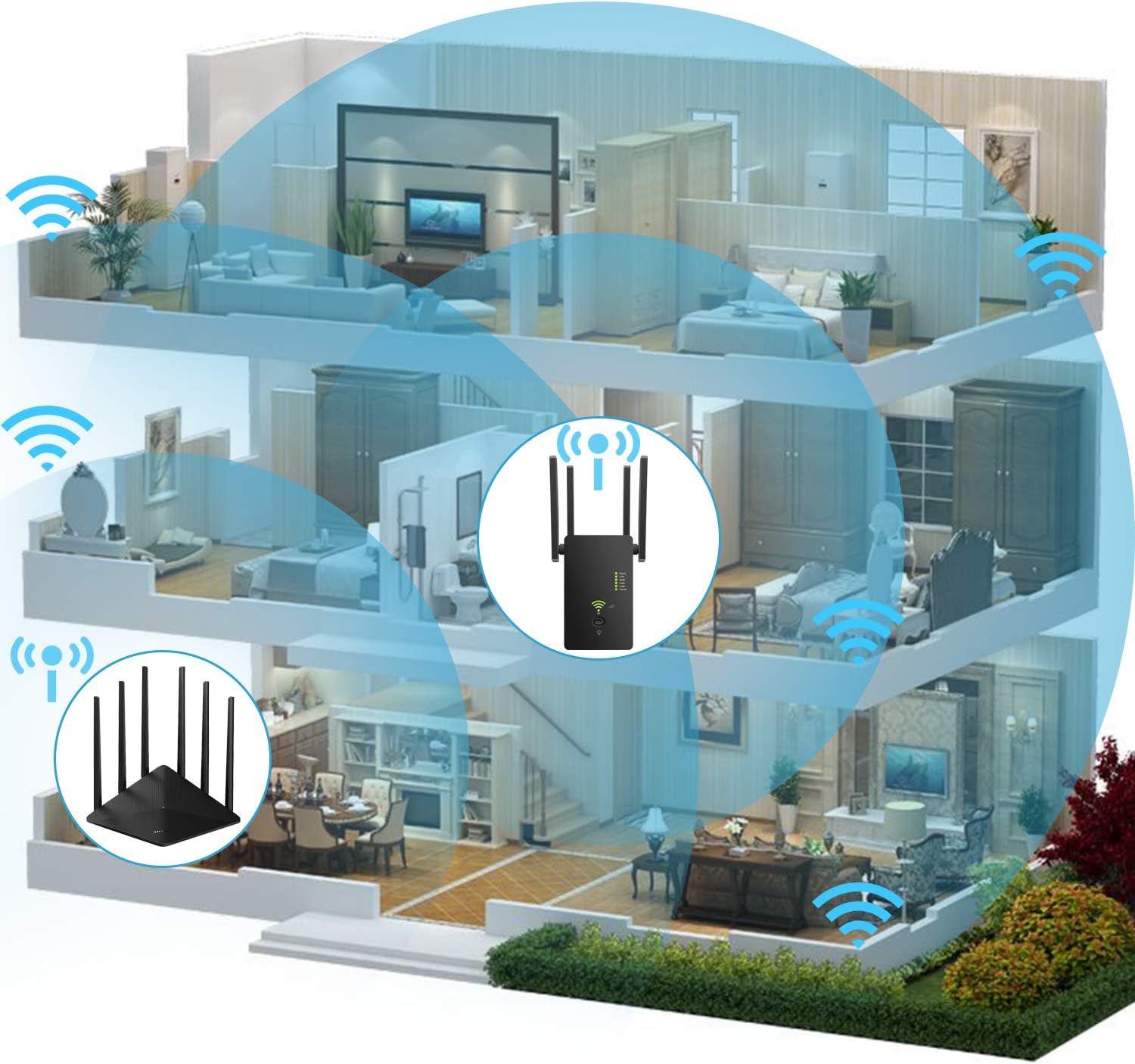
Image: A cutaway diagram of a multi-story house showing a router on the ground floor and the URANT WiFi Extender on the second floor, with blue signal waves indicating extended Wi-Fi coverage throughout the entire house.
Manutenzjoni
To ensure optimal performance and longevity of your URANT Super Boost WiFi Extender, consider the following maintenance tips:
- Pjazzament: Place the extender in a well-ventilated area, away from direct sunlight, heat sources, and obstructions that could block the signal.
- Tindif: Periodically wipe the device with a soft, dry cloth to remove dust. Do not use liquid cleaners or aerosols.
- Aġġornamenti tal-Firmware: Iċċekkja l-manifattur website periodically for firmware updates. Keeping the firmware updated can improve performance and security.
- Ċiklu tal-Enerġija: If you experience performance issues, try power cycling the extender by unplugging it from the power outlet for 10-15 seconds and then plugging it back in.
Issolvi l-problemi
If you encounter issues with your URANT Super Boost WiFi Extender, refer to the following common troubleshooting steps:
| Problema | Kawża Possibbli | Soluzzjoni |
|---|---|---|
| Ebda Dawl ta 'Qawwa | Extender not plugged in or power outlet issue. | Kun żgur li l-estensur huwa pplaggjat sew f'sokit tal-elettriku li jaħdem. Ipprova sokit ieħor. |
| Ma nistax nikkonnettja man-Netwerk Estiż | Incorrect password, extender out of range, or setup incomplete. | Verify the Wi-Fi password. Move the extender closer to the main router. Re-run the setup process. |
| Veloċità tal-Internet bil-mod | Poor signal strength to extender, network congestion, or interference. | Relocate the extender to a spot with better signal from the main router. Reduce the number of connected devices. Avoid placing near microwaves or cordless phones. |
| Is-Setup tal-WPS ifalli | Router WPS timeout, or incompatible WPS. | Try pressing the WPS buttons simultaneously or within the specified time frame. Use the manual browser-based setup method. |
For further assistance, please consult the full user manual or contact URANT customer support.
Speċifikazzjonijiet
- Ditta: URANT
- Numru tal-Mudell: ASDIOFJ2
- ASIN: B089SQRPPH
- Standard tal-Komunikazzjoni mingħajr Fili: 802.11ac
- Rata ta' Trasferiment tad-Dejta: 1200 MBPS
- Klassi tal-Faxxa tal-Frekwenza: Doppju-Band
- Karatteristika Speċjali: Long Range with Advanced Antennas and Dual-Band High-Speed Data Transfer
- Dimensjonijiet tal-pakkett: 5.39 x 4.57 x 2.44 pulzieri
- Piż tal-oġġett: 7.4 uqija
- Data L-Ewwel Disponibbli: 24 ta’ Jannar, 2021
Garanzija u Appoġġ
For information regarding product warranty, technical support, or service, please refer to the warranty card included with your product packaging or visit the official URANT webis-sit. Id-dettalji ta' kuntatt għall-appoġġ għall-klijenti tipikament ikunu pprovduti fuq is-sit tal-manifattur webis-sit jew fil-manwal sħiħ tal-utent.
Ask a question about this manual
Ask about setup, troubleshooting, compatibility, parts, safety, or missing instructions. Manuals+ will review the question and use this page’s manual context to help answer it.