
1. Introduzzjoni
Thank you for choosing the Powertech PT-600 Uninterruptible Power Supply (UPS). This device is designed to provide reliable battery backup and surge protection for your electronic equipment, safeguarding against power outages, voltage fluctuations, and electrical surges. The PT-600 ensures continuous operation and protection for critical devices such as PCs, wireless routers, modems, TVs, and home entertainment systems.
Karatteristiċi ewlenin:
- 6 Sokits NEMA 5-15R: All outlets provide both battery backup and surge protection.
- Self-Starting Functionality: The UPS is designed to auto-restart after an AC power failure once power is restored.
- Vol. Awtomatikutage Regolament (AVR): Microprocessor-controlled AVR corrects minor power fluctuations without switching to battery, extending battery life.
- Touch Screen LCD Display: Provides real-time information on the UPS status, including battery load, voltage, u l-livell tal-batterija.
- Protezzjoni Komprensiva: Guards against discharges, voltage surges, overloads, short circuits, and transients from modems/telephone lines.
2. Prodott Aktarview
Familiarize yourself with the components of your Powertech PT-600 UPS.

Figura 2.1: Quddiem u ġenb view of the Powertech PT-600 UPS, showing the main unit with ventilation grilles and the Powertech logo.
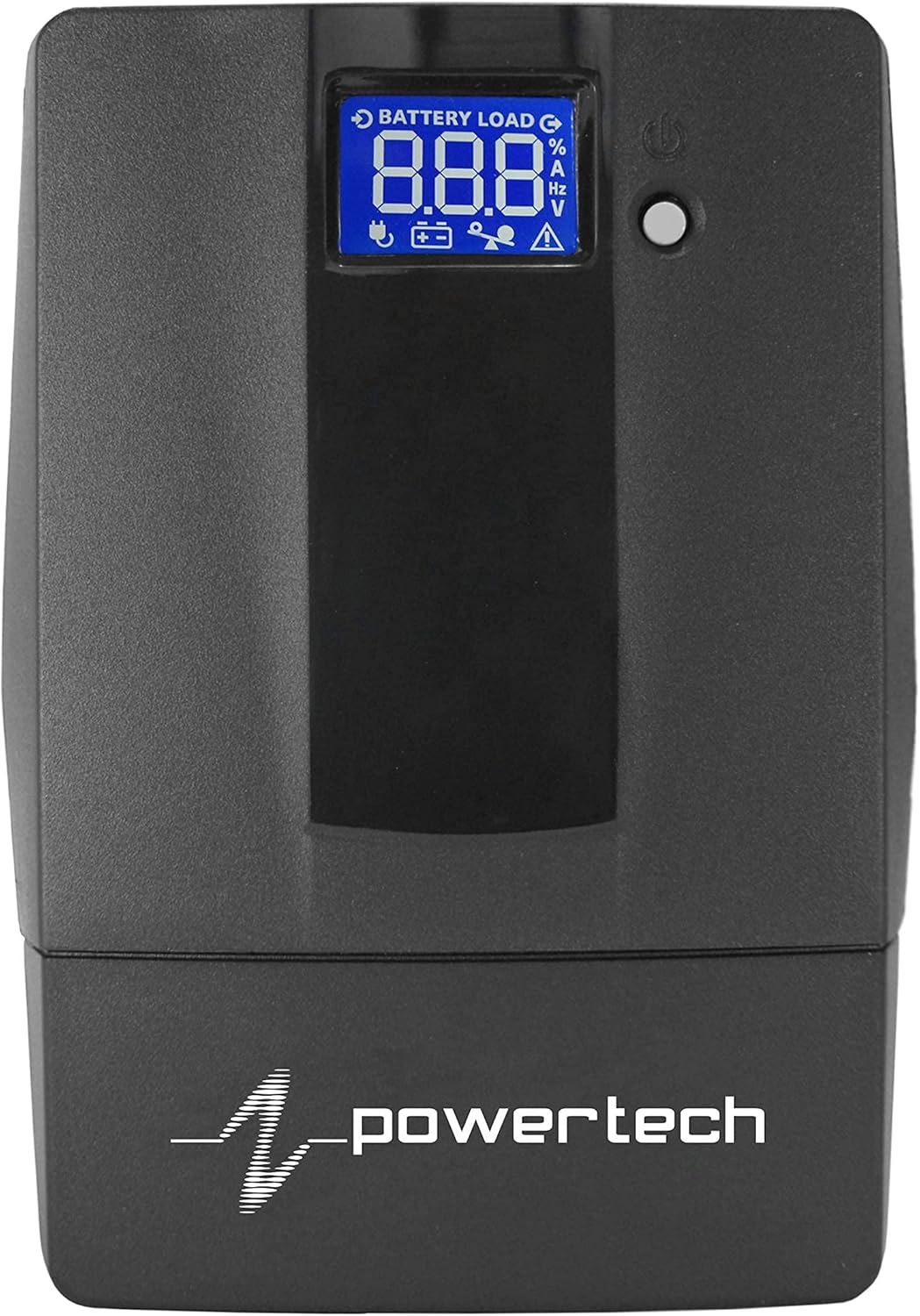
Figure 2.2: Close-up of the touch screen LCD display on the Powertech PT-600 UPS, showing battery load, voltage, and other status indicators.

Figure 2.3: Rear panel of the Powertech PT-600 UPS, displaying six NEMA 5-15R outlets, a USB port, and RJ11/RJ45 ports for modem/telephone line protection.
Komponenti:
- Panel ta' quddiem: Features the touch screen LCD display for status monitoring and a power button.
- Panel ta 'wara: Includes six NEMA 5-15R outlets (all battery backup and surge protected), a USB communication port, and RJ11/RJ45 ports for surge protection of telephone/modem lines.
- Korda tal-Enerġija: Integrated power cord for connecting to a wall outlet.
3. Setup
Follow these steps for the initial setup of your Powertech PT-600 UPS.
- Spakkjar: Neħħi l-UPS mill-imballaġġ tiegħu bir-reqqa. Spezzjona għal kwalunkwe ħsara waqt it-tbaħħir.
- Pjazzament: Place the UPS in a cool, dry, and well-ventilated area, away from direct sunlight, heat sources, and excessive moisture. Ensure adequate space around the unit for proper airflow.
- Ċarġ tal-Batterija Inizjali: Connect the UPS power cord to a standard wall outlet. Allow the unit to charge for at least 8 hours before connecting any devices to ensure optimal battery performance. The LCD display will indicate charging status.
- Apparat li jgħaqqad: Once the battery is sufficiently charged, connect your electronic devices (e.g., computer, monitor, router) to the NEMA 5-15R outlets on the rear panel. Ensure the total load does not exceed the UPS's capacity (600VA / 360W).
- Connecting Data Lines (Optional): For surge protection of telephone or modem lines, connect your incoming line to the "IN" port and your device to the "OUT" port on the rear panel.
- Tixgħel: Press and hold the power button on the front panel for a few seconds until the UPS powers on and the LCD display illuminates.
Importanti: Do not connect laser printers or shredders to the UPS battery backup outlets, as their high power draw can overload the unit.
4. Istruzzjonijiet Operattivi
4.1 Tixgħel/Jitfi
- Biex Tixgħel: With the UPS connected to AC power, press and hold the power button for approximately 2-3 seconds until you hear a beep and the LCD display lights up.
- Biex Tifi: Press and hold the power button for approximately 2-3 seconds until the LCD display turns off. If the UPS is running on battery power, it will shut down immediately. If connected to AC power, it will enter standby mode.
4.2 Nifhmu d-Displej LCD
The touch screen LCD display provides real-time operational status. Tap the screen to cycle through different information displays.
| Ikona/Indikatur | Deskrizzjoni |
|---|---|
| Battery Load % | Jindika l-perċentwalitage of the UPS's capacity currently being used by connected devices. |
| Livell tal-batterija | Juri l-livell attwali tal-iċċarġjar tal-batterija interna. |
| Input Voltage (V) | Displays the incoming AC voltage mill-plakka tal-ħajt. |
| Ħruġ Voltage (V) | Juri l-voltage being supplied by the UPS to connected devices. |
| Frekwenza (Hz) | Shows the operating frequency of the power supply. |
| Indikatur ta' Tagħbija Eċċessiva | Flashes or illuminates if the connected load exceeds the UPS's capacity. Disconnect non-essential devices immediately. |
| Indikatur tal-Ħsara | Indicates an internal fault with the UPS. Refer to troubleshooting. |
4.3 Vol. AwtomatikutagRegolament (AVR)
The PT-600 features Automatic Voltage Regulation (AVR) to stabilize incoming utility power. When the input voltage fluctuates (either too high or too low) but remains within a safe range, the UPS will automatically adjust the output voltage without switching to battery power. This protects your devices from minor power disturbances and prolongs the life of the UPS battery.
4.4 Operazzjoni ta' Backup tal-Batterija
Fil-każ ta' qawwa outage, the UPS will automatically switch to battery power, providing continuous power to connected devices. The UPS will emit an audible alarm (beeping) to indicate it is operating on battery. The LCD display will show the remaining battery level. When utility power is restored, the UPS will automatically switch back to AC power and begin recharging its battery.
Nota: The runtime on battery power depends on the load connected. Disconnect non-essential devices during an outage to maximize runtime for critical equipment.
5. Manutenzjoni
Proper maintenance ensures the longevity and optimal performance of your Powertech PT-600 UPS.
- Kura tal-batterija:
- Keep the UPS connected to AC power to ensure the battery remains fully charged.
- Evita skarika profonda frekwenti.
- If storing the UPS for an extended period, fully charge it, then disconnect from AC power. Recharge every 3 months to prevent battery degradation.
- The internal battery is a sealed lead-acid type. Its lifespan is typically 3-5 years under normal operating conditions. Battery replacement should be performed by qualified personnel.
- Tindif:
- Disconnect the UPS from AC power and all connected devices before cleaning.
- Uża drapp ratba u niexfa biex timsaħ in-naħa ta 'barra tal-unità.
- Tużax prodotti tat-tindif likwidi jew sprejs tal-ajrusol.
- Kun żgur li l-fetħiet tal-ventilazzjoni huma ħielsa mit-trab u l-fdalijiet.
- Kundizzjonijiet Ambjentali:
- Operate the UPS within its specified temperature and humidity ranges (refer to Specifications section).
- Avoid placing the UPS near water or in excessively humid environments.
6 Issolvi l-problemi
If you encounter issues with your Powertech PT-600 UPS, refer to the following common problems and solutions.
| Problema | Kawża Possibbli | Soluzzjoni |
|---|---|---|
| Il-UPS ma jixgħelx. | No AC power; Battery discharged; Power button not held long enough. | Ensure UPS is plugged into a live wall outlet. Allow battery to charge for 8 hours. Press and hold power button for 2-3 seconds. |
| UPS beeps continuously or shows overload. | Overload condition; Too many devices connected. | Disconnect non-essential devices. Ensure total load is within 600VA/360W capacity. |
| L-UPS jaħdem bil-batterija ta' spiss. | Input voltage fluctuations; AVR working. | This may be normal if power quality is poor. If excessive, check wall outlet or consult an electrician. |
| Il-ħin tal-batterija huwa iqsar milli mistenni. | Battery not fully charged; Battery nearing end of life; Excessive load. | Allow battery to fully charge. Reduce connected load. Consider battery replacement if unit is old. |
| Id-displej tal-LCD huwa vojt. | L-UPS mitfi; Il-wiri għandu modalità sleep. | Press the power button briefly to wake the display. Ensure UPS is powered on. |
If the problem persists after trying these solutions, please contact Powertech customer support.
7. Speċifikazzjonijiet
Technical specifications for the Powertech PT-600 UPS.
| Attribut | Dettall |
|---|---|
| Brand | Powertech |
| Mudell | PT-600 (PT 600) |
| Kapaċità | 600VA / 360W |
| Input Voltage | 120 Volts |
| Output Waveform | Mewġa Sinusali Mgħaġġla |
| Ħwienet | 6 x NEMA 5-15R (Battery Backup & Surge Protected) |
| Tip ta 'batterija | Sealed Lead Acid (1 x 12V battery required for operation) |
| Fattur tal-Formola | Rack (Note: Product images suggest a tower form factor, but specification lists "Rack". User should verify.) |
| Dimensjonijiet tal-Prodott | 30 x 9.98 x 14 ċm; 4.35 kg |
| L-Ewwel Data Disponibbli | 14 ta’ April, 2021 |
| Kulur | Iswed |
| Ampetà | 3 Amps |
8. Garanzija u Appoġġ
For detailed warranty information, please refer to the warranty card included with your purchase or visit the official Powertech websit.
If you require technical assistance, troubleshooting beyond this manual, or have questions regarding your Powertech PT-600 UPS, please contact Powertech customer support.
- Powertech Official Websit: www.powertech.com (Eżample link, please refer to actual manufacturer websit)
- Appoġġ għall-Klijent: Refer to contact information provided on the product packaging or official websit.