
Introduzzjoni
The Forty4 Wireless Gaming Controller is designed to provide a versatile and immersive gaming experience across multiple platforms. Featuring 2.4GHz wireless technology, dual vibration motors, and programmable M buttons, this gamepad offers precise control and enhanced realism for your gaming sessions. It supports both wireless and wired modes, ensuring uninterrupted gameplay.
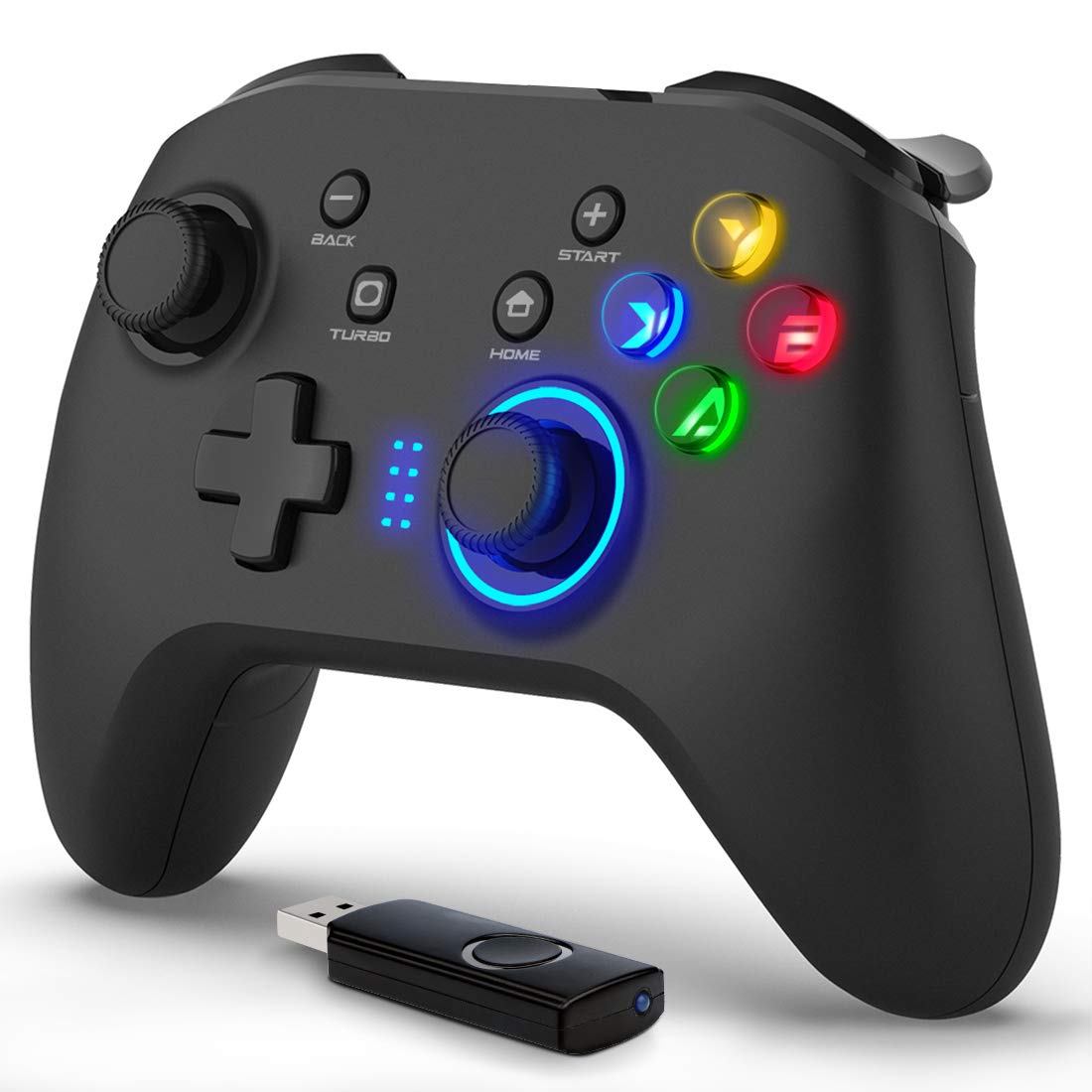
Immaġni: Quddiem view of the Forty4 Wireless Gaming Controller, showcasinid-disinn ergonomiku u t-tqassim tal-buttuni tiegħu.
Karatteristiċi Ewlenin
- Teknoloġija bla fili 2.4GHz: Offers a long transmission distance, bidirectional transmission, and substantial anti-interference for a reliable connection.
- Kompatibilità Wiesgħa: Compatible with Windows (Xinput and Dinput), PS3, and Switch. (Not compatible with Xbox 360, Xbox One, Mac, iOS, PlayStation 4, Amazon Fire TV, Amazon Fire Stick).
- M Buttons: Features programmable M buttons (M1, M2) on the back, allowing users to assign complex operations for enhanced control. Combination keys include A, B, X, Y, LB, RB, L3, LT, RT, R3, and directional keys (up, down, left, right).
- Vibrazzjoni Doppja: Asymmetrical and linear vibrating motors provide distinct feedback during gameplay, increasing the realism of game scenarios and immersion.
- Wireless & Wired Mode: Seamlessly switch between wireless and wired modes. If the battery runs low, simply connect the USB cable to continue playing while charging.

Image: Illustration of the dual vibration motors within the controller, highlighting the immersive gaming experience.
Kontenut tal-Pakkett
Malli tiftaħ il-pakkett, jekk jogħġbok kun żgur li l-oġġetti kollha li ġejjin huma preżenti:
- Forty4 Wireless Gaming Controller (Model: GC201)
- 2.4GHz USB Receiver (Wireless Dongle)
- Cable tal-Iċċarġjar tal-USB-C
- Manwal għall-Utent (dan id-dokument)
Video: Unboxing the Forty4 Wireless Gaming Controller, showing the controller, USB receiver, and charging cable.
Setup Istruzzjonijiet
1. Konnessjoni bla fili
- Insert the 2.4GHz USB receiver into an available USB port on your PC, PS3, or Switch dock.
- Press the "Home" button on the controller to power it on. The indicator lights will illuminate.
- The controller should automatically pair with the USB receiver. If not, hold the "Home" button for a few seconds to cycle through connection modes until it connects (often indicated by a steady light). For Windows, ensure the controller is in X-input mode for optimal compatibility.

Image: The Forty4 controller and its USB receiver, demonstrating how to connect wirelessly to a computer.
2. Konnessjoni bil-fili
- Connect one end of the provided USB-C charging cable to the USB-C port on the top of the controller.
- Connect the other end of the USB-C charging cable to an available USB port on your PC, PS3, or Switch dock.
- The controller will automatically switch to wired mode and begin charging if needed.

Image: A visual representation of both wireless and wired connection methods for the Forty4 controller.
Istruzzjonijiet Operattivi
Layout tal-buttuna u Funzjonijiet
The Forty4 controller features a standard button layout for intuitive gameplay:
- Sticks Analogiċi tax-Xellug/Lemin: For precise 360-degree movement and camera control.
- D-Pad: Għal input direzzjonali.
- Buttuni ta' Azzjoni (A, B, X, Y): Standard action inputs.
- Buttuni tal-Ispalla (LB, RB): Buttuni mmuntati fuq nett għal diversi azzjonijiet fil-logħba.
- Triggers (LT, RT): Analog triggers for nuanced control, especially in racing or shooting games.
- Buttuna LURA/AGĦŻEL: Tipikament użat għan-navigazzjoni tal-menu jew għal funzjonijiet sekondarji.
- Buttuna START: Tipikament jintuża biex twaqqaf il-logħob jew taċċessa l-menus.
- Buttuna HOME: Powers the controller on/off and can be used to switch controller modes (e.g., X-input/D-input).
- Buttuna TURBO: Jattiva l-funzjoni turbo għal għafsijiet rapidi tal-buttuni.
- M Buttons (M1, M2): Programmable back buttons for custom macros or remapping. Refer to the detailed manual for programming instructions.

Image: Close-up of the back of the controller, highlighting the M1 and M2 programmable buttons for advanced customization.
Feedback ta 'Vibrazzjoni Doppju
The controller's dual vibration motors provide tactile feedback during gameplay, enhancing immersion. You will feel vibrations for in-game events such as explosions, impacts, or specific actions, making the experience more realistic.
Controller in Action
Video: Demonstration of the Forty4 Wireless Gaming Controller's features and responsiveness during gameplay.
Iċċarġjar tal-Kontrollur
To charge the controller, connect it to a USB power source (e.g., computer USB port, USB wall adapter) using the provided USB-C cable. The indicator lights may show charging status and turn off or change color when fully charged.
Manutenzjoni
- Tindif: Uża drapp artab u niexef biex tnaddaf il-kontrollur. Evita li tuża kimiċi ħarxa jew materjali li joborxu.
- Ħażna: Aħżen il-kontrollur f'post frisk u niexef 'il bogħod mix-xemx diretta u minn temperaturi estremi.
- Kura tal-batterija: Biex ittawwal il-ħajja tal-batterija, evita li tiċċarġja l-kontrollur kompletament ta' spiss. Iċċarġjah regolarment, anke jekk ma tkunx qed tużah kontinwament.
Issolvi l-problemi
Il-Kontrollur Mhux Qed Jikkonnettja/Jirrispondi
- Iċċekkja r-Riċevitur USB: Ensure the 2.4GHz USB receiver is securely plugged into a working USB port on your device.
- Qawwa Mixgħul: Make sure the controller is powered on by pressing the "Home" button.
- Bidla Modalità: Hold the "Home" button to cycle through different connection modes (e.g., X-input, D-input) until the controller is recognized by your system. For PC, X-input mode is generally recommended.
- Erġa 'par: If issues persist, try unplugging and replugging the USB receiver, then re-powering the controller to re-establish the connection.
- Livell tal-batterija: Ensure the controller has sufficient battery charge. Connect it via the USB-C cable to check if it functions in wired mode.
Input Delay in Wireless Mode
- If you experience noticeable input delay in wireless mode, try switching to wired mode using the provided USB-C cable for a more direct connection.
Stick Drift or Unresponsive Buttons
- While designed for durability, prolonged heavy use can sometimes lead to wear. If you experience stick drift or unresponsive buttons, try recalibrating the controller through your device's settings. If the issue persists, please contact customer support.
Speċifikazzjonijiet
| Karatteristika | Dettall |
|---|---|
| Numru tal-Mudell | GC201 |
| Konnettività | 2.4GHz Wireless, Wired (USB-C) |
| Kompatibilità | PC (Windows 7/8/10/11 - Xinput & Dinput), PS3, Switch |
| Vibrazzjoni | Muturi ta 'Vibrazzjoni Doppju |
| Karatteristiċi Speċjali | Programmable M Buttons, Colorful Backlight |
| Sors tal-Enerġija | 1 batterija tal-jone tal-litju (inkluża) |
| Piż tal-oġġett | 11.6 uqija |
| Dimensjonijiet tal-Pakkett | 6.38 x 4.69 x 2.8 pulzieri |
| Manifattur | Erbgħin4 |
| Data L-Ewwel Disponibbli | 25 ta’ Mejju, 2020 |
Garanzija u Appoġġ
The Forty4 Wireless Gaming Controller comes with a Garanzija ta' Sena. For any troubleshooting assistance, warranty claims, or product inquiries, please contact Forty4 customer service.
For additional information, you may refer to the official User Manual PDF: Manwal għall-Utent (PDF)