
1. Introduzzjoni
This manual provides essential information for the safe and efficient use of your Lenovo IdeaPad Flex 5 14ARE05 2-in-1 Notebook Computer. Please read this manual thoroughly before operating your device to ensure proper setup, operation, and maintenance. Keep this manual for future reference.
2. Prodott Aktarview
The Lenovo IdeaPad Flex 5 14ARE05 is a versatile 14-inch Full HD touchscreen 2-in-1 notebook computer designed for flexibility and performance. It features an AMD Ryzen 7 4700U processor, 8GB of RAM, and a 512GB SSD, running on Windows 10 Home. Its 2-in-1 design allows it to function as a traditional laptop, a tablet, or in tent and stand modes.

Figure 2.1: Lenovo IdeaPad Flex 5 in standard laptop configuration.

Figure 2.2: The device configured in tablet mode, demonstrating touchscreen and digital pen functionality.

Figure 2.3: The device in stand mode, ideal for media consumption or presentations.
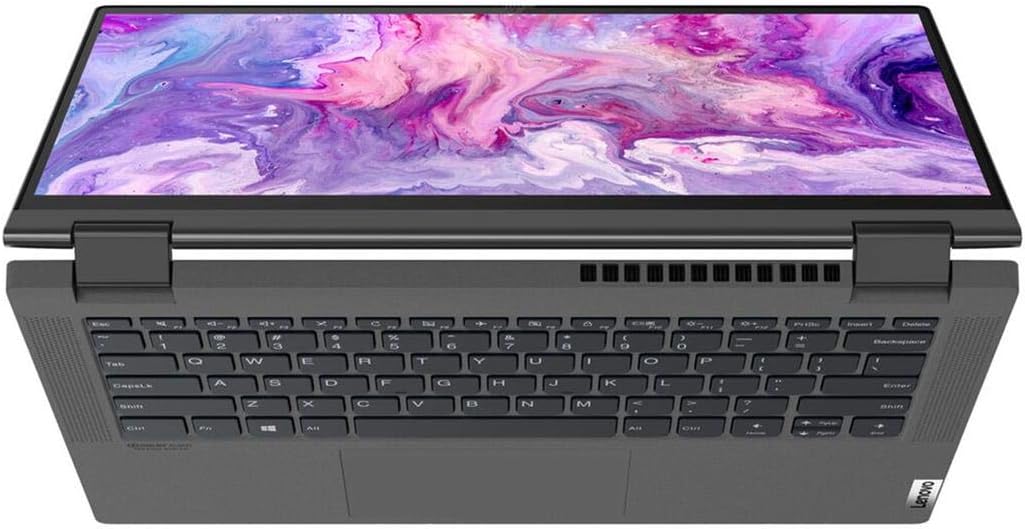
Figura 2.4: Minn fuq għal isfel view highlighting the keyboard and touchpad layout.
3. Setup
3.1 Disimballaġġ
Carefully remove the notebook and all accessories from the packaging. Verify that all components listed in the packing list are present.
3.2 Konnessjoni tal-Adapter tal-Enerġija
- Connect the power adapter to the power connector on the side of the notebook.
- Ipplaggja l-korda tad-dawl fi żbokk tal-elettriku.
- Ħalli l-batterija tiċċarġja għal mill-inqas 30 minuta qabel l-ewwel użu, jew sakemm l-indikatur tal-batterija juri ċarġ suffiċjenti.
3.3 Tixgħel Inizjali u Setup tal-Windows
- Agħfas il-buttuna tal-qawwa biex tixgħel in-notebook.
- Segwi l-istruzzjonijiet fuq l-iskrin biex tlesti l-proċess tas-setup tal-Windows 10 Home. Dan jinkludi l-għażla tar-reġjun tiegħek, il-lingwa, il-konnessjoni ma' netwerk Wi-Fi, u l-ħolqien ta' kont tal-utent.
3.4 Konnessjoni tal-Periferali
The IdeaPad Flex 5 14ARE05 includes various ports for connecting external devices:
- Portijiet USB: Qabbad apparati USB bħal mawsijiet, tastieri, jew drives tal-ħażna esterni.
- Port HDMI: Qabbad monitor jew proġettazzjoni esterna.
- Port USB-C: For data transfer, display output, or charging (with compatible adapters).
- Jack tal-headphone: Qabbad headphones jew kelliema esterni.
- SD Card Reader: Daħħal SD card għat-trasferiment tad-dejta.
For wireless connections, enable Bluetooth in Windows settings to pair with Bluetooth-enabled devices.
4. Istruzzjonijiet Operattivi
4.1 Navigazzjoni Bażika
- Tastiera: Use for typing and executing commands. The keyboard features backlighting, which can be toggled on/off.
- Touchpad: Use for cursor control and multi-touch gestures.
- Touchscreen: Interact directly with the display using your fingers or a compatible digital pen.
4.2 L-Użu tal-Modalitajiet 2 f'1
The IdeaPad Flex 5 can be used in four primary modes:
- Modalità tal-Laptop: Konfigurazzjoni standard tan-notebook għat-tajping u l-produttività.
- Modalità Tinda: Fold the display back to form an inverted 'V' shape, ideal for watching videos or presentations in confined spaces.
- Modalità Stand: Fold the display back further, with the keyboard facing down, to use the screen for media viewing or touch interaction.
- Modalità Pillola: Fold the display completely back against the base, converting the notebook into a tablet for touch-first interaction. Windows will automatically prompt to switch to Tablet Mode for an optimized experience.
4.3 Ġestjoni tal-batterija
- Biex timmassimizza l-ħajja tal-batterija, aġġusta l-luminożità tal-iskrin, agħlaq l-applikazzjonijiet mhux użati, u attiva l-modi ta' ffrankar tal-enerġija fis-settings tal-Windows.
- Evita li tiċċarġja l-batterija kompletament ta' spiss.
- Aħżen l-apparat b'ċarġ parzjali (madwar 50%) jekk ma jintużax għal perjodi twal.
5. Manutenzjoni
5.1 Tindif tal-Apparat
- Skrin: Uża ċarruta ratba u mingħajr ħelu dampLaħlaħ bl-ilma jew b'tindif tal-iskrin. Tisprejjax likwidu direttament fuq l-iskrin.
- Chassis u Tastiera: Uża drapp artab u niexef. Għal ħmieġ iebes, neħħi ftit drapp.amp jista' jintuża drapp. Evita kimiċi ħarxa jew materjali li joborxu.
- Portijiet: Uża arja kkompressata biex tneħħi t-trab bil-mod mill-portijiet.
5.2 Aġġornamenti tas-Software
Regularly update your Windows operating system and device drivers to ensure optimal performance, security, and compatibility. Windows Update can be accessed through the Settings menu.
5.3 Ġestjoni tal-Ħażna
Perjodikament mill-ġdidview u ħassar bla bżonn filebiex tillibera spazju għall-ħażna fuq l-SSD ta' 512GB. Uża l-ħażna fuq il-cloud jew drives esterni għal ħażna kbira files biex tinżamm il-prestazzjoni tas-sistema.
6 Issolvi l-problemi
This section addresses common issues you might encounter with your Lenovo IdeaPad Flex 5.
6.1 Kwistjonijiet tal-Enerġija
- L-apparat ma jixgħelx: Ensure the power adapter is securely connected and the outlet is functional. Try pressing and holding the power button for 10-15 seconds.
- Il-batterija mhix qed tiċċarġja: Verify the power adapter and cable are not damaged. Try a different outlet. Check the charging indicator light on the device.
6.2 Kwistjonijiet tal-Wiri
- No display or black screen: Connect an external monitor to check if the issue is with the internal display. Restart the device.
- L-iskrin tattili ma jirrispondix: Restart the device. Ensure display drivers are up to date.
6.3 Keyboard/Touchpad Issues
- It-tastiera jew it-touchpad ma jirrispondux: Restart the device. Check for any physical obstructions. Ensure drivers are updated. For specific key sections not working, a hardware issue may be present.
6.4 Kwistjonijiet ta' Prestazzjoni
- Prestazzjoni bil-mod: Close unnecessary applications. Check Task Manager for high CPU/RAM usage. Ensure sufficient free storage space. Run a virus scan.
6.5 Ikkuntattja l-Appoġġ
If troubleshooting steps do not resolve the issue, please refer to the Warranty and Support section for information on contacting Lenovo customer service.
7. Speċifikazzjonijiet
| Isem tal-Mudell | Lenovo IdeaPad Flex 5 14ARE05 |
| Daqs tal-Iskrin | 14 Pulzier |
| Riżoluzzjoni tal-Iskrin | 1920 x 1080 pixels (Full HD) |
| Proċessur | AMD Ryzen 7 4700U (2 GHz base, 8 cores) |
| RAM | 8 GB DDR4 |
| Ħażna | 512 GB SSD |
| Koproċessur tal-Grafika | Radeon (Integrated) |
| Sistema Operattiva | Windows 10 Home |
| Tip bla fili | Bluetooth |
| Ħajja Medja tal-Batterija | 6 Hours (approximate) |
| Piż tal-oġġett | 5.06 liri |
| Dimensjonijiet tal-Prodott | 19 x 11 x 3 pulzieri |
| Kulur | Griż tal-grafita |
| Karatteristika Speċjali | Tastiera backlit |
8. Garanzija u Appoġġ
8.1 Garanzija tal-Prodott
Your Lenovo IdeaPad Flex 5 14ARE05 typically comes with a standard manufacturer's warranty, which usually covers defects in materials and workmanship for a period of one year from the date of purchase. Please refer to the warranty card included with your product or visit the official Lenovo support websit għal termini u kundizzjonijiet speċifiċi applikabbli għar-reġjun tiegħek.
8.2 Appoġġ Tekniku
Għal assistenza teknika, downloads ta' sewwieqa, jew talbiet għal servizz, jekk jogħġbok żur is-sit uffiċjali tal-Appoġġ Lenovo website. You will need your product's serial number, which can usually be found on a sticker on the bottom of the device or within the system information in Windows.
Appoġġ Lenovo Websit: https://support.lenovo.com/