
1. Introduzzjoni
This manual provides comprehensive instructions for the setup, operation, maintenance, and troubleshooting of your ASUS XA04 ROG Strix Scope Deluxe RGB Mechanical Gaming Keyboard. Please read this manual thoroughly before using the product to ensure proper functionality and to maximize your user experience.
2. Prodott Aktarview
The ASUS ROG Strix Scope Deluxe is a mechanical gaming keyboard designed for performance and durability, featuring Cherry MX switches and customizable RGB lighting.
2.1 Karatteristiċi ewlenin
- Xccurate Ctrl Key: An extra-wide Ctrl key designed for improved precision in FPS gaming.
- Cherry MX RGB Switches: German-made mechanical switches providing tactile feedback and precise actuation.
- Quick-Toggle Switch: Instantly shifts between function (F1-F12) and media key input.
- Ċavetta Stealth: Hides all applications and mutes audio for instant privacy.
- Aura Sync RGB LED Technology: Customizable per-key backlighting with dynamic lighting effects.
- Kostruzzjoni Durabbli: Aluminum top plate for resilience.
- Mistrieħ Ergonomiku tal-Polz: Detachable magnetic wrist rest crafted from memory foam for comfort.
- Memorja Abbord: For storing profiles u settings.
- 100% Anti-Ghosting & N-Key Rollover: Ensures every keystroke is registered accurately.
- Windows Lock Key: Jipprevjeni l-ippressar aċċidentali taċ-ċavetta tal-Windows waqt il-logħba.
- On-the-Fly Macro Recordings: Allows for macro creation without software.
- Rotot tal-kejbil: Integrated cable management options.
2.2 Kontenut tal-Pakkett
- ASUS XA04 ROG Strix Scope Deluxe RGB Mechanical Gaming Keyboard
- Mistrieħ tal-polz manjetiku li jista' jinqala'
- Keycap Puller Tool
- Additional Silver-hued WASD Keycaps
- Manwal għall-Utent (dan id-dokument)
2.3 Keyboard Layout and Components

Figura 1: Fuq view of the ASUS ROG Strix Scope Deluxe keyboard. This image displays the full keyboard layout with its RGB backlighting active, showcasing the standard QWERTY layout, function keys, and numeric keypad.
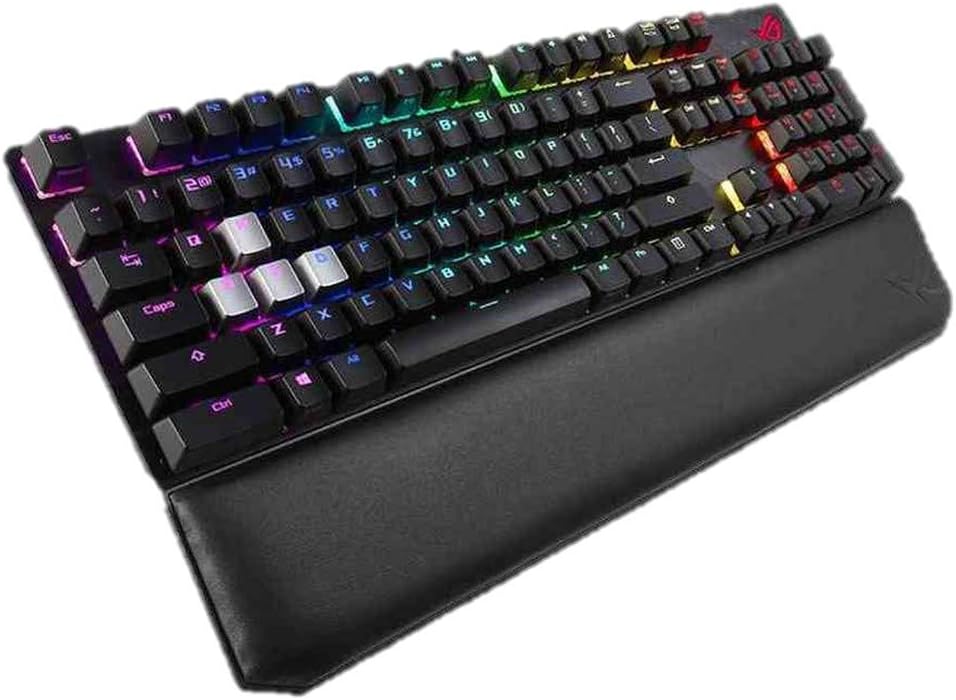
Figura 2: Angolat view of the keyboard with the detachable magnetic wrist rest attached. This perspective highlights the ergonomic design and the integrated wrist support.

Figura 3: Close-up of the magnetic wrist rest. The image shows the comfortable, memory foam wrist rest with a leatherette finish, designed to attach seamlessly to the keyboard.

Figura 4: Detail of the Xccurate Ctrl key. This image highlights the enlarged Ctrl key, designed to be more than twice the width of a standard Ctrl key for enhanced FPS gaming precision.

Figura 5: Illustration of the Stealth Key function. The image shows the F12 key, which acts as the Stealth Key, along with icons depicting its actions: hiding all apps and muting audio for instant privacy.

Figura 6: Explanation of the Quick-Toggle Switch. This image illustrates how pressing the Fn key + Ins (Fn Lock) toggles between standard function keys (F1-F12) and media control keys.

Figura 7: Close-up of Cherry MX mechanical switches. The image displays various types of Cherry MX switches (e.g., Blue, Red, Brown, Speed Silver) and their internal mechanisms, highlighting the precision components.

Figura 8: Fuqview of additional keyboard features. This graphic illustrates key functionalities such as onboard memory, 100% anti-ghosting with N-key rollover, Windows lock key, on-the-fly macro recording, dual-textured case design, and integrated cable routing.

Figura 9: Qiegħ view of the keyboard. This image shows the underside of the keyboard, highlighting the durable aluminum top plate and the cable routing channels.
3. Setup
3.1 Konnessjoni tat-Tastiera
- Oħroġ it-tastiera u l-komponenti tagħha mill-pakkett.
- Attach the magnetic wrist rest to the front edge of the keyboard if desired.
- Ipplaggja l-konnettur USB tat-tastiera ma' port USB disponibbli fuq il-kompjuter tiegħek.
- Is-sistema operattiva tiegħek għandha tiskopri u tinstalla awtomatikament id-drajvers meħtieġa.
3.2 Installazzjoni tas-Softwer (Mhux obbligatorja)
For full customization of RGB lighting, macros, and other advanced features, it is recommended to install the ASUS Armoury Crate software. This software can be downloaded from the official ASUS support websit.
- Żur l-appoġġ uffiċjali tal-ASUS websit.
- Navigate to the support page for the ROG Strix Scope Deluxe keyboard (Model XA04).
- Download and install the latest version of Armoury Crate.
- Segwi l-istruzzjonijiet fuq l-iskrin biex tlesti l-installazzjoni.
4. Istruzzjonijiet Operattivi
4.1 Funzjonijiet Bażiċi tat-Tastiera
- Ċwievet Standard: Function as a typical QWERTY keyboard.
- Ċwievet tal-Funzjoni (F1-F12): By default, these keys perform their standard F-key functions.
- Tastiera numerika: Located on the right side for numerical input.
4.2 Special Key Functions
- Xccurate Ctrl Key: The enlarged Ctrl key on the left side provides a larger target for improved accuracy, particularly useful in fast-paced gaming scenarios.
- Stealth Key (F12): Tagħfas il- Stealth Key (F12) instantly hides all open applications and mutes all audio, providing immediate privacy. Press it again to restore applications and audio.
- Quick-Toggle Switch (Fn + Ins): This combination allows you to switch the functionality of the F1-F12 keys between standard function keys and multimedia controls.
- Meta fi Modalità tal-Funzjoni, F1-F12 perform their standard operating system or application-specific functions.
- Meta fi Modalità tal-Midja, F1-F12 perform multimedia actions such as play/pause, stop, previous/next track, and volume control.
- Windows Lock Key: This key (often located near the right Ctrl key or as an Fn combination) disables the Windows key to prevent accidental presses that could interrupt gameplay.
4.3 RGB Lighting Control (Aura Sync)
The keyboard features per-key RGB backlighting customizable via ASUS Aura Sync.

Figura 10: Keyboard displaying Aura Sync RGB lighting. This image shows the vibrant, customizable lighting effects across the keyboard, often synchronized with other Aura Sync compatible devices.
- Default Effects: The keyboard comes with pre-programmed lighting effects that can be cycled through using specific key combinations (refer to the Armoury Crate software for exact combinations or customization).
- Personalizzazzjoni tas-softwer: Use the ASUS Armoury Crate software to:
- Select from a wide range of static colors.
- Apply dynamic lighting effects (e.g., breathing, wave, reactive).
- Synchronize lighting with other Aura Sync compatible devices.
- Oħloq professjonist tad-dawl appostafiles.
4.4 Reġistrazzjoni Makro
The keyboard supports on-the-fly macro recording without requiring software.
- Agħfas Fn + Left Alt to start recording. The indicator light will blink.
- Ittajpja s-sekwenza taċ-ċwievet li tixtieq tirrekordja.
- Agħfas Fn + Left Alt again to stop recording. The indicator light will stop blinking.
- Press the desired key to assign the macro to.
- To execute the macro, press the assigned key.
Note: For advanced macro management and editing, use the ASUS Armoury Crate software.
5. Manutenzjoni
5.1 Tindif tat-Tastiera
Tindif regolari jgħin biex tinżamm il-prestazzjoni u d-dehra tat-tastiera.
- Tneħħija tat-Trab: Uża arja kkompressata biex tneħħi t-trab u l-fdalijiet minn bejn il-keycaps.
- Tindif tal-wiċċ: Gently wipe the keycaps and keyboard surface with a soft, lint-free cloth slightly dampLaħlaħ bl-ilma jew b'soluzzjoni tat-tindif ħafifa u mhux abrażiva. Evita umdità eċċessiva.
- Mistrieħ tal-polz: Imsaħ il-mistrieħ tal-polz tal-ġilda artifiċjali b'reklamaramp drapp.
- Tneħħija tal-Għatu taċ-Ċwievet: Use the included keycap puller tool to carefully remove keycaps for deeper cleaning. Ensure the keyboard is unplugged before removing keycaps.
Attenzjoni: Do not immerse the keyboard in water or use harsh chemicals, as this may damage the product.
6 Issolvi l-problemi
Jekk tiltaqa' ma' problemi bit-tastiera tiegħek, irreferi għas-soluzzjonijiet komuni li ġejjin:
| Problema | Soluzzjoni Possibbli |
|---|---|
| It-tastiera mhix qed tirrispondi. |
|
| Id-dawl RGB mhux qed jaħdem jew mhux korrett. |
|
| Macros are not executing correctly. |
|
| Iċ-ċwievet huma mwaħħlin jew ma jirrispondux. |
|
If the problem persists after attempting these solutions, please contact ASUS customer support for further assistance.
7. Speċifikazzjonijiet
| Karatteristika | Dettall |
|---|---|
| Brand | ASUS |
| Numru tal-Mudell | XA04 (192876327791) |
| Tip ta' Tastiera | Tastiera tal-Logħob Mekkanika |
| Tip ta' Swiċċ | Cherry MX RGB Switches |
| Kulur | Black (with Blue Cherry MX switches) |
| Materjal | Aluminju (pjanċa ta' fuq) |
| Konnettività | USB bil-fili |
| Backlighting | Per-key RGB, Aura Sync compatible |
| Kontra l-Ghosting | 100% Anti-Ghosting with N-Key Rollover |
| Memorja Abbord | Iva |
| Kompatibilità tas-Sistema Operattiva | Windows 10, Windows 7 |
| Dimensjonijiet tal-Prodott (L x W x H) | 43.94 x 13.46 x 3.89 ċm (17.3 x 5.3 x 1.53 pulzieri) |
| Piż tal-oġġett | 1.92 kg (4.23 lbs) |
| Komponenti Inklużi | Keycap Puller, Detachable Wrist Rest |
8. Garanzija u Appoġġ
Għal informazzjoni dwar il-garanzija, jekk jogħġbok irreferi għall-karta tal-garanzija inkluża mal-prodott tiegħek jew żur is-sit uffiċjali tal-ASUS website. ASUS provides customer support for product inquiries, technical assistance, and warranty claims.
Appoġġ ASUS Websit: www.asus.com/support/
Please have your product model number (XA04) and serial number ready when contacting support.