
Introduzzjoni
This manual provides comprehensive instructions for the installation, operation, and maintenance of the AXIS P1447-LE Network Camera. Please read this manual thoroughly before using the product to ensure proper functionality and safety.
The AXIS P1447-LE Network Camera is designed for surveillance applications, offering excellent image quality at 5-megapixel resolution and a 16:9 aspect ratio.
Prodott Overview
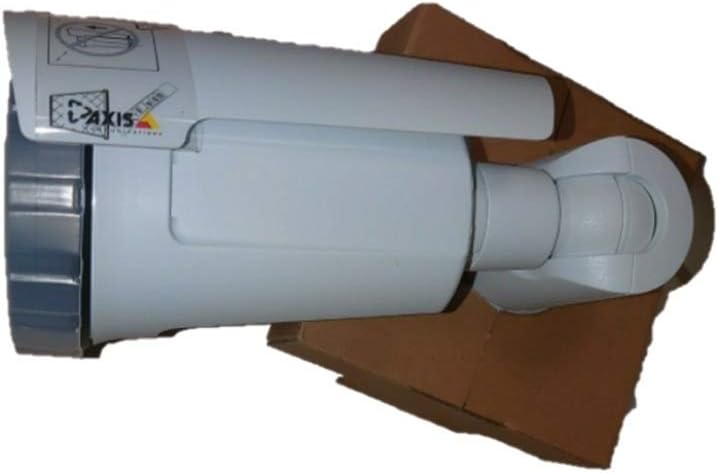
Figure 1: The AXIS P1447-LE Network Camera, a white bullet-style camera with a sun shield, shown resting on a brown cardboard box. The camera features the AXIS logo on its side.
The AXIS P1447-LE is a robust network camera built for reliable outdoor surveillance. Key features include:
- 5 MP resolution for detailed video capture.
- 16:9 format for wide-angle viewing.
- Low light technology (Night Color) for improved performance in challenging lighting conditions.
- Outdoor suitability with IP54 international protection rating.
- Wired connectivity and ONVIF compatibility.
Setup u Installazzjoni
1. Spakkjar
Neħħi bir-reqqa l-komponenti kollha mill-imballaġġ. Ivverifika li l-oġġetti kollha elenkati fil-lista tal-imballaġġ huma preżenti. Żomm l-imballaġġ oriġinali għal trasport jew ħażna fil-futur.
2. Immuntar tal-Kamera
The AXIS P1447-LE supports ceiling mount installation. Choose a stable mounting surface that can support the camera's weight and provide an optimal field of view.
- Drill pilot holes according to the mounting template (if provided).
- Waħħal il-bracket tal-immuntar mal-wiċċ billi tuża viti u ankri xierqa.
- Waħħal il-korp tal-kamera mal-bracket tal-immuntar, waqt li tiżgura li jkun imsakkar sew f'postu.
3. Konnessjoni tal-Enerġija u tan-Netwerk
Connect the camera to a power source (AC/DC) and to your network via an Ethernet cable. The camera supports wired connectivity and ONVIF protocol for integration with network video recorders (NVRs) or video management systems (VMS).
- Ensure the power supply meets the camera's specifications.
- Use a reliable Ethernet cable for stable network connection.
Istruzzjonijiet Operattivi
1. Aċċess u Konfigurazzjoni Inizjali
Upon first power-up, the camera will acquire an IP address from your network's DHCP server. Use the AXIS IP Utility or your VMS to discover the camera on the network.
- Aċċessa l-kamera web interface using its IP address in a web browser.
- Log in with the default credentials (refer to the camera's packaging or quick start guide for default username and password). Huwa rakkomandat ħafna li tbiddel il-password awtomatika immedjatament għas-sigurtà.
- Configure network settings, video resolution (up to 5 MP), frame rate (30 fps), and image quality settings.
2. Video Surveillance and Recording
The camera is primarily used for surveillance. It supports motion-only alert types and can be integrated with various surveillance platforms.
- Set up motion detection zones and sensitivity within the camera's web interface or your VMS.
- Configure recording schedules and storage locations (e.g., NVR, NAS, or cloud storage).
- Utilize the optical zoom feature for detailed viewoqsma speċifiċi.
3. Remote Control and Monitoring
The camera can be controlled and monitored remotely. It is compatible with Amazon Alexa for certain control functions, and general remote control is available via its web interface or integrated VMS.
Manutenzjoni
Regular maintenance ensures optimal performance and longevity of your AXIS P1447-LE Network Camera.
- Tindif tal-Lenti: Naddaf il-lenti tal-kamera perjodikament b'ċarruta ratba u mingħajr suf. Għal ħmieġ iebes, uża soluzzjoni ħafifa għat-tindif tal-lentijiet. Evita materjali li jobrox li jistgħu jigrif il-lenti.
- Spezzjoni tad-Djar: Inspect the camera housing and mounting bracket for any signs of damage, corrosion, or loose connections. Tighten screws as needed.
- Aġġornamenti tal-Firmware: Iċċekkja l-manifattur website regularly for firmware updates. Keeping the firmware updated can improve performance, add new features, and address security vulnerabilities.
- Verifiki Ambjentali: Ensure the camera's operating environment remains within specified temperature and humidity ranges. Clear any obstructions that might block the camera's view jew ventilazzjoni.
Issolvi l-problemi
This section provides solutions to common issues you might encounter with your network camera.
| Problema | Kawża Possibbli | Soluzzjoni |
|---|---|---|
| Ebda feed video |
|
|
| Kwalità ta 'immaġni fqira |
|
|
| Ma jistax jaċċessa web interface |
|
|
Speċifikazzjonijiet
| Karatteristika | Dettall |
|---|---|
| Mudell | P1447-LE (01054-001) |
| Brand | ADI (AXIS) |
| Riżoluzzjoni tal-Qbid tal-Vidjo | 5 MP |
| Frame Rata | 30 fps |
| Teknoloġija tal-Konnettività | Bil-fili |
| Protokoll tal-Konnettività | ONVIF |
| Sors tal-Enerġija | AC/DC |
| Tip ta 'Immuntar | Muntatura tal-Limitu |
| Użu fuq ġewwa/barra | Barra |
| Klassifikazzjoni tal-Protezzjoni Internazzjonali | IP54 |
| Teknoloġija tad-Dawl Baxx | Kulur bil-lejl |
| Tip ta 'Twissija | Mozzjoni Biss |
| Metodu ta' Kontroll | Remote, Amazon Alexa |
| Fattur tal-Formola | Bullet |
| UPC | 753359771953 |
Garanzija u Appoġġ
For warranty information and technical support, please refer to the official ADI (AXIS) webis-sit jew ikkuntattja lis-servizz tal-konsumatur tagħhom direttament. Żomm l-irċevuta tax-xiri tiegħek bħala prova tax-xiri.
Nota: It-termini speċifiċi tal-garanzija u l-kanali ta' appoġġ jistgħu jvarjaw skont ir-reġjun.