
1. Introduzzjoni
This manual provides essential information for the proper use and care of your ProGrade Digital microSDXC UHS-II V60 memory card. This 256GB card is engineered for high-performance applications, including aerial and action cameras, as well as DSLR and mirrorless cameras. It offers UHS-I DDR-104 and U3 speed class ratings for broad compatibility, with read speeds up to 250MB/s and write speeds up to 130MB/s, facilitating efficient capture and transfer of high-resolution photos and 4K video.

Stampa 1.1: Quddiem view of the ProGrade Digital 256GB microSDXC V60 memory card, highlighting its capacity and speed ratings.
2. Karatteristiċi ewlenin
- Prestazzjoni ta' Veloċità Għolja: Features fast write speeds of up to 130MB/s and read speeds of up to 250MB/s, enabling quick capture of high-resolution content and rapid data transfer.
- Kompatibilità versatili: Designed for aerial cinematographers, action camera users, and photographers using DSLR or mirrorless cameras. Includes a V60 speed rating for consistent performance in demanding recording scenarios.
- Authenticity and Quality: Each card features a laser-etched custom serial number, ensuring authenticity and quality control. Cards undergo meticulous inspection at the ProGrade Digital Lab.
- Data Recovery Support: Compatible with ProGrade Digital Refresh Pro software (available separately) for advanced data recovery and card maintenance, helping to restore lost photos and videos and optimize card performance.
- Optimized Workflow: Supports efficient data transfer to workstations, reducing waiting times for content offloading.

Image 2.1: A sports car on a road, illustrating the high speed and performance capabilities of the memory card.
3. Setup u Installazzjoni
To begin using your ProGrade Digital microSD Card, follow these steps:
- Identifika s-Slott: Locate the microSD card slot on your device (e.g., camera, drone, smartphone, tablet). If your device uses a standard SD card slot, use the included microSD to SD adapter.
- Daħħal il-Karta: Gently insert the microSD card into the slot with the gold contacts facing down (or as indicated by your device's manual). Ensure it clicks into place. If using the adapter, insert the microSD card into the adapter first, then insert the adapter into the device's SD card slot.
- Karta tal-Format: For optimal performance and to ensure compatibility, it is recommended to format the card using your device's internal formatting function before first use. Refer to your device's instruction manual for specific formatting procedures. Nota: Il-formattjar se jħassar id-dejta kollha fuq il-kard.
- Ivverifika r-Rikonoxximent: After formatting, check your device's display or settings to confirm that the microSD card is recognized and shows the correct storage capacity.
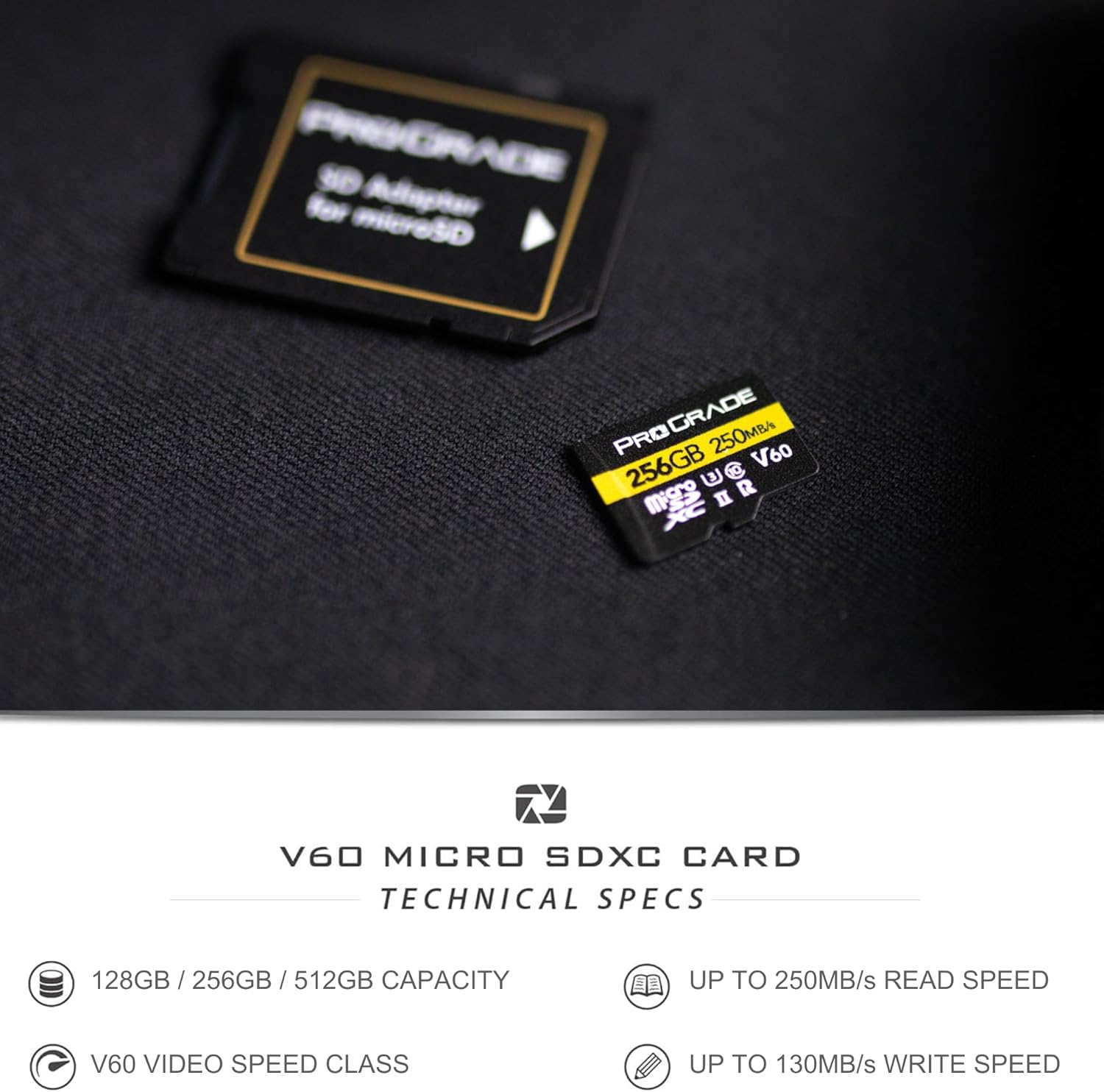
Image 3.1: The ProGrade Digital microSD card shown with its accompanying SD adapter, illustrating how it can be used in devices with standard SD card slots.
4. Istruzzjonijiet Operattivi
Once the microSD card is installed and formatted, you can begin using it to store data.
4.1. Recording Photos and Videos
- Ensure the card is properly inserted and recognized by your camera or device.
- Select your desired recording settings (e.g., resolution, frame rate, compression). The V60 speed class supports high-bitrate 4K video recording.
- Begin recording as per your device's operational instructions. The card's high write speed ensures smooth capture of continuous bursts and high-resolution video.

Image 4.1: A person operating a drone, demonstrating the card's use in aerial photography and videography.

Image 4.2: A photographer with a camera and tripod, representing the card's suitability for professional photography with DSLR and mirrorless cameras.
4.2. Trasferiment tad-Data
- To transfer data to a computer, remove the microSD card from your device.
- Insert the microSD card into a compatible card reader (or the included SD adapter and then into an SD card reader).
- Connect the card reader to your computer. The card will appear as a removable drive.
- Iddreggja u qiegħed files or use your operating system's file management tools to copy data. The high read speed of 250MB/s will facilitate quick transfers.

Image 4.3: A visual representation of a digital workflow, showing how the card optimizes data transfer and content creation on computers.
5. Manutenzjoni u Kura
Proper care extends the life and performance of your memory card:
- Protezzjoni Fiżika: Store the card in its protective case when not in use to prevent damage from dust, moisture, and static electricity.
- Evita Kundizzjonijiet Estremi: Do not expose the card to extreme temperatures, direct sunlight, or strong magnetic fields.
- Kuntatti Nadif: Jekk meħtieġ, naddaf il-kuntatti tad-deheb bil-mod b'ċarruta ratba u mingħajr suf. Evita li tmiss il-kuntatti direttament b'subgħajk.
- Tneħħija Sikura: Dejjem oħroġ il-kard mill-kompjuter jew mit-tagħmir tiegħek b'mod sigur qabel ma tneħħiha fiżikament biex tevita l-korruzzjoni tad-dejta.
- Softwer Refresh Pro: Consider using ProGrade Digital Refresh Pro software (available separately) to maintain optimal card performance and monitor card health. Flash memory can degrade over time, and this software can help refresh the card's internal memory.
6 Issolvi l-problemi
If you encounter issues with your microSD card, try the following solutions:
- Karta Mhux Rikonoxxuta:
- Kun żgur li l-kard hija mdaħħla kompletament u b'mod korrett fl-apparat jew fl-adapter.
- Ipprova l-kard f'apparat kompatibbli differenti jew qarrej tal-kards biex teskludi problema bl-apparat.
- Check if the card's contacts are clean and free of debris.
- Prestazzjoni bil-mod:
- Ensure your device and card reader support UHS-II speeds to fully utilize the card's capabilities.
- The card may be nearly full; transfer data to free up space.
- Consider using ProGrade Digital Refresh Pro software to optimize card performance.
- Korruzzjoni/Żbalji fid-Data:
- Dejjem oħroġ il-karta b'mod sigur qabel ma tneħħiha.
- If data is corrupted, ProGrade Digital Refresh Pro software may be able to recover files.
- Reformat the card (after attempting data recovery) if errors persist.
Jekk il-problemi jippersistu, ikkuntattja l-appoġġ għall-klijenti ta' ProGrade Digital għal aktar assistenza.
7. Speċifikazzjonijiet
| Karatteristika | Dettall |
|---|---|
| Brand | ProGrade Diġitali |
| Isem tal-Mudell | secure-digital-cards |
| Tip ta' Memorja Flash | Mikro SDXC |
| Kapaċità | 256 GB |
| Aqra Veloċità | Sa 250 MB/s |
| Ikteb Veloċità | Sa 130 MB/s |
| Klassi tal-Veloċità SD | Klassi 10 |
| Klassi tal-Veloċità tal-Vidjo | V60 |
| Klassi tal-Veloċità UHS | U3 |
| Interface tal-Ħardwer | microSDXC |
| Apparati Kompatibbli | Camera, smartphone, tablet, personal computer |
| Kulur | Iswed |
| Piż tal-oġġett | 11 Gramm |
| Dimensjonijiet tal-Prodott | 5 x 5 x 1 ċm |
| UPC | 850009524881 |
8. Garanzija u Appoġġ
8.1. Garanzija Limitata
This ProGrade Digital microSD Card comes with a Limited Warranty. For specific terms and conditions of the warranty, please refer to the warranty documentation included with your product or visit the official ProGrade Digital websit.
8.2. Appoġġ għall-Klijent
For technical assistance, troubleshooting, or warranty claims, please contact ProGrade Digital customer support. You can find contact information on the official ProGrade Digital webis-sit jew permezz tal-bejjiegħ bl-imnut minn fejn xtrajt il-prodott.
Riżorsi onlajn:
- Żur il- ProGrade Digital Store on Amazon għal informazzjoni u aġġornamenti dwar il-prodott.
- Check the official ProGrade Digital website for FAQs, support articles, and contact details.