
Introduzzjoni
This manual provides essential information for setting up, operating, maintaining, and troubleshooting your Lenovo ThinkPad E15 laptop. Please read this guide thoroughly to ensure proper use and to maximize the performance and longevity of your device.
1. Setup
1.1 Żpakkjar u Spezzjoni Inizjali
Carefully remove your ThinkPad E15 from its packaging. Verify that all components are present, including the laptop, power adapter, and any included documentation. Inspect the laptop for any physical damage before proceeding.
1.2 Qawwa tal-Konnessjoni
Connect the power adapter to the laptop's power input port and then plug the adapter into a wall outlet. It is recommended to fully charge the battery before initial use.

Figura 1.1: The left side of the ThinkPad E15, illustrating the various connectivity ports including USB-C, USB-A, HDMI, and the power input.
1.3 L-Ewwel Boot u s-Setup tas-Sistema Operattiva
Press the power button to turn on your ThinkPad E15. Follow the on-screen instructions to complete the initial setup of the Windows 10 Pro operating system. This process typically involves selecting language, region, accepting terms, and creating a user account.
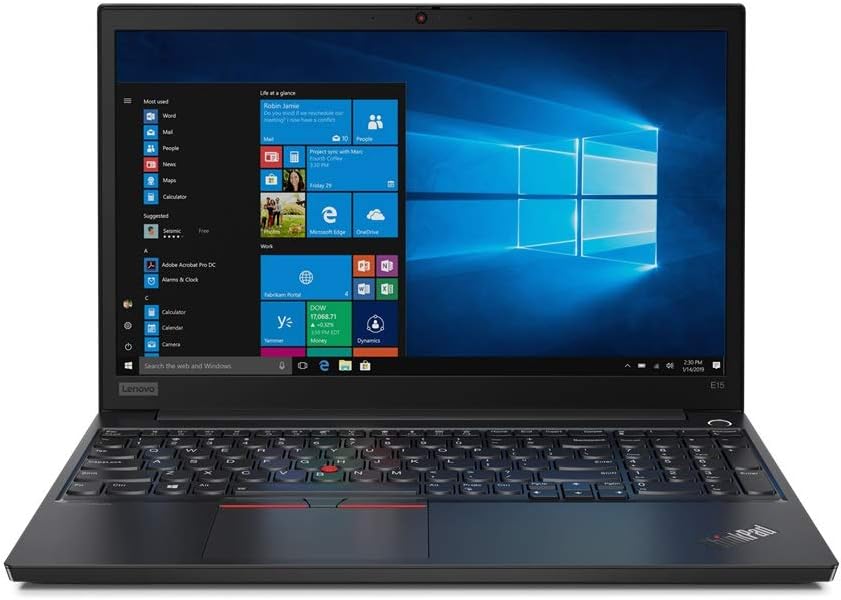
Figura 1.2: The Lenovo ThinkPad E15 laptop from the front, open and powered on, with the Windows 10 Pro operating system desktop visible on its 15.6-inch Full HD anti-glare display.
2. Operating the ThinkPad E15
2.1 Tastiera u Apparati li Jippontaw
The ThinkPad E15 features a full-sized keyboard, a TrackPoint pointing device, and a multi-touch touchpad.
- Tastiera: Standard QWERTY layout with function keys (Fn) for various system controls.
- TrackPoint: A red pointing stick located between the G, H, and B keys. Use it with the three buttons below the spacebar for precise cursor control.
- Touchpad: Jappoġġja ġesti multi-touch għan-navigazzjoni, l-iscrolljar, u ż-żum.

Figura 2.1: A dettaljata view of the ThinkPad E15's keyboard, featuring the iconic red TrackPoint pointing device and the large touchpad below.
2.2 Karatteristiċi tal-Wiri
The 15.6-inch Full HD (1920x1080) IPS Anti-Glare display provides clear visuals and reduced reflections, enhancing viewkumdità f'diversi kundizzjonijiet tad-dawl.
2.3 Portijiet u Konnetturi
Your ThinkPad E15 is equipped with various ports for connecting external devices:
- USB-C: For power delivery, data transfer, and video output.
- USB-A: Għall-konnessjoni ta' apparati USB bħal drives esterni, ġurdien, jew tastieri.
- HDMI: Għall-konnessjoni ma' displays jew projetturi esterni.
- Ethernet (RJ-45): Għal konnessjonijiet tan-netwerk bil-fili.
- Awdjo Jack: Għall-konnessjoni ta' headphones jew kelliema esterni.
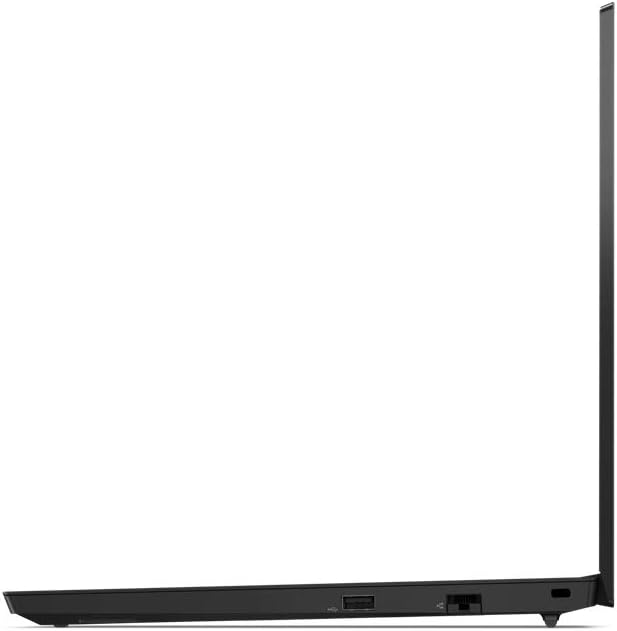
Figura 2.2: The right side of the ThinkPad E15, displaying additional ports such as USB-A and the Ethernet port.
3. Manutenzjoni
3.1 Tindif tal-Laptop Tiegħek
To maintain optimal performance and appearance, regularly clean your ThinkPad E15:
- Uża drapp ratba u mingħajr ħelu ftit dampNaddaf bl-ilma jew b'tindif tal-iskrin għall-wiri.
- Għat-tastiera u x-chassis, uża drapp artab. Evita kimiċi ħarxa jew materjali li joborxu.
- Kun żgur li l-laptop ikun mitfi u skonnettjat qabel ma tnaddaf.
3.2 Kura tal-Batterija
Biex ittawwal il-ħajja tal-batterija:
- Evita temperaturi estremi.
- Tneħħix il-batterija kompletament ta' spiss.
- Jekk se taħżen il-laptop għal perjodu estiż, kun żgur li l-batterija tkun iċċarġjata għal madwar 50-60%.
3.3 Aġġornamenti tas-Software
Regularly update your operating system and drivers to ensure security, stability, and optimal performance. Windows Update can be accessed through the Settings menu.
4 Issolvi l-problemi
This section addresses common issues you might encounter with your ThinkPad E15.
4.1 Kwistjonijiet tal-Enerġija
- Il-laptop ma jixgħelx: Ensure the power adapter is securely connected to both the laptop and a working power outlet. Check if the battery is charged.
- Il-batterija mhix qed tiċċarġja: Verify the power adapter is functioning correctly. Try a different outlet.
4.2 Problemi tal-Wiri
- L-ebda immaġni fuq l-iskrin: Connect an external monitor to check if the issue is with the laptop's display or the graphics output. Adjust display brightness.
- Skrin li jteptep: Aġġorna s-sewwieqa tal-grafika tiegħek.
4.3 Kwistjonijiet ta' Prestazzjoni
- Prestazzjoni bil-mod: Close unnecessary applications. Check for background processes consuming high resources. Ensure sufficient free space on the SSD.
- Is-sħana żejda: Kun żgur li l-ventijiet tal-ventilazzjoni huma ċari. Uża l-laptop fuq wiċċ iebes u ċatt.
5. Speċifikazzjonijiet
The following table outlines the key technical specifications for the Lenovo ThinkPad E15 (Model E15).
| Karatteristika | Speċifikazzjoni |
|---|---|
| Daqs tal-wiri tal-iskrin wieqaf | 15.6 Pulzier |
| Riżoluzzjoni tal-Iskrin | 1920 x 1080 pixel |
| Riżoluzzjoni Massima tal-Iskrin | 1920x1080 |
| Proċessur | Intel Core i7-10510U ta' 1.8 GHz |
| RAM | 16 GB DDR4 |
| Veloċità tal-Memorja | 1.8 GHz |
| Hard Drive | 1 TB SSD (PCIe-NVMe) |
| Koproċessur tal-Grafika | Intel HD Graphics/Iris Graphics/UHD Graphics (Integrated) |
| Tip bla fili | Bluetooth |
| Sistema Operattiva | Windows 10 Pro |
| Piż tal-oġġett | 3.98 liri |
| Dimensjonijiet tal-Prodott (LxWxH) | 14.48 x 9.64 x 0.74 pulzieri |
| Kulur | Iswed |
| Numru ta' Proċessuri | 4 |
| Tip ta' Memorja tal-Kompjuter | SODIMM |
| Batteriji | 1 batterija tal-jone tal-litju (inkluża) |
6. Garanzija u Appoġġ
6.1 Garanzija tal-Prodott
Your Lenovo ThinkPad E15 comes with a standard manufacturer's warranty. The duration and terms of the warranty may vary by region and purchase date. Please refer to the warranty documentation included with your product or visit the official Lenovo support websit għal informazzjoni dettaljata.
Extended protection plans, such as 2-year or 4-year options, may be available for purchase separately to extend coverage beyond the standard warranty period.
6.2 Appoġġ Tekniku
Għal assistenza teknika, downloads ta' sewwieqa, jew talbiet għal servizz, jekk jogħġbok żur is-sit uffiċjali tal-Appoġġ Lenovo website. You will typically need your product's serial number to access specific support resources.
- Appoġġ Lenovo Websit: support.lenovo.com
- Informazzjoni ta' Kuntatt: Irreferi għall-appoġġ website for regional phone numbers and contact methods.